
You are using an out of date browser. It may not display this or other websites correctly.
You should upgrade or use an alternative browser.
You should upgrade or use an alternative browser.

In Progress Street Fighter 89 The Final Fight by Machok v3.8.3
No permission to download
- Thread starter danno
- Start date
-
- Tags
- final fight
The project is currently under development.

machok
Well-known member
I see.. don't worry about the shape sometimes I am limiting or exceed the attack box but it serves its purpose nicelyI mean, I always try to follow the actual sprite shape for the different hitboxes. I know old games were kind of weird, but it's not an excuse anymore.

For my attacks, most of time I use 15 as z. Combo enders uses 20 and some special cases like sword attacks uses 25
Incidentally, a depth of 0 for attack and body would be effectively impossible to hit. Boxes are calculated with whole numbers, but positioning is a floating decimal.
My choice isn't effective because I need the ATK line to something like this, engine default would broke the obstacle with wider depth
So I adjusted almost one by one each ATK box (and sometime obstacle platform) to get exactly what I wanted

yeah 2 attack box or 2 bbox one frame would be coolDC current actually had something crazy where there were 2 attack boxes on one frame.
it feels to me like the playable area is too small now, it's just a personal preference but I do feel like the playable area should be expanded with the new moves to play with.
I've been experimenting with 420x240
widescreen personally I would love that hovewer specifically for SF89? I don't want to do it yet
danno I wants every wait spot pixels exactly the same with the original (nothing less and nothing more) so adding wide screen would make them different. That's why when I add an extended stage I didn't change the original parts of the stage (not sure everyone will notice, perhaps eventually).
This one for example:
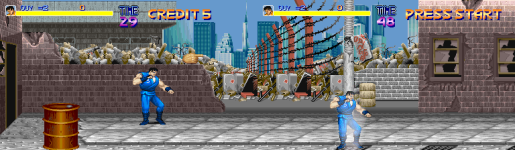
left is my custom, right is the og. I didn't touch the og pixels a bit.
Currently there are requests for 3 player so with a wide screen I think it would make more sense.
Maybe 3 players mode that will use the wide screen. I'll wait when there are many requests for this as for now I prefer the default mode as it is now
Your 420x240 experiment did you find any issues?
Last edited:

Personally I think the 420x240 on the danno's test looks great, basically it gives you more space currently used by the black borders but without changing sprites too much.Your 420x240 experiment did you find any issues?
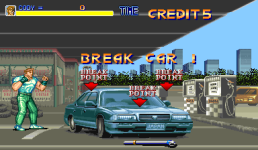
Specifically for the bonus car stage you may need to draw an extra content for left/right parts too because this level has the same size as the resolution, but usually you will only need to draw extra content for top/bottom parts and for left/right a little adjustment on the "wait" points will be enough. Getting SORX levels as an example, most stages can be rebuilt by repeating the same existing content (like textures) with no resizes to avoid losing image quality.I should also add more pixels for some stages if we add widescreen feature I think? I have never experimented with wide resolution so far
The white border has 420x240 compared with your current 384x224.

And here's a very simple example of what I'm talking about. I'm not a sprite expert, certainly you or Don Vecta can fill the empty spaces easier than me with your skills.
And you need to fill a really small space, 420x240 compared with 384x224 have a difference of 36 pixels left/right (18 each side) and 16 top/bottom (8 each side), SORX is 480x272 against 320x224 and even that it was not hard to draw all the extra content.

machok
Well-known member
this is beautiful

Thanks for explanation, still need to think about hud and others if I want to do this, not to mention if i want to add 3 players hud would something need to think carefully.

Your 420x240 experiment did you find any issues?
Only spawn location issues which is to be expected, 420x240 looks good for the sprite size and spacing, my intention was to make the screen look less busy and give more room to play, the resolution you are using now is 384x224 so it's not much different but enough to make a difference.
I would not add 3 players because that would make the screen even more crowded and busy, I don't like too much of a busy screen because it reminds me of the old BOR days when enemies would suffocate the player.
With your new move set the players can go from one side of the screen to the other side of the screen very quickly and it now feels like there is not enough space for the new moves, in the classic version you made this was not a problem.
machok
Well-known member
After thinking about it, I also don't like changing the hud for 3 playersI would not add 3 players because that would make the screen even more crowded and busy
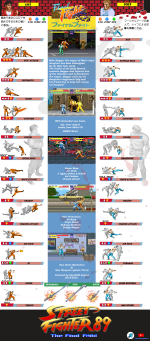
v3.5 MOVELIST
SF89v3.5 movelist_temp
Manual still updating for next v3.6
machok
Well-known member
I tried SF89 with new engine (v7553)
must say it's not compatible at the moment and maybe it will remain the same, so don't ask and stay with old v6330
Incompatibilities / error found list:
1. death anim / bouncefactor error?
2. Cody tornado not load, pretty sure Guy Ki also suffer the same
3. Weapons throw very slow
4. Music / Sound noises?
5. Red Hollywood bottle fire can't be hit
6. Cody bad Stone knife animation flying Yes you read it correctly
7. Chargeattack can't do juggle
8. Random music missing in some stages
9. Second run attack wih weapons can't hit enemies
10.Random Bosses lifebar error (possibility enemy with huge number of health)
11.Bonus Stage Car breaks error, can get stuck if you hit it too fast
12.Delay entity (scripted) not working / too much delay
I have just played to stage 3 at the moment and found a lot of incompatibilities, I need to test it further
And Keep in mind all of this list is jut specific SF89 module, so others may be different
must say it's not compatible at the moment and maybe it will remain the same, so don't ask and stay with old v6330
Incompatibilities / error found list:
1. death anim / bouncefactor error?
2. Cody tornado not load, pretty sure Guy Ki also suffer the same
3. Weapons throw very slow
4. Music / Sound noises?
5. Red Hollywood bottle fire can't be hit
6. Cody bad Stone knife animation flying
Yes you read it correctly7. Chargeattack can't do juggle
8. Random music missing in some stages
9. Second run attack wih weapons can't hit enemies
10.Random Bosses lifebar error (possibility enemy with huge number of health)
11.Bonus Stage Car breaks error, can get stuck if you hit it too fast
12.Delay entity (scripted) not working / too much delay
I have just played to stage 3 at the moment and found a lot of incompatibilities, I need to test it further
And Keep in mind all of this list is jut specific SF89 module, so others may be different

O Ilusionista
Captain 100K
This could be something to look at. Can you check which music and attack it here (or at OpenBOR 4 thread) so the devs can take a look?8. Random music missing in some stages
machok
Well-known member
Can you check which music and attack it here (or at OpenBOR 4 thread) so the devs can take a look?
They were two missing but I only remember one, here:
C:
1.music data/music/2_1_Subway_Smash.ogg*edit can't attach the file, not sure may include this link or not?
**don't think mediafire is an approve site here
Last edited:
O Ilusionista
Captain 100K
attach the .ogg file here, please.
machok
Well-known member

@machok I suggest first comparing every point with SORX to see if the same issue happens. Example, the music/sound noise issue doesn't happen to me, instead now the audio volume was changed a bit to balance both sound and music on the same level avoiding the necessity of increasing the audio files volume too much and causing distortion.I tried SF89 with new engine (v7553)
must say it's not compatible at the moment and maybe it will remain the same, so don't ask and stay with old v6330
Incompatibilities / error found list:
1. death anim / bouncefactor error?
2. Cody tornado not load, pretty sure Guy Ki also suffer the same
3. Weapons throw very slow
4. Music / Sound noises?
5. Red Hollywood bottle fire can't be hit
6. Cody bad Stone knife animation flying
7. Chargeattack can't do juggle
8. Random music missing in some stages
9. Second run attack wih weapons can't hit enemies
10.Random Bosses lifebar error (possibility enemy with huge number of health)
11.Bonus Stage Car breaks error, can get stuck if you hit it too fast
12.Delay entity (scripted) not working / too much delay
I have just played to stage 3 at the moment and found a lot of incompatibilities, I need to test it further
And Keep in mind all of this list is jut specific SF89 module, so others may be different
Maybe your audio file's volume is now higher and you are hearing the noise that already exists in your files.
I need to make an advice in this point, not all the differences are related to the v4, there's some changes between 6330 and 6391 (6384/6385/6390) and if I'm not wrong a few are related to juggling. I remember that when moving from 6330 to 6391 I needed to fill all the jugglecost/jugglecost correctly in order to allow aerial collisions, I suggest checking itstay with old v6330
I can make a quick answer in every point you mentioned:
Both are working fine in SORX but it would be good to know more details about your problem.1. death anim / bouncefactor error?
How this entity is loaded in your game? For me all loads are working fine on the same way as before.2. Cody tornado not load, pretty sure Guy Ki also suffer the same
Which method you are using to throw weapons (script or native)?3. Weapons throw very slow
Not happened in SORX yet, maybe related to your audio files.4. Music / Sound noises?
Check the juggle change I mentioned, maybe adding jugglepoints in some projectiles can solve the problem.5. Red Hollywood bottle fire can't be hit
How is the stone thrown (script/native)? If scripted, there's a change in this aspect, I suggest to make these adaptations:6. Cody bad Stone knife animation flying
Knife behaviour (straight movement)
vShot = projectile(name, x+dx, z+dz, y+dy, direction, 0, 0, 0);
Bomb behaviour (arc movement)
vShot = projectile(name, x+dx, z+dz, y+dy, direction, 0, 1, 0);
Have this animation jugglecost declared?7. Chargeattack can't do juggle
How this random system works? I have scripted musics and works fine in SORX.8. Random music missing in some stages
Need more details or visual examples about these.9. Second run attack wih weapons can't hit enemies
10.Random Bosses lifebar error (possibility enemy with huge number of health)
11.Bonus Stage Car breaks error, can get stuck if you hit it too fast
12.Delay entity (scripted) not working / too much delay
An extra tip about the collisions, @DCurrent can explain technically better than me but in short is:
In v3 the Z axis sometimes would "compensate" the Y axis distance between attack boxes and body boxes. In the v4 the system is more accurate and each axis is independent, so the collision must happen in all the three dimensions in order to be a valid one.
An easier way to check why it's not colliding is, put the two entities in the exact Z axis (use the debug feature) and see if the atbox/bbox are visually touching each other. If not, you need to adjust it. Usually I first adjust X/Y and then proceed to Z.
machok
Well-known member
I will, I check mine is SORX_BETA_23 do I need latest version or this one is enough?I suggest first comparing every point with SORX
Both are working fine in SORX but it would be good to know more details about your problem.
I need to play it to finish first then I'll check them one by one
How this entity is loaded in your game? For me all loads are working fine on the same way as before.
with projectile command, I can change it. This was lazy work at that time it straight copy paste from pierwolf FFGold

C:
@cmd projectile 1 "tornado" -15 0 0Which method you are using to throw weapons (script or native)?
earlier when I test it holly wood and elgado still use custknife - throwframe
but now I have replaced everything with shooter script and the newest shooter89 from you
so both results are the same (script and native)
Not happened in SORX yet, maybe related to your audio files.
instead now the audio volume was changed a bit to balance both sound and music on the same level avoiding the necessity of increasing the audio files volume too much and causing distortion
well I indeed raise up the music file volume to about 150% and lower it in sound setting, also sound FX are louder than music. Doing this to make it sounds similar to the arcade version
This must be the problem
This is my Cody bad stone, also same with tornadoHow is the stone thrown (script/native)? If scripted, there's a change in this aspect, I suggest to make these adaptations:
Knife behaviour (straight movement)
vShot = projectile(name, x+dx, z+dz, y+dy, direction, 0, 0, 0);
C:
@cmd projectile 1 "bad_stone1" 5 0 0Yes it's jugglecost 1Have this animation jugglecost declared?
however I am using flags script too, maybe it causing it. Will try to remove it and see what happen
How this random system works? I have scripted musics and works fine in SORX.
It's my bad english what I mean is random missing music in some stages.
Actually, I remembered some YouTubers also experienced this with the engine v6391, that's why I always recommended sticking with v6330 for a long time.
my other theory is, if their PC is not strong enough to run openbor (v6391) + video recorder (maybe using onboard gpu) , then missing music also happened randomly (just my assumption).
Need more details or visual examples about these.
Sometime I am using delay entities before my outro script animation (example: before andore grab players to enter the ring, west side stage) but this delay entity never appears, so player not doing outro scene at all.
I sometimes also use a delay entity before the spawn group (inline script) enters. However, the delay felt very long different from version 6330. Of course I can't confirm whether this delay entity is the cause or something else, I need to test it further to make sure
C:
name       delay
health       10
type       enemy
shadow     0
nomove     1

animationscript        data/scripts/cbusters.c


anim idle
    @script
        void self = getlocalvar("self");
        int  Health = getentityproperty(self, "health");

        if(frame==1){
          changeentityproperty(self, "health", Health-5);
          if (Health <= 0){
            killentity(self);
          }
        }
    @end_script
       loop   1
       delay   49
       offset   1 1
       frame   data/chars/misc/empty.gif
       delay   1
frame data/chars/misc/empty.gifYes, or the beta 24 too.I will, I check mine is SORX_BETA_23 do I need latest version or this one is enough?
Yeah, it's a good idea, I always recommend creating a function like shooter instead of using the @cmd projectile directly in the animations. This way you have much more control.so how to change it? with shooter script like you write above?
Strange, even when I used the native music I never had this issue before. Are you using scripted music somewhere in the game together with native ones? Because trying to play an invalid music name with scripts can stop the current music and leave the game with no music.Actually, I remembered some YouTubers also experienced this with the engine v6391, that's why I always recommended sticking with v6330 for a long time.
my other theory is, if their PC is not strong enough to run openbor (v6391) + video recorder (maybe using onboard gpu) , then missing music also happened randomly (just my assumption).
I'm using delay entities too, try to copy some properties from my version and see if it solves the problem.Sometime I am using delay entities before my outro script animation (example: before andore grab players to enter the ring, west side stage) but this delay entity never appears, so player not doing outro scene at all.
I sometimes also use a delay entity before the spawn group (inline script) enters. However, the delay felt very long different from version 6330. Of course I can't confirm whether this delay entity is the cause or something else, I need to test it further to make sure
C:
name                Delay #ENTITY USED TO CREATE A DELAY BETWEEN TWO ENEMY SPAWNS/GROUPS
type                enemy
subject_to_wall        0
subject_to_platform    0
subject_to_minz        0
subject_to_maxz        0
health                1
shadow                0
nomove                1 1
nodrop                2
stealth                2
offscreenkill        6000
antigravity            100
setlayer            1000

anim idle
    loop    0
    delay    1
    offset    62 126
frame data/chars/random/empty.pngmachok
Well-known member
You can fake it using the iconmphigh as mentioned above - you just make a icon big enough with the word super over where the mp bar is
But if you want to replace the bar with the word super... You will need to script it.
iconmphigh can't use animated.gif?
can I use blank/full transparent mp bar so it show up only when full mp are ready?
I just want to show super animated when mp is ready to use, when it's not I prefer to hide it
- "typemp" command in the levels.txt file at the "set" header, which defines how the mp will be recovered during the game (by time or by hits).
I am doing another test for player mp since only using HP for super is not effective in game
player respawn always fill the mpbar to full?
O Ilusionista
Captain 100K
No icon can use animated gificonmphigh can't use animated.gif
You can add the word super to the icon and it will be displayed over the life bar (I intend to use this someday). But to use an animation, you would need a script.can I use blank/full transparent mp bar so it show up only when full mp are ready?
Yes, but you can avoid it by adding a script to reset the mp manually inside the respawn1.c/respawn2.c events. You can do the same in the level.c in order to reset when any level starts.player respawn always fill the mpbar to full?
Respawn1.c for player 1
C:
void main()
{//Reset mp during respawn
    void player = getplayerproperty(0, "entity");

    if(player != NULL()){
        changeentityproperty(player, "mp", 0);
    }
}
Respawn2.c for player 2
C:
void main()
{//Reset mp during respawn
    void player = getplayerproperty(1, "entity");

    if(player != NULL()){
        changeentityproperty(player, "mp", 0);
    }
}machok
Well-known member
More less the best I can do without scriptYou can add the word super to the icon and it will be displayed over the life bar (I intend to use this someday). But to use an animation, you would need a script

Couldn't found mp 0 at start (spawn), should use script too?Yes, but you can avoid it by adding a script