
You are using an out of date browser. It may not display this or other websites correctly.
You should upgrade or use an alternative browser.
You should upgrade or use an alternative browser.
Canceled Let's do a He-Man/She-Ra collaboration!
- Thread starter mersox
- Start date
Project is halted prior to completion and will not receive further updates.
- Status
- Not open for further replies.


Die_In_Fire
Well-known member
amazing!! it looks like you do't have any limitation bWWd.
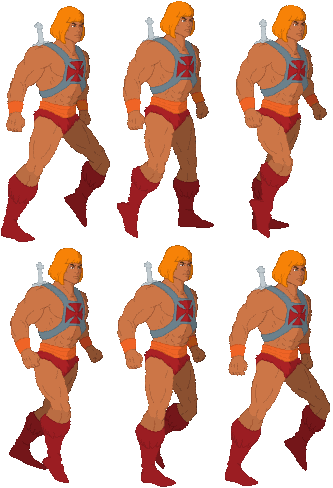
the he-man sprites looks oustanding!
yeah, while still good, it looks like an ogre walk animation
the he-man sprites looks oustanding!
O Ilusionista said:the walk animation at the left is better. The one at the right looks like he is pissed off.
yeah, while still good, it looks like an ogre walk animation

O Ilusionista
Captain 100K
I formatted my pc recently and I tried to run this tool again. Again, its just a blank screen.
I choose the form I want, but the form doesn't appears on the canva (but I can see its name at the left side)

I choose the form I want, but the form doesn't appears on the canva (but I can see its name at the left side)
Die_In_Fire
Well-known member
the right walking stance would fit great for the likes of BeastmanbWWd said:

So it does open but buttons arent working? I only tried it on vista and XP.O Ilusionista said:I formatted my pc recently and I tried to run this tool again. Again, its just a blank screen.
I choose the form I want, but the form doesn't appears on the canva (but I can see its name at the left side)
O Ilusionista
Captain 100K
take a look http://i.imgur.com/8LMAq1C.png
O Ilusionista
Captain 100K
So it works for You finally?
great, lets dance ;D
Im gonna do video tutorial soon how i assemble characters from bodyu parts, all im using is image from drawing window on left, then i load image and from window on left i pick layers and choose deform, then i insert every image in its own deform layer, then you can add control points to stretch deform layers with them, if you add point go to deform layer and find setup in menu in the middle bottom, then you can choose what points you want to assign to deform layer and thats basically it, you do it to one deform layer after another.There is also switch layer where you can switch between different body parts so you can use mouth open/mouth closed or entirely different head or different hands etc.
These tutorials are made by stickman programmer but all you need is deform layer and control points, sometimes switch layer.
I learned how to use deform from this : Working With Masking Inside Deform Node
Also there is value called units to control deform to be more smooth or less
great, lets dance ;D
Im gonna do video tutorial soon how i assemble characters from bodyu parts, all im using is image from drawing window on left, then i load image and from window on left i pick layers and choose deform, then i insert every image in its own deform layer, then you can add control points to stretch deform layers with them, if you add point go to deform layer and find setup in menu in the middle bottom, then you can choose what points you want to assign to deform layer and thats basically it, you do it to one deform layer after another.There is also switch layer where you can switch between different body parts so you can use mouth open/mouth closed or entirely different head or different hands etc.
These tutorials are made by stickman programmer but all you need is deform layer and control points, sometimes switch layer.
I learned how to use deform from this : Working With Masking Inside Deform Node
Also there is value called units to control deform to be more smooth or less

great work bwwd I hope to use your animation tool for my future mods its amazing !

 .
.
Die_In_Fire
Well-known member
amazing!! when I get a new laptop, definitely I need to learn this!!
I think i took over that thread with my own stuff, this is my second tutorial and i explain all the stuff thats needed for assembling character in stickman.
www.youtube.com/watch?v=2cilcE_QX24
I made this enemy char today

I will probably use this stance

www.youtube.com/watch?v=2cilcE_QX24
I made this enemy char today
I will probably use this stance
O Ilusionista
Captain 100K
Will you use the belly dance as stance?
I dont know maybe i will hide some special moves in characters ;D
I tried to add some more shadow to sprite but it looks less like a cartoon now, im not sure which one is better


I think this kind of shadow works best, i also tried to animate his hair but i dont know if its worth it, its the most time consuming part in animation


I tried to add some more shadow to sprite but it looks less like a cartoon now, im not sure which one is better
I think this kind of shadow works best, i also tried to animate his hair but i dont know if its worth it, its the most time consuming part in animation
In beatem ups you never have sprites with both feet on the same line, thats just basics, its to match camera angle and it adds depth to the sprites, if both feet are on the same axis then it looks to flat, its only used in platformers where straight lines are used for top parts of the platforms.
check ffight sprites
http://fc08.deviantart.net/fs7/i/2005/181/e/9/Final_fight_sprite_sheet_by_cheesyniblets.jpg
Its not as visible on smallers capcom sprites but its there, one foot is higher .
check ffight sprites
http://fc08.deviantart.net/fs7/i/2005/181/e/9/Final_fight_sprite_sheet_by_cheesyniblets.jpg
Its not as visible on smallers capcom sprites but its there, one foot is higher .


Die_In_Fire
Well-known member
just remembered when I saw the He-man/She-ra movie on the theater with my father (RIP)... jeez I'm old

- Status
- Not open for further replies.