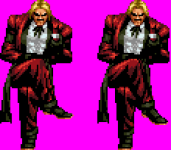
King of Rage

In Progress King of Rage v 0.1

No permission to download
The project is currently under development.
Nice work! Why is there no music with the warning sign before the boss battle? At least it's OK without it. Just asking.

EDIT: Oh BTW. That SF1 Ryu with that Ryo base is a nice pick because he looks like a supposed SF2 character if Nishiyama-san would've not left Capcom for SNK. I mean, Fatal Fury and Art of Fighting were spiritual successors in Takashi Nishiyama's side, while Capcom's was SF2. Man, talk about Nishiyama-san's point of view on martial artists.
 
Last edited:
Nice work! Why is there no music with the warning sign before the boss battle? At least it's OK without it. Just asking.

EDIT: Oh BTW. That SF1 Ryu with that Ryo base is a nice pick because he looks like a supposed SF2 character if Nishiyama-san would've not left Capcom for SNK. I mean, Fatal Fury and Art of Fighting were spiritual successors in Takashi Nishiyama's side, while Capcom's was SF2. Man, talk about Nishiyama-san's point of view on martial artists.
The background sound being silenced when the warning sound comes out was a feature that appeared in Mega Man 4, and the same warning sound was used in the beginning. Regarding silence, I tend to prefer this because the tense atmosphere of the warning sound is emphasized when it is quiet.
 
When you defeat Rugal he should fly off screen so in the next scene he falls out of the window for continuity.
Sound like it could apply to kick the boss out of the window like Final Fight where Cody kicks Belger off to his death.

But every time it comes with flying off screen, I can't help but think of this.
 
Ummm... Did you remove yuki&ai from ngbc and jack from aof?
Is 5th stage military stage?
yuki & Ai were originally going to be bosses, but they seemed to lack charisma as bosses, so they were put on hold for now.

I removed Jack because his AOF sprite was too big.

Stage 5 will have a military-like atmosphere, but weapons will not play a large part in fist fights. Instead, we plan to add obstacles.
 
Sound like it could apply to kick the boss out of the window like Final Fight where Cody kicks Belger off to his death.

But every time it comes with flying off screen, I can't help but think of this.
Wow, how was this produced? How amazing. If possible, I also want to make Rugal go off the screen when he is defeated.
 
KoR - 0045.png

After completing the hidden stage and various functions of Stage 1, Stage 2 has begun in earnest. After completing stage 2, I thought I would complete the playable character's weapon usage movements and upload it.
The problem is that I saw a video where the boss flew off the screen, so I think Rugal is in that situation and wants to apply directing.
 
Wow, how was this produced? How amazing. If possible, I also want to make Rugal go off the screen when he is defeated.
I don't know, to be honest. At first, I thought @danno was joking about Rugal flying off the screen, but then I thought of that video.

The problem is that I saw a video where the boss flew off the screen, so I think Rugal is in that situation and wants to apply directing.
How do you wanna finish off Rugal before he flies off the screen? You can make that Rugal as an exception if you like. Maybe, instead of setting boss 1 on Rugal, you can use item which @Bloodbane made an invisible entity (I forget the name) that kills all enemies like you kill the regular boss, but not ending the level. It's from @dantedevil's Mortal Kombat: The Chosen One.

The enemies' anim death style from Spartan X/Kung-Fu seems very easy to do. :LOL:

 
I don't know, to be honest. At first, I thought @danno was joking about Rugal flying off the screen, but then I thought of that video.


How do you wanna finish off Rugal before he flies off the screen? You can make that Rugal as an exception if you like. Maybe, instead of setting boss 1 on Rugal, you can use item which @Bloodbane made an invisible entity (I forget the name) that kills all enemies like you kill the regular boss, but not ending the level. It's from @dantedevil's Mortal Kombat: The Chosen One.

The enemies' anim death style from Spartan X/Kung-Fu seems very easy to do. :LOL:

subject_to_minz 0
subject_to_maxz 0
subject_to_wall 0
subject_to_platform 0
subject_to_obstacle 0

Are these settings used in Spartan X not affected by terrain?
I tried it once, but I think I need to try another method.

But I'm curious as to whether the boss in the video fell along the y-axis or the z-axis.
 
If it's in the character header, no. I was referring to the one used in script without listing them in the header. Like this one here.

Example:
C:
anim death
@script
    void self = getlocalvar("self");
   
    if(frame>=0){
      changeentityproperty(self, "Subject_to_Wall", 0);
      changeentityproperty(self, "subject_to_obstacle", 0);
      changeentityproperty(self, "subject_to_platform", 0);
      changeentityproperty(self, "subject_to_maxz", 0);
      changeentityproperty(self, "subject_to_minz", 0);
    }
@end_script
    loop    0
    offset    81 170
        bbox    60 55 44 100
    delay    111
        frame    data/chars/oharra3/fall01.gif
        frame    data/chars/oharra3/fall01.gif
        frame    data/chars/oharra3/fall01.gif

But I'm curious as to whether the boss in the video fell along the y-axis or the z-axis.
It's the Z axis because how do you want the enemy to land. I think that enemy could be knocked out in one Z axis where the player is, but needs to jump in Y axis, before landing to the ground. Think of the classic Sonic games in Sega Genesis, especially the way Sonic dies.
 
1710725857687.png

Rugal’s standby posture has been modified. After 98, the bangs are as neat as straight hair, but I also mixed up the 95 style a little. And my legs looked really messy, so I trimmed them using my lack of skills.
 
If it's in the character header, no. I was referring to the one used in script without listing them in the header. Like this one here.

Example:
C:
anim death
@script
    void self = getlocalvar("self");
  
    if(frame>=0){
      changeentityproperty(self, "Subject_to_Wall", 0);
      changeentityproperty(self, "subject_to_obstacle", 0);
      changeentityproperty(self, "subject_to_platform", 0);
      changeentityproperty(self, "subject_to_maxz", 0);
      changeentityproperty(self, "subject_to_minz", 0);
    }
@end_script
    loop    0
    offset    81 170
        bbox    60 55 44 100
    delay    111
        frame    data/chars/oharra3/fall01.gif
        frame    data/chars/oharra3/fall01.gif
        frame    data/chars/oharra3/fall01.gif


It's the Z axis because how do you want the enemy to land. I think that enemy could be knocked out in one Z axis where the player is, but needs to jump in Y axis, before landing to the ground. Think of the classic Sonic games in Sega Genesis, especially the way Sonic dies.
We confirmed that when using an attack that moves along the Z axis with the subject_to_ script applied, the enemy goes down and out of the screen. It works fine.

However, in the game I set up, there are no cases where enemies fly in the z-axis when attacking, or the character falls down in the z-axis, so it's difficult to disappear into a "Death Anim" with no movement.

If you can add a separate movement when defeated, it would be possible to escape from the screen.
 
We confirmed that when using an attack that moves along the Z axis with the subject_to_ script applied, the enemy goes down and out of the screen. It works fine.

However, in the game I set up, there are no cases where enemies fly in the z-axis when attacking, or the character falls down in the z-axis, so it's difficult to disappear into a "Death Anim" with no movement.

If you can add a separate movement when defeated, it would be possible to escape from the screen.
I'm so sorry for wrongly pointing out that one. I just realized that subject_to_maxz or subject_to_minz effects those that are bound to outside of Z limit. I didn't think about the different numbers of zmin and zmax. But I meant for the enemy to "jump" to the highest point before dropping down straight with Z movement like dasher, leaper, or move, whatever.

How about this? Only if the enemy is around at the Z limit. The 7th frame is when it moves in Z axis all the way down while falling.
Code:
anim death
@script
    void self = getlocalvar("self");
 
    if(frame==0){
      changeentityproperty(self, "Subject_to_Wall", 1);
      changeentityproperty(self, "subject_to_obstacle", 1);
      changeentityproperty(self, "subject_to_platform", 1);
      changeentityproperty(self, "subject_to_maxz", 1);
      changeentityproperty(self, "subject_to_minz", 1);
    }

    if(frame==6){
      changeentityproperty(self, "Subject_to_Wall", 0);
      changeentityproperty(self, "subject_to_obstacle", 0);
      changeentityproperty(self, "subject_to_platform", 0);
      changeentityproperty(self, "subject_to_maxz", 0);
      changeentityproperty(self, "subject_to_minz", 0);
    }
@end_script
    loop    0
    offset    81 170
        bbox    60 55 44 100
    delay    1000
    jumpframe 0 4 0 0
   dropframe 1
   landframe 7
        frame    data/chars/oharra3/fall01.gif #Jump
        delay 10
        frame    data/chars/oharra3/fall02.gif #Drop
        frame    data/chars/oharra3/fall03.gif
        frame    data/chars/oharra3/fall04.gif
        frame    data/chars/oharra3/fall05.gif
        frame    data/chars/oharra3/fall06.gif
        delay 1000
        @cmd dasher 0 0 1 #dasher {x} {y} {z}
        frame    data/chars/oharra3/fall06.gif #Fall
         delay 20
        frame    data/chars/oharra3/fall07.gif #Land
 
Last edited:
I'm so sorry for wrongly pointing out that one. I just realized that subject_to_maxz or subject_to_minz effects those that are bound to outside of Z limit. I didn't think about the different numbers of zmin and zmax. But I meant for the enemy to "jump" to the highest point before dropping down straight with Z movement like dasher, leaper, or move, whatever.

How about this? Only if the enemy is around at the Z limit. The 7th frame is when it moves in Z axis all the way down while falling.
Code:
anim death
@script
    void self = getlocalvar("self");
 
    if(frame==0){
      changeentityproperty(self, "Subject_to_Wall", 1);
      changeentityproperty(self, "subject_to_obstacle", 1);
      changeentityproperty(self, "subject_to_platform", 1);
      changeentityproperty(self, "subject_to_maxz", 1);
      changeentityproperty(self, "subject_to_minz", 1);
    }

    if(frame==6){
      changeentityproperty(self, "Subject_to_Wall", 0);
      changeentityproperty(self, "subject_to_obstacle", 0);
      changeentityproperty(self, "subject_to_platform", 0);
      changeentityproperty(self, "subject_to_maxz", 0);
      changeentityproperty(self, "subject_to_minz", 0);
    }
@end_script
    loop    0
    offset    81 170
        bbox    60 55 44 100
    delay    1000
    jumpframe 0 4 0 0
   dropframe 1
   landframe 7
        frame    data/chars/oharra3/fall01.gif #Jump
        delay 10
        frame    data/chars/oharra3/fall02.gif #Drop
        frame    data/chars/oharra3/fall03.gif
        frame    data/chars/oharra3/fall04.gif
        frame    data/chars/oharra3/fall05.gif
        frame    data/chars/oharra3/fall06.gif
        delay 1000
        @cmd dasher 0 0 1 #dasher {x} {y} {z}
        frame    data/chars/oharra3/fall06.gif #Fall
         delay 20
        frame    data/chars/oharra3/fall07.gif #Land

very good. The death animation was completed as well as the fall.
 
Since yours is all about moving outside of zmax which is below the bottom border, here it is.

Code:
anim death
@script
    void self = getlocalvar("self");
 
    if(frame==0){
      changeentityproperty(self, "subject_to_maxz", 1);
    }

    if(frame==6){
      changeentityproperty(self, "subject_to_maxz", 0);
    }
@end_script
    loop    0
    offset    81 170
        bbox    60 55 44 100
    delay    1000
    jumpframe 0 4 0 0
   dropframe 1
   landframe 7
        frame    data/chars/oharra3/fall01.gif #Jump
        delay 10
        frame    data/chars/oharra3/fall02.gif #Drop
        frame    data/chars/oharra3/fall03.gif
        frame    data/chars/oharra3/fall04.gif
        frame    data/chars/oharra3/fall05.gif
        frame    data/chars/oharra3/fall06.gif
        delay 1000
        @cmd dasher 0 0 1 #dasher {x} {y} {z}
        frame    data/chars/oharra3/fall06.gif #Fall
         delay 20
        frame    data/chars/oharra3/fall07.gif #Land

Or what's better, you can use this.
Code:
anim death
    loop    0
    offset    81 170
        bbox    60 55 44 100
    delay    1000
    jumpframe 0 4 0 0
   dropframe 1
   landframe 7
        @cmd maxZ 1
        frame    data/chars/oharra3/fall01.gif #Jump
        delay 10
        frame    data/chars/oharra3/fall02.gif #Drop
        frame    data/chars/oharra3/fall03.gif
        frame    data/chars/oharra3/fall04.gif
        frame    data/chars/oharra3/fall05.gif
        frame    data/chars/oharra3/fall06.gif
        delay 1000
        @cmd dasher 0 0 1 #dasher {x} {y} {z}
        @cmd maxZ 0
        frame    data/chars/oharra3/fall06.gif #Fall
         delay 20
        frame    data/chars/oharra3/fall07.gif #Land

Here are the parts of the subject_to scripts for particular effects like the others (subject_to_screen, etc.) in animation script.
C:
void maxZ(int maxz){
  void self = getlocalvar("self");
  changeentityproperty(self, "subject_to_maxz", maxz);
}

void minZ(int minz){
  void self = getlocalvar("self");
  changeentityproperty(self, "subject_to_minz", minz);
}

void wall(int wall){
  void self = getlocalvar("self");
  changeentityproperty(self, "subject_to_wall", wall);
}

void platform(int platform){
  void self = getlocalvar("self");
  changeentityproperty(self, "subject_to_platform", platform);
}

void obstacle(int obstacle){
  void self = getlocalvar("self");
  changeentityproperty(self, "subject_to_obstacle", obstacle);
}

void gravity(int gravity){
  void self = getlocalvar("self");
  changeentityproperty(self, "subject_to_gravity", gravity);
}

void hole(int hole){
  void self = getlocalvar("self");
  changeentityproperty(self, "subject_to_hole", hole);
}

void screen(int screen){
  void self = getlocalvar("self");
  changeentityproperty(self, "subject_to_screen", screen);
}

void basemap(int basemap){
  void self = getlocalvar("self");
  changeentityproperty(self, "subject_to_basemap", basemap);
}


We adjusted the falling motion and the details of the glass window.
The last video is better, funnier, and quirkier than ever! :LOL:
 
Last edited:
Back
Top Bottom