King of Rage

In Progress King of Rage v 0.1

No permission to download
The project is currently under development.
The character graphics are larger than I thought, so there won't be stage interaction like in Double Dragon, but I think you could make a practice dummies.
Here:
 
Here:
Thanks for the sprite data. I was thinking of placing that target board for a bonus game.
 

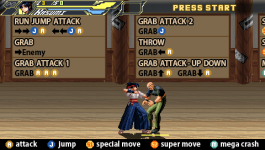
This is a newly created practice stage. You can practice here before playing the game.
I get the concept, but this a more "how to play" mode than a practice mode. Practice mode is usually a place to learn how to do combos and such.
Maybe make it 2 rooms, first room is like this, where you learn how to play, and the next has a list of combos that you can teach the player how to do.

Also, for the grab instruction, I know its probably self explanatory, but maybe there should be some indication that the grab attack 1, is done during the grab state, else it looks like the command to do the grab attack 1 is just to press a a a, and not press a a a during the grab state.
 
Snap7.png

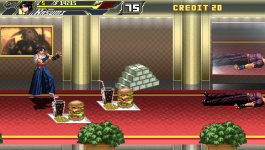
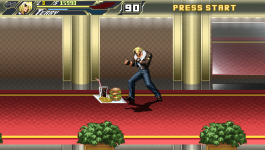
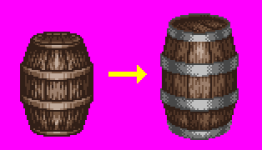
I'm drawing a new item. I'm drawing it big like the money I drew before, and making it look tempting.
I'm trying to make the number of items as small as possible and place them on the stage.
 
I get the concept, but this a more "how to play" mode than a practice mode. Practice mode is usually a place to learn how to do combos and such.
Maybe make it 2 rooms, first room is like this, where you learn how to play, and the next has a list of combos that you can teach the player how to do.

Also, for the grab instruction, I know its probably self explanatory, but maybe there should be some indication that the grab attack 1, is done during the grab state, else it looks like the command to do the grab attack 1 is just to press a a a, and not press a a a during the grab state.
Then I will rewrite the practice into a tutorial.
 
  • Like
Reactions: NED
Snap8.png
Snap9.png

This time, we took feedback from the practice mode and changed it to a tutorial mode, and fixed some of the shortcomings in the "grab" section of the manual.
 
awesome.
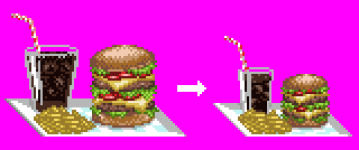
that burger sprite looks so good, but it does look a bit weird being so big, Im guessing you are making it big so that easier to notice?
 
Yes, the in-game items are drawn large to make them look rich.
I agree with DatKofGuy, the items being so big are very weird.
if you want them to stand out, you can make them to blink - and you don't need extra sprites for that, you can use drawmethod.

This is what I use:
anim idle
loop 1
delay 10
offset 7 16
bbox 0 3 22 18
nodrawmethod
frame data/chars/misc/items/1up_b.gif
drawmethod tintmode 1
drawmethod tintcolor 255_255_255

frame data/chars/misc/items/1up_b.gif
nodrawmethod
frame data/chars/misc/items/1up_b.gif
drawmethod tintmode 2
drawmethod tintcolor 0_0_0

frame data/chars/misc/items/1up_b.gif
The first drawmethod make it to blink in white, the second make it to blink in black.

Another idea is to add a spawn animation to items and make them to execute a short hop
anim spawn
loop 0
delay 10
offset 7 16
jumpframe 0 2
frame data/chars/misc/items/1up_b.gif
 
It's a similar method I use with drawmethod tintmode and tintcolor. It doesn't matter whether you use nodrawmethod for the first frame or not unless you add drawmethod in another frame after the drawmethod effect is applied. What I mean by that is the last/second one below, not the first since it's totally fine.


Code:
anim follow1 #GREEN
    loop    1
    delay    80
    offset    14 19
    bbox    5 4 19 16
    frame    data/chars/misc/1upg.gif
    drawmethod tintmode 1
    drawmethod tintcolor 255_255_255
    delay 3
    frame    data/chars/misc/1upg.gif

Code:
anim follow1 #GREEN
    loop    1
    delay    80
    offset    14 19
    bbox    5 4 19 16
    frame    data/chars/misc/1upg.gif
    drawmethod tintmode 1
    drawmethod tintcolor 255_255_255
    delay 3
    frame    data/chars/misc/1upg.gif
    delay 15
    nodrawmethod
    frame    data/chars/misc/1upg.gif

nodrawmethod

  • This command disables 'drawmethod'.
  • Use this with 'drawmethod' of course. See 'drawmethod' above.
 
I agree with DatKofGuy, the items being so big are very weird.
if you want them to stand out, you can make them to blink - and you don't need extra sprites for that, you can use drawmethod.

This is what I use:

The first drawmethod make it to blink in white, the second make it to blink in black.

Another idea is to add a spawn animation to items and make them to execute a short hop
Thank you. I think it's an idea that's hard to adapt to a unique item if it's too big, so I'm drawing it again in an appropriate size.
 
  • Like
Reactions: NED
It's a similar method I use with drawmethod tintmode and tintcolor. It doesn't matter whether you use nodrawmethod for the first frame or not unless you add drawmethod in another frame after the drawmethod effect is applied. What I mean by that is the last/second one below, not the first since it's totally fine.


Code:
anim follow1 #GREEN
    loop    1
    delay    80
    offset    14 19
    bbox    5 4 19 16
    frame    data/chars/misc/1upg.gif
    drawmethod tintmode 1
    drawmethod tintcolor 255_255_255
    delay 3
    frame    data/chars/misc/1upg.gif

Code:
anim follow1 #GREEN
    loop    1
    delay    80
    offset    14 19
    bbox    5 4 19 16
    frame    data/chars/misc/1upg.gif
    drawmethod tintmode 1
    drawmethod tintcolor 255_255_255
    delay 3
    frame    data/chars/misc/1upg.gif
    delay 15
    nodrawmethod
    frame    data/chars/misc/1upg.gif
"drawmethod" is used to create super moves for player characters, so there's no problem. Let's apply it to items as well.
 
  • Like
Reactions: NED

In this video, I've refined the difficulty and applied the updated items. I personally recommend Normal difficulty, with the rest feeling like Hard. It might be too difficult for my standards.
I like a chellenge in games but it mustn't feel cheap to me.
I prefer a technical experience over throwing everything at the player.
4 or 5 enemies max over 30.
Final fight did this rather well. Where certain enemies are faster and hit harder or attack from behind. Then I want to make it easy for the player to identify them. I got no reskins in mind that's to all the sprites I compiled.

With regards to your game, I notice that enemies bounce off the wall off almost every attack that knock them against the edge of the screen.
Wouldn't it be better to have certain EX attacks do that as a means to extend the come?
Like in SFxTekken.

You could make it so they fly off screen then just make it so they don't attack unless onscreen.
I will have characters like Guy wall bounces off the edges but still thinking about enemies bouncing off the wall since the flow of combat I have in mind doesn't require.
I also started on my take on Omega Rugal as a playable character but wrote in a good enough reason to feature him.
 
  • Like
Reactions: NED
I like a chellenge in games but it mustn't feel cheap to me.
I prefer a technical experience over throwing everything at the player.
4 or 5 enemies max over 30.
Final fight did this rather well. Where certain enemies are faster and hit harder or attack from behind. Then I want to make it easy for the player to identify them. I got no reskins in mind that's to all the sprites I compiled.

With regards to your game, I notice that enemies bounce off the wall off almost every attack that knock them against the edge of the screen.
Wouldn't it be better to have certain EX attacks do that as a means to extend the come?
Like in SFxTekken.

You could make it so they fly off screen then just make it so they don't attack unless onscreen.
I will have characters like Guy wall bounces off the edges but still thinking about enemies bouncing off the wall since the flow of combat I have in mind doesn't require.
I also started on my take on Omega Rugal as a playable character but wrote in a good enough reason to feature him.
I think I knew how to prevent enemies that are off screen from attacking before, but I forgot because I was doing this and that.😫
 
Back
Top Bottom