Chronocrash Modders Tools

ChronoCrash Modders Tools 0.7.9.10.1

No permission to download
@Piccolo The border removal is perfect, thanks a lot :) Now I know exactly where all the collision boxes start/end.
Item 1 is completely solved, hope 2 and 3 are not too hard to implement.

1702768424495.png
 
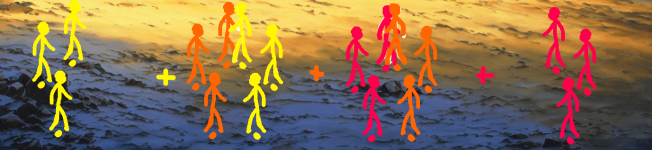
Is there a way to mark all enemies from the same group with one color or visible ID or something, maybe a big color dot near their shadow or something so visually we know theyre in same group, now its hard to tell what is what. and colors should also follow natural order maybe starting from yellow towards orange red , purple blue green and yellow again or somethin.

Also i was thinking about option to flip enemies that are spawned in front of player to be flipped in level preview, cause they face player in the game, this will also help to identify which enemies are the ones spawned on right side of the screen and which are the ones from left side of the screen, and id base it on resolution split in half, so if resolution is 320 then the ones spawned at 180 200 are flipped, and the ones spawned at 80 200 are just left like they are now.

Maybe there are other ways to make the grouping more readable by eye just by looking at the level editor, so we know that those enemies are from same group .

Now all enemies face same direction and its impossible to tell what is what until you click it, simple color id should help with this.

Yeah i think this would require readin group srtring and when another group string starts then all enemies after it are new group.


What i propose :
1702772035605.png
vs current :
1702772098328.png
Even better would be tints for actual enemy sprites and + is where AT is for this group:
1702772300828.png
 
Hey buddy, the find and replace color is really hard to read:
1702776229694.png
You probably will need to darken that green color (and the red one too, when the search fails)

Also, the Zoom In and Zoom Out (next to the play button) is invisible.
Captura de tela 2023-12-16 222537.png


I saw that you use a .svg for the find icon, so I've made two icons for you:

1702776456810.png

The .svg files are attached here
 

Attachments

Thank you very much for it! I love the look of the design.

I agree with O on the search box being bright. I can see the text a bit though its text background is (almost too) bright.

I just encountered this error in the Text tab.

Code:
Traceback (most recent call last):
  File "gui\entity\animselector.py", line 213, in enterEvent
AttributeError: 'EverydayEditor' object has no attribute 'mainSplitter'
 
Thank you very much for it! I love the look of the design.

I agree with O on the search box being bright. I can see the text a bit though its text background is (almost too) bright.

I just encountered this error in the Text tab.

Code:
Traceback (most recent call last):
  File "gui\entity\animselector.py", line 213, in enterEvent
AttributeError: 'EverydayEditor' object has no attribute 'mainSplitter'
Ah yeah probably related to the new anim panel on the right, forgot to test with auto-collapse.

And yeah some parts of the UI have the colors only adjusted for light theme, so in dark theme they look out of place. Will fix this
 
Any way to make the red box in levels to jump between various AT coords for wait or group ?
I think at is at the left side of the screen, so the left line of the box should be at that location, a button to jump between those would be handy.
 
Any way to make the red box in levels to jump between various AT coords for wait or group ?
I think at is at the left side of the screen, so the left line of the box should be at that location, a button to jump between those would be handy.
Wiil look into it. But maybe done later if it takes too much time, I'll only have time to do little things or fixes in the coming weeks.
 
Any way to make the red box in levels to jump between various AT coords for wait or group ?
I think at is at the left side of the screen, so the left line of the box should be at that location, a button to jump between those would be handy.
it's a nice idea. Sometimes its hard to see which enemies will spawn in each wait
 
Hey buddy, I've had a data loss again, but this time I managed to replicate it easily:
- create a new animation but don't save it.
- jump to another entity and copy something
- jump back to the first entity...and the new animation is gone

edit: I did it again right after I posted it and I can confirm it happens this way
 
Hey buddy, I've had a data loss again, but this time I managed to replicate it easily:
- create a new animation but don't save it.
- jump to another entity and copy something
- jump back to the first entity...and the new animation is gone

edit: I did it again right after I posted it and I can confirm it happens this way
Hey, ok no wonder I couldn't reproduce it. I'm sure I tried to do this last time and I hunted this bug. And at first I still couldn't reproduce it, following your instructions. But it turns out that one ONLY happens if you have "Force empty lines between animation" option enabled. And it was disabled on my end (because I tested it when I added it recently), so until I enabled it back I could never make this bug happen.

EDIT : it also happens ONLY if you add an animation which already exists. There is a check for rename, but not for add. So obviously when the entity is reconstructed it only keep one of the two animations with the same name. I'll add a check to prevent adding existing animation with add feature too.

So yeah now I can reproduce it too. And again turns out it had nothing to do with renaming animation in entity editor (you all can assume this is actually pretty safe), but the add animation feature (combined with another option). I'll fix it asap

EDIT : actually it was not that at all, was just yet again coincidences. The real issue was a lot more core related. But now it's fixed 🥳
 
Last edited:
Piccolo updated Chronocrash Modders Tools with a new update entry:

Changelog 0.5.8

Dark theme : main editor search colors fixed @O Ilusionista


Added option "Main editor - anim selector on left side" to put new anim selector to left side instead of right @bWWd


Fixed major bug where if you loaded a file from session (opened files list), made changes on it without saving, and then loaded this file from library list (the one with all entities, not opened files list), it would actually reload the file and erase your changes. Now the two lists...

Read the rest of this update entry...
 
  • Like
Reactions: ABK
EDIT : it also happens ONLY if you add an animation which already exists. There is a check for rename, but not for add. So obviously when the entity is reconstructed it only keep one of the two animations with the same name. I'll add a check to prevent adding existing animation with add feature too.
ah no, in fact what happens is what you posted in the update log:

Fixed major bug where if you loaded a file from session (opened files list), made changes on it without saving, and then loaded this file from library list (the one with all entities, not opened files list), it would actually reload the file and erase your changes. Now the two lists (library and open files) are more tightly linked so that it doesn't happen anymore.

Can I make a suggestion, since this part is related to some past issues?
The "opened" list can be quite confusing the way it is now. It's a handy feature for sure, but it should work on a different way - it should only list the recent opened entities from the project you had selected in the main menu.

If you open another project later, ok, it can display both projects there. But not if you only had opened only one project.

This is my list when I opened the tool:
1702906564472.png

It is listing 3 different folders, from 3 different projects. But I had opened the last one (and since I haven't opened any entity yet, it lists the project by its name).
It's even worse if I let all the folders open:
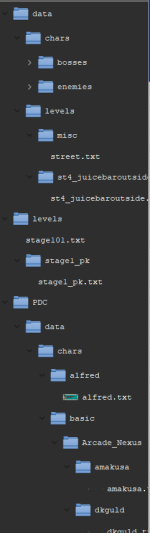
1702906749910.png

Why I am saying this?
- It's confusing to have that much entities listed there, as its hard to find some entities down on the road
- As far as I remember, in every issue I had with the data loss, I've accidentally clicked on an entity from a different project - I have dyslexia but, on top of that, my games are on an external hard drive which is a bit slow and hibernates from time to time (even though I have disabled this). Therefore, as the tool only loads something when necessary, sometimes I click once, see that it doesn't open (because it is loading) and click again - but this second click always ends up being on another entity.

It may seem like this is my problem (in a way it is, but unfortunately I didn't choose to have dyslexia) but I notice that some things work with a single click (choose an entity in the left menu) while others work with two (choose an animation in the list of animations).

So perhaps there could be an option (which I suggest is turned off by default) where the user chooses whether the list in the "opened" tab shows everything that has already been opened or whether it starts showing only what you open in this session.

----

Still on this subject, I was working in text mode directly and I noticed something:

I had an animation where I wanted to paste the content of another (it's not this animation, it's just an example):
anim pain
delay 4
bbox 12 31 32 36
offset 27 65
frame data/chars/basic/shadaloo/vega/pain01.gif
offset 32 65
frame data/chars/basic/shadaloo/vega/pain01a.gif
delay 30
offset 27 65
frame data/chars/basic/shadaloo/vega/pain01a.gif

When I copied the content of another animation and pasted it into this one, I accidentally pasted the name of the animation as well, making it duplicate like this:

anim pain
anim special

delay 5
offset 27 67
followanim 2
followcond 3
sound data/chars/basic/shadaloo/vega/voices/at2.wav
frame data/chars/basic/shadaloo/vega/at01.gif
delay 18
attack 33 37 50 22 12 0 0 1 10 10
sound data/sounds/vuu.wav
frame data/chars/basic/shadaloo/vega/at02.gif
delay 8
attack 0 0 0 0 0 0 0 0 0 0
frame data/chars/basic/shadaloo/vega/at03.gif
frame data/chars/basic/shadaloo/vega/at11.gif
frame data/chars/basic/shadaloo/vega/at01.gif

I noticed that, after the last line, the tool added "_ALREADYUSED" several times, making it "_ALREADYUSED_ALREADYUSED_ALREADYUSED_ALREADYUSED_ALREADYUSED_ALREADYUSED"
 
So perhaps there could be an option (which I suggest is turned off by default) where the user chooses whether the list in the "opened" tab shows everything that has already been opened or whether it starts showing only what you open in this session.
I can add a prompt to load session or not at startup. But in the meantime just click "Sesison" -> "New session" when you open the app, and it will be as if no session was loaded.
 
It may seem like this is my problem (in a way it is, but unfortunately I didn't choose to have dyslexia) but I notice that some things work with a single click (choose an entity in the left menu) while others work with two (choose an animation in the list of animations).
Yeah this I'll definitely make it universal and with an option. Thought about it since I added single click in one of them, but forgot to.
 
Piccolo updated Chronocrash Modders Tools with a new update entry:

Changelog 0.5.8.1

Added option "Double click to load element in list" to make it consistent across all widgets whether a single click or a double click will trigger loading the selected element. By default it's disabled, which means a single click will suffice to load element in list.


Added start up prompt to let user choose if he wants to load last session (list of opened files last time) or create a new session.


In animation editor, you can no longer write a line starting with anim after the first...

Read the rest of this update entry...
 
Piccolo updated Chronocrash Modders Tools with a new update entry:

Changelog 0.5.9

Animation editor : added preview support for "move" command. The entity will now move "x" pixels according to move command setting in animation text content @Kratus


LEVEL EDITOR :

In bar above level, added three buttons :

- Prev wait / Next wait : will move screen (red frame) from one wait to the next

- Tint by groups : toggle button that will tint entities based on their group. Useful to quickly view which entities belong to which group. Note that if you have...

Read the rest of this update entry...
 
Back
Top Bottom