EDIT : it also happens ONLY if you add an animation which already exists. There is a check for rename, but not for add. So obviously when the entity is reconstructed it only keep one of the two animations with the same name. I'll add a check to prevent adding existing animation with add feature too.
ah no, in fact what happens is what you posted in the update log:
Fixed major bug where if you loaded a file from session (opened files list), made changes on it without saving, and then loaded this file from library list (the one with all entities, not opened files list), it would actually reload the file and erase your changes. Now the two lists (library and open files) are more tightly linked so that it doesn't happen anymore.
Can I make a suggestion, since this part is related to some past issues?
The "opened" list can be quite confusing the way it is now. It's a handy feature for sure, but it should work on a different way - it should only list the recent opened entities from the project you had selected in the main menu.
If you open another project later, ok, it can display both projects there. But not if you only had opened only one project.
This is my list when I opened the tool:

It is listing 3 different folders, from 3 different projects. But I had opened the last one (and since I haven't opened any entity yet, it lists the project by its name).
It's even worse if I let all the folders open:
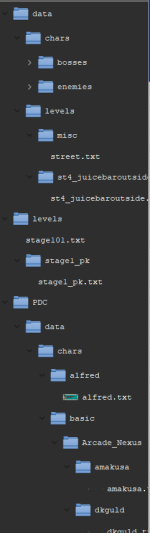
Why I am saying this?
- It's confusing to have that much entities listed there, as its hard to find some entities down on the road
- As far as I remember, in every issue I had with the data loss, I've accidentally clicked on an entity from a different project - I have dyslexia but, on top of that, my games are on an external hard drive which is a bit slow and hibernates from time to time (even though I have disabled this). Therefore, as the tool only loads something when necessary, sometimes I click once, see that it doesn't open (because it is loading) and click again - but this second click always ends up being on another entity.
It may seem like this is my problem (in a way it is, but unfortunately I didn't choose to have dyslexia) but I notice that some things work with a single click (choose an entity in the left menu) while others work with two (choose an animation in the list of animations).
So perhaps there could be an option (which I suggest is turned off by default) where the user chooses whether the list in the "opened" tab shows everything that has already been opened or whether it starts showing only what you open in this session.
----
Still on this subject, I was working in text mode directly and I noticed something:
I had an animation where I wanted to paste the content of another (it's not this animation, it's just an example):
anim pain
delay 4
bbox 12 31 32 36
offset 27 65
frame data/chars/basic/shadaloo/vega/pain01.gif
offset 32 65
frame data/chars/basic/shadaloo/vega/pain01a.gif
delay 30
offset 27 65
frame data/chars/basic/shadaloo/vega/pain01a.gif
When I copied the content of another animation and pasted it into this one, I accidentally pasted the name of the animation as well, making it duplicate like this:
anim pain
anim special
delay 5
offset 27 67
followanim 2
followcond 3
sound data/chars/basic/shadaloo/vega/voices/at2.wav
frame data/chars/basic/shadaloo/vega/at01.gif
delay 18
attack 33 37 50 22 12 0 0 1 10 10
sound data/sounds/vuu.wav
frame data/chars/basic/shadaloo/vega/at02.gif
delay 8
attack 0 0 0 0 0 0 0 0 0 0
frame data/chars/basic/shadaloo/vega/at03.gif
frame data/chars/basic/shadaloo/vega/at11.gif
frame data/chars/basic/shadaloo/vega/at01.gif
I noticed that, after the last line, the tool added "_ALREADYUSED" several times, making it "_ALREADYUSED_ALREADYUSED_ALREADYUSED_ALREADYUSED_ALREADYUSED_ALREADYUSED"










 Now I know exactly where all the collision boxes start/end.