Chronocrash Modders Tools

ChronoCrash Modders Tools 0.7.9.10.1

No permission to download
Piccolo updated Chronocrash Modders Tools with a new update entry:

Changelog 0.6.17

- Added an option "Null collision reuse original format". When enabled, the animation editor will try to reconstruct empty collision (attack 0, attack none, bbox 0 0 0 0, and so on) with the original format that was set if data is still empty. It's enabled by default.

- In "Edit -> Settings > Misc", added a field "Null collision format". This is the default values for new empty collisions lines (or for new and old empty collisions lines when option mentioned above is...

Read the rest of this update entry...
 
Buddy, thanks a lot for the update. So far CMT is not trying to change my empty collision boxes with "none" anymore :)

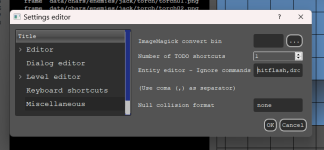
Recently I saw a new button but I forgot to ask about what it does. Is this related to the "ob-utils" folder inside the user/appdata/roaming folder?

View attachment 8105
Great ;)

Good that you mention that, actually this button is not finished (forgot to remove it) and during development I replaced its function with the new prompt that you get when loading project for the first time :

- The first time you load a project (since this update), CMT will ask you if you want to load (and save) settings from the project folder.

- If you say yes, from now on, when using this project, CMT will read and save its settings from 'cmt-settings.ini' located in the project folder (the file will be created when needed if it doesn't exist)

- If you say no, when using this project, CMT will read and save its settings from the global/shared 'settings.ini' (as before)

So the idea of this button was to basically let users choose the global settings location, but I'm not sure it's needed now because users can now have their projects use/save CMT settings directly from the project folder.
 
So the idea of this button was to basically let users choose the global settings location, but I'm not sure it's needed now because users can now have their projects use/save CMT settings directly from the project folder.
I was thinking about it yesterday, I like the idea of allowing users to choose where CMT will save settings. The appdata/roaming is not a too "friendly" location.
I accidentally chose "yes" to make CMT settings inside my project's folder and the only way I was able to revert it was by editing the .ini file. This button can solve the problem.
 
I was thinking about it yesterday, I like the idea of allowing users to choose where CMT will save settings. The appdata/roaming is not a too "friendly" location.
I accidentally chose "yes" to make CMT settings inside my project's folder and the only way I was able to revert it was by editing the .ini file. This button can solve the problem.
In the update I documented that if you want to reset those parameters you have to remove/add the project again. But yes manually editing the global ini works too.
 
Piccolo updated Chronocrash Modders Tools with a new update entry:

Changelog 0.6.18

- Fixed this bug @O Ilusionista

- Save icon in main editor (the one next to undo and redo buttons) will now indicate if current file is saved or not. There was already a save indicator in the left panel, but this one is useful when you have lots of files opened and still want to see a save indicator no matter what (without having to scroll the left panel to check)

- Advanced...

Read the rest of this update entry...
 
Hello,

I run into CMT crashing sometimes:

Traceback (most recent call last):
File "gui\entity\frameproperties.py", line 113, in entityModelEntryChanged
File "gui\entity\__init__.py", line 2923, in loadOpponent
File "gui\level\items.py", line 166, in __init__
File "gui\level\items.py", line 432, in loadAnims
ValueError: invalid literal for int() with base 10: '94s'
 
Hello,

I run into CMT crashing sometimes:

Traceback (most recent call last):
File "gui\entity\frameproperties.py", line 113, in entityModelEntryChanged
File "gui\entity\__init__.py", line 2923, in loadOpponent
File "gui\level\items.py", line 166, in __init__
File "gui\level\items.py", line 432, in loadAnims
ValueError: invalid literal for int() with base 10: '94s'
Hello, in one of your entities files you have "94s" somewhere. Instead of what should be "94".
You probably used Ctrl + S to save this file, and one time the "Ctrl" key wasn't properly held so you input "s".

I suggest you use a file search software and search for the string "94s" in the content of files.
 
@Piccolo I've found an issue on the last CMT version and I finally could recreate it.
Looks like the legacy BURN are beeing deleted once you go the the animation tab, specially if they are placed on the first frame.

This is my entity animation (on the notepad):
anim idle
loop 1
offset 37 47
delay 6
hitflash flashfire
burn 30 31 16 18 29 20 0 1 10 15
dropv 3.0 3.0

sound data/chars/basic/basic6/molotov/16-fire.wav
@cmd antiwallturn 10 5 0
frame data/chars/basic/basic6/molotov/molotov06.gif
@cmd antiwallturn 10 5 0
frame data/chars/basic/basic6/molotov/molotov07.gif
@cmd antiwallturn 10 5 0
frame data/chars/basic/basic6/molotov/molotov06.gif
@cmd antiwallturn 10 5 0
frame data/chars/basic/basic6/molotov/molotov07.gif
@cmd antiwallturn 10 5 0
frame data/chars/basic/basic6/molotov/molotov06.gif
@cmd antiwallturn 10 5 0
frame data/chars/basic/basic6/molotov/molotov07.gif

Once you open it on the text mode, everything is fine:
1718116816468.png

But as soon I jump to the ANIMATION tab, the BURN line gets removed:
1718116853288.png


Edit: more info about this issue
It only happens when you open the entity, then go to animation tab for the first time.
If you paste the information again and save, you can go to text and return to animation with no issue.

So maybe its something related with the conversion.
 
@Piccolo I've found an issue on the last CMT version and I finally could recreate it.
Looks like the legacy BURN are beeing deleted once you go the the animation tab, specially if they are placed on the first frame.

This is my entity animation (on the notepad):


Once you open it on the text mode, everything is fine:
View attachment 8242

But as soon I jump to the ANIMATION tab, the BURN line gets removed:
View attachment 8243


Edit: more info about this issue
It only happens when you open the entity, then go to animation tab for the first time.
If you paste the information again and save, you can go to text and return to animation with no issue.

So maybe its something related with the conversion.
@O Ilusionista I suspect that this issue can be related to the hitflash/dropv commands, some time ago I needed to put them in the "ignore" list because in the latest version CMT is changing something, I don't remember exactly what.

I suggest trying to add hitflash/dropv in the ignore commands and see if it solves the problem, I tested here and apparently my burn was not removed.

1718127981030.png

EDIT: I found the post where I reported the hitflash changes.
 
Last edited:
OK this is crazy, for some reason this setup keeps removing burn command completely leaving this :

Code:
anim    idle
    loop    1
    delay    14
    offset    23 11
    bbox none
                @script
                void self = getlocalvar("self");
         if ((getentityproperty(self, "direction")==1)&&(frame == 1)){
        changeentityproperty(self, "velocity", 10, 0, 0);
        }
        if ((getentityproperty(self, "direction")==0)&&(frame == 1)){
        changeentityproperty(self, "velocity", -10, 0, 0);
        }
    @end_script
    
    seta  1
    forcedirection    -1
        followanim 1
        followcond 1

    dropv 7.0 3.0
    hitfx data/sounds/boom4.wav
    frame    data/chars/heman/rocket.gif

    frame    data/chars/heman/rocket.gif
    attack none
    delay 2
        frame    data/chars/heman/rocket.gif


Before save its like this :


Code:
anim    idle
    loop    1
    delay    14
    offset    23 11
    bbox none
                @script
                void self = getlocalvar("self");
         if ((getentityproperty(self, "direction")==1)&&(frame == 1)){
        changeentityproperty(self, "velocity", 10, 0, 0);
        }
        if ((getentityproperty(self, "direction")==0)&&(frame == 1)){
        changeentityproperty(self, "velocity", -10, 0, 0);
        }
    @end_script
    
    seta  1
    forcedirection    -1
        followanim 1
        followcond 1
    burn    11 4 22 15 15 0 1 1 0 75
    dropv 7.0 3.0
    hitfx data/sounds/boom4.wav

    frame    data/chars/heman/rocket.gif

    frame    data/chars/heman/rocket.gif
    attack none
    delay 2
        frame    data/chars/heman/rocket.gif

Also, i always used hitfx before actual attack command, im not sure if it works if its after it, the only ones that should be after is dropv stuff from what i remember , is this correct ?
 
It's the same issue as O Ilusionista reported a few hours before. Don't know if you realized or if its a coincidence. I'll fix it, but it's one example that illustrate well how the legacy system can be a PITA to support.

As for the order of dropv/hitfx and so on, I didn't check but I would be surprised if it matters at all in "latest" builds of OpenBOR (by latest I mean builds from around 2015 to now, I think it's around that time that the new style of commands was introduced). What still matters I think is that it's set before the frame you want to tie it to, obviously.
 
Question: I see that you added DRAWMETHOD SCALEX and SCALEY to the preview, which is great.
But would it be possible to use DRAWMETHOD SCALE too?

drawmethod scale {scalex} {scaley}

  • If scaley is not specified, it is the same as scalex. For example, drawmethod scale 1.5 will scale the whole sprite by 1.5.
Question 2: We can preview DRAWMETHOD FLIPX 1 on the editor, but to cancel it we need to use DRAWMETHOD FLIPX 0 which isn't how, most of time, we cancel it.
So would it be possible to add NODRAWMETHOD shortcut (which isn't on the manual btw), to cancel any active drawmethod (which the editor supports, sure)?
 
As for the order of dropv/hitfx and so on, I didn't check but I would be surprised if it matters at all in "latest" builds of OpenBOR (by latest I mean builds from around 2015 to now, I think it's around that time that the new style of commands was introduced). What still matters I think is that it's set before the frame you want to tie it to, obviously.

It doesn't and really never did. See, the dirty secret is the legacy and current systems really work the same way. There's no difference between this:

Code:
attack 85 8 128 43 8 1 20
dropv 3.0 2.0

..and this...

Code:
attack.damage.force 8
attack.position.x 85
attack.position.y 8
attack.size.x 128
attack.size.y 43
attack.reaction.fall.force 1
attack.reaction.pause.time 20
attack.reaction.fall.velocity.x 2.0
attack.reaction.fall.velocity.y 3.0

In both cases, it's a series of attack commands read and applied to the next frame in order. The new one just makes it obvious, and only has one parameter each.

DC
 
Back
Top Bottom