This is what i get when running build.bat from android folder , id like to at least build non customizable apk file.Im on Win 7.
--
Read about that online then added this to gradle.properties file
org.gradle.jvmargs=-Xmx1536m
org.gradle.jvmargs=-Xmx1024m
There was just first line, i added second one and something moved... compiling/configuring/downloading
--
got error cuse keystore.properties wasnt in folder, tried again.
hahaha ;D another error, this one is hilarious, it appears that there is no tools.jar in java folders anywhere, a bit of reading online... they removed tools.jar since version 9 and i have 12, will downgrade to 8 and let you know how it goes... wow, cant believe all the damn quirks.Compiling windows is like a walk in the park, this is just like walking on landmines ;D
---
This is where im right now, another error
Code:
C:\openbor.git\branches\Malik-Updates\engine\android>cmd /k "gradlew.bat clean &
 gradlew.bat assembleDebug"
Starting a Gradle Daemon, 2 incompatible and 1 stopped Daemons could not be reus
ed, use --status for details

> Task :app:externalNativeBuildCleanDebug
Clean cpufeatures armeabi-v7a,openbor armeabi-v7a
process_begin: CreateProcess(NULL, C:/android/SDK/ndk-bundle/build//../toolchain
s/llvm/prebuilt/windows-x86_64/bin/clang++.exe -print-resource-dir, ...) failed.

[armeabi-v7a] "Clean          ": "SDL2 [armeabi-v7a]"
[armeabi-v7a] "Clean          ": "cpufeatures [armeabi-v7a]"
[armeabi-v7a] "Clean          ": "ogg [armeabi-v7a]"
[armeabi-v7a] "Clean          ": "openbor [armeabi-v7a]"
[armeabi-v7a] "Clean          ": "png [armeabi-v7a]"
[armeabi-v7a] "Clean          ": "stdc++ [armeabi-v7a]"
[armeabi-v7a] "Clean          ": "vorbisidec [armeabi-v7a]"
[armeabi-v7a] "Clean          ": "vpx [armeabi-v7a]"

> Task :app:externalNativeBuildCleanRelease
Clean cpufeatures armeabi-v7a,openbor armeabi-v7a
process_begin: CreateProcess(NULL, C:/android/SDK/ndk-bundle/build//../toolchain
s/llvm/prebuilt/windows-x86_64/bin/clang++.exe -print-resource-dir, ...) failed.

[armeabi-v7a] "Clean          ": "SDL2 [armeabi-v7a]"
[armeabi-v7a] "Clean          ": "cpufeatures [armeabi-v7a]"
[armeabi-v7a] "Clean          ": "ogg [armeabi-v7a]"
[armeabi-v7a] "Clean          ": "openbor [armeabi-v7a]"
[armeabi-v7a] "Clean          ": "png [armeabi-v7a]"
[armeabi-v7a] "Clean          ": "stdc++ [armeabi-v7a]"
[armeabi-v7a] "Clean          ": "vorbisidec [armeabi-v7a]"
[armeabi-v7a] "Clean          ": "vpx [armeabi-v7a]"

BUILD SUCCESSFUL in 2m 27s
4 actionable tasks: 3 executed, 1 up-to-date

> Task :app:compileDebugJavaWithJavac
Note: Some input files use or override a deprecated API.
Note: Recompile with -Xlint:deprecation for details.
Note: C:\openbor.git\branches\Malik-Updates\engine\android\app\src\main\java\org
\libsdl\app\SDLActivity.java uses unchecked or unsafe operations.
Note: Recompile with -Xlint:unchecked for details.

> Task :app:externalNativeBuildDebug FAILED
Build openbor armeabi-v7a
process_begin: CreateProcess(NULL, C:/android/SDK/ndk-bundle/build//../toolchain
s/llvm/prebuilt/windows-x86_64/bin/clang++.exe -print-resource-dir, ...) failed.

[armeabi-v7a] "Compile thumb  ": "openbor <= control.c"
process_begin: CreateProcess(NULL, C:/android/SDK/ndk-bundle/build//../toolchain
s/llvm/prebuilt/windows-x86_64/bin/clang.exe -MMD -MP -MF C:/openbor.git/branche
s/Malik-Updates/engine/android/app/build/intermediates/ndkBuild/debug/obj/local/
armeabi-v7a/objs-debug/openbor/__/__/__/__/sdl/control.o.d -target armv7-none-li
nux-androideabi19 -fdata-sections -ffunction-sections -fstack-protector-strong -
funwind-tables -no-canonical-prefixes --sysroot C:/android/SDK/ndk-bundle/build/
/../toolchains/llvm/prebuilt/windows-x86_64/sysroot -g -Wno-invalid-command-line
-argument -Wno-unused-command-line-argument -fno-addrsig -fpic -march=armv7-a -m
thumb -O0 -UNDEBUG -fno-limit-debug-info -IC:/openbor.git/branches/Malik-Updates
/engine/android/app/jni/openbor/src/ -IC:/openbor.git/branches/Malik-Updates/eng
ine/android/app/jni/openbor/include/ -IC:/openbor.git/branches/Malik-Updates/eng
ine/android/app/jni/openbor/include/png -IC:/openbor.git/branches/Malik-Updates/
engine/android/app/jni/openbor/include/sdl -IC:/openbor.git/branches/Malik-Updat
es/engine/android/app/jni/openbor/../../../.. -IC:/openbor.git/branches/Malik-Up
dates/engine/android/app/jni/openbor/../../../../sdl -IC:/openbor.git/branches/M
alik-Updates/engine/android/app/jni/openbor/../../../../resources -IC:/openbor.g
it/branches/Malik-Updates/engine/android/app/jni/openbor/../../../../source -IC:
/openbor.git/branches/Malik-Updates/engine/android/app/jni/openbor/../../../../s
ource/adpcmlib -IC:/openbor.git/branches/Malik-Updates/engine/android/app/jni/op
enbor/../../../../source/gamelib -IC:/openbor.git/branches/Malik-Updates/engine/
android/app/jni/openbor/../../../../source/gfxlib -IC:/openbor.git/branches/Mali
k-Updates/engine/android/app/jni/openbor/../../../../source/pnglib -IC:/openbor.
git/branches/Malik-Updates/engine/android/app/jni/openbor/../../../../source/pre
processorlib -IC:/openbor.git/branches/Malik-Updates/engine/android/app/jni/open
bor/../../../../source/ramlib -IC:/openbor.git/branches/Malik-Updates/engine/and
roid/app/jni/openbor/../../../../source/randlib -IC:/openbor.git/branches/Malik-
Updates/engine/android/app/jni/openbor/../../../../source/scriptlib -IC:/openbor
.git/branches/Malik-Updates/engine/android/app/jni/openbor/../../../../source/op
enborscript -IC:/openbor.git/branches/Malik-Updates/engine/android/app/jni/openb
or/../../../../source/tracelib2 -IC:/openbor.git/branches/Malik-Updates/engine/a
ndroid/app/jni/openbor/../../../../source/webmlib -IC:/openbor.git/branches/Mali
k-Updates/engine/android/app/jni/openbor/../../../../source/webmlib/halloc -IC:/
openbor.git/branches/Malik-Updates/engine/android/app/jni/openbor/../../../../so
urce/webmlib/nestegg -IC:/android/SDK/ndk-bundle/build//../sources/cxx-stl/syste
m/include -IC:/android/SDK/ndk-bundle/build//../sources/android/cpufeatures -IC:
/openbor.git/branches/Malik-Updates/engine/android/app/jni/openbor -DANDROID -g
-O2 -Wall -Werror -Wno-unused-result -fsigned-char -fno-ident -freorder-blocks -
DLINUX -DSDL=1 -DANDROID=1 -DTREMOR=1 -DWEBM=1 -Wa,--noexecstack -Wformat -Werro
r=format-security -c C:/openbor.git/branches/Malik-Updates/engine/android/app/jn
i/openbor/../../../../sdl/control.c -o C:/openbor.git/branches/Malik-Updates/eng
ine/android/app/build/intermediates/ndkBuild/debug/obj/local/armeabi-v7a/objs-de
bug/openbor/__/__/__/__/sdl/control.o, ...) failed.
make (e=2): Nie mo?na odnale?? okre?lonego pliku.
make: *** [C:/openbor.git/branches/Malik-Updates/engine/android/app/build/interm
ediates/ndkBuild/debug/obj/local/armeabi-v7a/objs-debug/openbor/__/__/__/__/sdl/
control.o] Error 2

FAILURE: Build failed with an exception.

* What went wrong:
Execution failed for task ':app:externalNativeBuildDebug'.
> Build command failed.
  Error while executing process C:\android\SDK\ndk-bundle\ndk-build.cmd with arg
uments {NDK_PROJECT_PATH=null APP_BUILD_SCRIPT=C:\openbor.git\branches\Malik-Upd
ates\engine\android\app\jni\Android.mk NDK_APPLICATION_MK=C:\openbor.git\branche
s\Malik-Updates\engine\android\app\jni\Application.mk APP_ABI=armeabi-v7a NDK_AL
L_ABIS=armeabi-v7a NDK_DEBUG=1 APP_PLATFORM=android-19 NDK_OUT=C:/openbor.git/br
anches/Malik-Updates/engine/android/app/build/intermediates/ndkBuild/debug/obj N
DK_LIBS_OUT=C:\openbor.git\branches\Malik-Updates\engine\android\app\build\inter
mediates\ndkBuild\debug\lib APP_PLATFORM=android-19 C:/openbor.git/branches/Mali
k-Updates/engine/android/app/build/intermediates/ndkBuild/debug/obj/local/armeab
i-v7a/libopenbor.so}
  process_begin: CreateProcess(NULL, C:/android/SDK/ndk-bundle/build//../toolcha
ins/llvm/prebuilt/windows-x86_64/bin/clang++.exe -print-resource-dir, ...) faile
d.
  [armeabi-v7a] "Compile thumb  ": "openbor <= control.c"
  process_begin: CreateProcess(NULL, C:/android/SDK/ndk-bundle/build//../toolcha
ins/llvm/prebuilt/windows-x86_64/bin/clang.exe -MMD -MP -MF C:/openbor.git/branc
hes/Malik-Updates/engine/android/app/build/intermediates/ndkBuild/debug/obj/loca
l/armeabi-v7a/objs-debug/openbor/__/__/__/__/sdl/control.o.d -target armv7-none-
linux-androideabi19 -fdata-sections -ffunction-sections -fstack-protector-strong
 -funwind-tables -no-canonical-prefixes --sysroot C:/android/SDK/ndk-bundle/buil
d//../toolchains/llvm/prebuilt/windows-x86_64/sysroot -g -Wno-invalid-command-li
ne-argument -Wno-unused-command-line-argument -fno-addrsig -fpic -march=armv7-a
-mthumb -O0 -UNDEBUG -fno-limit-debug-info -IC:/openbor.git/branches/Malik-Updat
es/engine/android/app/jni/openbor/src/ -IC:/openbor.git/branches/Malik-Updates/e
ngine/android/app/jni/openbor/include/ -IC:/openbor.git/branches/Malik-Updates/e
ngine/android/app/jni/openbor/include/png -IC:/openbor.git/branches/Malik-Update
s/engine/android/app/jni/openbor/include/sdl -IC:/openbor.git/branches/Malik-Upd
ates/engine/android/app/jni/openbor/../../../.. -IC:/openbor.git/branches/Malik-
Updates/engine/android/app/jni/openbor/../../../../sdl -IC:/openbor.git/branches
/Malik-Updates/engine/android/app/jni/openbor/../../../../resources -IC:/openbor
.git/branches/Malik-Updates/engine/android/app/jni/openbor/../../../../source -I
C:/openbor.git/branches/Malik-Updates/engine/android/app/jni/openbor/../../../..
/source/adpcmlib -IC:/openbor.git/branches/Malik-Updates/engine/android/app/jni/
openbor/../../../../source/gamelib -IC:/openbor.git/branches/Malik-Updates/engin
e/android/app/jni/openbor/../../../../source/gfxlib -IC:/openbor.git/branches/Ma
lik-Updates/engine/android/app/jni/openbor/../../../../source/pnglib -IC:/openbo
r.git/branches/Malik-Updates/engine/android/app/jni/openbor/../../../../source/p
reprocessorlib -IC:/openbor.git/branches/Malik-Updates/engine/android/app/jni/op
enbor/../../../../source/ramlib -IC:/openbor.git/branches/Malik-Updates/engine/a
ndroid/app/jni/openbor/../../../../source/randlib -IC:/openbor.git/branches/Mali
k-Updates/engine/android/app/jni/openbor/../../../../source/scriptlib -IC:/openb
or.git/branches/Malik-Updates/engine/android/app/jni/openbor/../../../../source/
openborscript -IC:/openbor.git/branches/Malik-Updates/engine/android/app/jni/ope
nbor/../../../../source/tracelib2 -IC:/openbor.git/branches/Malik-Updates/engine
/android/app/jni/openbor/../../../../source/webmlib -IC:/openbor.git/branches/Ma
lik-Updates/engine/android/app/jni/openbor/../../../../source/webmlib/halloc -IC
:/openbor.git/branches/Malik-Updates/engine/android/app/jni/openbor/../../../../
source/webmlib/nestegg -IC:/android/SDK/ndk-bundle/build//../sources/cxx-stl/sys
tem/include -IC:/android/SDK/ndk-bundle/build//../sources/android/cpufeatures -I
C:/openbor.git/branches/Malik-Updates/engine/android/app/jni/openbor -DANDROID -
g -O2 -Wall -Werror -Wno-unused-result -fsigned-char -fno-ident -freorder-blocks
 -DLINUX -DSDL=1 -DANDROID=1 -DTREMOR=1 -DWEBM=1 -Wa,--noexecstack -Wformat -Wer
ror=format-security -c C:/openbor.git/branches/Malik-Updates/engine/android/app/
jni/openbor/../../../../sdl/control.c -o C:/openbor.git/branches/Malik-Updates/e
ngine/android/app/build/intermediates/ndkBuild/debug/obj/local/armeabi-v7a/objs-
debug/openbor/__/__/__/__/sdl/control.o, ...) failed.
  make (e=2): Nie mo?na odnale?? okre?lonego pliku.
  make: *** [C:/openbor.git/branches/Malik-Updates/engine/android/app/build/inte
rmediates/ndkBuild/debug/obj/local/armeabi-v7a/objs-debug/openbor/__/__/__/__/sd
l/control.o] Error 2


* Try:
Run with --stacktrace option to get the stack trace. Run with --info or --debug
option to get more log output. Run with --scan to get full insights.

* Get more help at https://help.gradle.org

BUILD FAILED in 54s
17 actionable tasks: 15 executed, 2 up-to-date

C:\openbor.git\branches\Malik-Updates\engine\android>
I can tell nobody else tried to compile android from this tutorial, it points to version 12 which is wrong one and someone would complain about the same error i had with 12.
Could you give info about the same versions you have installed ? and all paths , vars in system .Im ready to try it again but want to do it exactly like you, same versions and step by step including when to restart pc.Im a bit tired of these errors, i knew it was gonna be like that , thats why i postponed it a bit.
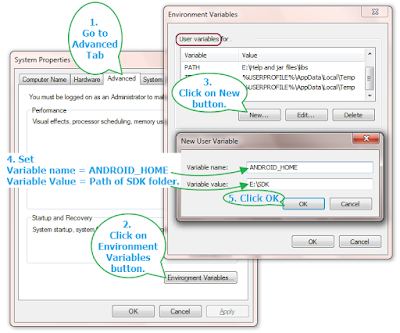
Tutorial is very vague, also you skip to custom apk, id prefer to just compile normal apk for starters.Also creating variables is not explained, where and how to do it.So even reading this quickly can scare people off.