Chronocrash Modders Tools

ChronoCrash Modders Tools 0.7.9.10.1

No permission to download
Hey Piccolo, I saw a point on CMT that I wanna share with you

How the tool display the layers? on the order you put it on the .txt or it uses a logic to tell which comes first, like "background goes back, then panel, then fglayer or front layer".

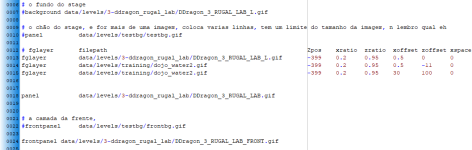
Looks like to be the second case, as my fglayers are located behind the panel and come first on the stage:
View attachment 5520

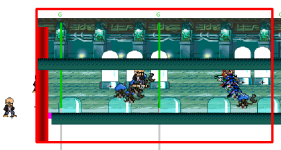
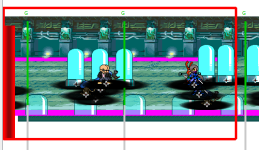
But this is how the tool display the stage:
View attachment 5521

Dunno if you are aware, but fglayer can, in fact, be placed anywhere you want to (well, exclusing behind the background), because you have fine control about the Z placement (this is what differs bglayer from fglayer).

If you look at the first image, you will see that my fglayers are placed at -400/-401/-403 which makes them to appear behind the panel.
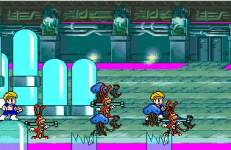
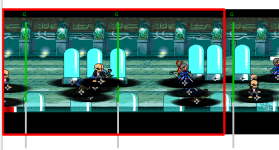
But the tool renders them in front of it, where it should be displaced like this:

View attachment 5522

So I would like to check if its possible the tool to do one of the following:

A) The tool could use the order we put the layers on the stage file to display them (and that is imporant when you use script to control the layers)
B) or, the tool could use the Z value (if present) to display the layer order

Honestly, the option A would make more sense.

Is this possible?


Another question: it is possible to have an option to not break line of the codes?
This is the same stage on Stats:

View attachment 5523
So I looked into this and actually CMT should already use Z property if set (what you call option B). It uses the order in which layers are declared (what you call option A) only to differentiate layers with the same Z value.

If it doesn't work like that for a stage then I would need the files to investigate ;)
 
Piccolo updated Chronocrash Modders Tools with a new update entry:

Changelog 0.4.6.4

Animation Editor
- Mouse coords will now be shown in lower left corner
- When clicking "Set offset", the cursor will now change to a cross instead of a hand
- Clicking on a sprite will put the cursor to the corresponding "frame" line in the text editor


Level Editor

- Added support for panel order property ("aaa", "abc", ...)

General :

- File selector and animation selector will now expand properly when splitters are manually stretched.

Read the rest of this update entry...
 
  • Like
Reactions: ABK
@Piccolo I am sending you another game which has the same issue -check your DM in few minutes

This is a screenshot of the layer order (I can't use CMT for that thanks to the auto warp feature - we could have an option to choose if we want an horizontal scrollbar or not, kinda like windows notepad has):
Captura de tela 2023-11-15 112417.png

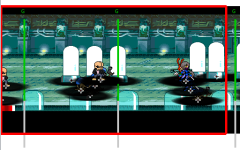
You will see that it doesn't care if the fglayers comes before the panel or not, they are always displayed in front of it:
- the red bar (DDragon_3_RUGAL_LAB_L.gif) should be displayed behind the Panel and behind the other fglayers
- the water (dojo_water2.gif) should be displayed behind the panel

Captura de tela 2023-11-15 112314.png

The panel has transparent areas to display both:
1700058796742.png

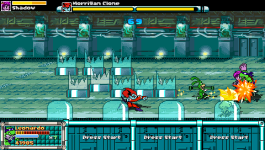
This is the game running on the engine:
pdc - 0056.png
 
Thanks I just checked, the problem was that for some reason CMT reverses the z position given to fglayer/frontpanel (so if you set -399, it will have 399). I don't understand why I did this, but there probably was a reason. I will make some checks before updating in a release.
 
reverses the z position given to fglayer/frontpanel (so if you set -399, it will have 399)
I can confirm this - If I set the z to 399, the water fglayers now diplays behind the panel:

1700060605034.png

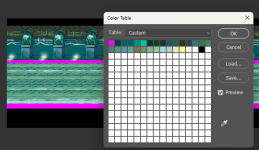
But this leads us to another issue: the panel image transparency isn't working - it is displaying the pink color.
With that, I can't see the upper fglayer anymore :(
 
I can confirm this - If I set the z to 399, the water fglayers now diplays behind the panel:

View attachment 5707

But this leads us to another issue: the panel image transparency isn't working - it is displaying the pink color.
With that, I can't see the upper fglayer anymore :(
This is the same problem that you had a few weeks ago, where the the transparency color is not indexed on the first color of the image palette. For this one file it's on the 13 index.

You can see that if you change the line to :

Code:
panel        data/levels/3-ddragon_rugal_lab/ddragon_3_rugal_lab.gif # transp=13;

It will read the transparency correctly.
 
BTW I know if you open the file with an image editor it will show that the transparent color is indeed at index 0, but it's probably encoded in a way that the code that open the palette in CMT can't recognize properly.

EDIT : yeah that's what I mean :)
 
BTW I know if you open the file with an image editor it will show that the transparent color is indeed at index 0, but it's probably encoded in a way that the code that open the palette in CMT can't recognize properly.
that would be a bad news, since we have no way to guess where the transparent color is, in fact :(

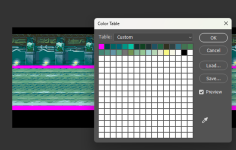
sorry for the double post, but I tried to convert the image from .gif to .png format just to check (as I remember CMT had some issues with .gif in the past.

The transparency is set right again:
1700061477716.png

Now when I check the stage on CMT (inverting the Z value), the transparency works:
1700062211480.png

So there is something weird going on with the .gif parser.
 
that would be a bad news, since we have no way to guess where the transparent color is, in fact :(

sorry for the double post, but I tried to convert the image from .gif to .png format just to check (as I remember CMT had some issues with .gif in the past.

The transparency is set right again:
View attachment 5709

Now when I check the stage on CMT (inverting the Z value), the transparency works:
View attachment 5710

So there is something weird going on with the .gif parser.
Yeah basically for some gif files when I try to get the palette it's empty so I read the image without the palette and then recreate a palette, but you can never be sure it's going to be the same order as the true palette. I will try a bit to see if I can fix this, but I won't spend too much time on it as I already tried several times in the past, and nothing worked.
 
Frame clicking wont move the gray selection on animation text editor to corresponding frame that was clicked in newest version , vice versa is possible - clicking on frame in animation text window will change the frame in animation preview

the + when offset is set works nice, also AABAA for panels work nice
 
Frame clicking wont move the gray selection on animation text editor to corresponding frame that was clicked in newest version
Yup I know which is why I just mentioned the cursor, it's a bit more complicated to also highlight the line so I'll do it later, and also let the user choose the color of the highlight.
 
Don't hate me, please :)

I was trying the "generate command list" and I had two errors:

1- The first time I tried to select a file, the tool game me this error:

Traceback (most recent call last):
File "gui\commandgen.py", line 29, in setPath
RuntimeError: wrapped C/C++ object of type CommandListGenerator has been deleted

2- I tried again, and now I was able to select a file. But once I've selected it, it gave me another error:

Traceback (most recent call last):
File "gui\commandgen.py", line 114, in processFile
ValueError: mode U cannot be combined with 'x', 'w', 'a', or '+'

I dunno if the tool is talking about the command inputs, but you CAN combine U + other inputs.
In case you wanna check the file, its the "alfred" character on the game I've sent you

anim freespecial
com A + A2 freespecial
com D D A freespecial
loop 0
Energycost 80 1 0
mponly 1
 
Back
Top Bottom