Chronocrash Modders Tools

ChronoCrash Modders Tools 0.7.9.11

No permission to download
I can confirm this update fixed the crash, thank you so much buddy.
I'm working on Stranger Things UpSideDown stage and monsters right now.
You are the best, happy new year to you, family, and everyone else.
Sorry to bother you again buddy, can you please check on this?
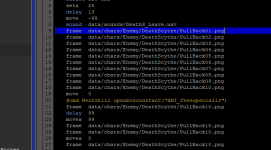
Clicking at the line of the animation frame to copy/cut/paste the whole line with Ctrl + C/X/V no longer works.
I have to highlight the whole line in order to copy or cut it.
Pasting between the lines of the frame no longer works either.
It was working in the previous revision.
I hope it makes sense.
Thank you

1767363098350.png
 
Sorry to bother you again buddy, can you please check on this?
Clicking at the line of the animation frame to copy/cut/paste the whole line with Ctrl + C/X/V no longer works.
I have to highlight the whole line in order to copy or cut it.
Pasting between the lines of the frame no longer works either.
It was working in the previous revision.
I hope it makes sense.
Thank you

View attachment 13097
Yeah makes sense as I updated the editor, must have missed some minor stuff like this. Will look into it
 
Thank you so much for the update. The copy and cut bug has been fixed, but the paste in between lines has not been fixed (it pastes at the end of the line instead).
Can you please take a look at it when you a chance? Thank you
I don't really remember this feature what did it do exactly and how did it worked ?
 
I don't really remember this feature what did it do exactly and how did it worked ?
It is the feature like Note++ that allows you to paste a string above or below the current selected line (or where the cursor is).
I requested this feature long time ago, and you were able to add it to your app.
 
It is the feature like Note++ that allows you to paste a string above or below the current selected line (or where the cursor is).
I requested this feature long time ago, and you were able to add it to your app.
I don't recall this and from your description alone I can't understand the difference with regular Ctrl + V. I tried to look how it works when you requested it in 2024 to see what it is exactly but the video you provided then is no longer available. I don't have Notepad++ either.
 
I don't recall this and from your description alone I can't understand the difference with regular Ctrl + V. I tried to look how it works when you requested it in 2024 to see what it is exactly but the video you provided then is no longer available. I don't have Notepad++ either.

0.7.8 Jun 25, 2025
still has this feature, but the last few updates removed this feature
 
Last edited:
Just downloaded this and I got this error message which I forgot to click.

Code:
Traceback (most recent call last):
  File "gui\main\everydayeditor.py", line 897, in loadNamedVersion
KeyError: 'Unknown'

When I tried to add a new animation under Text tabs (both Text and Text | Text) where the green highlight of "Standard" text is, I received this error.
Code:
Traceback (most recent call last):
  File "gui\json_editor\keyselector.py", line 252, in createAnim
AttributeError: 'EverydayEditor' object has no attribute 'addAnim'

Code:
Traceback (most recent call last):
  File "gui\json_editor\keyselector.py", line 256, in deleteAnim
AttributeError: 'KeySelector' object has no attribute 'currentAnimID'

Code:
Traceback (most recent call last):
  File "gui\main\everydayeditor.py", line 1347, in postLoadFile
  File "gui\main\everydayeditor.py", line 669, in loadContentIndexerPanel
AttributeError: 'NoneType' object has no attribute 'endswith'
 
Just downloaded this and I got this error message which I forgot to click.

Code:
Traceback (most recent call last):
  File "gui\main\everydayeditor.py", line 897, in loadNamedVersion
KeyError: 'Unknown'

When I tried to add a new animation under Text tabs (both Text and Text | Text) where the green highlight of "Standard" text is, I received this error.
Code:
Traceback (most recent call last):
  File "gui\json_editor\keyselector.py", line 252, in createAnim
AttributeError: 'EverydayEditor' object has no attribute 'addAnim'

Code:
Traceback (most recent call last):
  File "gui\json_editor\keyselector.py", line 256, in deleteAnim
AttributeError: 'KeySelector' object has no attribute 'currentAnimID'

Code:
Traceback (most recent call last):
  File "gui\main\everydayeditor.py", line 1347, in postLoadFile
  File "gui\main\everydayeditor.py", line 669, in loadContentIndexerPanel
AttributeError: 'NoneType' object has no attribute 'endswith'
The two middles ones those buttons should not be visible here (only in anim tab, not text tab). So it's expected they throw an error, they won't be visible in next update (as they were before).

The first and last errors, those are different, but not sure how you triggered them.
 
Another report: I get this error here after pressing Ctrl + S to save a particular character file. However, it works for other entities and levels.
Code:
Traceback (most recent call last):
  File "\\VBoxSvr\Partage\CMT\cmt.py", line 405, in saveFile
  File "gui\main\__init__.py", line 398, in save
  File "gui\main\fileselector.py", line 307, in save
KeyError: 'standard'

I tried adding a new animation by clicking on the green plus button, but somehow, I got an error for that. Now I have to add new animations only on the Text tab instead of animations.

I see there's an alternative for adding new models like model A and/or model B which you gave an explanation, but I'm unaccustomed to that system. LOL Guess I'll have to learn it?

EDIT: Because I cannot save in CMT, I have to use NotePad to do it. I tried closing and reopening CMT for this, but I cannot. Do you want me to send you the data which has a problem with saving one particular entity?

EDIT 2: Sorry. I was wrong. I saved it in CMT, and it works fine, but only the CMT window about the save system keeps popping up every time I do. I went to open that particular entity's txt file with NotePad and I found out that I actually saved it. There's no problem with that, so that's a relief.
 
Last edited:
Another report: I get this error here after pressing Ctrl + S to save a particular character file. However, it works for other entities and levels.
Code:
Traceback (most recent call last):
  File "\\VBoxSvr\Partage\CMT\cmt.py", line 405, in saveFile
  File "gui\main\__init__.py", line 398, in save
  File "gui\main\fileselector.py", line 307, in save
KeyError: 'standard'

I tried adding a new animation by clicking on the green plus button, but somehow, I got an error for that. Now I have to add new animations only on the Text tab instead of animations.

I see there's an alternative for adding new models like model A and/or model B which you gave an explanation, but I'm unaccustomed to that system. LOL Guess I'll have to learn it?

EDIT: Because I cannot save in CMT, I have to use NotePad to do it. I tried closing and reopening CMT for this, but I cannot. Do you want me to send you the data which has a problem with saving one particular entity?

EDIT 2: Sorry. I was wrong. I saved it in CMT, and it works fine, but only the CMT window about the save system keeps popping up every time I do. I went to open that particular entity's txt file with NotePad and I found out that I actually saved it. There's no problem with that, so that's a relief.
I'll update a version without the buttons that should be there, and then post a small how to video for the differents versions feature.
 
Hi there! I'm new on this community and figuring out how to add new Characters on the tool.

when I do rigthclic on the mouse I got this error
Traceback (most recent call last):

File "gui\main\fileselector.py", line 1935, in showContextMenu

AttributeError: 'NoneType' object has no attribute 'projectName'
 
Another report: I get this error here after pressing Ctrl + S to save a particular character file. However, it works for other entities and levels.
Code:
Traceback (most recent call last):
  File "\\VBoxSvr\Partage\CMT\cmt.py", line 405, in saveFile
  File "gui\main\__init__.py", line 398, in save
  File "gui\main\fileselector.py", line 307, in save
KeyError: 'standard'

I tried adding a new animation by clicking on the green plus button, but somehow, I got an error for that. Now I have to add new animations only on the Text tab instead of animations.

I see there's an alternative for adding new models like model A and/or model B which you gave an explanation, but I'm unaccustomed to that system. LOL Guess I'll have to learn it?

EDIT: Because I cannot save in CMT, I have to use NotePad to do it. I tried closing and reopening CMT for this, but I cannot. Do you want me to send you the data which has a problem with saving one particular entity?

EDIT 2: Sorry. I was wrong. I saved it in CMT, and it works fine, but only the CMT window about the save system keeps popping up every time I do. I went to open that particular entity's txt file with NotePad and I found out that I actually saved it. There's no problem with that, so that's a relief.

Here's a video showcasing how to use the "alternate version" feature

http://life-journal.org/data/tmp/cmt-alternate.mkv
 
Back
Top Bottom