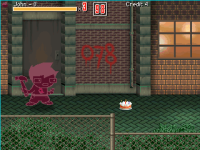
Sprites displaying incorrect colors.

Exegesis Vetusta

New member
Hello, it´s the first time I use Openbor for a game, I am currently making a project for the Sega Dreamcast, I´ve been following tutorials and adressing the RAM limitants such as using an Old Build, no scripts, a 4:3 240x320 video, and gif image using 128 colour palettes.
Got the game running on hardware just fine with a low memory usage, but there is a problem with the sprites in game.
This is how the image looks on GIMP
1682035642852.png

This is how it looks in Openborstats:
1682035738584.png

But THIS IS HOW IT LOOKS IN GAME!

1682035808471.png
I have tried different methods, and always looks like this, this is the best i could get since at least now displays 4 colours.
Does anyone know a solution to this? Would be saving my life.
PS: Also, sorry for making it a homestuck beat em up, just tought would be funny.
 
To create a global palette I recommend two apps, one is the StitchStudio and the other is the PalApply v2.

The first app allows you to create a sprite sheet that contains all the images you want (you don't need to put everything, just the images with different color variations), and then change it to indexed color mode in Gimp to create a 256 color palette for this sprite sheet.

In the second step will apply the global palette on all the game sprites using the PalApply v2. you can find both apps here in the resources section.
Note that the remap command works fine even using the global palette.


I started working on my own game, and I have questions about creating the global palette.
I understand that use StitchStudio to create a sheet then use Gimp to create a global palette for all the sprites with different colors.
My question I have is
If I add more characters with colors that are not existing in the current global palette, can the sprites till display properly in the game?
My concern is that shock, freeze, and burn sprites for pain and death animations will be screwed up for new characters later on.
I noticed this when I added more characters to the FF LNS game.
I just want to make sure to setup my own game properly from start, so that it would be less issues and headaches later on.

Please advise, thank you so much for your help.
 
@Exegesis Vetusta
i had a similar problem with some entites that where basically greyscale, read on to see what i had to do.....


and @Bruce, i am not sure why a global palette is needed, so far i have created some entities that dont even have a palette file assigned to them, but here is my weird experiences using Gimp...

I don't use the magenta as transparent color, i actually use images with alpha channel (actual trasparent PNGs)
of course in GIMP, you just make a layer with magenta and if you wish youcan export every frame with this enabled...

Gimp has this weird problem i have not figured out how to resolve yet,
i had some sprites that where supposed to be exported as 255/or 256 colors and they end up being PNGs that are only 8bit or 16 bit color images that either crash the engine or display incorrectly (again , the sprites in question are very limited in color or where basically greyscale images)


the only way i could fix this was to create a hidden layer and using the gradient tool to actually fill up the rest of the palette´s missing colors and then export, the images would then display correctly.

xome entities dont have to have a palette "master image", so each frame can have its own variety of colors, but you need to make absolutely sure that every PNG image exported from GIMP ends up as 255/256 colors ...
 
I started working on my own game, and I have questions about creating the global palette.
I understand that use StitchStudio to create a sheet then use Gimp to create a global palette for all the sprites with different colors.
My question I have is
If I add more characters with colors that are not existing in the current global palette, can the sprites till display properly in the game?
My concern is that shock, freeze, and burn sprites for pain and death animations will be screwed up for new characters later on.
I noticed this when I added more characters to the FF LNS game.
I just want to make sure to setup my own game properly from start, so that it would be less issues and headaches later on.

Please advise, thank you so much for your help.
If you use a global palette you will need to update it constantly to show the newly added colors, otherwise it can show wrong colors. But unless you are using 8 bits mode, you don't need a global palette once each character can have your own palette.

Usually the global palette is only used in low hardware device ports like Dreamcast or PSP in order to improve performance using the 8 bit mode.
 
If you use a global palette you will need to update it constantly to show the newly added colors, otherwise it can show wrong colors. But unless you are using 8 bits mode, you don't need a global palette once each character can have your own palette.

Usually the global palette is only used in low hardware device ports like Dreamcast or PSP in order to improve performance using the 8 bit mode.
To be honest, I would be careless about PSP and Dreamcast.

I understand that I can have 1 palette per character, enemy, object, fx entity
My problem is about the burn, shock, freeze death animations - 1 set of sprites for each for enemy entities.
Same for player enities.
Basically, there are 6 sets total for death or 3 sets total if possible.
how can I accomplish this without a global pallete?
I hope it makes sense, thank you.
 
@Bruce
in the module i work on, i had to add a couple of characters and i had this same problem,
i dont know how, but all characters share the same burn and shock animation frames, the only variation on them is the drawmethod....
all the original characters have their own palette file.

my two new characters do not.

one of the new characters had to have this same animations, but i never could figure out how to apply or make the same palette work, i even made a palette file that included all the color data from the shared shock burn and freze frames, but that did not work either. , so the only solution was to give this new character its own burn , freze and shock animation frames,
by editing the existing shared frames and transform them to 256 color pngs with alpha channel and include them in the new character´s folder.

these 2 new characters ended up with no palettte files (palette none)
 
@Bruce you can either place all the sprites you'll ever use for your character (burn, freeze, death) on 1 sprite sheet and make a palette out of that, kinda like a global palette per character or you can use a different palette per animation using drawmethod so in your freeze/burn animation data you can use an alternate palette during the animation.

If nobody else's posts the drawmethod I'll do it later when I arrive back home.

drawmethod remap {int}

use -1 if you want to use current map. Don’t use 0, because it means default palette. {int} points to which alternate palette to use


Name dude
Type player
Health 100
Mp 100
Shadow 1

Palette data/chars/dude/0.act
alternatepal data/chars/dude/1.act
alternatepal data/chars/dude/2.act #burn
alternatepal data/chars/dude/3.act #freeze


Anim idle
Loop 1
Offset 34 56
box 12 45 57 32
Delay 20
Frame data/chars/dude/idle1.png
Frame data/chars/dude/idle2.png


Anim burn
Loop 0
Offset 34 56
box 12 45 57 32
Delay 20
drawmethod remap 2
Frame data/chars/dude/b1.png
Frame data/chars/dude/b2.png


Anim shock #freeze
Loop 0
Offset 34 56
box 12 45 57 32
Delay 20
drawmethod remap 3
Frame data/chars/dude/f1.png
Frame data/chars/dude/f2.png


Using phone to type so sorry if typos
 
Last edited:
I don't use the magenta as transparent color, i actually use images with alpha channel (actual trasparent PNGs)
It's worth remembering that magenta has nothing to do with transparency - it's the position of the color in the color table. It could be any color in this position, we just generally use either magenta 255 0 255 or green 0 255 0 because they are colors that are rarely used in sprites (unless you are working with images from 8-bit systems, such as NES).

Some people prefer to work with paler colors, like 66 74 107, so they are softer on the eyes:
1700311318777.png

Regarding what you said about "alpha channel", I think you are confusing the formats. There is no alpha channel support in 8bit images (no matter the format), only transparency - meaning any pixel can only be fully transparent or fully opaque, so it's not possible to make partially transparent. Only 24bit PNG supports alpha channel (16bits of image + 8bits of alpha).

You can simulate alpha channel in 8bit images if you use Alpha Mask in OpenBOR.

------

@Bruce as @danno said, drawmethod remap will work for those cases - but it will affect the character icon if you set it to match the character palette.
 
Basically, there are 6 sets total for death or 3 sets total if possible.
how can I accomplish this without a global pallete?

One way I could suggest is to use other entity for the shocked, burnt, frozen etc animations while the character is invisible. This is great if you're using generic FX for those states.
Here's an example:
Code:
anim    burn
    delay    1
    landframe 3 dust
    offset    80 90
    frame    data/chars/misc/empty.gif
    delay    30
    @cmd    spawnBind "ReactFX" 0 0 1 1 4
    sound    data/chars/bard/sounds/Pain.wav
    frame    data/chars/misc/empty.gif
    delay    300
    frame    data/chars/misc/empty.gif
    delay    20
    frame    data/chars/bard/fall4.png
        
anim    shock
    delay    1
    landframe 3 dust
    offset    80 90
    frame    data/chars/misc/empty.gif
    delay    30
    @cmd    spawnBind "ReactFX" 0 0 1 1 4
    sound    data/chars/bard/sounds/Pain.wav
    frame    data/chars/misc/empty.gif
    delay    300
    frame    data/chars/misc/empty.gif
    delay    20
    frame    data/chars/bard/fall4.png

In this example, she plays blank sprite aka invisible when ReactFX is spawnbound to her. IOW players will see ReactFX instead of her when these animations are played. She reappears when she landed, just about the same time ReactFX removes itself.
This is ReactFX:
Code:
name        ReactFX
type        none
gfxshadow    1
subject_to_platform 1
subject_to_wall 1
subject_to_hole 1
no_adjust_base  0
palette        none


anim    bpain
@script
    if(frame == 9){
      void self = getlocalvar("self");
      killentity(self);
    }
@end_script
    loop    1
    delay    5
    offset    50 103
    frame    data/chars/misc/burn/fire01.gif
    frame    data/chars/misc/burn/fire02.gif
    frame    data/chars/misc/burn/fire03.gif
    frame    data/chars/misc/burn/fire04.gif #
    frame    data/chars/misc/burn/fire01.gif
    frame    data/chars/misc/burn/fire02.gif
    frame    data/chars/misc/burn/fire03.gif
    frame    data/chars/misc/burn/fire04.gif #
    frame    data/chars/misc/burn/fire01.gif
    frame    data/chars/misc/burn/fire02.gif
    frame    data/chars/misc/burn/fire03.gif
    frame    data/chars/misc/burn/fire04.gif #

anim    burn
@script
    if(frame > 2){
      void self = getlocalvar("self");
      int y = getentityproperty(self, "a");
      int b = getentityproperty(self, "base");

      if(y <= b+5){
        killentity(self);
      }
    }
@end_script
    loop    1 3 7
    delay    1
    offset    35 70
    frame    data/chars/misc/burn/burn1.gif
    delay    5
    frame    data/chars/misc/burn/burn1.gif
    frame    data/chars/misc/burn/burn2.gif
    frame    data/chars/misc/burn/burn3.gif
    frame    data/chars/misc/burn/burn2.gif #
    frame    data/chars/misc/burn/burn1.gif
    frame    data/chars/misc/burn/burn2.gif
    frame    data/chars/misc/burn/burn3.gif
    frame    data/chars/misc/burn/burn2.gif #

anim    fall5
@script
    if(frame > 2){
      void self = getlocalvar("self");
      int y = getentityproperty(self, "a");
      int b = getentityproperty(self, "base");

      if(y <= b+5){
        killentity(self);
      }
    }
@end_script
    loop    1 3 7
    delay    1
    offset    35 70
    frame    data/chars/misc/burn/burn1.gif
    delay    5
    frame    data/chars/misc/burn/burn1.gif
    frame    data/chars/misc/burn/burn2.gif
    frame    data/chars/misc/burn/burn3.gif
    frame    data/chars/misc/burn/burn2.gif #
    frame    data/chars/misc/burn/burn1.gif
    frame    data/chars/misc/burn/burn2.gif
    frame    data/chars/misc/burn/burn3.gif
    frame    data/chars/misc/burn/burn2.gif #

anim    spain
@script
    if(frame == 9){
      void self = getlocalvar("self");
      killentity(self);
    }
@end_script
    loop    1
    delay    5
    offset    50 115
    frame    data/chars/misc/shock/ele1.gif
    frame    data/chars/misc/shock/ele2.gif
    frame    data/chars/misc/shock/ele1.gif
    frame    data/chars/misc/shock/ele2.gif #
    frame    data/chars/misc/shock/ele1.gif
    frame    data/chars/misc/shock/ele2.gif
    frame    data/chars/misc/shock/ele1.gif
    frame    data/chars/misc/shock/ele2.gif #
    frame    data/chars/misc/shock/ele1.gif
    frame    data/chars/misc/shock/ele2.gif
    frame    data/chars/misc/shock/ele1.gif
    frame    data/chars/misc/shock/ele2.gif #

anim    shock
@script
    if(frame > 2){
      void self = getlocalvar("self");
      int y = getentityproperty(self, "a");
      int b = getentityproperty(self, "base");

      if(y <= b+5){
        killentity(self);
      }
    }
@end_script
    loop    1 3 6
    delay   1
    offset    220 166
    frame    data/chars/misc/shock/shom01.gif
    delay   4
    frame    data/chars/misc/shock/shom01.gif
    frame    data/chars/misc/shock/shom02.gif
    frame    data/chars/misc/shock/shom03.gif #
    frame    data/chars/misc/shock/shom01.gif
    frame    data/chars/misc/shock/shom02.gif
    frame    data/chars/misc/shock/shom03.gif #
    frame    data/chars/misc/shock/shom01.gif
    frame    data/chars/misc/shock/shom02.gif
    frame    data/chars/misc/shock/shom03.gif #

anim    fall6
@script
    if(frame > 2){
      void self = getlocalvar("self");
      int y = getentityproperty(self, "a");
      int b = getentityproperty(self, "base");

      if(y <= b+5){
        killentity(self);
      }
    }
@end_script
    loop    1 3 6
    delay   1
    offset    220 166
    frame    data/chars/misc/shock/shom01.gif
    delay   4
    frame    data/chars/misc/shock/shom01.gif
    frame    data/chars/misc/shock/shom02.gif
    frame    data/chars/misc/shock/shom03.gif #
    frame    data/chars/misc/shock/shom01.gif
    frame    data/chars/misc/shock/shom02.gif
    frame    data/chars/misc/shock/shom03.gif #
    frame    data/chars/misc/shock/shom01.gif
    frame    data/chars/misc/shock/shom02.gif
    frame    data/chars/misc/shock/shom03.gif #

Yes, ReactFX has more animations than just BURN and SHOCK cause it's also used for respective animations.
 
One way I could suggest is to use other entity for the shocked, burnt, frozen etc animations while the character is invisible. This is great if you're using generic FX for those states.
Here's an example:
Code:
anim    burn
    delay    1
    landframe 3 dust
    offset    80 90
    frame    data/chars/misc/empty.gif
    delay    30
    @cmd    spawnBind "ReactFX" 0 0 1 1 4
    sound    data/chars/bard/sounds/Pain.wav
    frame    data/chars/misc/empty.gif
    delay    300
    frame    data/chars/misc/empty.gif
    delay    20
    frame    data/chars/bard/fall4.png
       
anim    shock
    delay    1
    landframe 3 dust
    offset    80 90
    frame    data/chars/misc/empty.gif
    delay    30
    @cmd    spawnBind "ReactFX" 0 0 1 1 4
    sound    data/chars/bard/sounds/Pain.wav
    frame    data/chars/misc/empty.gif
    delay    300
    frame    data/chars/misc/empty.gif
    delay    20
    frame    data/chars/bard/fall4.png

In this example, she plays blank sprite aka invisible when ReactFX is spawnbound to her. IOW players will see ReactFX instead of her when these animations are played. She reappears when she landed, just about the same time ReactFX removes itself.
This is ReactFX:
Code:
name        ReactFX
type        none
gfxshadow    1
subject_to_platform 1
subject_to_wall 1
subject_to_hole 1
no_adjust_base  0
palette        none


anim    bpain
@script
    if(frame == 9){
      void self = getlocalvar("self");
      killentity(self);
    }
@end_script
    loop    1
    delay    5
    offset    50 103
    frame    data/chars/misc/burn/fire01.gif
    frame    data/chars/misc/burn/fire02.gif
    frame    data/chars/misc/burn/fire03.gif
    frame    data/chars/misc/burn/fire04.gif #
    frame    data/chars/misc/burn/fire01.gif
    frame    data/chars/misc/burn/fire02.gif
    frame    data/chars/misc/burn/fire03.gif
    frame    data/chars/misc/burn/fire04.gif #
    frame    data/chars/misc/burn/fire01.gif
    frame    data/chars/misc/burn/fire02.gif
    frame    data/chars/misc/burn/fire03.gif
    frame    data/chars/misc/burn/fire04.gif #

anim    burn
@script
    if(frame > 2){
      void self = getlocalvar("self");
      int y = getentityproperty(self, "a");
      int b = getentityproperty(self, "base");

      if(y <= b+5){
        killentity(self);
      }
    }
@end_script
    loop    1 3 7
    delay    1
    offset    35 70
    frame    data/chars/misc/burn/burn1.gif
    delay    5
    frame    data/chars/misc/burn/burn1.gif
    frame    data/chars/misc/burn/burn2.gif
    frame    data/chars/misc/burn/burn3.gif
    frame    data/chars/misc/burn/burn2.gif #
    frame    data/chars/misc/burn/burn1.gif
    frame    data/chars/misc/burn/burn2.gif
    frame    data/chars/misc/burn/burn3.gif
    frame    data/chars/misc/burn/burn2.gif #

anim    fall5
@script
    if(frame > 2){
      void self = getlocalvar("self");
      int y = getentityproperty(self, "a");
      int b = getentityproperty(self, "base");

      if(y <= b+5){
        killentity(self);
      }
    }
@end_script
    loop    1 3 7
    delay    1
    offset    35 70
    frame    data/chars/misc/burn/burn1.gif
    delay    5
    frame    data/chars/misc/burn/burn1.gif
    frame    data/chars/misc/burn/burn2.gif
    frame    data/chars/misc/burn/burn3.gif
    frame    data/chars/misc/burn/burn2.gif #
    frame    data/chars/misc/burn/burn1.gif
    frame    data/chars/misc/burn/burn2.gif
    frame    data/chars/misc/burn/burn3.gif
    frame    data/chars/misc/burn/burn2.gif #

anim    spain
@script
    if(frame == 9){
      void self = getlocalvar("self");
      killentity(self);
    }
@end_script
    loop    1
    delay    5
    offset    50 115
    frame    data/chars/misc/shock/ele1.gif
    frame    data/chars/misc/shock/ele2.gif
    frame    data/chars/misc/shock/ele1.gif
    frame    data/chars/misc/shock/ele2.gif #
    frame    data/chars/misc/shock/ele1.gif
    frame    data/chars/misc/shock/ele2.gif
    frame    data/chars/misc/shock/ele1.gif
    frame    data/chars/misc/shock/ele2.gif #
    frame    data/chars/misc/shock/ele1.gif
    frame    data/chars/misc/shock/ele2.gif
    frame    data/chars/misc/shock/ele1.gif
    frame    data/chars/misc/shock/ele2.gif #

anim    shock
@script
    if(frame > 2){
      void self = getlocalvar("self");
      int y = getentityproperty(self, "a");
      int b = getentityproperty(self, "base");

      if(y <= b+5){
        killentity(self);
      }
    }
@end_script
    loop    1 3 6
    delay   1
    offset    220 166
    frame    data/chars/misc/shock/shom01.gif
    delay   4
    frame    data/chars/misc/shock/shom01.gif
    frame    data/chars/misc/shock/shom02.gif
    frame    data/chars/misc/shock/shom03.gif #
    frame    data/chars/misc/shock/shom01.gif
    frame    data/chars/misc/shock/shom02.gif
    frame    data/chars/misc/shock/shom03.gif #
    frame    data/chars/misc/shock/shom01.gif
    frame    data/chars/misc/shock/shom02.gif
    frame    data/chars/misc/shock/shom03.gif #

anim    fall6
@script
    if(frame > 2){
      void self = getlocalvar("self");
      int y = getentityproperty(self, "a");
      int b = getentityproperty(self, "base");

      if(y <= b+5){
        killentity(self);
      }
    }
@end_script
    loop    1 3 6
    delay   1
    offset    220 166
    frame    data/chars/misc/shock/shom01.gif
    delay   4
    frame    data/chars/misc/shock/shom01.gif
    frame    data/chars/misc/shock/shom02.gif
    frame    data/chars/misc/shock/shom03.gif #
    frame    data/chars/misc/shock/shom01.gif
    frame    data/chars/misc/shock/shom02.gif
    frame    data/chars/misc/shock/shom03.gif #
    frame    data/chars/misc/shock/shom01.gif
    frame    data/chars/misc/shock/shom02.gif
    frame    data/chars/misc/shock/shom03.gif #

Yes, ReactFX has more animations than just BURN and SHOCK cause it's also used for respective animations.
Thank you very much for scripts, and I could use these scripts for something else.
I think I would go with the drawmethod remap method as it is easy to set it up and it is working fine.
The only problem is that someone mentioned it will affect the character icon, but I will find a way to get around it.
Maybe I will also have the icon remap to match the element FX.
 
One way I could suggest is to use other entity for the shocked, burnt, frozen etc animations while the character is invisible. This is great if you're using generic FX for those states.
Here's an example:
Code:
anim    burn
    delay    1
    landframe 3 dust
    offset    80 90
    frame    data/chars/misc/empty.gif
    delay    30
    @cmd    spawnBind "ReactFX" 0 0 1 1 4
    sound    data/chars/bard/sounds/Pain.wav
    frame    data/chars/misc/empty.gif
    delay    300
    frame    data/chars/misc/empty.gif
    delay    20
    frame    data/chars/bard/fall4.png
       
anim    shock
    delay    1
    landframe 3 dust
    offset    80 90
    frame    data/chars/misc/empty.gif
    delay    30
    @cmd    spawnBind "ReactFX" 0 0 1 1 4
    sound    data/chars/bard/sounds/Pain.wav
    frame    data/chars/misc/empty.gif
    delay    300
    frame    data/chars/misc/empty.gif
    delay    20
    frame    data/chars/bard/fall4.png

In this example, she plays blank sprite aka invisible when ReactFX is spawnbound to her. IOW players will see ReactFX instead of her when these animations are played. She reappears when she landed, just about the same time ReactFX removes itself.
This is ReactFX:
Code:
name        ReactFX
type        none
gfxshadow    1
subject_to_platform 1
subject_to_wall 1
subject_to_hole 1
no_adjust_base  0
palette        none


anim    bpain
@script
    if(frame == 9){
      void self = getlocalvar("self");
      killentity(self);
    }
@end_script
    loop    1
    delay    5
    offset    50 103
    frame    data/chars/misc/burn/fire01.gif
    frame    data/chars/misc/burn/fire02.gif
    frame    data/chars/misc/burn/fire03.gif
    frame    data/chars/misc/burn/fire04.gif #
    frame    data/chars/misc/burn/fire01.gif
    frame    data/chars/misc/burn/fire02.gif
    frame    data/chars/misc/burn/fire03.gif
    frame    data/chars/misc/burn/fire04.gif #
    frame    data/chars/misc/burn/fire01.gif
    frame    data/chars/misc/burn/fire02.gif
    frame    data/chars/misc/burn/fire03.gif
    frame    data/chars/misc/burn/fire04.gif #

anim    burn
@script
    if(frame > 2){
      void self = getlocalvar("self");
      int y = getentityproperty(self, "a");
      int b = getentityproperty(self, "base");

      if(y <= b+5){
        killentity(self);
      }
    }
@end_script
    loop    1 3 7
    delay    1
    offset    35 70
    frame    data/chars/misc/burn/burn1.gif
    delay    5
    frame    data/chars/misc/burn/burn1.gif
    frame    data/chars/misc/burn/burn2.gif
    frame    data/chars/misc/burn/burn3.gif
    frame    data/chars/misc/burn/burn2.gif #
    frame    data/chars/misc/burn/burn1.gif
    frame    data/chars/misc/burn/burn2.gif
    frame    data/chars/misc/burn/burn3.gif
    frame    data/chars/misc/burn/burn2.gif #

anim    fall5
@script
    if(frame > 2){
      void self = getlocalvar("self");
      int y = getentityproperty(self, "a");
      int b = getentityproperty(self, "base");

      if(y <= b+5){
        killentity(self);
      }
    }
@end_script
    loop    1 3 7
    delay    1
    offset    35 70
    frame    data/chars/misc/burn/burn1.gif
    delay    5
    frame    data/chars/misc/burn/burn1.gif
    frame    data/chars/misc/burn/burn2.gif
    frame    data/chars/misc/burn/burn3.gif
    frame    data/chars/misc/burn/burn2.gif #
    frame    data/chars/misc/burn/burn1.gif
    frame    data/chars/misc/burn/burn2.gif
    frame    data/chars/misc/burn/burn3.gif
    frame    data/chars/misc/burn/burn2.gif #

anim    spain
@script
    if(frame == 9){
      void self = getlocalvar("self");
      killentity(self);
    }
@end_script
    loop    1
    delay    5
    offset    50 115
    frame    data/chars/misc/shock/ele1.gif
    frame    data/chars/misc/shock/ele2.gif
    frame    data/chars/misc/shock/ele1.gif
    frame    data/chars/misc/shock/ele2.gif #
    frame    data/chars/misc/shock/ele1.gif
    frame    data/chars/misc/shock/ele2.gif
    frame    data/chars/misc/shock/ele1.gif
    frame    data/chars/misc/shock/ele2.gif #
    frame    data/chars/misc/shock/ele1.gif
    frame    data/chars/misc/shock/ele2.gif
    frame    data/chars/misc/shock/ele1.gif
    frame    data/chars/misc/shock/ele2.gif #

anim    shock
@script
    if(frame > 2){
      void self = getlocalvar("self");
      int y = getentityproperty(self, "a");
      int b = getentityproperty(self, "base");

      if(y <= b+5){
        killentity(self);
      }
    }
@end_script
    loop    1 3 6
    delay   1
    offset    220 166
    frame    data/chars/misc/shock/shom01.gif
    delay   4
    frame    data/chars/misc/shock/shom01.gif
    frame    data/chars/misc/shock/shom02.gif
    frame    data/chars/misc/shock/shom03.gif #
    frame    data/chars/misc/shock/shom01.gif
    frame    data/chars/misc/shock/shom02.gif
    frame    data/chars/misc/shock/shom03.gif #
    frame    data/chars/misc/shock/shom01.gif
    frame    data/chars/misc/shock/shom02.gif
    frame    data/chars/misc/shock/shom03.gif #

anim    fall6
@script
    if(frame > 2){
      void self = getlocalvar("self");
      int y = getentityproperty(self, "a");
      int b = getentityproperty(self, "base");

      if(y <= b+5){
        killentity(self);
      }
    }
@end_script
    loop    1 3 6
    delay   1
    offset    220 166
    frame    data/chars/misc/shock/shom01.gif
    delay   4
    frame    data/chars/misc/shock/shom01.gif
    frame    data/chars/misc/shock/shom02.gif
    frame    data/chars/misc/shock/shom03.gif #
    frame    data/chars/misc/shock/shom01.gif
    frame    data/chars/misc/shock/shom02.gif
    frame    data/chars/misc/shock/shom03.gif #
    frame    data/chars/misc/shock/shom01.gif
    frame    data/chars/misc/shock/shom02.gif
    frame    data/chars/misc/shock/shom03.gif #

Yes, ReactFX has more animations than just BURN and SHOCK cause it's also used for respective animations.
is there anyway for the summoning entity to resize or re-scale the reactfx entity as if using drawmethod??
if i am not mistaken it would require addtitional code to the spawnbind command...

using or recycling the same entity with no palette limits for effects would be very good, but how would you scale those effects? (besides the obvious of just making multiple reactfx text files with all the size variations via drawmethod in them - thus succesfully recycling/reusing the same image files)
 
is there anyway for the summoning entity to resize or re-scale the reactfx entity as if using drawmethod??
if i am not mistaken it would require addtitional code to the spawnbind command...

Yep, you should create special function to add scaling effect while also spawnbinding.
 
Back
Top Bottom