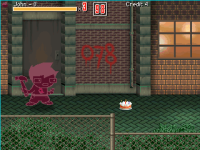
Sprites displaying incorrect colors.

Exegesis Vetusta

New member
Hello, it´s the first time I use Openbor for a game, I am currently making a project for the Sega Dreamcast, I´ve been following tutorials and adressing the RAM limitants such as using an Old Build, no scripts, a 4:3 240x320 video, and gif image using 128 colour palettes.
Got the game running on hardware just fine with a low memory usage, but there is a problem with the sprites in game.
This is how the image looks on GIMP
1682035642852.png

This is how it looks in Openborstats:
1682035738584.png

But THIS IS HOW IT LOOKS IN GAME!

1682035808471.png
I have tried different methods, and always looks like this, this is the best i could get since at least now displays 4 colours.
Does anyone know a solution to this? Would be saving my life.
PS: Also, sorry for making it a homestuck beat em up, just tought would be funny.
 
Welcome to the community @Exegesis Vetusta.

First, you should probably know we don't officially support the Dreamcast any more. We'll be glad to help you along, but don't expect any fixes or developments for the DC port.

I would also tell you to throw away OpenBOR Stats because it's been abandoned over 10 years now and never had a stable version. The editor you need is ChronoCrash Modders Tools. Problem is, it uses the more up to date collision commands not available on DC port. You're really just putting yourself in a tight spot.

So far as the colors go, I'd need to know if you are using Palette, or the archaic Remap command. Either way, most likely, you haven't matched all of your character's sprites to a uniform palette. That's the issue 99.99% of the time we see these questions. I'd recommend you view some of the tutorials posted here, this subject is covered in exquisite detail more ways than I can count.

Here's just one of many:

 
Thank you so much!
Problem is, it uses the more up to date collision commands not available on DC port. You're really just putting yourself in a tight spot.
About the colision commands, I do know how to change those from newer format to the ones DC can read, since I edited a character previously with CMT and crashed the game.

This is the .txt im using for the character, I used Kula as base, could that mean something?

1682052104589.png
 
palette none

That doesn't do what you seem to think it does. All sprites have palettes, full stop. That's not an OpenBOR thing, it's just the way any lossless compression image works.

Palette none causes each sprite to load with its very own palette instead of the model’s master palettes. It's only for special use cases. Otherwise all you get is a mess.

DC
 
Hello, it´s the first time I use Openbor for a game, I am currently making a project for the Sega Dreamcast, I´ve been following tutorials and adressing the RAM limitants such as using an Old Build, no scripts, a 4:3 240x320 video, and gif image using 128 colour palettes.
Got the game running on hardware just fine with a low memory usage, but there is a problem with the sprites in game.
This is how the image looks on GIMP
View attachment 3632

This is how it looks in Openborstats:
View attachment 3633

But THIS IS HOW IT LOOKS IN GAME!

View attachment 3634
I have tried different methods, and always looks like this, this is the best i could get since at least now displays 4 colours.
Does anyone know a solution to this? Would be saving my life.
PS: Also, sorry for making it a homestuck beat em up, just tought would be funny.
@Exegesis Vetusta

Are you using colourdepth 8bit in the video.txt file? First, it's strongly required for DC port otherwise both 16/32 bits will hugely decrease the performance.
Considering that you are using the 8bit, this mode uses a global palette for the entire game, individual palettes will not work properly.
I suggest to use .png image files, which will save some memory, and I strongly recommend to use .bor format for music to save cpu power, reducing lags.
 
Now, tried to export a colour table with photoshop.
This one
1682111038176.png

and indicated it right there

1682111264559.png
and still the same happens.1682111358978.pngBTW, i watched the Digital brilliance hour tutorials and it was very helpful with everything, so far this is the only issue i´ve had.
 
@Exegesis Vetusta

Are you using colourdepth 8bit in the video.txt file? First, it's strongly required for DC port otherwise both 16/32 bits will hugely decrease the performance.
Considering that you are using the 8bit, this mode uses a global palette for the entire game, individual palettes will not work properly.
I suggest to use .png image files, which will save some memory, and I strongly recommend to use .bor format for music to save cpu power, reducing lags.
OOOH, a global palette?
And where can I find or indicate to use that palette?
Also, Yes, i am using a 8bit colourdepth on video.txt
 
OOOH, a global palette?
And where can I find or indicate to use that palette?
Also, Yes, i am using a 8bit colourdepth on video.txt
To create a global palette I recommend two apps, one is the StitchStudio and the other is the PalApply v2.

The first app allows you to create a sprite sheet that contains all the images you want (you don't need to put everything, just the images with different color variations), and then change it to indexed color mode in Gimp to create a 256 color palette for this sprite sheet.

In the second step will apply the global palette on all the game sprites using the PalApply v2. you can find both apps here in the resources section.
Note that the remap command works fine even using the global palette.


I know nothing about Dreamcast porting at all, but I understand there needs some old/archaic methods for its DC performance.

What about remap? Hasn't it existed until one certain build released with no remaps? I wonder what build of OpenBOR (v2?) released with palette and alternatepal.

remap {path1} {path2}

  • Allows you to create alternate palletes for entities.
  • Each entity can have up to 14 palletes.
  • {path1} is a sprite of an entity in their normal pallete. {path2} is a sprite of the entity in an alternate pallete.
  • You should not change the file's pallete. The only changes should be to the pixels in the image, not the pallete data.
  • Player 2 normally uses the first alternate pallete, but both players can select their color when choosing a character with up and down if the colourselect option is on.
  • If your entity has sprites with incorrect colors in alternate palletes, the entity may use colors which are not in {path1}. Check the frames with incorrect colors and compare them. Then just add the colors somewhere in {path1} and the new colors in the same position in {path2}. If that sounds confusing, look at K9999's remaps. That's what I mean.
  • In truecolormode (see video.txt above), this command works same way.

(Global palette is what concerns me most about this.)
 
To create a global palette I recommend two apps, one is the StitchStudio and the other is the PalApply v2.

The first app allows you to create a sprite sheet that contains all the images you want (you don't need to put everything, just the images with different color variations), and then change it to indexed color mode in Gimp to create a 256 color palette for this sprite sheet.

In the second step will apply the global palette on all the game sprites using the PalApply v2. you can find both apps here in the resources section.
Note that the remap command works fine even using the global palette.


@Kratus,

Unless I'm mistaken, I'd already removed the 8bit option before discontinuing DC port. I can’t recall for sure but it's worth checking.

If so, there's no benefit to subjecting one's self to the utter nightmare of a single master palette and Remap command.

@maxman, I restored Remap support immediately after removing it. That said, under the hood it's just converting everything to individual palettes anyway, so may as well use Palette unless you're on a super old version that doesn't support it.

Also, in case I hadn't removed the older methods before the last Dreamcast build, the DC can run just fine without a master palette. Just use 16bit colordepth. Not as good as 32bit, but still gives you 65,000 on screen colors and it's functionally the same as 32bit.

DC
 
Last edited:
@DCurrent

Unless I'm mistaken, I'd already removed the 8bit option before discontinuing DC port. I can’t recall for sure but it's worth checking.
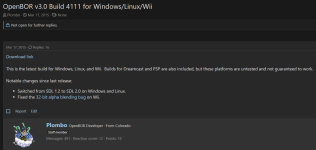
Hmm according to the last ports I made, the 8 bits mode is working fine. Currently I'm using the build 4111 to test on Windows before creating the .cdi Dreamcast media because this was the last build that officially supports the DC console.

1682115887147.png

1682116011975.png

If so, there's no benefit to subjecting one's self to the utter nightmare of a single master palette and Remap command.
Yeah 😁, I agree that the global palette in 8 bits mode is is a pain compared to individual palettes on 16/32 bit modes. The hardest part is creating/applying the palettes, once it's done the remap command is working fine like on other builds.


What about remap? Hasn't it existed until one certain build released with no remaps? I wonder what build of OpenBOR (v2?) released with palette and alternatepal.
@maxman I don't know too much about older builds but at least in the 4111 it works fine.


Sorry for annoying again.
But i changed it to 16 bit colourdepth and incredibly, worked.
@Exegesis Vetusta

16 bits works even in the DC port too, but unfortunately decreases the performance and uses more memory than the 8 bit.
Small games can work but if you plan to make more content, 8 bits is the best way.
 
Small games can work but if you plan to make more content, 8 bits is the best way.

That's not quite correct. It's true that more palettes do use more memory, but performance wise it won't slow the DC down. In fact that's the reason 16bit mode existed. DC handles 16bit color natively.

The idea back when we had all three modes was this:
  • 8bit - Minimal memory use and legacy compatibility.
  • 16bit - Native color depth of the DC.
  • 32bit - Maximum color depth. Also native for PCs.
Of course once we dropped DC support there wasn't any point in supporting all these modes, so I dropped 8bit and 16bit.

DC
 
That's not quite correct. It's true that more palettes do use more memory, but performance wise it won't slow the DC down. In fact that's the reason 16bit mode existed. DC handles 16bit color natively.

The idea back when we had all three modes was this:
  • 8bit - Minimal memory use and legacy compatibility.
  • 16bit - Native color depth of the DC.
  • 32bit - Maximum color depth. Also native for PCs.
Of course once we dropped DC support there wasn't any point in supporting all these modes, so I dropped 8bit and 16bit.

DC
@DCurrent

Yeah, maybe there's no difference for small games like BOR mod, but for bigger games it can have some impact. Look how the fps decreases when I change the same game to 16 bits.
 
@DCurrent

Yeah, maybe there's no difference for small games like BOR mod, but for bigger games it can have some impact. Look how the fps decreases when I change the same game to 16 bits.
I'll take your word then, I'm just going off what SX said. I don't have a DC to benchmark with and no interest in getting one. I always found it funny people obessing over Dreamcast so much they call themselves "DC<whatever>" when my real initials are DC and I couldn't care less about it. :P

DC
 
I always found it funny people obessing over Dreamcast so much they call themselves "DC<whatever>" when my real initials are DC and I couldn't care less about it. :p
😅 😅
To be honest I'm not a Dreamcast fan either, but surprisingly there's a lot of people that like this console, mainly in Europe. I was curious to see a BOR game working on a real console and after receiving some requests on my patreon I saw an opportunity to see the result.

I'll take your word then, I'm just going off what SX said
Indeed I think the same as you and SX, it makes more sense, but for some unknown reason the 16/32 bits decreases the performance on this port.
 
but for some unknown reason the 16/32 bits decreases the performance on this port.

It makes sense 32bit bit mode would have slowdown. 16 bit should run full speed though. If we still supported the DC that would be something to look into, but again, I have zero interest in it.

To be honest I'm not a Dreamcast fan either, but surprisingly there's a lot of people that like this console, mainly in Europe.

It's not that it was a bad console, and I'm a huge Sega fan. I just got soured on the weird obsession over it that used to plague the community. @danno can back me up on this: Any time someone would try to get ambitious and step outside the clone module gig, posts would flood their thread within minutes: "DC Version please". "Make a light version for DC". "No play on DC? You suck!"

If the creator didn't acquiesce and make a cut down version, others would do it anyway and ruin the game. It still goes on to some extent now. That sort of behavior really soured me on the DC community, and fair or not, on ports as a whole. It was also a huge albatross on engine development.

Anyway, before I go and hijack the thread too much, I still think for a beginner's project it's best to use 16bit mode and learn the ropes. There should be plenty of resource surplus for a reasonable project, and this one doesn't look particularly ambitious (don't take that as an insult @Exegesis Vetusta, it's better to start small and work your way in). There's no way I'd recommend 8bit for a newcomer.


DC
 
Anyway, before I go and hijack the thread too much, I still think for a beginner's project it's best to use 16bit mode and learn the ropes. There should be plenty of resource surplus for a reasonable project, and this one doesn't look particularly ambitious (don't take that as an insult @Exegesis Vetusta, it's better to start small and work your way in). There's no way I'd recommend 8bit for a newcomer.

I wanted to try making a game for a console that I owned, that´s why chose the dreamcast, also, is really easy and cheap to get one in Japan :p
I kinda understand the dreamcast hype since it was innovative for it´s time, but people take it as peak console gaming, i guess.

I will work around 16 bit mode meanwhile, and later when i get more experience try to make a proper dreamcast port that uses 8bit.

Thank you very much for the advice, andtbh I didn´t know BOR community overhyped such an old ass console that much
 
Back
Top Bottom