SPRITE SHEET SIZING/MEASUREMENTS

jet

New member
Tell me some easy ways to get perfect slices for sprites.Is there a way to measure a square and then tell the programme to cut them all perfectly?
ChatGPT5 makes mistakes every time.
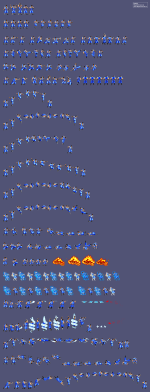
Or if some 1 can do it for me,here it is, Hanzo World Heroes Sprite Sheet.
 

Attachments

  • WH_Hanzo (2).png
    WH_Hanzo (2).png
    411.5 KB · Views: 21
When it comes to spritesheet like this, I usually copy each sprite manually and pasted it to a layer in Photoshop. By doing this, not only I get the sprites, I can align them properly in Photoshop for further use.
I could do this for you but you need to tell me which sprites you want to be used from the sheet. I prefer to give them to you in psd format (all sprites in one file) but I could do it in png format (one file for one sprite).
 
Hello,I need all the sprites and if you can,get me them in psd format and png format,if you cant do both,just png format.Also,can you make a step by step text document in notepad that can tell me ALL the steps for slicing a spritesheet manually.
That would help alot,thanks.
 
You will need to do it yourself, manually.
There is a handy tool for cutting all the sprites automatically here Alferd Spritesheet Unpacker - ASU by ForkandBeard
But it will just cut the images, not align them.

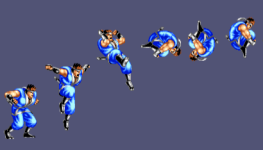
As Bloodbane said, you will need to align then at photoshop, taking care of the wrong alignments of the original image, like this:
1755605832079.png
You should never align a jump sprite like that, as the body should stay in place while jumping

The only way to cut then already align is if the original sheel is aligned, then you can use Stitch Studio (under UnStitch)
 
Hello,I need all the sprites and if you can,get me them in psd format and png format,if you cant do both,just png format.Also,can you make a step by step text document in notepad that can tell me ALL the steps for slicing a spritesheet manually.
That would help alot,thanks.

Alright, I've done the psd, I'll make the pngs and send them to you tomorrow.
 
When it comes to spritesheet like this, I usually copy each sprite manually and pasted it to a layer in Photoshop. By doing this, not only I get the sprites, I can align them properly in Photoshop for further use.
I could do this for you but you need to tell me which sprites you want to be used from the sheet. I prefer to give them to you in psd format (all sprites in one file) but I could do it in png format (one file for one sprite).
A video tutorial for this would be most helpful 🙏
 
Back
Top Bottom