Optimizing Night Slashers X for the Rpi Zero

GoogleBot

New member
Hey guys,

First off: this forum rocks. I've been reading and trying stuff for a couple of days now.

With that out of the way; I love the original Night Slashers Arcade game. It's a pain to get it to run smoothly especially on low-powered devices tho. I was ecstatic when I found out about Night Slashers X, since it will scratches that itch perfectly and runs a lot better on most devices.

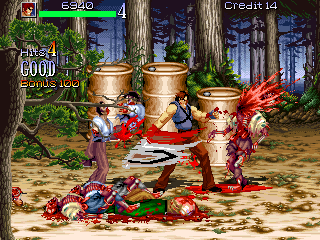
However on the Raspberry Pi Zero it stutters to a crawl when there are a lot of bodies on the ground an more enemies pop up. Also the red screen flash looks odd.
I've looked into modding it myself but I'm simply too much of a noob to fix those issues.

Can anyone help out with that? My idea would be to de-spawn dead enemies after 15 seconds and disable the red flashing entirely.


Thanks for all the great tutorials and downloads.
 
Hello and welocme to the forums.  To remove dead bodies you need to unpack the mod and set enemies noblink to 0 or 1 then repack it up and enjoy.

Code:
nodieblink {int}

~Sets how entity's death animation is played.
0 = entity starts blinking as soon as entity die in respective FALL animation.
1 = entity won't blink until after the last frame of entity's FALL or DEATH animation when killed.
2 = entity won't blink at all during death, and entity will disappear after the last frame of their death animation.
3 = entity will play it's death animation without blinking, and will not disappear until scrolled offscreen. The enemy won't count towards 'group's after dying, even though they don't disappear. This setting ONLY works for enemies.
 
Thanks for your help. Unfortunately I couldn't get the repacked version to run. It has also doubled in size compared to the original pak. Not sure what's going on. Doesn't help that my pc is acting weird..

msmalik681 said:
Hello and welocme to the forums.  To remove dead bodies you need to unpack the mod and set enemies noblink to 0 or 1 then repack it up and enjoy.

Code:
nodieblink {int}

~Sets how entity's death animation is played.
0 = entity starts blinking as soon as entity die in respective FALL animation.
1 = entity won't blink until after the last frame of entity's FALL or DEATH animation when killed.
2 = entity won't blink at all during death, and entity will disappear after the last frame of their death animation.
3 = entity will play it's death animation without blinking, and will not disappear until scrolled offscreen. The enemy won't count towards 'group's after dying, even though they don't disappear. This setting ONLY works for enemies.
 
Here is a lighter version of Night Slashers X: Download GoogleBot I have also set enemies to be removed once they die so you hopefully will not get anymore slowdown.

Here is what I did to cut it down sorry but this video is longer then it should be.

 
Lol l never used openbor stats just notepad and paintshop pro.  And as you can see that video was  un-scripted it was a very last minute thing i normally use tools i have pre-downloaded.
 
Malik, if i understand correctly this re-pack eliminates the fact that dead bodies remain?
because i want the bodies to stay around for my widescreen edits...
i have seen the video so far at it does seem to have lots of changes (a bit overwhelming)
 
I’ve also seen a version with a secret fourth playable character added, but I don’t think I have it.

giphy.gif


Apparently there were also some extra levels in that version:

6_night_slashers_x.jpg

4_night_slashers_x.jpg
 
oldyz the main reason for this version was so it would work on low end systems without slowdown. If you want to use my optimized version but keep the enemies on screen just delete the char folder and replace it with the one from the original game.

I am sure this mod can be streched to fit widescreen in the video options.
 
OK msmalik681, once i finish i will test & will let you know how it works.

@ Miru, i also managed to test some levels with 3 players, so the addition of this 4th one is certainly welcome , if you can find it.

I.... was going to experiment with a certain Boomstick character as a bonus (and only available for player 4)
 
oldyz said:
OK msmalik681, once i finish i will test & will let you know how it works.

@ Miru, i also managed to test some levels with 3 players, so the addition of this 4th one is certainly welcome , if you can find it.

I.... was going to experiment with a certain Boomstick character as a bonus (and only available for player 4)

Not sure how you’d be able to make his Sprite set fit, unless you’d make a new one. Also, I think it’s time for Hong Hua to make her comeback...
 
nsw25 said:
I made a evil dead fan game and then also was going to make a sequel using nightslashers mod so I have a ash you can use as a base to get started etc (but sometimes its best to start from scratch)

Thanks, i hope i can make it work, (sigh , i wanted to finish this before October 31st, but other things get in the way)
 
Miru said:
Not sure how you’d be able to make his Sprite set fit, unless you’d make a new one. Also, I think it’s time for Hong Hua to make her comeback...

I think So too, i wonder if it would be best to set her as the original color scheme of sorts (press down or up & She changes into Jasmine)
 
oldyz said:
Miru said:
Not sure how you’d be able to make his Sprite set fit, unless you’d make a new one. Also, I think it’s time for Hong Hua to make her comeback...

I think So too, i wonder if it would be best to set her as the original color scheme of sorts (press down or up & She changes into Jasmine)

Or we could make her moveset compliment Jasmine’s, with ice attacks instead of fire, for example, and more emphasis on swordplay than energy blasts.
 
nsw25 said:
Ash works trust me, you can change the width and height to sprites to make them suit the other players aesthetics.


https://www.youtube.com/watch?v=S7YJxHMffiY&feature=youtu.be

Well... his shading is off. It looks flatter than the rest of the cast. I think he’s in need of a few more colors to his skin and clothes, too, in order to get that retro look down pat.

EDIT: I also took a peek, and found out that a lot of things that should be labeled with "know" are given "load" instead. Calling lesser entities with "know" allows for less taxing of memory.
 
Miru said:
I also took a peek, and found out that a lot of things that should be labeled with "know" are given "load" instead

I believe that is deliberate to reduce loading time during level transition.
Setting load or know, is a choice between faster loading time vs less memory usage

nsw25 said:
another issue I couldn't figure out was
Code:
Assertion `name' failed in function 'makelowercp' at source/gamelib/models.c:20.
This is an OpenBOR bug.  Please report this at www.chronocrash.com.

IIRC that error message appear when a weaponmodel is missing or not loaded when it's needed
 
Back
Top Bottom