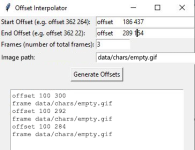
Save as bat
Code:
0<0# : ^
'''
@echo off
set script=%~f0
python -x "%script%" %*
exit /b 0/b 0
'''

import tkinter as tk
from tkinter import messagebox

def parse_offset(text):
    try:
        parts = text.strip().replace("offset", "").split()
        return int(parts[0]), int(parts[1])
    except:
        raise ValueError("Invalid offset format. Use: offset X Y")

def interpolate_offsets():
    try:
        start = parse_offset(start_entry.get())
        end = parse_offset(end_entry.get())
        frames = int(frames_entry.get())

        if frames < 2:
            raise ValueError("Frames must be at least 2 (start and end).")

        steps = frames - 1
        dx = (end[0] - start[0]) / steps
        dy = (end[1] - start[1]) / steps

        results = []
        for i in range(frames):
            x = round(start[0] + dx * i)
            y = round(start[1] + dy * i)
            results.append(f"offset {x} {y}")

        output_box.delete("1.0", tk.END)
        output_box.insert(tk.END, "\n".join(results))

    except Exception as e:
        messagebox.showerror("Error", str(e))

# GUI Setup
root = tk.Tk()
root.title("Offset Interpolator")

tk.Label(root, text="Start Offset (e.g. offset 362 264):").grid(row=0, column=0, sticky="w")
start_entry = tk.Entry(root, width=30)
start_entry.grid(row=0, column=1)

tk.Label(root, text="End Offset (e.g. offset 362 22):").grid(row=1, column=0, sticky="w")
end_entry = tk.Entry(root, width=30)
end_entry.grid(row=1, column=1)

tk.Label(root, text="Frames (number of total frames):").grid(row=2, column=0, sticky="w")
frames_entry = tk.Entry(root, width=10)
frames_entry.grid(row=2, column=1, sticky="w")

generate_button = tk.Button(root, text="Generate Offsets", command=interpolate_offsets)
generate_button.grid(row=3, column=0, columnspan=2, pady=10)

output_box = tk.Text(root, height=10, width=40)
output_box.grid(row=4, column=0, columnspan=2, padx=10, pady=5)

root.mainloop()