NPC walking backwards (how to solve it?)

Majestic Menace

New member
Hello everyone
I create NPC characters files (to use obviously as an NPC ally, duh)
Everything is working correctly, except one thing that bothers me:

The NPC walks backwards sometimes. I wanted to change that, make it so that if he walks to the right, he walks FACING right. If he walks left, walk facing left. As it is, the NPC sometimes walks to the right, but with his back turned (facing the other side)
I don't know if this also happens with the game's enemies.

If necessary, I can record a video to show (but I don't think it's necessary)


Putting it in Portuguese also because in English it might have been a little confusing:

O NPC fica caminhando de costas as vezes. Eu queria mudar isso, fazer com que se ele andar pra direita, caminhe de FRENTE pra direita. Se caminhar pra esquerda, caminhe de frente pra esquerda. Da maneira que está, o NPC caminha as vezes pra direita, mas de costas (virado para o outro lado) e vice-versa
Eu não sei se isso ocorre também com os inimigos do jogo. Deve haver uma maneira simples de resolver isso.
 
I don't know if this also happens with the game's enemies.

It does. By default, CPU controlled entities always face their current opponent when walking. Players can optionally do this too.

While moving backward, if an entity doesn't have a backwalk animation, they just play their default walk animation in reverse order. As @O Ilusionista mentioned, all you need to do is give them a backwalk animation. You can flip the sprites so it looks like they turn around and walk the other way.

DC
 
Thank you guys

I add "backwalk" anim but i'm getting crash (on loading openbor)
Yes, I already add backwalks sprites (inside the character paste)

here is the code

Code:
anim    backwalk
    loop    1
    delay    12
    offset    38 100
    bbox    23 21 27 79
    frame    data/chars/Cyclops/bw1.gif
    offset    38 101
    frame    data/chars/Cyclops/bw2.gif
    offset    38 100
    frame    data/chars/Cyclops/bw3.gif
    offset    38 101
    frame    data/chars/Cyclops/bw4.gif
    offset    38 100
    frame    data/chars/Cyclops/bw1.gif
    offset    38 99
    frame    data/chars/Cyclops/bw5.gif

weird... I don't see anything wrong 😕

the anim name is "backwalk" right?

here is the walk original animation to compare:

Code:
anim    walk
    loop    1
    delay    12
    offset    38 100
    bbox    23 21 27 79
    frame    data/chars/Cyclops/w1.gif
    offset    38 101
    frame    data/chars/Cyclops/w2.gif
    offset    38 100
    frame    data/chars/Cyclops/w3.gif
    offset    38 101
    frame    data/chars/Cyclops/w4.gif
    offset    38 100
    frame    data/chars/Cyclops/w1.gif
    offset    38 99
    frame    data/chars/Cyclops/w5.gif
 
Please post the log. That should tell us the issue.

DC

It's says "Invalid animation name"

Here is the part:

Code:
Loaded 'Cyclops' from data/chars/Cyclops/Cyclops_.txt 

********** An Error Occurred **********
*            Shutting Down            *

Fatal Error in load_cached_model, file: data/chars/Cyclops/Cyclops_.txt, line 1234, message: Invalid animation name!

It says "line 1234" but i'm pretty sure is backwalk animation (because when I remove it, it loads)

Maybe the openbor i'm trying to add backwalk is too old? backwalk anim was add on the last openbor versions? I don't know...
 
"OpenBOR v3.0 Build , Compile Date: May 12 2023"
You are using an experimental build, which I use too. But I am not having any issue with the animation name. Weird .

It's Zvictor Marvel Infinity Game
Don't worry, I won't share anything. I'm just doing a few changes to myself (in case, i'm adding some NPC's to play with)
maybe zvictor removed that animation from his game database? I don't know... I have no idea. I don't even know if it's possible to do such a thing (and if he did it, why? For what reason?)

Well, I tried to do the same thing with other game
This game here:


And it worked
I add the same animation (backwalk) and it worked...
It must be something related to Marvel Infinity
 
maybe zvictor removed that animation from his game database? I don't know

It doesn't work like that. You can't just remove parts of the engine.

Most likely you caused a conflict of some sort. Either way, it's never a good idea going around trying to modify advanced projects and expecting them to work. Far too many moving parts to consider.

DC
 
I tested on Maximum Carnage Return. It worked too.

Taking advantage of the thread (I don't think it's worth creating another thread just for this), I would like to try to solve another problem that has been bothering me:

When an NPC throws an enemy, it damages/hits my character (player)
Yes, ally damage option is already disabled (versusdamage 0)
This happens on some openbor, not all.
Is there any way to avoid this?
I thought about simply removing the "grab" option (from the NPC only) so he can't throw anyone and cause damage to me. But that would be the most drastic option.

Ah, about backwalk animation the best thing is to use "flipframe 1" inside animation (in case, using walk original animation sprites)
It's easier and you don't need to copy the images and invert them :cool:
 
It's Zvictor Marvel Infinity Game
Don't worry, I won't share anything. I'm just doing a few changes to myself (in case, i'm adding some NPC's to play with)
maybe zvictor removed that animation from his game database? I don't know... I have no idea. I don't even know if it's possible to do such a thing (and if he did it, why? For what reason?)
No, he didn't. I gave him that version - Kratus send that version to me.
its the same 6391 version with a fix, but not related with animations of any sort.
But I would advice you to rely on the origtinal builds - experimental builds are, as the name says, experimental and should be used by advanced users only because, as DC sair above, it will add more moving parts to an already complex thing.

When an NPC throws an enemy, it damages/hits my character (player)
Yes, ally damage option is already disabled (versusdamage 0)
This happens on some openbor, not all.
Is there any way to avoid this?
You may need to change (or add) the projectilehit setting on every enemy.
Most of the throws on that game uses the default BOR throw, so you should be good.
 
edit:
nvw, you already fixed the backwalk problem :)

best option should be do another thread to talk about throw enemys, this way helps people at future looking for common solutions
 
Last edited:
edit:
nvw, you already fixed the backwalk problem :)

I didn't
I just tried backwalk animation on other games (Final Fight PC and Maximum Carnage Return) and it worked
but your game (Marvel Infinity) still getting crash
Do you have idea why?

It doesn't work like that. You can't just remove parts of the engine.


That's exactly what I thought reading this 😂

You may need to change (or add) the projectilehit setting on every enemy.
Most of the throws on that game uses the default BOR throw, so you should be good.

Where I should add that?
Right here?

11.03.2024_20.15.19_REC.png

just below the candamage?


Screenshot Capture - 2024-03-11 - 20-17-54.png

Well, better use "none" hehe
(actually, would be better use "projectilehit enemy obstacle")
It wouldn't make sense to hit the player or other NPCs (if there is more)

Is it necessary to use this code for all enemies, right?
(this will take work... omg)

@DCurrent it would't be better to set projectilehit enemy obstacle as default? (I mean, inside own openbor engine)
I think would makes sense

or simply option to set this for all enemies :ROFLMAO:
 
Last edited:
I didn't
I just tried backwalk animation on other games (Final Fight PC and Maximum Carnage Return) and it worked
but your game (Marvel Infinity) still getting crash
Do you have idea why?
to not moonwalk i use same walk anim + drawmethod line, the 1 after 256 256 make npc face correct direction
anim backwalk
loop 1
delay 12
offset 77 115
bbox 60 34 34 84
drawmethod 256 256 1 0 0 0 -1 0 0 0
frame data/chars/Sentry/e11.gif
frame data/chars/Sentry/e12.gif
frame data/chars/Sentry/e13.gif
frame data/chars/Sentry/e14.gif
frame data/chars/Sentry/e15.gif
frame data/chars/Sentry/e16.gif
frame data/chars/Sentry/e17.gif
but if game crash, problem for sure are not at backwalk anim, because i use it to several NPCs, post char file, may be something after that anim
 
to not moonwalk i use same walk anim + drawmethod line, the 1 after 256 256 make npc face correct direction

but if game crash, problem for sure are not at backwalk anim, because i use it to several NPCs, post char file, may be something after that anim

I tried to change anim backwalk position (I mean, placing above, using alphabetical order, right after Attack4)
It didn't work either :p

It looks like your game really don't like backwalk animation :ROFLMAO:
I attached the file if you want to check it

If you can't fix, don't worry about that, because NPC's already working anyway (if I remove backwalk anim of course)

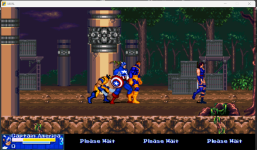
CapAmerica.png

They just don't know how to jump those stones right there :ROFLMAO:

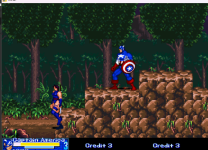
NPC03.png

I don't know if there is any command to make NPCs go through this
In any case, this level was not designed to have NPCs so it's acceptable that they can't go beyond that
 

Attachments

I tried to change anim backwalk position (I mean, placing above, using alphabetical order, right after Attack4)
It didn't work either :p

It looks like your game really don't like backwalk animation :ROFLMAO:
I attached the file if you want to check it

If you can't fix, don't worry about that, because NPC's already working anyway (if I remove backwalk anim of course)

View attachment 7500

They just don't know how to jump those stones right there :ROFLMAO:

View attachment 7501

I don't know if there is any command to make NPCs go through this
In any case, this level was not designed to have NPCs so it's acceptable that they can't go beyond that
There are so much player code on this npc, he cant use this freespecial, or items, or infinity gems, would be more easy take a npc, like forge, and copy cyclops anims which you want him to use to there instead of just chamge type player to npc, i cant see the error at backanim code file
 
It's says "Invalid animation name"
Check this:

If you are receiving an error "Invalid animation name line xxx" , you need to rise the value of the max animations you use for each type. For example, if you have MAXFOLLOWS 4 and try to use FOLLOW10, you will receive that error and you need to change the MAXFOLLOWS to 10. No need to change the others if you aren't using more animations than the max value.
 
Back
Top Bottom