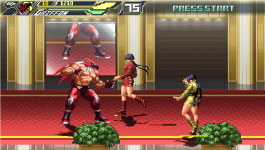
King of Rage

In Progress King of Rage v 0.1

No permission to download
The project is currently under development.
View attachment 4885

1 Changed the shadow position on stage. Since the background position is brightly lit, I changed the shadow down to make it look more three-dimensional.

View attachment 4886

The stage with Rugal was covered with full shadow and the effect of letting light come in the window was applied.

Man, your work of light is absolutely awesome !
The 3D effect works !

I can't wait to see more !
The next demo will be epic!
 
I think Ryoko is also good as a grappling character. But it would have been nice if she had her kof style.
One dude named Chamat made Ryoko in KOF style but only in a single sprite.
 

Attachments

  • ryoko world heroes in kof by chamat.png
    ryoko world heroes in kof by chamat.png
    2.7 KB · Views: 13
One dude named Chamat made Ryoko in KOF style but only in a single sprite.
nice It's a shame that it's just one picture. I can change the original Ryoko sprite to be like a Kisarah sprite if I think it's necessary. But for now, we are concentrating on completing the demo version.
 
  • Like
Reactions: NED
nice It's a shame that it's just one picture. I can change the original Ryoko sprite to be like a Kisarah sprite if I think it's necessary. But for now, we are concentrating on completing the demo version.
She can be created and animated in KOF style.

I know you're focusing on finishing the demo for release. But in case you want to edit, you can do it later.

I don't understand what he's saying in his KOF spriting tutorial, but I get a very good grasp from watching how he creates an illustration of it in step-by-step process. I learned a thing or two about drawing and shading shapes, including much example of the shading, especially arm muscles.


She can be created and animated in KOF style.

I know you're focusing on finishing the demo for release. But in case you want to edit, you can do it later.

I don't understand what he's saying in his KOF spriting tutorial, but I get a very good grasp from watching how he creates an illustration of it in step-by-step process. I learned a thing or two about drawing and shading shapes, including much example of the shading, especially arm muscles.


It's amazing. To draw in the KOF style, I need to study the human body and the folds of clothes. I'm not good at drawing, so I'll have to try even if the tutorial is good.
 
I really suggest you to remove the voice when the enemy is on pain animation (or at least make it random) because it's very annoying the way it is :(
In fact, the function I want to do is to make the voice come out with probability, not all voices for each action the enemy takes.
 
@DD Tokki You can use a random sound script for that. I use it on my games, either to make them speak random lines or just one line at random chance

Put this at your animationscipt file:

C-like:
void randSound0(char s1,char s2)
{
   int r = rand()%100;
   char sound;
   if (r<=0)
   {
      sound=s1;
   }else{
      sound=s2;
   }
   playSound("data/"+sound);
}

void randSound(char s1,char s2,char s3)
{
   int r = rand()%300;
   char sound;
   if (r<=-100)
   {
      sound=s1;
   }else if(r<=100){
      sound=s2;
   }else{
      sound=s3;
   }
   playSound("data/"+sound);
}

The script already include the "data" of the path, so you don't need to add it manually.
Both scripts do the same, but one accepts 2 files and the other one 3 files

This is an example when you want a sound file just in 50% of the cases, or silence:

@cmd randSound0 "chars/redjason/voices/jasonshort01.wav" "sounds/null.wav"

"Null.wav" is an empty sound file (a very short sound file with just silence)
This is very useful in animations like PAIN or JUMPATTACK, to avoid hearing the same sound over and over.

The other function works on the same way, you just need to point 3 files:

@cmd randSound "chars/deadpool/pineapple.wav" "chars/deadpool/pineapple2.wav" "chars/deadpool/att4.wav"
 
Last edited:
@DD Tokki You can use a random sound script for that. I use it on my games, either to make them speak random lines or just one line at random chance

Put this at your animationscipt file:

C-like:
void randSound0(char s1,char s2)
{
   int r = rand()%100;
   char sound;
   if (r<=0)
   {
      sound=s1;
   }else{
      sound=s2;
   }
   playSound("data/"+sound);
}

void randSound(char s1,char s2,char s3)
{
   int r = rand()%300;
   char sound;
   if (r<=-100)
   {
      sound=s1;
   }else if(r<=100){
      sound=s2;
   }else{
      sound=s3;
   }
   playSound("data/"+sound);

The script already include the "data" of the path, so you don't need to add it manually.
Both scripts do the same, but one accepts 2 files and the other one 3 files

This is an example when you want a sound file just in 50% of the cases, or silence:


"Null.wav" is an empty sound file (a very short sound file with just silence)
This is very useful in animations like PAIN or JUMPATTACK, to avoid hearing the same sound over and over.
Amazing sound script! That's way better than what I made my random sound script. It looks very easy to find sounds in specific path. I'll grab that.
 
@DD Tokki You can use a random sound script for that. I use it on my games, either to make them speak random lines or just one line at random chance

Put this at your animationscipt file:

C-like:
void randSound0(char s1,char s2)
{
   int r = rand()%100;
   char sound;
   if (r<=0)
   {
      sound=s1;
   }else{
      sound=s2;
   }
   playSound("data/"+sound);
}

void randSound(char s1,char s2,char s3)
{
   int r = rand()%300;
   char sound;
   if (r<=-100)
   {
      sound=s1;
   }else if(r<=100){
      sound=s2;
   }else{
      sound=s3;
   }
   playSound("data/"+sound);

The script already include the "data" of the path, so you don't need to add it manually.
Both scripts do the same, but one accepts 2 files and the other one 3 files

This is an example when you want a sound file just in 50% of the cases, or silence:


"Null.wav" is an empty sound file (a very short sound file with just silence)
This is very useful in animations like PAIN or JUMPATTACK, to avoid hearing the same sound over and over.

The other function works on the same way, you just need to point 3 files:
thank you But when I add the script, the game crashes. Do I need to fix something?
 
thank you But when I add the script, the game crashes. Do I need to fix something?
Did you check the log? He forgot to put the closing bracket way below.

C:
void randSound(char s1,char s2,char s3)
{
   int r = rand()%300;
   char sound;
   if (r<=-100)
   {
      sound=s1;
   }else if(r<=100){
      sound=s2;
   }else{
      sound=s3;
   }
   playSound("data/"+sound);
}
 
Did you check the log? He forgot to put the closing bracket way below.

C:
void randSound(char s1,char s2,char s3)
{
   int r = rand()%300;
   char sound;
   if (r<=-100)
   {
      sound=s1;
   }else if(r<=100){
      sound=s2;
   }else{
      sound=s3;
   }
   playSound("data/"+sound);
}
I use randSound0, but the parentheses seem to be there.
 
It seems that there is a difference in the application of the script depending on the game. I've tried to apply other scripts before and failed, so I fixed it and succeeded.

The log comes out like this:
Can't compile script 'Flash-grey' data/chars/misc/flash/flash-grey.txt
 
Oh yeah, sorry, I forgot to paste the whole code (the error was in the randSound() function
Try again:

C-like:
void randSound0(char s1,char s2)
{
   int r = rand()%100;
   char sound;
   if (r<=0)
   {
      sound=s1;
   }else{
      sound=s2;
   }
   playSound("data/"+sound);
}


void randSound(char s1,char s2,char s3)
{
   int r = rand()%300;
   char sound;
   if (r<=-100)
   {
      sound=s1;
   }else if(r<=100){
      sound=s2;
   }else{
      sound=s3;
   }
   playSound("data/"+sound);
}
 
in case you need the whole group of functions (all works in the same way, just with more sound files):


C-like:
///////////////////////////////////////////////////////////////// 2- RANDSOUND
void randSound0(char s1,char s2)
{
   int r = rand()%100;
   char sound;
   if (r<=0)
   {
      sound=s1;
   }else{
      sound=s2;
   }
   playSound("data/"+sound);
}


void randSound(char s1,char s2,char s3)
{
   int r = rand()%300;
   char sound;
   if (r<=-100)
   {
      sound=s1;
   }else if(r<=100){
      sound=s2;
   }else{
      sound=s3;
   }
   playSound("data/"+sound);
}
void randSound2(char s1,char s2,char s3,char s4,char s5,char s6)
{
   int      r      =   rand()%300+300;
   char   sound   =   "";


   if (r<100){
      sound=s1;
   }else if(r<200){
      sound=s2;
   }else if(r<300){
      sound=s3;
   }else if(r<400){
      sound=s4;
   }else if(r<500){
      sound=s5;
   }else if(r<600){
      sound=s6;
   }
   playSound("data/"+sound);
}
void playSound(void file)
{
   if(!file||file==""){return;}else{}
   int sfx=loadsample(file);
   playsample(sfx, 0, openborvariant("effectvol"), openborvariant("effectvol"), 100, 0);
}


// THANKS MERSOX
void randSound7(char s1,char s2,char s3,char s4,char s5,char s6,char s7)
{
   int      r      =   rand()%300+300+100;
   char   sound   =   "";


   if (r<100){
      sound=s1;
   }else if(r<200){
      sound=s2;
   }else if(r<300){
      sound=s3;
   }else if(r<400){
      sound=s4;
   }else if(r<500){
      sound=s5;
   }else if(r<600){
      sound=s6;
   }else if(r<700){
      sound=s7;
   }
   playSound("data/sounds/"+sound);
}
 
in case you need the whole group of functions (all works in the same way, just with more sound files):


C-like:
///////////////////////////////////////////////////////////////// 2- RANDSOUND
void randSound0(char s1,char s2)
{
   int r = rand()%100;
   char sound;
   if (r<=0)
   {
      sound=s1;
   }else{
      sound=s2;
   }
   playSound("data/"+sound);
}


void randSound(char s1,char s2,char s3)
{
   int r = rand()%300;
   char sound;
   if (r<=-100)
   {
      sound=s1;
   }else if(r<=100){
      sound=s2;
   }else{
      sound=s3;
   }
   playSound("data/"+sound);
}
void randSound2(char s1,char s2,char s3,char s4,char s5,char s6)
{
   int      r      =   rand()%300+300;
   char   sound   =   "";


   if (r<100){
      sound=s1;
   }else if(r<200){
      sound=s2;
   }else if(r<300){
      sound=s3;
   }else if(r<400){
      sound=s4;
   }else if(r<500){
      sound=s5;
   }else if(r<600){
      sound=s6;
   }
   playSound("data/"+sound);
}
void playSound(void file)
{
   if(!file||file==""){return;}else{}
   int sfx=loadsample(file);
   playsample(sfx, 0, openborvariant("effectvol"), openborvariant("effectvol"), 100, 0);
}


// THANKS MERSOX
void randSound7(char s1,char s2,char s3,char s4,char s5,char s6,char s7)
{
   int      r      =   rand()%300+300+100;
   char   sound   =   "";


   if (r<100){
      sound=s1;
   }else if(r<200){
      sound=s2;
   }else if(r<300){
      sound=s3;
   }else if(r<400){
      sound=s4;
   }else if(r<500){
      sound=s5;
   }else if(r<600){
      sound=s6;
   }else if(r<700){
      sound=s7;
   }
   playSound("data/sounds/"+sound);
}
thank you This could be useful for characters that say multiple things in one move.
 
Back
Top Bottom