How to see the coordinates of a point in a gameplay screenshot.

Steven1985

Active member
Hi, I would like to know what is the best way to see the coordinates of a point in a gameplay screenshot as below to determine where to put the HUD.
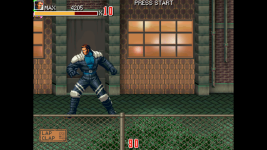
Screenshot (73).png
 
I usually take a screenshot and measure everything up inside of Photoshop for hud placement.
I'll explain how I did it since I'm not a graphics expert: the image in question is 1920 x 1080, I should have eliminated the black sides (using a program but I don't know how to do it) because the coordinates 0,0 in this case are at the top left where the black part is and not where the actual image of the game is.
So what I've done is to start the game, go to the video options, stretch the image to occupy the whole screen, take a screenshot that the PC makes me 1920 x 1080 because it is the size of the PC screen and resize the screenshot to 320 x 240 with Paint because this is the video resolution of the game. Now the origin of the coordinates is in the right place and I can set the coordinates where to place the HUD.

Did I do it right?
 
@Steven1985

I suggest the same as danno. Take an in-game screenshot (not Windows print screen) in order to get the real image size.
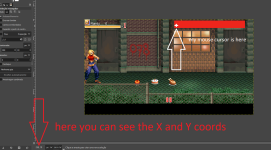
After that, open it in any image editor like Photoshop or Gimp and use the cursor to see the positions.

In case you are using 320x240, I suggest you cut the black borders to get the real position, same as you already did on the 1920x1080 image.

Here's an example using Gimp, this screenshot have the same game's resolution of 480x272:

Sem título.png
 
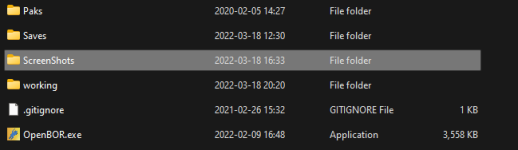
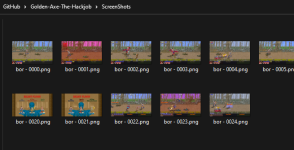
Same as everyone else says. It sounds like you're trying to screen capture. If so, stop right there. OpenBOR has a built in screenshot functionality. It defaults to F12, but you can change it in control options. Each press sends a shot to a sub folder named ScreenShots. It's located in the same folder as the engine executable.

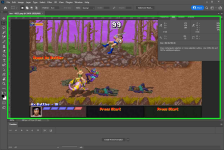
The shots are output at the game module's exact resolution, regardless of your screen, zoom, or whatever else. That's all you need. Mouse to the pixel you want in your favorite image program and there's your coordinates. Here's a Photoshop example:

1648162529971.png

1648162728300.png

1648161978946.png

DC
 
Back
Top Bottom