
You are using an out of date browser. It may not display this or other websites correctly.
You should upgrade or use an alternative browser.
You should upgrade or use an alternative browser.
Canceled Dungeons & Dragons UPDATE
- Thread starter Count Monte
- Start date
-
- Tags
- dungeons and dragons
Project is halted prior to completion and will not receive further updates.
 ;D
;DCount Monte
Member
Earlier in this thread, Bloodbane and I showed how certain monsters will drop unique items when they die - if you kill a Troll using fire, it'll drop Troll Fat. If you kill a Wyvern using poison or acid, it will drop a Wyvern Scale. Slay a demon and it'll drop a Demon Scale. If you cast Polymorph on a ghost, it turns into Ectoplasm.
These items can only be used in one place: Pierwolf's shop. You can trade them to him for gold, or for unique magic items. For example, once you collect 20 Wyvern Scales you can trade them for a Flying Carpet, which allows you to travel faster on the world map and also avoid random encounters. 20 Ectoplasm gets you a Glass Sword, which kills anything (including bosses) in one hit - but there's only one of these so save it for the right time. There's a few others, so the idea is that you'll want to acquire these monster drops so you can trade them for cool stuff.
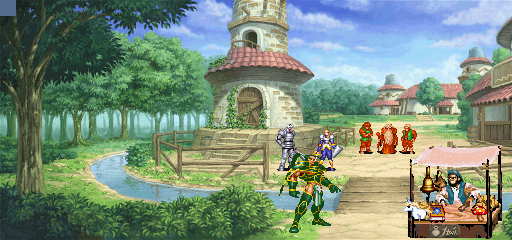
So we've now added a particularly nasty monster to the game: The Xorn. If this creature hits you, it 'eats' those unique items (Troll Fat, Wyvern Scales, Demon Scales etc) out of your inventory. If you don't have any of those items, it eats 1000 gold with each hit.
Here's how it looks (still missing sound FX)
XORN:
www.youtube.com/watch?v=gdc7HlO0pvU
I should also mention that it isn't mandatory that you get these items to win the game - they add more depth and RPG flavor, but you can choose to never visit Pierwolf's shop if you'd rather just focus on combat.
These items can only be used in one place: Pierwolf's shop. You can trade them to him for gold, or for unique magic items. For example, once you collect 20 Wyvern Scales you can trade them for a Flying Carpet, which allows you to travel faster on the world map and also avoid random encounters. 20 Ectoplasm gets you a Glass Sword, which kills anything (including bosses) in one hit - but there's only one of these so save it for the right time. There's a few others, so the idea is that you'll want to acquire these monster drops so you can trade them for cool stuff.
So we've now added a particularly nasty monster to the game: The Xorn. If this creature hits you, it 'eats' those unique items (Troll Fat, Wyvern Scales, Demon Scales etc) out of your inventory. If you don't have any of those items, it eats 1000 gold with each hit.
Here's how it looks (still missing sound FX)
XORN:
www.youtube.com/watch?v=gdc7HlO0pvU
I should also mention that it isn't mandatory that you get these items to win the game - they add more depth and RPG flavor, but you can choose to never visit Pierwolf's shop if you'd rather just focus on combat.

O Ilusionista
Captain 100K
Earlier in this thread, Bloodbane and I showed how certain monsters will drop unique items when they die - if you kill a Troll using fire, it'll drop Troll Fat. If you kill a Wyvern using poison or acid, it will drop a Wyvern Scale. Slay a demon and it'll drop a Demon Scale. If you cast Polymorph on a ghost, it turns into Ectoplasm.
This is sick! Good idea.

In a Nevewwinter Nights server I ran - I scripted up every player's worst nightmare, RUST MONSTERS! One hit and *poof*, you're naked. I gave fair warning by signs leading into the area that said (assuming you had the language proff to read Orcish) "Be aware or be bare." Like typical rust monsters they were wimps otherwise so monks and other unarmed/unarmored fighters had a field day. Everyone else, not so much.
Now NWN was polygon models, meaning armor and weapons swapped in and out easily and visually, something that's not really feasible in a sprite game. However, there's no reason you couldn't have rust monsters that ruin your gear via stat debuff. Just severely lower defense and offense to simulate AC loss and busted weapons. Add in a visual of rust colored dust or particles dripping from the char while the debuff is in place and you're golden. In fact, the visual effect entity itself actually being responsible for applying the debuff is a simple, efficient and less messy way to make it work.
Of course, players would need to repair their rusted gear, which would be a nice shop idea. It also isn't a bad idea to let players take advantage. What if there's a near impossible to beat group of iron golems elsewhere? Lead the rust monsters to them and....
Just an idea.
DC
Now NWN was polygon models, meaning armor and weapons swapped in and out easily and visually, something that's not really feasible in a sprite game. However, there's no reason you couldn't have rust monsters that ruin your gear via stat debuff. Just severely lower defense and offense to simulate AC loss and busted weapons. Add in a visual of rust colored dust or particles dripping from the char while the debuff is in place and you're golden. In fact, the visual effect entity itself actually being responsible for applying the debuff is a simple, efficient and less messy way to make it work.
Of course, players would need to repair their rusted gear, which would be a nice shop idea. It also isn't a bad idea to let players take advantage. What if there's a near impossible to beat group of iron golems elsewhere? Lead the rust monsters to them and....
Just an idea.
DC
Count Monte
Member
DC, that's brilliant!
Also the perfect thing to introduce later in the game, to add some unexpected difficulty. The trick is going to be finding sprites that can be modified into a Rust Monster. Any ideas at all?
RUST MONSTER

Would this work, even though its bipedal?

Also the perfect thing to introduce later in the game, to add some unexpected difficulty. The trick is going to be finding sprites that can be modified into a Rust Monster. Any ideas at all?
RUST MONSTER
Would this work, even though its bipedal?
O Ilusionista
Captain 100K
Maybe you can find some bases on this game https://www.youtube.com/watch?v=4uifSdDQwGU

don vecta
Active member
I like those unique drop items... but instead of swapping certain quantity of those for a special weapon, why not doing something that Dragonquest VIII had: alchemy shop (well, in DQVIII was the alchemy pot, but you got the gist). Pierwold could be an alchemist that need certain items to build special weapons/armor/relics/items, etc.
Example (just random items our from my mind):
Chimaera Sword = Gladius sword + Giant snake poison gland + Dragon scale + Goat horns + Manticore claw.
Some items could be normal drops, or found in towns chests or hidden areas and those special drops from killings monsters in certain ways. I'm sure any RPG lover would LOVE to get the special alchemy items. ;D
Hope it's not a bitch to script it. :-[
Example (just random items our from my mind):
Chimaera Sword = Gladius sword + Giant snake poison gland + Dragon scale + Goat horns + Manticore claw.
Some items could be normal drops, or found in towns chests or hidden areas and those special drops from killings monsters in certain ways. I'm sure any RPG lover would LOVE to get the special alchemy items. ;D
Hope it's not a bitch to script it. :-[
Count Monte
Member
We do have some of that in the game - there's a magician in one of the shops who needs the Skin of a Displacer Beast and an Owlbear Egg to make you a Cloak of Displacement.
Also, we have an Enchantress who is crafting the Meteor Storm spell but needs items (Dragons Horn, Golem Heart, Beholder Eye) to finish it -- once that happens she also teaches you the spell.
Finally, we have a gnome tinkerer who builds a Golem for you, if you can find and bring him a Power Core, Gears, and a Dwarven Clockwork Kit.
So yes, in theory it should be possible to add more alchemical stuff like you said - Bloodbane is the guy who has to code the script, so let's hope he gets inspired reading this
Also, we have an Enchantress who is crafting the Meteor Storm spell but needs items (Dragons Horn, Golem Heart, Beholder Eye) to finish it -- once that happens she also teaches you the spell.
Finally, we have a gnome tinkerer who builds a Golem for you, if you can find and bring him a Power Core, Gears, and a Dwarven Clockwork Kit.
So yes, in theory it should be possible to add more alchemical stuff like you said - Bloodbane is the guy who has to code the script, so let's hope he gets inspired reading this

aL BeasTie
Well-known member
You guys really should edit all the palettes of stages and chars in the game, so they match each other properly.
Some chars are bright/bold colours others have very desaturated sprites etc. It's really starting to look a bit ugly at times, but other parts look very good.
Count Monte
Member
Hi Beastie, could you give an example? Would be helpful!
We've used Capcom and IGS sprites for characters and backgrounds whenever possible.
We've used Capcom and IGS sprites for characters and backgrounds whenever possible.
aL BeasTie
Well-known member
The sprites are fine, it's just the palettes. I just think some the original palettes don't work. Like the 'King of Dragons' sprites have too much contrast and are very bright. While D&D sprites are more faded less contrast. King of Dragons sprites IMO are too colourful to begin with, and the backgrounds were too faded. Very strong greens and yellows in those sprites, but that's more personal taste.
I just mean doing something like this.
Original

Darker more faded style.

less colour, increased contrast


Like here, this dwarf is a main offender. See how he is against the background?
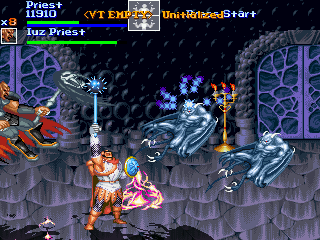
See this guy too, he is too bright and colours look too faded.
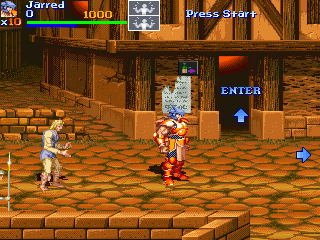
Background and chars, too similar in brightness and contrast. In every game you will ever play, background will be darker or more faded than chars.
this background is very out of place, it at least needs more contrast. But this painted background style should probably be avoided altogether.
Looking at some of your custom made sprites, they have nice darker palettes. If you simply edit other chars to match your own style/tastes it will look fantastic.
Anyhow I'm not nitpicking, just mean decide on a certain look and edit the rest to suit. Like if you want it to look like original D&D and KOD games then edit other chars to match them.

Personally I'd try make them look more like this guy. The helmet dude (warduke?) has nice dark palette but not too faded either. but sprite behind him, colours are very bold and a bit bright. The dragon is a litte faded and could use little more saturation.
But overall this screen looks better.
I just mean doing something like this.
Original
Darker more faded style.
less colour, increased contrast
Like here, this dwarf is a main offender. See how he is against the background?
See this guy too, he is too bright and colours look too faded.
Background and chars, too similar in brightness and contrast. In every game you will ever play, background will be darker or more faded than chars.
this background is very out of place, it at least needs more contrast. But this painted background style should probably be avoided altogether.
Looking at some of your custom made sprites, they have nice darker palettes. If you simply edit other chars to match your own style/tastes it will look fantastic.
Anyhow I'm not nitpicking, just mean decide on a certain look and edit the rest to suit. Like if you want it to look like original D&D and KOD games then edit other chars to match them.
Personally I'd try make them look more like this guy. The helmet dude (warduke?) has nice dark palette but not too faded either. but sprite behind him, colours are very bold and a bit bright. The dragon is a litte faded and could use little more saturation.
But overall this screen looks better.
Count Monte
Member
Thanks for taking the time to explain -- I definitely see what you mean, especially with that King of Dragons orc. I guess it's harder for me to see on the dwarf example, because that's how his sprite is in Shadow Over Mystara, we didn't change the palette, so I'm so used to seeing him that way.
You definitely have a great artistic eye, much better than mine. Once we finish programming the game, if you'd be interested in helping adjust the palettes I'd really welcome the help -- I honestly don't have the artistic eye for it that you do, I love how you made the KoD orc actually look better. I always just chalked it up to the sprites being simpler.
You definitely have a great artistic eye, much better than mine. Once we finish programming the game, if you'd be interested in helping adjust the palettes I'd really welcome the help -- I honestly don't have the artistic eye for it that you do, I love how you made the KoD orc actually look better. I always just chalked it up to the sprites being simpler.
B
bsk
Guest
BeasTie said:You guys really should edit all the palettes of stages and chars in the game, so they match each other properly.
Some chars are bright/bold colours others have very desaturated sprites etc. It's really starting to look a bit ugly at times, but other parts look very good.
I'm agree with @BeasTie for colors .... it can be very cool if he can help you for this
For my part i want to know if it will be possible to finish the game like a real other openBor Beat'em all ?
Because you had many object to find, to buy more weapons, etc .... but is i only want to launch the game and rush it with a friend to the end, is it possible ?
Because if it is not possible you are creating an adventure game, like a Never Winter Night, and not a beat'em all, action game like Street of Rage

I wish it will be possible to play it like we want...
Thanks
aL BeasTie
Well-known member
Nah I'm not that great, it's just guesswork, adjusting colour settings and brightness contrast etc. in photoshop.
You can trust your own judgement. Just decide which look you want. If you want the classic look, boost the colour on the faded sprites, vice versa if you want the 'faded' look. Or just create your own style. Adjust brightness/contrast for finishing touch. Editing the palette directly is still the best thou, some sprites will need it.

Backgrounds are easy to adjust Brightness/Contrast etc.
stuff like this just decrease the master saturation a bit, you'll only need minor changes to most things.
You can trust your own judgement.
Just decide which look you want. If you want the classic look, boost the colour on the faded sprites, vice versa if you want the 'faded' look. Or just create your own style. Adjust brightness/contrast for finishing touch. Editing the palette directly is still the best thou, some sprites will need it.
Backgrounds are easy to adjust Brightness/Contrast etc.
stuff like this just decrease the master saturation a bit, you'll only need minor changes to most things.

Count Monte
Member
bsk, if you want to just play through the game like a beat 'em up, yes you can. You don't have to go find the special items, special weapons etc if you choose not to. D&D Shadow Over Mystara is this way.
However, to finish the main quest, you WILL have to talk to NPC's to unlock the next mission sometimes, which means you might have to do a little RPG playing.
Beastie, I see what you're saying about the palettes. We used some King of Dragons characters, but mostly just some bosses because they have nice big sprites that fit with the D&D ones. We avoided using orcs, skeletons, regular enemies because Tower of Doom/Shadow Over Mystara had better ones or we sprited-edited our own. Having said that, I'm not very comfortable trying to change the ToD/SoM sprite palettes because I'd just muck them up. I really would love some help with this, if you have time at some point.
However, to finish the main quest, you WILL have to talk to NPC's to unlock the next mission sometimes, which means you might have to do a little RPG playing.
Beastie, I see what you're saying about the palettes. We used some King of Dragons characters, but mostly just some bosses because they have nice big sprites that fit with the D&D ones. We avoided using orcs, skeletons, regular enemies because Tower of Doom/Shadow Over Mystara had better ones or we sprited-edited our own. Having said that, I'm not very comfortable trying to change the ToD/SoM sprite palettes because I'd just muck them up. I really would love some help with this, if you have time at some point.
B
bsk
Guest
Ok, thanks, it is perfect
aL BeasTie
Well-known member
I can definitely take a look whenever your ready if time allows. If you're using 16bit mode it's just a matter of making new pals. I'm not always that confident editing them either, some sprites are more troublesome. Especially if their skin shares colours with parts of the costume.
It's also a tough call which look is best. And personal taste. Depends what you like, but I can see the potential of some of them having more 'realistic' colours. Instead of bright yellow armor, change it to look gold. Blue weapons become shiny steel etc. And all you're doing is editing the colour table and adjusting what's already there.
OR just some cool palette options when you choose your char.


(quick examples, classic style)
It's also a tough call which look is best. And personal taste. Depends what you like, but I can see the potential of some of them having more 'realistic' colours. Instead of bright yellow armor, change it to look gold. Blue weapons become shiny steel etc. And all you're doing is editing the colour table and adjusting what's already there.
OR just some cool palette options when you choose your char.
(quick examples, classic style)

Die_In_Fire
Well-known member
Amazing management of colours beastie!!
Would love to see this applied to other mods also.
Count Montecristo, I can't imagine all he hard work on having these rpg-adventure touchs on the mod, although the same as Pierwolf mods, I prefer real game music like the ost of the capcom D&D instead of two step from hell (love their music, but prefer games with game music), the size of this project really amazes me, and if Beastie add those touches to the sprites, it will turn even better!
When played ad&d I always hated those rust beasts, it's really discouraging when you had endured hard situations to get a good armor or weapon, and on the next adventure all that effort just flushed through the water because of a rust monster... But on the video game world I think it would make a cool addition.
I'm pretty excited about this project and would love to play an ad&d campaign again lol
Would love to see this applied to other mods also.
Count Montecristo, I can't imagine all he hard work on having these rpg-adventure touchs on the mod, although the same as Pierwolf mods, I prefer real game music like the ost of the capcom D&D instead of two step from hell (love their music, but prefer games with game music), the size of this project really amazes me, and if Beastie add those touches to the sprites, it will turn even better!
When played ad&d I always hated those rust beasts, it's really discouraging when you had endured hard situations to get a good armor or weapon, and on the next adventure all that effort just flushed through the water because of a rust monster... But on the video game world I think it would make a cool addition.
I'm pretty excited about this project and would love to play an ad&d campaign again lol