Chronocrash Modders Tools

ChronoCrash Modders Tools 0.7.9.10.1

No permission to download
Piccolo said:
Ok I'll work on this later, in the meantime I uploaded a new build with the last tweaks that were made since the last upload.

Christmas came early!!! WOOT WOOT!

Piccolo said:
Thanks for the suggestion, I'll look into it later. Though I did not understand everything you proposed at the bottom, especially point 1).

To clarify my points, images included! For additional reference, Tnail would be the representation of a small thumbnail image auto generated by the icon file specified in the loaded enemy character.txt. Otherwise the tool could reference a generic black square or something in the absence of a specified thumbnail in the character.txt file.
 
Damon Caskey said:
Sorry, I hate to chime in with bugs - as a developer I know how annoying that is.

Just tried out and, at least for me none of the new key shortcuts work at all. Also, the mouse wheel zoom control is now very unstable. You can't really zoom precisely any more.

DC

Erf, I saw that I made a mistake on the local zoom shortcuts (which cancel each other) and it will be fixed in the next release, but for the others ones I still don't understand. Well, I'll wait for other feedbacks and figure this out. Thanks for the feedback.

EDIT : Just figured it out. I wrote "Ctr" instead of "Ctrl" in many instances of the code. I'll soon release an update, but in the meantime if you used the last release, you'll have to replace manually any "Ctr+" with "Ctrl+" in the custom keyboard shortcuts settings.

Zexika said:

Ok thanks, I understand the entity drag and drop in the level editor. But I still don't understand the purpose of adding the animation tab in level editor.
 
Quick bug fix update. V0.3.6.2

For anyone that used the last version : you'll have to replace manually any "Ctr+" with "Ctrl+" in the custom keyboard shortcuts settings (and then restart the app).
 
Piccolo I've tried the latest version and I think I've found a bug
In the stage editor, if I click "hide front panel', it doesn't works
wh9Zpx7.png

(I double checked if I wasn't using fglayer but no, frontpanel)

Them if I click "disable panels", it disable all the panels from the stage
xEw5YYF.png

(the tubes are entities)

If I remove the frontpanel and reload the tool, I can't see the panel
SYtd3aq.png


I've tried other stages, same result. The stages images are .gif

Also, it would be cool if we have a checkbox called "transparent bg" so the images would be displayed with transparent background.
 
Indeed front panel images were simply not indexed on loading, so the hide/show checkbox was not doing anything. I fixed it, it will work in the next version.

As for transparency, it shoud already work. The first color is set to transparent. But I guess it doesn't take the right color on some images. I'll see what I can do, but can you send me an image that isn't properly made transparent by the level editor so that I can investigate ?
 
(I’m not using the last version yet)
Is there a way to reload an entity?
Like if I add a gif to an animation outside the editor and want to check the animation in the editor, but couldn’t find a way to reload.

Everytime I open the program I need to locate the data folder again. I don’t know how to bypass this step.
 
Finally managed to get a appimage made for this application have not tested it as I do not use this application (yet) but when I  tried to add it to the releases I did not have access so could you grant me access for future updates ?

here is the appimage for linux: https://www.mediafire.com/file/i1pj0o25kjgmtxu/chronocrash-modders-tools-v0.3.6.2-linux.zip/file
 
O Ilusionista said:
Although this tool runs fine using Wine emulator, how hard it would be to port it to Mac?

You should be able to run it from source just install python3 and pyqt5 then execute cmt.py
 
Piccolo I am receiving an error report when working on a stage and I found the reason: the program can't read the extra parameters for "hole" (alt and type)
hole {xpos} {zpos} {upperleft} {lowerleft} {upperright} {lowerright} {depth} {alt} {type}

I had to comment the last value so the program recognize the stage
Code:
hole 2425 485 40 40 196 197 40 #5

both alt and type are useful for holes, so it would be cool to have the tool accept it.
 
I wonder if it's possible to have drawmethod previewed, especially scaling sprites. When you're using it in text and/or previewing it in animation test, you see how they are handled. For example, when you have the original sprite of an item in anim idle, you either use the legacy drawmethod or the modern drawmethod (such as separate scale, scalex, shiftx, etc.) for scaling and such. When using scale, you see in the preview how big or small they are scaled in frame.
 
Thanks for the feedback guys, I'll try to process all this.


Ok so built-in dark mode and color settings edition, should not be a problem to do this.


This should already be enabled in the main editor if you open file with code-ish extension (".c", etc). I actually started a parser descriptor for model files so that we have color highlighting in those too ;) I'll be sure to allow color selection for this too if you're interested.


Should be feasible. I could simply allow to view the initial page anytime again and it should work. I don't know if you have something more fledged in mind.


Oh man that is so needed, I always try to do it manually but end up using a too complete model and removing plenty of existing stuff. This is really a good idea.


I started a prototype that has graphical wall edition. Still lots of work to do though, but it's on the way.


That could be interesting.


If you really can't open it, I'd appreciate a copy of the mod you're trying to open for debugging purposes.


For now I'll just start the color settings stuff, I'll probably create a system to import/export themes.
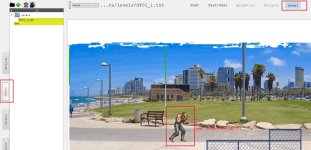
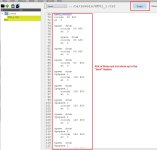
Hello Piccolo, first of all, thank you so much for the great program. I am not sure if you have seen my bug report or not, when using the "level" feature, only bout 5-10% of the enemies and objects are shown up on the level (stage). These entities do show up under "text" feature. Can you please check and see why they are not shown up under "level" feature? Please see attachments for clarification, thank you
 

Attachments

  • 1 entity shown up.jpg
    1 entity shown up.jpg
    286.2 KB · Views: 29
  • Entities not shown up.jpg
    Entities not shown up.jpg
    133.1 KB · Views: 29
Back
Top Bottom