
You are using an out of date browser. It may not display this or other websites correctly.
You should upgrade or use an alternative browser.
You should upgrade or use an alternative browser.

ChronoCrash Modders Tools 0.7.11.2
No permission to download
- Thread starter Piccolo
- Start date

Piccolo
Well-known member
You can probably right click on the project in the project selector and check the "OpenBor" checkbox. If not then yeah removing it from the list and adding it again might be the easiest fix.I don't know what happened when I tried to open one of my projects. Does this mean I have to remove it from the list and open a new one?
Code:Traceback (most recent call last): File "gui\project\__init__.py", line 297, in projectClicked KeyError: 'is_OpenBOR'

maxman
Well-known member
Thanks. I added it again, but there's one problem.
This window box says here saying that I don't have models.txt, even though I have information in it.
Also, after I added it again, my project doesn't have animation tab anymore. Even JSON tab was there along with the text tabs. But it disappeared after I selected another project to see I have animation tab, and I did click no to "Keep session?" window. I went back to my added project and JSON tab is gone, leaving only those two text tabs.
How can I restore the animation tab to appear while CMT says that I don't have models.txt? If not, is it okay if I can send you my project data in PM for you to check out?
This window box says here saying that I don't have models.txt, even though I have information in it.
No models.txt found in this folder. Are you sure you want to continue?
Also, after I added it again, my project doesn't have animation tab anymore. Even JSON tab was there along with the text tabs. But it disappeared after I selected another project to see I have animation tab, and I did click no to "Keep session?" window. I went back to my added project and JSON tab is gone, leaving only those two text tabs.
How can I restore the animation tab to appear while CMT says that I don't have models.txt? If not, is it okay if I can send you my project data in PM for you to check out?
Piccolo
Well-known member
Did you make sure you selected the data folder and not the parent folder ?Thanks. I added it again, but there's one problem.
This window box says here saying that I don't have models.txt, even though I have information in it.
Also, after I added it again, my project doesn't have animation tab anymore. Even JSON tab was there along with the text tabs. But it disappeared after I selected another project to see I have animation tab, and I did click no to "Keep session?" window. I went back to my added project and JSON tab is gone, leaving only those two text tabs.
How can I restore the animation tab to appear while CMT says that I don't have models.txt? If not, is it okay if I can send you my project data in PM for you to check out?
Yeah the issue is related to it not finding models.txt (CMT then consider it's not an OpenBOR project). You should be able to change the checkbox the way I described in my previous post, but probably won't fix the issue of the wrong folder selected. You should remove the project again and make really sure you select the data folder (I'm not sure how it works in Windows, but probably best to enter the data folder, and then click ok)
maxman
Well-known member
Yes, I did select the data folder itself, but I have no idea what a parent folder is.Did you make sure you selected the data folder and not the parent folder ?
I removed it again and selected the same data folder, but it says that I don't have models.txt for this particular data folder. I checkmarked that project as OpenBOR project.Yeah the issue is related to it not finding models.txt (CMT then consider it's not an OpenBOR project). You should be able to change the checkbox the way I described in my previous post, but probably won't fix the issue of the wrong folder selected. You should remove the project again and make really sure you select the data folder (I'm not sure how it works in Windows, but probably best to enter the data folder, and then click ok)
P.S.: I did it. I did what you instructed, but I just closed CMT and reopened it. I checkmarked it as OpenBOR project. Now the animation tab is back.
Thank you, Piccolo.
Piccolo
Well-known member
No problem, and by parent folder I meant the folder that contains your data folder (probably named after your project). But since you fixed it, it doesn't matter.Yes, I did select the data folder itself, but I have no idea what a parent folder is.
I removed it again and selected the same data folder, but it says that I don't have models.txt for this particular data folder. I checkmarked that project as OpenBOR project.
P.S.: I did it. I did what you instructed, but I just closed CMT and reopened it. I checkmarked it as OpenBOR project. Now the animation tab is back.
Thank you, Piccolo.
maxman
Well-known member
I created a new animation to rename it, but I got this error right after I dragged my target files to the new animation in the animation tab.
Code:
Traceback (most recent call last):
  File "gui\entity\__init__.py", line 1102, in positionChanged
  File "gui\entity\__init__.py", line 1708, in rebuildText
  File "gui\entity\__init__.py", line 181, in __getitem__
IndexError: list index out of range
Piccolo
Well-known member
Did you have some commands after the last frame ? Probably "offset"I created a new animation to rename it, but I got this error right after I dragged my target files to the new animation in the animation tab.
Code:Traceback (most recent call last): File "gui\entity\__init__.py", line 1102, in positionChanged File "gui\entity\__init__.py", line 1708, in rebuildText File "gui\entity\__init__.py", line 181, in __getitem__ IndexError: list index out of range
maxman
Well-known member
Not at all. Just this simple one after I created a new animation for this.Did you have some commands after the last frame ? Probably "offset"
Code:
anim freespecial9
    frame data/chars/misc/empty.gif
Then I dragged the target files below that first frame and that's how I got that error.
mwhaley1985
New member
Traceback (most recent call last):
File "\\VBoxSvr\Partage\CMT\cmt.py", line 271, in autoSave
File "gui\main\__init__.py", line 189, in backupUnsaved
File "gui\main\__init__.py", line 595, in updateFD
File "gui\entity\__init__.py", line 742, in getFullLines
File "gui\entity\__init__.py", line 1941, in validateChanges
File "gui\entity\__init__.py", line 1787, in rebuildText
File "gui\entity\__init__.py", line 181, in __getitem__
IndexError: list index out of range
File "\\VBoxSvr\Partage\CMT\cmt.py", line 271, in autoSave
File "gui\main\__init__.py", line 189, in backupUnsaved
File "gui\main\__init__.py", line 595, in updateFD
File "gui\entity\__init__.py", line 742, in getFullLines
File "gui\entity\__init__.py", line 1941, in validateChanges
File "gui\entity\__init__.py", line 1787, in rebuildText
File "gui\entity\__init__.py", line 181, in __getitem__
IndexError: list index out of range

tightninja
Member
copy and past bug i keep geting when using ctrl-a and ctrl-c (select all, paste all)
Traceback (most recent call last):
File "\\VBoxSvr\Partage\CMT\cmt.py", line 407, in saveFile
File "gui\main\__init__.py", line 398, in save
File "gui\main\fileselector.py", line 289, in save
RuntimeError: No active exception to reraise
Traceback (most recent call last):
File "\\VBoxSvr\Partage\CMT\cmt.py", line 407, in saveFile
File "gui\main\__init__.py", line 398, in save
File "gui\main\fileselector.py", line 289, in save
RuntimeError: No active exception to reraise
tightninja
Member
Is it possible to get a different font? I have run into an issue where the Lower case L "l" is the same as the number "1" it makes it hard to read freespecial19 vs freespecial9

O Ilusionista
Captain 100K
Edit > SettingsIs it possible to get a different font? I have run into an issue where the Lower case L "l" is the same as the number "1" it makes it hard to read freespecial19 vs freespecial9

Piccolo
Well-known member
Piccolo updated Chronocrash Modders Tools with a new update entry:
Changelog 0.7.11
Read the rest of this update entry...
Changelog 0.7.11
New feature :
- As before search bar in left panel (file selector) will first find matches in the files that are opened. But now, it can also find matches in the files that are not opened, if you press "Return" after the first batch of results.
Addressed these bugs :
ChronoCrash Modders Tools @maxman...
Read the rest of this update entry...
tightninja
Member
Every time i select a different font and restart, nothing changes. Sometimes I even get an error message.Edit > Settings
View attachment 15265
O Ilusionista
Captain 100K
Piccolo
Well-known member
Piccolo updated Chronocrash Modders Tools with a new update entry:
Changelog 0.7.11.1
Read the rest of this update entry...
Changelog 0.7.11.1
In Edit -> Settings -> Application you can now change the font for the whole GUI ( @tightninja guess this is what you wanted)
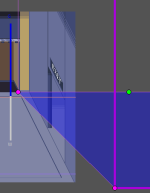
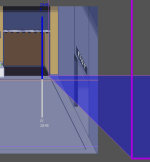
Bug fix walls interactive dots not showing : ChronoCrash Modders Tools @O Ilusionista
Read the rest of this update entry...
tightninja
Member
Piccolo updated Chronocrash Modders Tools with a new update entry:
Changelog 0.7.11.1
Read the rest of this update entry...
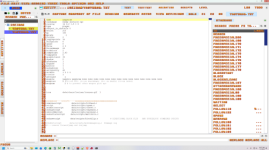
This is a great start, however the font in the editor did not change (most important).
Also when you restart the application the settings revert back. Attached is a screen shot where I changed application font AND the editor font. I used a goofy font just for reference.
Thanks for the quick update though! I appreciate it. Even in this state, reading and navigation are now easier.
Attachments
tightninja
Member
This is a great start, however the font in the editor did not change (most important).
Also when you restart the application the settings revert back. Attached is a screen shot where I changed application font AND the editor font. I used a goofy font just for reference.
Thanks for the quick update though! I appreciate it. Even in this state, reading and navigation are now easier.
UPDATE:
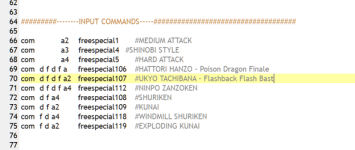
1. I select a new editor font, nothing changes. I then selected solarized dark, and the editor font changed! I kept changing the theme until I got Picture 2.
2. I closed app and restarted. The tool reverts back to original font with a weird hybrid normal/ solarized dark theme. Picture 3
3. I select the normal theme and it switch from hybrid theme back to normal theme.
Attachments

Last edited:
Piccolo
Well-known member
The editor font setting was already supported for years, it's a separate setting.This is a great start, however the font in the editor did not change (most important).
Also when you restart the application the settings revert back. Attached is a screen shot where I changed application font AND the editor font. I used a goofy font just for reference.
Thanks for the quick update though! I appreciate it. Even in this state, reading and navigation are now easier.
AFAIK you're the first to report it doesn't work, so nothing I can really do
 What you can do is make sure it's not a setting issue. I mention this setting issue because of what you mention about restarting the app. It seems to indicate that settings are not saved.
To verify : change the editor font, close the app, open the setting file with a text editor (see here for location) and look for the [editor] font value (I think it's something like that). If it did not change here, then it's a setting issue.
EDIT : never mind for the last step, checked the code, doesn't work like that.