kimono
Well-known member
I'm trying to modify the following attack5 and my attack boxHi, what do you mean by "automatically modified" ?
Code:
attack5 33 28 57 71 10 1 1
Code:
attack5 33

I'm trying to modify the following attack5 and my attack boxHi, what do you mean by "automatically modified" ?
attack5 33 28 57 71 10 1 1attack5 33
Use legacy commands (under options)I got the latest version 0.7.8: how can I prevent my attack5 from being automatically modified on the following lines?
ah no, wait, I already had this issue too. It's very rare to happenis automatically replaced by

I'm trying to modify the following attack5 and my attack boxis automatically replaced byCode:attack5 33 28 57 71 10 1 1if I change the numbers or press the up and down arrows.Code:attack5 33
- Fixed a bug where newly created legacy attack box couldn't be edited ChronoCrash Modders Tools @kimono
- Fileselector will now parse "steamer" entity type @O Ilusionista
- Various optimizations in text editor
New "alternate versions feature"
- this is a neat feature I pulled from another project, very useful if for some reason...

From this report, seems like you downloaded a very very old version of the app.Thank you so much buddy.
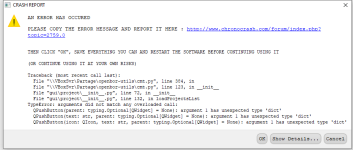
I received the error message and I had to close the app everytime I opened the latest version.
View attachment 13074

huh, where can I download the latest version? I clicked download at the very top right where it says download, so I have no clue how I got the very old version lolFrom this report, seems like you downloaded a very very old version of the app.
Just scroll to the top of this topic and you'll see a nice download button with the latest version, just waiting for you to click on ithuh, where can I download the latest version? I clicked download at the very top right where it says download, so I have no clue how I got the very old version lol

That's how I downloaded it, but he said it was the old version for some reasons..Just scroll to the top of this topic and you'll see a nice download button with the latest version, just waiting for you to click on it
You can check the version in "Help" -> "About this tool" to see which version you got.That's how I downloaded it, but he said it was the old version for some reasons..
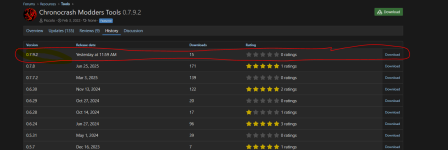
I just went to the history and downloaded the very top one that I highlighted in red which says "yesterday...". same error message. The error message forces me to close the app; therefore, I am not able to open the app at all.You can check the version in "Help" -> "About this tool" to see which version you got.
But from the screenshot you put here it's definitely a very old version : not only no lines in the report add up with the current source code, but the big red flag that it's very old is that the link report (in blue) is a link to the previous forum system !! (which changed in early 2022 or something like that). It's very probable you somehow ended up with the earliest version that is available here.
Try to download it again and make sure the files in the archive are from 31/12/2025.
Also you can manually download the latest revision in the "History" tab here : Chronocrash Modders Tools - History
Please screenshot again the error message to be sure it's the same, and also as I said, check the date of the files in the zip, make sure it's 31/12/2025.I just went to the history and downloaded the very top one that I highlighted in red which says "yesterday...". same error message. The error message forces me to close the app; therefore, I am not able to open the app at all.
I downloaded the version 0.7.8 just to test and it is working fine. I have Windows 10, so I am not sure if it has to do with anything with the crash for the latest version. thank you so much
Please screenshot again the error message to be sure it's the same, and also as I said, check the date of the files in the zip, make sure it's 31/12/2025.
If the error message is exactly the same as before, then you did not download the last version (or any recent version at all actually) because it's been years since the blue link in the message (that we can see in your previous screenshot) is no longer in the source code.

Thanks, see it's not the same message at all right now you had this before :
Fixed this bug ChronoCrash Modders Tools @Bruce
I can confirm this update fixed the crash, thank you so much buddy.Piccolo updated Chronocrash Modders Tools with a new update entry:
Changelog 0.7.9.3
Read the rest of this update entry...