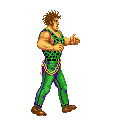
OK, first thing - your sprites have a serious issue. You shouldn't use white as the background color. It does not make a technical difference, but when working with sprites, you'll find the background should be something easily distinguished and rarely used in the sprite. (255, 0, 255) is what most authors here use. White is a very poor choice because nearly every sprite set you'll ever come across uses it somewhere in the sprite.
Now on to your main issue. You're trying to use the old technique of pixel remapping. Forget all about that. Both it and the remap command itself are only for backward compatibility with ancient modules. Never,
ever use them.
To make a new color set, all you need to do is open one of the sprites in your favorite editor. Then find the appropriate color table entries and set them to your liking. You don't have to edit the pixels, match images, or any of that silliness. All that matters is the color table. In fact, you don't even have to use images at all - OpenBOR supports .act files.
I made you two samples (see attached) and recorded the process. It's easy as can be.
To add them to your model, use
palette (the default color set) and
alternatepal (alternate color sets) to implement them.
Code:
name	Andore
health	95
speed	8.4
type	enemy
aimove normal
gfxshadow 1
candamage player obstacle
hostile player
score 4000 20
aggression 250
dust dust
noquake 1
grabdistance 38
icon	data/chars/andore/icon.gif
icondie data/chars/andore/icon.gif
diesound data/sounds/die2.wav

palette	data/chars/andore/pal_0.png

alternatepal data/chars/andore/pal_1.png
#alternatepal <path to alternate .act, .png, or .gif>