

DC Command
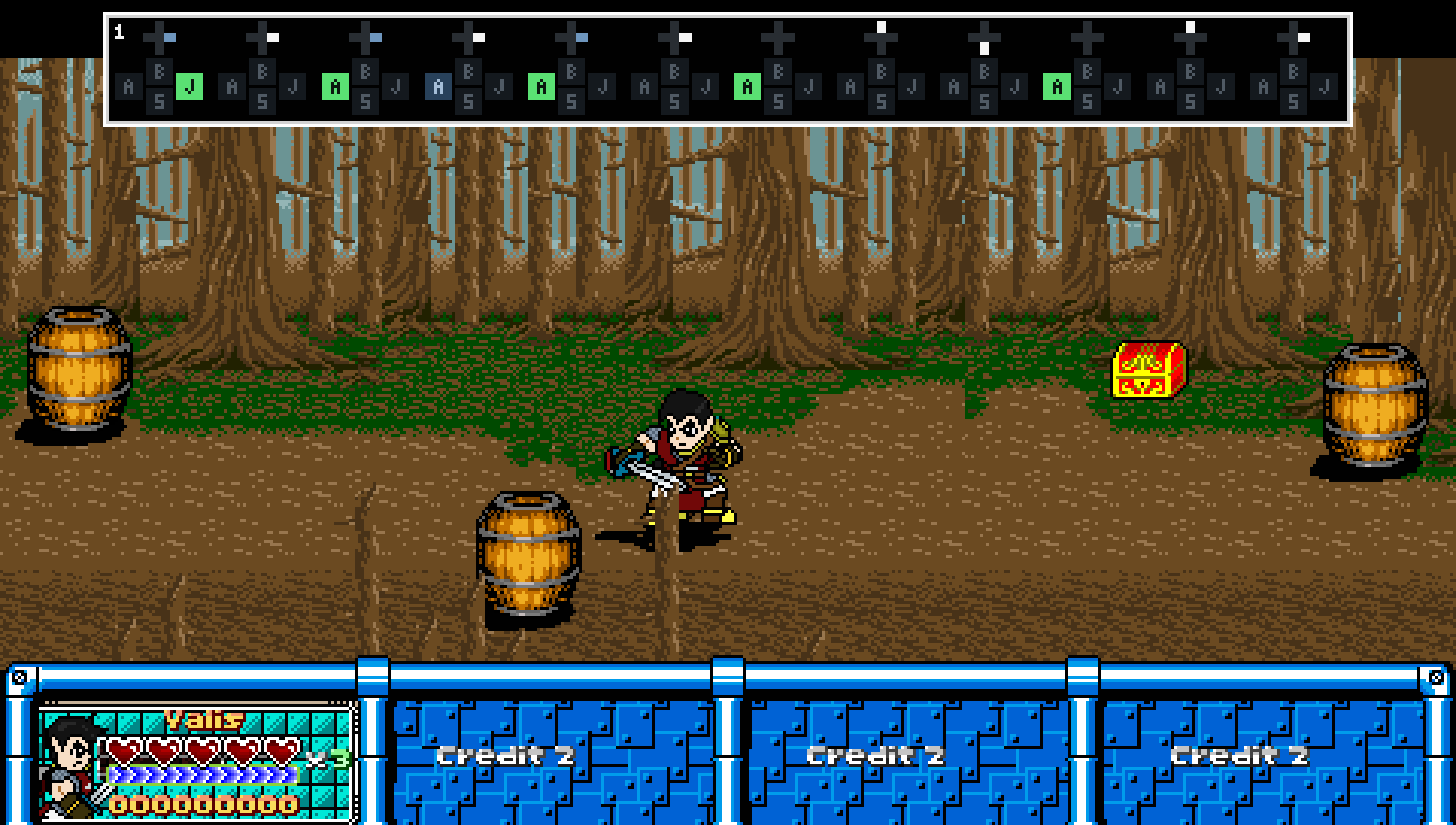
The DC Command library is a self-contained command and behavior system for OpenBOR 3.0 v6391 that emulates many of the new native command features in OpenBOR 4+, and adds a few more.
Build responsive combos, complex special moves, charged attacks, and automatic character behavior through one shared system of inputs, conditions, and actions. Commands can start animations, jump to specific frames, adjust resources, or change variables that your own scripts respond to.
What can it do?
Built to keep script work small
I've used every practical trick I know to keep the library's memory use and CPU overhead low, with particular attention to minimizing memory churn. Its optimizations include:
Installation
Copy the complete data/scripts/dc_command folder into your module.
If a hook already exists, add the include and function calls to its existing script. Keep your existing code. If it does not exist, create it using the examples below.
Global hooks
data/scripts/loading.c
Place the startup calls before other initialization, and the shutdown call before other cleanup.
data/scripts/keyall.c
data/scripts/updated.c
Use the filename updated.c, including the final d.
Character hooks
Each character using commands needs these hooks. For missing hooks, create the script files and add the corresponding declarations to the model header. Replace your_character with your character's folder. If a hook is already declared, use its existing script.
Include the library in each script:
Place these calls inside the corresponding script's main():
event_animation.c needs a conditional return:
Keep this check before existing frame logic. Put it directly in the script named by animationscript.
Leave the model settings nonestedscript and nocmdcompatible unset or set to 0.
Creating commands and cancels
DC Command uses the same building blocks for special moves, animation cancels, and automatic behavior:
The number passed to
Model-level commands have their own growing list and can work across animations. Animation commands belong to the animation where you define them.
Understanding the 32-cancel limit
Each animation has definition slots 0-31. The limit counts complete cancel definitions, not individual conditions. Each slot holds one complete cancel, including its inputs, conditions, resource rules, and actions.
For example, a cancel that requires:
Conditions and resource entries belong to that definition. They do not consume additional cancel slots. Resource entries have their own numbering within each definition, separate from the cancel index.
Every animation has its own 32 slots. Rule 0 in ATTACK1 is separate from rule 0 in ATTACK2 and model-level rule 0.
Use animation cancels first for animation-specific behavior. They keep those definitions attached to the animation where they belong.
If you ever need more than 32 complete cancels for one animation, define the additional cancels at model level and restrict them with an animation condition:
That condition makes the model-level cancel eligible only during ATTACK1. Model-level definitions have no fixed count limit and do not consume the animation's 32 slots, giving you room to expand when needed.
The examples below are separate recipes. Choose unused indices when combining them, and replace example animations with your own.
1. Create a special-move command
This command starts FOLLOW1 when the player enters Down, Forward, Attack while the character is in IDLE.
Put the definition in your existing spawn hook, after
The scope switch controls where you create definitions. Switching back to 0 does not disable the model-level commands you already created.
Model-level commands have no automatic animation or frame restriction. Change or remove the IDLE condition to suit the states where your move should work.
Tip: As with native commands, don't try to be overly precise and require diagonal chords like Down, Down+Forward, Forward, Attack. In typical side-scrolling gameplay, this makes commands feel less responsive and accurate, not more.
Overlapping commands
Suppose FOLLOW1 is your fireball and FOLLOW2 is your super fireball. Keep the previous command, then define this second model-level command:
The shorter command is contained in the end of the longer one. When both are eligible and match the completed input, the longer command wins.
Priority favors more input steps, then more required keys. You do not need to place the longer command at a lower index to give it priority.
2. Create an animation cancel
Animation definitions use the same functions through
This example accepts Attack during frames 1-5 of ATTACK1, then starts FOLLOW2 on frame 5. Put this block before ATTACK1's first frame:
Frame numbers start at 0. Both ends of the acceptance window are included.
Remove the
To require at least one registered hit, add this inside the definition:
This checks the engine's current animation hit count. Blocked contacts can count too.
Buffer lifetime
Releasing the button does not withdraw accepted input. Leaving the source animation discards its pending buffer.
You can also limit how long the input waits:
This gives the accepted input a 100-tick lifetime. Without an expiry, it can remain pending until execution or source-animation exit.
Ordinary conditions are accepted with the input. Resources are checked again when the buffered action executes.
Checking a definition on its setup frame
The animation hook runs before that frame's
Later frame checks happen automatically. The buffered example above targets later frames, so it does not need an explicit execute.
Without explicit frame bounds, a new animation definition applies to the frame where it was first created. To extend its window through the rest of the animation:
3. Choose the input
The following script snippets belong inside an open definition. They also work as
Press, hold, and release
These are three separate examples. Each ordinary input call starts another chronological step.
Use
Hold Forward and press Attack
Join requirements belonging to the same step with
Forward can already be held. Pressing Attack completes the step.
Attack + Jump
Combine key flags with
Either button may be pressed first. Their presses must fit within six ticks, and both must still be held when the chord completes.
If another DC Command rule handles Attack alone, give that simpler rule a conflict window:
This lets the simpler command wait briefly for an eligible competing chord. Chord grace alone does not delay the simpler command.
Charge and release
Hold Attack for at least 100 ticks, then release it:
To add a maximum permitted hold duration, place this after the HOLD requirement too:
Both duration limits are inclusive.
Charge and fire automatically
This attempts the command when Attack has been held for 100 ticks:
The player does not need to release the button. Failed conditions spend that hold's attempt; releasing and pressing again starts another.
Use
Reject unwanted buttons
This prevents completion while Up or Jump is held:
Sequence timing
Set the maximum gap between successive steps:
The default is 50 ticks. This setting applies to the whole sequence.
At normal speed, the engine uses 200 elapsed-time ticks per second:
These values are elapsed-time ticks, not animation frames or model
Commands support up to 32 input steps. Chords count as one step; timing settings and SAME_STEP additions do not consume another step.
4. Add conditions
Every configured condition must pass. For alternative ways to activate the same action, define separate rules.
Animation and frame conditions
For example, restrict a model-level command to frames 2-6 of ATTACK1:
Other animation checks include:
These illustrate separate requirements. The previous-animation check reads the previous observed frame, which may belong to the current animation. Use it for entry-sensitive behavior, not persistent history of the last distinct animation.
Character flags
Require walking and a cleared jumping flag:
Supported flag conditions are:
These compare the corresponding engine flags. Zero requires a cleared flag; it does not disable the condition.
Target range
Require a target within FOLLOW1's configured range:
Require that range to be clear:
The two checks are independent. For example, if FOLLOW1 has your long-range settings and FOLLOW2 has your close-range settings:
This requires a target in the long range and no target in the close range.
Passing
Limit repeated attempts
Space attempts by at least 100 ticks:
Allow only one attempt during an observed frame occurrence:
These throttle attempts, including failures. Avoid the frame restriction when you want a later button press to qualify during the same frame.
5. Require, spend, or restore resources
Resource definitions can check balances, change them, or do both.
This requires 20 MP and spends 20 when the command executes:
The argument order is:
Use NULL() for an unused interior argument. Trailing arguments can be omitted.
Requirements and adjustments are independent. Requiring 20 does not spend 20. Spending 20 without a minimum does not automatically reject an underfunded command.
The default adjustment floor is 1. Supply 0 when the resource may be emptied.
These examples belong to separate definitions:
Use different resource indices when combining several entries in one command.
Spend MP before HP
The HP entry names resource entry 0 as its parent. Unpaid cost flows from MP to HP.
With 50 MP and 30 HP, this leaves 0 MP and 20 HP. The HP floor is 1. Minimum requirements and spending floors remain separate, so a floor can prevent the full deduction.
Custom meters and flags
Use an entity variable as a resource:
This requires at least 10 in the owner's
The argument order adds scope and name before the resource settings:
For a flag that must equal 1 and is consumed back to 0:
Scopes are:
Use entity or global variables for values shared across hooks. Local variables belong to whichever hook is evaluating the command.
Variable resources require non-negative integers. Unset variables count as zero.
Velocity checks and changes
Velocity uses a related helper:
For example, require X velocity between -3.0 and 0.0, add 0.75, and cap the result between -4.0 and 4.0:
To set vertical velocity and stop depth movement:
X is horizontal, Y is vertical, and Z is depth. Values follow world axes, independent of facing.
Omit the change arguments for a condition-only check. Required bounds of 0 and 0 require a stopped axis.
Velocity shares the resource index space. Its changes happen before animation actions, so destination scripts or engine physics can change it afterward.
6. Choose what happens
Start an animation
FOLLOW animations are just examples. You can use any valid animation through the attack action.
To enter an animation through the engine's idle action:
Jump to a frame
Jump to frame 4 of the current animation:
Combine animation and frame actions to enter FOLLOW2 and jump to frame 4:
For this combined action, put
Frames skipped by the jump do not run their setup commands. Define anything needed by the destination before the jump.
Change character flags
For example:
Supported flag actions are:
These assign the flags directly. Setting a jumping flag does not supply jump velocity, for example.
Set a variable
Commands can request behavior from your own scripts without changing animation.
This model-level command sets an entity variable when Special is pressed:
Your own script can read
Variable actions use the same scope choices as variable resources. SET can assign integers, strings, decimals, pointers, or NULL().
Adjust a variable
Add one to an entity's combo counter, keeping it between 0 and 10:
The current value must be an integer or NULL(). Unset values start from zero. Unlike variable resources, this action supports negative values and negative caps.
Each definition supports one variable action: SET or ADJUST. It can run alone or accompany animation, frame, flag, and resource changes.
Resources change first, then the variable action runs, then animation/frame actions follow. Destination animation scripts can therefore read the updated variable immediately.
7. Create automatic behavior
Leave out input steps to make a rule operate entirely from its conditions. This also works for NPCs.
This model-level rule waits for
Your gameplay script requests the action with:
Here, self must be the character owning the command. The request waits until its conditions pass.
Consuming the flag prevents the same request from repeating. For automatic rules generally, make success stop the conditions from passing or give the rule a suitable attempt delay.
8. Add chance or random choices
Give a command a fixed 50% chance:
Place the call inside its open/close block. Chance works for both animation and model-level definitions.
For an adjustable chance:
This starts at 50%, decreases by 20 after a passed roll, and increases by 10 after a failed roll, staying between 0% and 100%. Adjustments follow the chance roll itself, even if a later resource check prevents the action.
Choose between animation commands
To choose equally between eligible animation rules, mark each with
Put the complete group before the frame where the choice should happen. Define all candidates before executing.
Each candidate can have its own conditions. Only eligible candidates participate. Random-list selection belongs to animation definitions; percentage chance works in either scope.
9. Change an existing definition
Completed definitions are retained. Passing over their setup again during animation playback does not rebuild them.
To deliberately replace one, open it with reset enabled:
The model-text equivalent is:
Use ordinary open calls for normal setup. Use reset when you intentionally replace or unlock behavior.
10. Show inputs while testing
Enable the command display for player 1:
Enable it for players 1 and 2:
Turn it off:
The constant names use zero-based player indices. The display helps you see the inputs received while you tune sequences, holds, and chords.
You can use DC Command without reading this section. If you are curious about how it works, why certain limits exist, or what all those optimization terms mean, this is the tour.
The library runs inside OpenBOR's script engine. Function calls, property lookups, array access, and memory allocation all add work. Small costs matter when they repeat across characters, commands, input events, and animation frames.
The design moves preparation into setup where practical, keeps frequently used storage available, and gives runtime code quick ways to decide whether more work is needed.
Distributing these jobs across the engine's hooks puts work where it is needed. Hold timers still receive service while a button stays down, even though no new press arrives. Frame-dependent work remains tied to animation progress.
OpenBOR already identifies the current animation with a number. The library uses that same number as an array index. Conceptually, the lookup is:
There is no need to search a list for the animation's name or maintain another mapping between engine IDs and library IDs. If the engine reports animation 42, directory entry 42 is where its commands belong.
That is the indexing we get "for free": the engine has already supplied the identifier. The directory itself still costs memory, and looking up an entry still takes work.
Reserving a directory entry does not create 32 complete commands for every animation. Unused entries remain empty. Child lists and definitions are created when setup needs them. This trades some empty directory cells for a direct route to the relevant list.
The main storage areas have different owners:
The library stores these records consecutively in a flat array. Locating a field follows this pattern:
For example, each input event has seven fields. Within the event area, record 0 occupies positions 0-6, record 1 occupies 7-13, and record 2 occupies 14-20. The surrounding player record has its own header and hold timestamps before that event area.
One allocation can hold the whole group. Reading an event does not first require fetching a separate child array for that event. Its location is calculated directly.
The entire library is not one giant array. The master directory still leads to child lists and definitions. Flattening is used inside storage areas where repeated, fixed-width records make it useful.
These sizes count script array fields, not bytes. Each field stores a script-engine value, with its associated type and storage overhead.
Once the definition is ready, passing over its setup again during animation playback reuses it. The script calls still occur, but their setup gates prevent rebuilding a completed definition unless you explicitly request a reset.
Sequence construction uses one reusable cache per entity, allocated when that entity first defines input steps. The cache has room for all 32 steps. Only one definition can be open on that entity at a time, so the next definition can reuse the same workspace.
Completed sequences keep only their actual steps. The current layout has ten header fields and seven fields per step. Down, Forward, Attack therefore retains
Automatic timer storage is created only for definitions that use automatic holds. Resource calculations likewise share an entity workspace, growing in groups of eight balance slots when larger definitions need it.
This is selective preallocation. Frequently reused storage is retained; every optional feature does not receive its maximum storage in every definition. New definitions and explicit resets can still allocate memory.
Suppose execution slots 1, 3, and 5 are occupied. Their flags can be combined like this:
The result is 42. That number describes the combination of occupied slots; it does not mean there are 42 occupied slots.
The useful operations are small:
Different masks answer different questions. The condition mask identifies categories a rule uses, so a rule with no target condition can skip targeting work. The execution mask identifies occupied slots. The automatic-step mask identifies steps needing timer service. The random-candidate mask identifies eligible animation rules.
These flags describe where work exists; the detailed values still live in the corresponding records. One condition-category bit may cover several settings or resource entries.
Only constants documented as flags or masks should be combined with OR. Ordinary field indices and resource indices are numbers with a different purpose.
These are separate limits. They do not mean 32 commands across your game, 32 conditions in total, or 32 physical controller buttons. Resource balance slots count distinct balances, not every repeated resource entry.
Model-level definitions have no fixed 32-definition limit because their list does not participate in the animation random-candidate mask. They still share the entity's execution pool.
Slot numbers run from 0 through 31. Bit 31 remains usable even though setting it makes a signed integer negative. The library checks whether masks are nonzero rather than assuming an active mask must be positive.
Arrays themselves can contain more than 32 fields. The bound applies where one bit represents one item, not to every array in the library.
Bounds are not limits.
These bounds may seem low, but in real terms they are far beyond practical limits. It is virtually impossible to fill the 32-slot action pool because slots are cleared as their executions finish. Likewise, random selection cannot exceed 32 candidates because that is the number of command definitions allowed per animation.
Thirty-two command steps exceed the engine's native 23, and those 23 steps are enough for five complete circuits around the controller's four cardinal directions, followed by three button presses. That is already absurdly generous for special moves - far more than even the worst excesses of old-school SNK-style motions.
Remember, chords count as one step. Attack + Jump uses one sequence step, not one for each button. Those three remaining steps could each be an entire chord.
Some especially outrageous creator might run into the 32-command-per-animation limit. Even then, the unbounded model-level list acts as an escape valve: put the additional commands there and restrict them to the animation where they belong.
The active mask answers that first. The library walks the relevant bits and reads record data for occupied slots. Finding a free slot uses the inverse mask. This still involves a bounded bit scan; it avoids inspecting every empty record's fields.
Slot release uses a guarded XOR to clear a bit known to be set. XOR toggles, so the guard matters: blindly applying it to an empty slot would mark that slot occupied. The pinned VM's problematic bitwise NOT operation is avoided by using XOR with -1 when all bits need to be inverted.
Resource evaluation uses the same general idea for a different purpose. Its workspace mask starts empty for each evaluation. The first visit to a balance loads its current value; further entries using that balance share the same working value. Unused alternatives need no balance read, and the next evaluation can start with an empty mask without clearing every old field first.
Sequence steps do not need another occupancy mask. Their populated records form a consecutive ordered list: step 0, step 1, step 2, and so on. The stored step count already identifies that list. The automatic-step mask remains useful because only some of those steps need timers.
Changing animation can immediately enter another script callback before the original call returns. Entering an animation and then jumping to a frame may also require the destination's setup to finish between those actions.
The library therefore keeps a pool of 32 reusable execution records per entity. It secures a free slot before committing an execution, copies the needed actions into that record, and tracks the next stage and any wait. Once the work finishes or is discarded, the slot becomes available again. If every slot is occupied, the new execution is discarded and the capacity failure is logged.
This avoids allocating and freeing a fresh action record for every activation. One slot can hold several effects from the same command. Defined commands and accepted input waiting for a buffer frame do not each reserve an execution slot.
Each use of a slot also gets an identity. If a callback returns after that slot has been reused, the identity prevents it from treating the new occupant as its old execution. The stage advances before calls that can reenter script, preventing a completed stage from running twice.
The 32-slot bound counts unfinished executions. It does not represent 32 engine threads or limit how many times a command can activate over the course of play.
Physical presses and releases append events. Automatic hold thresholds can also create events. Simply continuing to hold a button does not record another physical press every frame.
The write cursor points to the next slot to fill. After slot 127 comes slot 0. Once the buffer is full, each new event replaces the oldest one. Existing records stay where they are; the library does not shift the whole history to make space.
The capacity is deliberate: 32 steps fit four times into 128 events. That leaves room around a full-length sequence for presses, releases, and other recorded events. Steps describe logical requirements; records describe input events.
Chords still count as one sequence step. Attack + Jump may involve two separate press records within its grace period, followed by releases, while occupying one step in the definition. Particularly busy input can still overwrite old history; four events per step is a sizing allowance, not a fixed conversion or a guarantee for every possible chord.
Separately stored hold-start times let live charge timing survive after an old press event is overwritten. They do not recreate that missing event for sequence matching.
Why the wrap uses a mask
The buffer size is a power of two:
Advancing from 126 produces 127. Advancing from 127 produces 0. The actual code uses the named capacity mask,
This handles wrapping with one AND operation, without a separate branch at the end. It also handles crossing the beginning while reading backward: in this VM,
Notice the difference from an active mask. Here, seven bits form an address selecting one of 128 records. In the execution mask, 32 bits provide 32 separate occupancy flags. These are different uses of bits.
The wrapping formula requires a power-of-two capacity. Changing the buffer to 100 and using
If Attack matches, the reader works backward for Forward, then Down. The cursor points to the next write, so the newest event is one slot behind it:
Age 0 means the newest event, age 1 the preceding event, and so on. For example, if the next write slot is 2:
The physical indices wrap, but chronological order stays intact. Stored timestamps enforce timing limits; the distance between slots does not stand in for elapsed time. Directional steps use the facing recorded with their input, so turning later does not rewrite earlier Forward or Backward inputs.
Skipping is selective. Seeking a press can pass over a release-only event, but an intervening wrong press can break the sequence. The reader does not rummage through old history for any previously completed command whenever an unrelated input arrives. Chords can inspect multiple contributing presses within their permitted grace period.
Reading history also does not consume it. Competing definitions can examine the same events. Acceptance tracks consumed input separately, preventing that input from firing another live command while retaining the chronological records for other readers.
Packing reduces stored values and, where both parts are needed together, array or variable accesses. Masks and shifts recover the individual parts. Each part needs a defined range so its bits do not interfere with its neighbor.
The public setup functions handle these layouts for you.
The DC Command library is a self-contained command and behavior system for OpenBOR 3.0 v6391 that emulates many of the new native command features in OpenBOR 4+, and adds a few more.
Build responsive combos, complex special moves, charged attacks, and automatic character behavior through one shared system of inputs, conditions, and actions. Commands can start animations, jump to specific frames, adjust resources, or change variables that your own scripts respond to.
What can it do?
- Animation and model-level commands - Define up to 32 cancel commands per animation, plus an unlimited number of model-level commands. Model-level commands work across animations unless you restrict them, making them useful for ordinary special moves, cancels, and automatic behavior.
- Complex inputs - Build sequences of up to 32 steps per command using presses, holds, releases, and button chords. Support directional motions, charge moves, release-triggered attacks, and moves that activate automatically after holding a button.
- Buffered commands - Accept input during a chosen window and execute the action at a later animation frame. Configurable timing and chord grace help commands feel responsive, while more complex matching commands take priority over simpler ones.
- Throttling - Set time limits between acceptance of commands to limit spam and mashing.
- Flexible conditions - Check animations, frames, previous animations, character states, hit counts, velocities, and variables. Require a target inside an animation’s range, require that range to be clear, or combine both checks using different ranges.
- Resource rules - Require, spend, or restore HP, MP, guard points, and custom variable-based resources. Apply minimums, maximums, and linked costs such as consuming MP before drawing from HP.
- Flexible actions - Start any valid animation at a chosen frame, jump within the current animation, change supported character flags, adjust velocity, or set and modify variables.
- Automatic and randomized behavior - Commands can run entirely from conditions without player input. Add adjustable chance checks or randomly choose among eligible animation commands.
- Optional command display - Show input history for selected players. The display needs no sprites or fonts and can be used on its own without defining any commands.
Built to keep script work small
I've used every practical trick I know to keep the library's memory use and CPU overhead low, with particular attention to minimizing memory churn. Its optimizations include:
- Distributed Workfow - Processing is distributed across OpenBOR's event hooks to reduce redundant work.
- Bit twiddling - Heavy use of bit masks and packed values keeps bookkeeping compact and gates unnecessary processing.
- Flat arrays - Extensive array flattening reduces allocation overhead and unnecessary levels of indirection.
- Shared data - Common data is shared where practical to reduce duplicated storage and repeated work.
- Prepared definitions - Setup results are retained and reused, minimizing repeated interpretation during play.
- Minimal memory churn - Preallocation and reusable storage minimize repeated allocation and freeing.
- No-op gates - Early exits stop unnecessary processing when there is nothing relevant to do.
Installation
Copy the complete data/scripts/dc_command folder into your module.
If a hook already exists, add the include and function calls to its existing script. Keep your existing code. If it does not exist, create it using the examples below.
Global hooks
data/scripts/loading.c
C:
#include "data/scripts/dc_command/main.c"

void oncreate()
{
    dc_command_startup_sentinel();
}

void main()
{
    dc_command_startup_sentinel();
}

void ondestroy()
{
    dc_command_shutdown_sentinel();
}
Place the startup calls before other initialization, and the shutdown call before other cleanup.
data/scripts/keyall.c
C:
#include "data/scripts/dc_command/main.c"

void main()
{
    dc_command_key_sentinel();
}
data/scripts/updated.c
C:
#include "data/scripts/dc_command/main.c"

void main()
{
    dc_command_input_display_global();
}
Use the filename updated.c, including the final d.
Character hooks
Each character using commands needs these hooks. For missing hooks, create the script files and add the corresponding declarations to the model header. Replace your_character with your character's folder. If a hook is already declared, use its existing script.
Code:
onspawnscript data/chars/your_character/script/event_spawn.c
onkillscript data/chars/your_character/script/event_kill.c
thinkscript data/chars/your_character/script/event_think.c
script data/chars/your_character/script/event_update.c
animationscript data/chars/your_character/script/event_animation.c
Include the library in each script:
C:
#include "data/scripts/dc_command/main.c"Place these calls inside the corresponding script's main():
- event_spawn.c -
dc_command_initialize(getlocalvar("self")); - event_kill.c -
dc_command_cleanup(getlocalvar("self")); - event_think.c -
dc_command_think_sentinel(getlocalvar("self")); - event_update.c -
dc_command_update_sentinel(getlocalvar("self"));
C:
#include "data/scripts/dc_command/main.c"

void main()
{
    dc_command_initialize(getlocalvar("self"));

    // Model-level command definitions go here.
}
event_animation.c needs a conditional return:
C:
#include "data/scripts/dc_command/main.c"

void main()
{
    DC_COMMAND_ANIMATION_SENTINEL();
}
Keep this check before existing frame logic. Put it directly in the script named by animationscript.
Leave the model settings nonestedscript and nocmdcompatible unset or set to 0.
Creating commands and cancels
DC Command uses the same building blocks for special moves, animation cancels, and automatic behavior:
- Inputs describe what the player must enter.
- Conditions decide whether the command is allowed.
- Actions describe what happens when it succeeds.
C:
dc_command_open(0);

// Define inputs, conditions, and actions here.

dc_command_close();
The number passed to
dc_command_open() identifies the complete definition. Use a different number for each definition in the same list.Model-level commands have their own growing list and can work across animations. Animation commands belong to the animation where you define them.
Understanding the 32-cancel limit
Each animation has definition slots 0-31. The limit counts complete cancel definitions, not individual conditions. Each slot holds one complete cancel, including its inputs, conditions, resource rules, and actions.
For example, a cancel that requires:
- Pressing Attack.
- Frames 1-5.
- At least one registered hit.
- Target availability within a chosen range.
- At least 20 MP.
Conditions and resource entries belong to that definition. They do not consume additional cancel slots. Resource entries have their own numbering within each definition, separate from the cancel index.
Every animation has its own 32 slots. Rule 0 in ATTACK1 is separate from rule 0 in ATTACK2 and model-level rule 0.
Use animation cancels first for animation-specific behavior. They keep those definitions attached to the animation where they belong.
If you ever need more than 32 complete cancels for one animation, define the additional cancels at model level and restrict them with an animation condition:
C:
dc_command_setup(DC_COMMAND_CONDITION_ANIMATION_CURRENT, openborconstant("ANI_ATTACK1"));That condition makes the model-level cancel eligible only during ATTACK1. Model-level definitions have no fixed count limit and do not consume the animation's 32 slots, giving you room to expand when needed.
The examples below are separate recipes. Choose unused indices when combining them, and replace example animations with your own.
1. Create a special-move command
This command starts FOLLOW1 when the player enters Down, Forward, Attack while the character is in IDLE.
Put the definition in your existing spawn hook, after
dc_command_initialize():
C:
dc_command_set_global(1);

dc_command_open(0);
dc_command_command_step(DC_COMMAND_KEY_PRESS, openborconstant("FLAG_MOVEDOWN"));
dc_command_command_step(DC_COMMAND_KEY_PRESS, openborconstant("FLAG_FORWARD"));
dc_command_command_step(DC_COMMAND_KEY_PRESS, openborconstant("FLAG_ATTACK"));
dc_command_setup(DC_COMMAND_CONDITION_ANIMATION_CURRENT, openborconstant("ANI_IDLE"));
dc_command_setup(DC_COMMAND_ACTION_ANIMATION_ATTACK_ID, openborconstant("ANI_FOLLOW1"));
dc_command_close();

dc_command_set_global(0);dc_command_set_global(1)selects model-level definitions.dc_command_open(0)opens definition 0.- The three input calls describe successive presses.
- The animation condition restricts the move to IDLE.
- The action starts FOLLOW1.
dc_command_close()finishes the definition.dc_command_set_global(0)returns subsequent definitions to animation scope.
The scope switch controls where you create definitions. Switching back to 0 does not disable the model-level commands you already created.
Model-level commands have no automatic animation or frame restriction. Change or remove the IDLE condition to suit the states where your move should work.
Tip: As with native commands, don't try to be overly precise and require diagonal chords like Down, Down+Forward, Forward, Attack. In typical side-scrolling gameplay, this makes commands feel less responsive and accurate, not more.
Overlapping commands
Suppose FOLLOW1 is your fireball and FOLLOW2 is your super fireball. Keep the previous command, then define this second model-level command:
C:
dc_command_set_global(1);

dc_command_open(1);
dc_command_command_step(DC_COMMAND_KEY_PRESS, openborconstant("FLAG_MOVEDOWN"));
dc_command_command_step(DC_COMMAND_KEY_PRESS, openborconstant("FLAG_FORWARD"));
dc_command_command_step(DC_COMMAND_KEY_PRESS, openborconstant("FLAG_MOVEDOWN"));
dc_command_command_step(DC_COMMAND_KEY_PRESS, openborconstant("FLAG_FORWARD"));
dc_command_command_step(DC_COMMAND_KEY_PRESS, openborconstant("FLAG_ATTACK"));
dc_command_setup(DC_COMMAND_CONDITION_ANIMATION_CURRENT, openborconstant("ANI_IDLE"));
dc_command_setup(DC_COMMAND_ACTION_ANIMATION_ATTACK_ID, openborconstant("ANI_FOLLOW2"));
dc_command_close();

dc_command_set_global(0);
The shorter command is contained in the end of the longer one. When both are eligible and match the completed input, the longer command wins.
Priority favors more input steps, then more required keys. You do not need to place the longer command at a lower index to give it priority.
2. Create an animation cancel
Animation definitions use the same functions through
@cmd.This example accepts Attack during frames 1-5 of ATTACK1, then starts FOLLOW2 on frame 5. Put this block before ATTACK1's first frame:
Code:
@cmd dc_command_open 0
@cmd dc_command_command_step DC_COMMAND_KEY_PRESS openborconstant("FLAG_ATTACK")
@cmd dc_command_setup DC_COMMAND_CONDITION_ANIMATION_FRAME_START 1
@cmd dc_command_setup DC_COMMAND_CONDITION_ANIMATION_FRAME_END 5
@cmd dc_command_setup DC_COMMAND_CONDITION_BUFFER_FRAME 5
@cmd dc_command_setup DC_COMMAND_ACTION_ANIMATION_ATTACK_ID openborconstant("ANI_FOLLOW2")
@cmd dc_command_close
Frame numbers start at 0. Both ends of the acceptance window are included.
- Press during frames 1-4: the input waits until frame 5.
- Press during frame 5: the action can execute immediately.
- Press outside frames 1-5: this cancel does not accept it.
Remove the
DC_COMMAND_CONDITION_BUFFER_FRAME line if the cancel should execute immediately anywhere in the acceptance window.To require at least one registered hit, add this inside the definition:
Code:
@cmd dc_command_resource 0 DC_COMMAND_RESOURCE_HITS NULL() 1This checks the engine's current animation hit count. Blocked contacts can count too.
Buffer lifetime
Releasing the button does not withdraw accepted input. Leaving the source animation discards its pending buffer.
You can also limit how long the input waits:
Code:
@cmd dc_command_setup DC_COMMAND_CONDITION_BUFFER_TIME 100This gives the accepted input a 100-tick lifetime. Without an expiry, it can remain pending until execution or source-animation exit.
Ordinary conditions are accepted with the input. Resources are checked again when the buffered action executes.
Checking a definition on its setup frame
The animation hook runs before that frame's
@cmd lines. If a newly defined rule needs to act immediately on the frame where you create it, put this after its dc_command_close:
Code:
@cmd dc_command_executeLater frame checks happen automatically. The buffered example above targets later frames, so it does not need an explicit execute.
Without explicit frame bounds, a new animation definition applies to the frame where it was first created. To extend its window through the rest of the animation:
Code:
@cmd dc_command_setup DC_COMMAND_CONDITION_ANIMATION_FRAME_END DC_COMMAND_VALUE_FRAME_LAST3. Choose the input
The following script snippets belong inside an open definition. They also work as
@cmd lines using the same argument order.Press, hold, and release
C:
// New Attack press.
dc_command_command_step(DC_COMMAND_KEY_PRESS, openborconstant("FLAG_ATTACK"));

// Attack currently held.
dc_command_command_step(DC_COMMAND_KEY_HOLD, openborconstant("FLAG_ATTACK"));

// Attack released.
dc_command_command_step(DC_COMMAND_KEY_RELEASE, openborconstant("FLAG_ATTACK"));
These are three separate examples. Each ordinary input call starts another chronological step.
Use
FLAG_FORWARD and FLAG_BACKWARD for directions relative to the character's facing. Use FLAG_MOVELEFT, FLAG_MOVERIGHT, FLAG_MOVEUP, and FLAG_MOVEDOWN for screen directions.Hold Forward and press Attack
Join requirements belonging to the same step with
DC_COMMAND_SAME_STEP:
C:
dc_command_command_step(DC_COMMAND_KEY_HOLD, openborconstant("FLAG_FORWARD"));
dc_command_command_step(DC_COMMAND_KEY_PRESS | DC_COMMAND_SAME_STEP, openborconstant("FLAG_ATTACK"));
Forward can already be held. Pressing Attack completes the step.
Attack + Jump
Combine key flags with
|:
C:
dc_command_command_step(DC_COMMAND_KEY_PRESS, openborconstant("FLAG_ATTACK") | openborconstant("FLAG_JUMP"));
dc_command_command_step(DC_COMMAND_CHORD_TIME, 6);
Either button may be pressed first. Their presses must fit within six ticks, and both must still be held when the chord completes.
If another DC Command rule handles Attack alone, give that simpler rule a conflict window:
C:
dc_command_command_step(DC_COMMAND_CONFLICT_TIME, 6);This lets the simpler command wait briefly for an eligible competing chord. Chord grace alone does not delay the simpler command.
Charge and release
Hold Attack for at least 100 ticks, then release it:
C:
dc_command_command_step(DC_COMMAND_KEY_HOLD, openborconstant("FLAG_ATTACK"));
dc_command_command_step(DC_COMMAND_TIME_REQUIRED, 100);
dc_command_command_step(DC_COMMAND_KEY_RELEASE | DC_COMMAND_SAME_STEP, openborconstant("FLAG_ATTACK"));
To add a maximum permitted hold duration, place this after the HOLD requirement too:
C:
dc_command_command_step(DC_COMMAND_TIME_MAXIMUM, 200);Both duration limits are inclusive.
Charge and fire automatically
This attempts the command when Attack has been held for 100 ticks:
C:
dc_command_command_step(DC_COMMAND_KEY_HOLD | DC_COMMAND_AUTO_TRIGGER, openborconstant("FLAG_ATTACK"));
dc_command_command_step(DC_COMMAND_TIME_REQUIRED, 100);
The player does not need to release the button. Failed conditions spend that hold's attempt; releasing and pressing again starts another.
Use
DC_COMMAND_AUTO_TRIGGER_RETRY instead of DC_COMMAND_AUTO_TRIGGER if failure should restart the timer and try again while the button remains held. Success consumes the hold.Reject unwanted buttons
This prevents completion while Up or Jump is held:
C:
dc_command_command_step(DC_COMMAND_KEY_REJECT, openborconstant("FLAG_MOVEUP") | openborconstant("FLAG_JUMP"));Sequence timing
Set the maximum gap between successive steps:
C:
dc_command_command_step(DC_COMMAND_STEP_TIME, 50);The default is 50 ticks. This setting applies to the whole sequence.
At normal speed, the engine uses 200 elapsed-time ticks per second:
- 10 ticks = 0.05 seconds.
- 50 ticks = 0.25 seconds.
- 100 ticks = 0.5 seconds.
- 200 ticks = 1 second.
These values are elapsed-time ticks, not animation frames or model
delay values.Commands support up to 32 input steps. Chords count as one step; timing settings and SAME_STEP additions do not consume another step.
4. Add conditions
Every configured condition must pass. For alternative ways to activate the same action, define separate rules.
Animation and frame conditions
For example, restrict a model-level command to frames 2-6 of ATTACK1:
C:
dc_command_setup(DC_COMMAND_CONDITION_ANIMATION_CURRENT, openborconstant("ANI_ATTACK1"));
dc_command_setup(DC_COMMAND_CONDITION_ANIMATION_FRAME_START, 2);
dc_command_setup(DC_COMMAND_CONDITION_ANIMATION_FRAME_END, 6);
Other animation checks include:
C:
// Require the previous observed frame's animation to be WALK.
dc_command_setup(DC_COMMAND_CONDITION_ANIMATION_PREVIOUS, openborconstant("ANI_WALK"));

// Require the last DC Command animation destination to be FOLLOW1.
dc_command_setup(DC_COMMAND_CONDITION_LAST_COMMAND_ANIMATION_TRUE, openborconstant("ANI_FOLLOW1"));

// Exclude FOLLOW1 as the last command destination.
dc_command_setup(DC_COMMAND_CONDITION_LAST_COMMAND_ANIMATION_FALSE, openborconstant("ANI_FOLLOW1"));
These illustrate separate requirements. The previous-animation check reads the previous observed frame, which may belong to the current animation. Use it for entry-sensitive behavior, not persistent history of the last distinct animation.
Character flags
Require walking and a cleared jumping flag:
C:
dc_command_setup(DC_COMMAND_CONDITION_PROP_WALK, 1);
dc_command_setup(DC_COMMAND_CONDITION_PROP_JUMPING, 0);
Supported flag conditions are:
DC_COMMAND_CONDITION_PROP_DUCKINGDC_COMMAND_CONDITION_PROP_GETTINGDC_COMMAND_CONDITION_PROP_IDLEDC_COMMAND_CONDITION_PROP_JUMPINGDC_COMMAND_CONDITION_PROP_WALK
These compare the corresponding engine flags. Zero requires a cleared flag; it does not disable the condition.
Target range
Require a target within FOLLOW1's configured range:
C:
dc_command_setup(DC_COMMAND_CONDITION_TARGET_FOUND, openborconstant("ANI_FOLLOW1"));Require that range to be clear:
C:
dc_command_setup(DC_COMMAND_CONDITION_TARGET_NOT_FOUND, openborconstant("ANI_FOLLOW1"));The two checks are independent. For example, if FOLLOW1 has your long-range settings and FOLLOW2 has your close-range settings:
C:
dc_command_setup(DC_COMMAND_CONDITION_TARGET_FOUND, openborconstant("ANI_FOLLOW1"));
dc_command_setup(DC_COMMAND_CONDITION_TARGET_NOT_FOUND, openborconstant("ANI_FOLLOW2"));
This requires a target in the long range and no target in the close range.
Passing
NULL() explicitly uses the current animation's range. Leaving the condition out disables that check.Limit repeated attempts
Space attempts by at least 100 ticks:
C:
dc_command_setup(DC_COMMAND_CONDITION_DELAY_TIME, 100);Allow only one attempt during an observed frame occurrence:
C:
dc_command_setup(DC_COMMAND_CONDITION_DELAY_FRAME_STATE, DC_COMMAND_VALUE_FRAME_STATE_UPDATED);These throttle attempts, including failures. Avoid the frame restriction when you want a later button press to qualify during the same frame.
5. Require, spend, or restore resources
Resource definitions can check balances, change them, or do both.
This requires 20 MP and spends 20 when the command executes:
C:
dc_command_resource(0, DC_COMMAND_RESOURCE_MP, NULL(), 20, NULL(), -20, 0);The argument order is:
C:
dc_command_resource(index, type, parent, required_min, required_max, adjust, cap_min, cap_max);- index identifies this resource entry within the command.
- type selects HP, MP, guard points, or hits.
- parent links an alternate resource. Use NULL() for an independent entry.
- required_min / required_max control the balance needed to qualify.
- adjust changes the balance. Negative spends; positive restores.
- cap_min / cap_max constrain the resulting change.
Use NULL() for an unused interior argument. Trailing arguments can be omitted.
Requirements and adjustments are independent. Requiring 20 does not spend 20. Spending 20 without a minimum does not automatically reject an underfunded command.
The default adjustment floor is 1. Supply 0 when the resource may be emptied.
These examples belong to separate definitions:
C:
// Require 1-3 hits without changing the hit count.
dc_command_resource(0, DC_COMMAND_RESOURCE_HITS, NULL(), 1, 3);

// Require and spend 10 guard points.
dc_command_resource(0, DC_COMMAND_RESOURCE_GUARDPOINTS, NULL(), 10, NULL(), -10, 0);

// Require 20 HP or less and restore 5 HP.
dc_command_resource(0, DC_COMMAND_RESOURCE_HP, NULL(), NULL(), 20, 5, 1);
Use different resource indices when combining several entries in one command.
Spend MP before HP
C:
dc_command_resource(0, DC_COMMAND_RESOURCE_MP, NULL(), 60, NULL(), -60, 0);
dc_command_resource(1, DC_COMMAND_RESOURCE_HP, 0, NULL(), NULL(), 0, 1);
The HP entry names resource entry 0 as its parent. Unpaid cost flows from MP to HP.
With 50 MP and 30 HP, this leaves 0 MP and 20 HP. The HP floor is 1. Minimum requirements and spending floors remain separate, so a floor can prevent the full deduction.
Custom meters and flags
Use an entity variable as a resource:
C:
dc_command_variable(0, NULL(), "charge", NULL(), 10, NULL(), -10, 0);This requires at least 10 in the owner's
charge variable and spends 10.The argument order adds scope and name before the resource settings:
C:
dc_command_variable(index, scope, name, parent, required_min, required_max, adjust, cap_min, cap_max);For a flag that must equal 1 and is consumed back to 0:
C:
dc_command_variable(0, NULL(), "special_ready", NULL(), 1, 1, -1, 0, 1);Scopes are:
NULL()- entity variable on the command owner.- Explicit live entity pointer - entity variable on that entity.
DC_COMMAND_VARIABLE_GLOBAL- global variable.DC_COMMAND_VARIABLE_LOCAL- local variable in the script evaluating the command.
Use entity or global variables for values shared across hooks. Local variables belong to whichever hook is evaluating the command.
Variable resources require non-negative integers. Unset variables count as zero.
Velocity checks and changes
Velocity uses a related helper:
C:
dc_command_velocity(index, type, required_min, required_max, set_value, adjust, cap_min, cap_max);For example, require X velocity between -3.0 and 0.0, add 0.75, and cap the result between -4.0 and 4.0:
C:
dc_command_velocity(0, DC_COMMAND_RESOURCE_VELOCITY_X, -3.0, 0.0, NULL(), 0.75, -4.0, 4.0);To set vertical velocity and stop depth movement:
C:
dc_command_velocity(1, DC_COMMAND_RESOURCE_VELOCITY_Y, NULL(), NULL(), 2.5);
dc_command_velocity(2, DC_COMMAND_RESOURCE_VELOCITY_Z, NULL(), NULL(), 0);
X is horizontal, Y is vertical, and Z is depth. Values follow world axes, independent of facing.
Omit the change arguments for a condition-only check. Required bounds of 0 and 0 require a stopped axis.
Velocity shares the resource index space. Its changes happen before animation actions, so destination scripts or engine physics can change it afterward.
6. Choose what happens
Start an animation
C:
dc_command_setup(DC_COMMAND_ACTION_ANIMATION_ATTACK_ID, openborconstant("ANI_FOLLOW2"));FOLLOW animations are just examples. You can use any valid animation through the attack action.
To enter an animation through the engine's idle action:
C:
dc_command_setup(DC_COMMAND_ACTION_SET_IDLE_ANIMATION_ID, openborconstant("ANI_IDLE"));Jump to a frame
Jump to frame 4 of the current animation:
C:
dc_command_setup(DC_COMMAND_ACTION_ANIMATION_FRAME, 4);Combine animation and frame actions to enter FOLLOW2 and jump to frame 4:
C:
dc_command_setup(DC_COMMAND_ACTION_ANIMATION_ATTACK_ID, openborconstant("ANI_FOLLOW2"));
dc_command_setup(DC_COMMAND_ACTION_ANIMATION_FRAME, 4);
For this combined action, put
@cmd dc_command_execute after FOLLOW2's entry setup, before its first frame. This lets the destination setup finish before the pending frame jump continues.Frames skipped by the jump do not run their setup commands. Define anything needed by the destination before the jump.
Change character flags
For example:
C:
dc_command_setup(DC_COMMAND_ACTION_PROP_WALK, 0);
dc_command_setup(DC_COMMAND_ACTION_PROP_IDLE, 1);
Supported flag actions are:
DC_COMMAND_ACTION_PROP_DUCKINGDC_COMMAND_ACTION_PROP_GETTINGDC_COMMAND_ACTION_PROP_IDLEDC_COMMAND_ACTION_PROP_JUMPINGDC_COMMAND_ACTION_PROP_WALK
These assign the flags directly. Setting a jumping flag does not supply jump velocity, for example.
Set a variable
Commands can request behavior from your own scripts without changing animation.
This model-level command sets an entity variable when Special is pressed:
C:
dc_command_set_global(1);

dc_command_open(3);
dc_command_command_step(DC_COMMAND_KEY_PRESS, openborconstant("FLAG_SPECIAL"));
dc_command_action_variable_set(NULL(), "summon_request", 1);
dc_command_close();

dc_command_set_global(0);
Your own script can read
summon_request, perform the requested behavior, then clear it.Variable actions use the same scope choices as variable resources. SET can assign integers, strings, decimals, pointers, or NULL().
Adjust a variable
Add one to an entity's combo counter, keeping it between 0 and 10:
C:
dc_command_action_variable_adjust(NULL(), "combo_count", 1, 0, 10);The current value must be an integer or NULL(). Unset values start from zero. Unlike variable resources, this action supports negative values and negative caps.
Each definition supports one variable action: SET or ADJUST. It can run alone or accompany animation, frame, flag, and resource changes.
Resources change first, then the variable action runs, then animation/frame actions follow. Destination animation scripts can therefore read the updated variable immediately.
7. Create automatic behavior
Leave out input steps to make a rule operate entirely from its conditions. This also works for NPCs.
This model-level rule waits for
special_ready to equal 1, then consumes the flag and starts FOLLOW1 while the character is in IDLE:
C:
dc_command_set_global(1);

dc_command_open(2);
dc_command_setup(DC_COMMAND_CONDITION_ANIMATION_CURRENT, openborconstant("ANI_IDLE"));
dc_command_variable(0, NULL(), "special_ready", NULL(), 1, 1, -1, 0, 1);
dc_command_setup(DC_COMMAND_ACTION_ANIMATION_ATTACK_ID, openborconstant("ANI_FOLLOW1"));
dc_command_close();

dc_command_set_global(0);
Your gameplay script requests the action with:
C:
setentityvar(getlocalvar("self"), "special_ready", 1);Here, self must be the character owning the command. The request waits until its conditions pass.
Consuming the flag prevents the same request from repeating. For automatic rules generally, make success stop the conditions from passing or give the rule a suitable attempt delay.
8. Add chance or random choices
Give a command a fixed 50% chance:
C:
dc_command_chance(50);Place the call inside its open/close block. Chance works for both animation and model-level definitions.
For an adjustable chance:
C:
dc_command_chance(50, -20, 10, 0, 100);This starts at 50%, decreases by 20 after a passed roll, and increases by 10 after a failed roll, staying between 0% and 100%. Adjustments follow the chance roll itself, even if a later resource check prevents the action.
Choose between animation commands
To choose equally between eligible animation rules, mark each with
DC_COMMAND_CONDITION_RAND_LIST:
Code:
@cmd dc_command_open 2
@cmd dc_command_setup DC_COMMAND_CONDITION_RAND_LIST 1
@cmd dc_command_setup DC_COMMAND_ACTION_ANIMATION_ATTACK_ID openborconstant("ANI_FOLLOW1")
@cmd dc_command_close

@cmd dc_command_open 3
@cmd dc_command_setup DC_COMMAND_CONDITION_RAND_LIST 1
@cmd dc_command_setup DC_COMMAND_ACTION_ANIMATION_ATTACK_ID openborconstant("ANI_FOLLOW2")
@cmd dc_command_close

@cmd dc_command_execute
Put the complete group before the frame where the choice should happen. Define all candidates before executing.
Each candidate can have its own conditions. Only eligible candidates participate. Random-list selection belongs to animation definitions; percentage chance works in either scope.
9. Change an existing definition
Completed definitions are retained. Passing over their setup again during animation playback does not rebuild them.
To deliberately replace one, open it with reset enabled:
C:
dc_command_open(0, 1);

// Reapply the complete replacement definition.

dc_command_close();
The model-text equivalent is:
Code:
@cmd dc_command_open 0 1Use ordinary open calls for normal setup. Use reset when you intentionally replace or unlock behavior.
10. Show inputs while testing
Enable the command display for player 1:
C:
dc_command_enable_command_display(DC_COMMAND_DISPLAY_PLAYER_0);Enable it for players 1 and 2:
C:
dc_command_enable_command_display(DC_COMMAND_DISPLAY_PLAYER_0 | DC_COMMAND_DISPLAY_PLAYER_1);Turn it off:
C:
dc_command_enable_command_display(0);The constant names use zero-based player indices. The display helps you see the inputs received while you tune sequences, holds, and chords.
Optional appendix: Under the hood
You can use DC Command without reading this section. If you are curious about how it works, why certain limits exist, or what all those optimization terms mean, this is the tour.
The library runs inside OpenBOR's script engine. Function calls, property lookups, array access, and memory allocation all add work. Small costs matter when they repeat across characters, commands, input events, and animation frames.
The design moves preparation into setup where practical, keeps frequently used storage available, and gives runtime code quick ways to decide whether more work is needed.
From definition to action
The basic workflow is:- Prepare storage - Global startup reserves input history for each player. Character initialization prepares that entity's command registry and reusable execution pool.
- Build a definition - Your open/setup/close calls describe inputs, conditions, and actions. Closing a new definition validates it and prepares information that later checks can reuse.
- Observe the relevant event - The key hook records presses and releases. Animation hooks handle frame checks and buffered actions. The update hook services timed holds and conflicts; the think hook normally polls model-level behavior that needs no input.
- Find eligible rules - Checks use the current animation's list and the model-level list as appropriate. Prepared flags help skip irrelevant tests. Input matching compares the required sequence with recent history.
- Choose and accept - Matching input commands are ranked by steps, then required keys. Configured conflict windows and random choices apply where relevant. Accepted input is consumed separately from the stored history, and a frame-buffered command can wait for its execution point.
- Execute - Resources are checked again when a buffered action executes. Resource changes and the optional variable action happen before animation/frame actions. The execution record tracks any remaining work through animation changes and script callbacks.
- Reuse - Finished executions release their pool slots. Completed definitions remain available for later use, and input recording continues around the same history buffer.
Distributing these jobs across the engine's hooks puts work where it is needed. Hold timers still receive service while a button stays down, even though no new press arrives. Frame-dependent work remains tied to animation progress.
Where the data lives - using the engine's indexing for free
Each initialized entity owns a master command directory. The directory reserves entries covering the engine's animation indices, plus a separate location for model-level definitions.OpenBOR already identifies the current animation with a number. The library uses that same number as an array index. Conceptually, the lookup is:
Code:
current animation ID -> directory entry -> that animation's command listThere is no need to search a list for the animation's name or maintain another mapping between engine IDs and library IDs. If the engine reports animation 42, directory entry 42 is where its commands belong.
That is the indexing we get "for free": the engine has already supplied the identifier. The directory itself still costs memory, and looking up an entry still takes work.
Reserving a directory entry does not create 32 complete commands for every animation. Unused entries remain empty. Child lists and definitions are created when setup needs them. This trades some empty directory cells for a direct route to the relevant list.
The main storage areas have different owners:
- Player input history belongs to the player slot. It survives character cleanup and respawning, and can record input before a controlled entity exists.
- Definitions belong to the entity, organized into animation lists and a model-level list. "Model-level" describes their scope; it does not mean every instance of that model shares one mutable command state.
- Execution records belong to the entity and hold actions currently in progress.
- Setup and resource workspaces belong to the entity and are reused by its definitions.
Flat arrays - finding records with arithmetic
Several storage areas contain repeated records: input events, sequence steps, resource entries, and executions. Each record has a fixed set of fields.The library stores these records consecutively in a flat array. Locating a field follows this pattern:
Code:
field index = header size + record number * fields per record + field offsetFor example, each input event has seven fields. Within the event area, record 0 occupies positions 0-6, record 1 occupies 7-13, and record 2 occupies 14-20. The surrounding player record has its own header and hold timestamps before that event area.
One allocation can hold the whole group. Reading an event does not first require fetching a separate child array for that event. Its location is calculated directly.
The entire library is not one giant array. The master directory still leads to child lists and definitions. Flattening is used inside storage areas where repeated, fixed-width records make it useful.
These sizes count script array fields, not bytes. Each field stores a script-engine value, with its associated type and storage overhead.
Prepare once, keep only what is needed
Closing a definition does more than mark the end of your setup calls. It prepares information such as:- Which condition categories the rule uses.
- Which input events can complete its final step.
- Its step and key counts for command priority.
- Which steps need automatic hold timers.
- How linked resources connect and which entries refer to the same balance.
Once the definition is ready, passing over its setup again during animation playback reuses it. The script calls still occur, but their setup gates prevent rebuilding a completed definition unless you explicitly request a reset.
Sequence construction uses one reusable cache per entity, allocated when that entity first defines input steps. The cache has room for all 32 steps. Only one definition can be open on that entity at a time, so the next definition can reuse the same workspace.
Completed sequences keep only their actual steps. The current layout has ten header fields and seven fields per step. Down, Forward, Attack therefore retains
10 + 3 * 7 = 31 fields. The full construction cache occupies 10 + 32 * 7 = 234 fields, shared across the entity's command-building work.Automatic timer storage is created only for definitions that use automatic holds. Resource calculations likewise share an entity workspace, growing in groups of eight balance slots when larger definitions need it.
This is selective preallocation. Frequently reused storage is retained; every optional feature does not receive its maximum storage in every definition. New definitions and explicit resets can still allocate memory.
Bitfields and masks - many small answers in one number
The v6391 script engine uses 32-bit integers. Each bit can hold a zero or a one. Treating those bits as separate flags gives one integer room for 32 yes/no answers. This is a bitfield.Suppose execution slots 1, 3, and 5 are occupied. Their flags can be combined like this:
C:
mask = (1 << 1) | (1 << 3) | (1 << 5);The result is 42. That number describes the combination of occupied slots; it does not mean there are 42 occupied slots.
The useful operations are small:
1 << slotselects the bit for a particular slot.mask | bitsets that bit while preserving the others.(mask & bit) != 0checks whether it is set.(keys & required) == requiredchecks whether every required key is present.(keys & forbidden) != 0checks whether any forbidden key is present.
Different masks answer different questions. The condition mask identifies categories a rule uses, so a rule with no target condition can skip targeting work. The execution mask identifies occupied slots. The automatic-step mask identifies steps needing timer service. The random-candidate mask identifies eligible animation rules.
These flags describe where work exists; the detailed values still live in the corresponding records. One condition-category bit may cover several settings or resource entries.
Only constants documented as flags or masks should be combined with OR. Ordinary field indices and resource indices are numbers with a different purpose.
Why 32 keeps appearing
Thirty-two is useful because it matches the number of flags in one script integer. Several separate bounds deliberately fit that width:| Capacity | Why it fits |
|---|---|
| 32 definitions per animation | Each definition index can identify one bit in the random-candidate mask. |
| 32 sequence steps | Each step can identify one bit in the automatic-step mask. |
| 32 execution slots per entity | One active mask describes which slots hold unfinished work. |
| 32 distinct resource balances per definition | One mask tracks which balances have been loaded into the shared workspace during that evaluation. |
| 32 held-key origin positions | Each possible native key-bit position has a direct place to store its hold-start time. |
These are separate limits. They do not mean 32 commands across your game, 32 conditions in total, or 32 physical controller buttons. Resource balance slots count distinct balances, not every repeated resource entry.
Model-level definitions have no fixed 32-definition limit because their list does not participate in the animation random-candidate mask. They still share the entity's execution pool.
Slot numbers run from 0 through 31. Bit 31 remains usable even though setting it makes a signed integer negative. The library checks whether masks are nonzero rather than assuming an active mask must be positive.
Arrays themselves can contain more than 32 fields. The bound applies where one bit represents one item, not to every array in the library.
Bounds are not limits.
These bounds may seem low, but in real terms they are far beyond practical limits. It is virtually impossible to fill the 32-slot action pool because slots are cleared as their executions finish. Likewise, random selection cannot exceed 32 candidates because that is the number of command definitions allowed per animation.
Thirty-two command steps exceed the engine's native 23, and those 23 steps are enough for five complete circuits around the controller's four cardinal directions, followed by three button presses. That is already absurdly generous for special moves - far more than even the worst excesses of old-school SNK-style motions.
Remember, chords count as one step. Attack + Jump uses one sequence step, not one for each button. Those three remaining steps could each be an entire chord.
Some especially outrageous creator might run into the 32-command-per-animation limit. Even then, the unbounded model-level list acts as an escape valve: put the additional commands there and restrict them to the animation where they belong.
Active masks - skip empty work
Execution slots can become free in any order. If only slots 2 and 19 are occupied, opening all 32 records to ask whether each is active would waste array accesses.The active mask answers that first. The library walks the relevant bits and reads record data for occupied slots. Finding a free slot uses the inverse mask. This still involves a bounded bit scan; it avoids inspecting every empty record's fields.
Slot release uses a guarded XOR to clear a bit known to be set. XOR toggles, so the guard matters: blindly applying it to an empty slot would mark that slot occupied. The pinned VM's problematic bitwise NOT operation is avoided by using XOR with -1 when all bits need to be inverted.
Resource evaluation uses the same general idea for a different purpose. Its workspace mask starts empty for each evaluation. The first visit to a balance loads its current value; further entries using that balance share the same working value. Unused alternatives need no balance read, and the next evaluation can start with an empty mask without clearing every old field first.
Sequence steps do not need another occupancy mask. Their populated records form a consecutive ordered list: step 0, step 1, step 2, and so on. The stored step count already identifies that list. The automatic-step mask remains useful because only some of those steps need timers.
Action pooling - reuse storage while callbacks run
The definition describes what should happen. Its execution record describes what remains to be done after that definition activates.Changing animation can immediately enter another script callback before the original call returns. Entering an animation and then jumping to a frame may also require the destination's setup to finish between those actions.
The library therefore keeps a pool of 32 reusable execution records per entity. It secures a free slot before committing an execution, copies the needed actions into that record, and tracks the next stage and any wait. Once the work finishes or is discarded, the slot becomes available again. If every slot is occupied, the new execution is discarded and the capacity failure is logged.
This avoids allocating and freeing a fresh action record for every activation. One slot can hold several effects from the same command. Defined commands and accepted input waiting for a buffer frame do not each reserve an execution slot.
Each use of a slot also gets an identity. If a callback returns after that slot has been reused, the identity prevents it from treating the new occupant as its old execution. The stage advances before calls that can reenter script, preventing a completed stage from running twice.
The 32-slot bound counts unfinished executions. It does not represent 32 engine threads or limit how many times a command can activate over the course of play.
The ring buffer - keep history without moving it
Each player has a fixed 128-event input ring buffer. Every event stores held keys, newly pressed keys, released keys, gameplay-available keys, a timestamp, facing, and automatic hold-trigger bits.Physical presses and releases append events. Automatic hold thresholds can also create events. Simply continuing to hold a button does not record another physical press every frame.
The write cursor points to the next slot to fill. After slot 127 comes slot 0. Once the buffer is full, each new event replaces the oldest one. Existing records stay where they are; the library does not shift the whole history to make space.
The capacity is deliberate: 32 steps fit four times into 128 events. That leaves room around a full-length sequence for presses, releases, and other recorded events. Steps describe logical requirements; records describe input events.
Chords still count as one sequence step. Attack + Jump may involve two separate press records within its grace period, followed by releases, while occupying one step in the definition. Particularly busy input can still overwrite old history; four events per step is a sizing allowance, not a fixed conversion or a guarantee for every possible chord.
Separately stored hold-start times let live charge timing survive after an old press event is overwritten. They do not recreate that missing event for sequence matching.
Why the wrap uses a mask
The buffer size is a power of two:
128 = 2^7. Seven bits can represent every slot from 0 to 127. Keeping those seven bits wraps the cursor:
C:
next = (next + 1) & 127;Advancing from 126 produces 127. Advancing from 127 produces 0. The actual code uses the named capacity mask,
DC_COMMAND_INPUT_SLOT_MASK.This handles wrapping with one AND operation, without a separate branch at the end. It also handles crossing the beginning while reading backward: in this VM,
-1 & 127 produces 127.Notice the difference from an active mask. Here, seven bits form an address selecting one of 128 records. In the execution mask, 32 bits provide 32 separate occupancy flags. These are different uses of bits.
The wrapping formula requires a power-of-two capacity. Changing the buffer to 100 and using
& 99 would not produce the correct sequence. Separate counts also track how much history exists and how much is available for matching; a wrapped address alone cannot establish either.Why command matching reads backward
Consider Down, Forward, Attack. The new Attack press is what could complete that command. Checking that final step first allows the library to reject a rule quickly when the latest event cannot finish it.If Attack matches, the reader works backward for Forward, then Down. The cursor points to the next write, so the newest event is one slot behind it:
C:
slot = (next - 1 - age) & 127;Age 0 means the newest event, age 1 the preceding event, and so on. For example, if the next write slot is 2:
| Age | Physical slot | Recorded event | Matching work |
|---|---|---|---|
| 0 | 1 | Attack pressed | Match Attack. |
| 1 | 0 | Forward released | Skip this release while seeking a press. |
| 2 | 127 | Forward pressed | Match Forward. |
| 3 | 126 | Down released | Skip this release while seeking a press. |
| 4 | 125 | Down pressed | Match Down. |
The physical indices wrap, but chronological order stays intact. Stored timestamps enforce timing limits; the distance between slots does not stand in for elapsed time. Directional steps use the facing recorded with their input, so turning later does not rewrite earlier Forward or Backward inputs.
Skipping is selective. Seeking a press can pass over a release-only event, but an intervening wrong press can break the sequence. The reader does not rummage through old history for any previously completed command whenever an unrelated input arrives. Chords can inspect multiple contributing presses within their permitted grace period.
Reading history also does not consume it. Competing definitions can examine the same events. Acceptance tracks consumed input separately, preventing that input from firing another live command while retaining the chronological records for other readers.
Small gates and packed values
Many savings come from avoiding work before it starts:- Hooks return early when an entity has no initialized command system.
- The update service can return when it has no enabled polling, timers, pending conflict, or occupied execution to observe.
- Prepared final-step masks can reject irrelevant input before a full sequence walk.
- Condition masks skip categories the definition does not use.
- Timer counts and cached deadlines avoid unnecessary timer scans.
- The optional input display keeps reusable drawing storage and redraws its contents when dirty, rather than rebuilding every glyph on every rendered frame.
Packing reduces stored values and, where both parts are needed together, array or variable accesses. Masks and shifts recover the individual parts. Each part needs a defined range so its bits do not interfere with its neighbor.
The public setup functions handle these layouts for you.


