Chronocrash Modders Tools

ChronoCrash Modders Tools 0.7.9.10.1

No permission to download
NIce, it still keeps empty folders tho, id delete them instead of keeping them.Maybe as last pass to check if theres files inside all folders after all the checks and if not - boot the folder.
Also i have this small tool for checking all paths inside txt file, and you have options to delete the line or edit it, it was useful for me , maybe will be for someone else, feel free to do whatever with it , i know you have check orphans too but we do not have ability to delete of edit on the fly as we detect them so i had to do it.
As usual you save this code into txt file , rename it to something like txtcleaner.bat and run it :
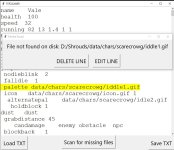
Code:
0<0# : ^
'''
@echo off
set script=%~f0
python -x "%script%" %*
exit /b 0/b 0
'''
import tkinter as tk
from tkinter import filedialog, messagebox
import os
import fnmatch
class TextFileScannerApp:
    def __init__(self, master):
        self.master = master
        master.title("TXTCLEANER")
        self.frame = tk.Frame(master)
        self.frame.pack(fill="both", expand=True)
        self.text = tk.Text(self.frame, wrap="word", width=50, height=20)
        self.text.pack(side="left", fill="both", expand=True)
        self.scrollbar = tk.Scrollbar(self.frame, command=self.text.yview)
        self.scrollbar.pack(side="right", fill="y")
        self.text.config(yscrollcommand=self.scrollbar.set)
        self.button_frame = tk.Frame(master)
        self.button_frame.pack(side="right", fill="y")
        self.save_button = tk.Button(self.button_frame, text="Save TXT", command=self.save_file)
        self.save_button.pack(pady=5)
        self.load_button = tk.Button(master, text="Load TXT", command=self.load_file)
        self.load_button.pack(side="left", padx=5, pady=5)
        self.scan_button = tk.Button(master, text="Scan for missing files", command=self.scan_file)
        self.scan_button.pack()
        self.text_file_path = None
    def load_file(self):
        file_path = filedialog.askopenfilename(filetypes=[("Text files", "*.txt")])
        if file_path:
            self.text_file_path = file_path
            with open(file_path, "r") as file:
                self.text.delete("1.0", tk.END)
                self.text.insert(tk.END, file.read())
    def save_file(self):
        if not self.text_file_path:
            messagebox.showwarning("No File Loaded", "Please load a text file first.")
            return
        with open(self.text_file_path, "w") as file:
            file.write(self.text.get("1.0", tk.END))
        self.show_save_dialog()
    def scan_file(self):
        if not self.text_file_path:
            messagebox.showwarning("No File Loaded", "Please load a text file first.")
            return
        data_folder_index = self.text_file_path.rfind("data/")
        if data_folder_index == -1:
            messagebox.showwarning("Invalid File Path", "The loaded file is not inside a 'data/' folder.")
            return
        data_folder_path = self.text_file_path[:data_folder_index]
        content = self.text.get("1.0", tk.END)
        lines = content.split("\n")
        for i, line in enumerate(lines, start=1):
            if "data/" in line:
                path_with_extension = line[line.find("data/"):]
                path, extension = os.path.splitext(path_with_extension.strip())
                if not path.startswith("data/"):
                    continue
                extension = extension[:4]
                full_path = os.path.join(data_folder_path, path) + extension
                print("Checking path:", full_path)
                if not self.file_exists_case_insensitive(full_path):
                    self.show_error_dialog(i, full_path)
                    return
        self.text.tag_remove("highlight", "1.0", tk.END)
        print("ALL PATHS ARE GOOD!")
    def file_exists_case_insensitive(self, path):
        directory, filename = os.path.split(path)
        for file in os.listdir(directory):
            if fnmatch.fnmatch(file, filename):
                return True
        return False
    def show_error_dialog(self, line_number, full_path):
        dialog = tk.Toplevel(self.master)
        dialog.title("File Not Found")
        label = tk.Label(dialog, text=f"File not found on disk: {full_path}")
        label.pack(padx=20, pady=10)
        button_frame = tk.Frame(dialog)
        button_frame.pack(pady=10)
        def delete_line():
            content = self.text.get("1.0", tk.END).split("\n")
            del content[line_number - 1]
            self.text.delete("1.0", tk.END)
            self.text.insert("1.0", "\n".join(content))
            dialog.destroy()
            self.scan_file()  # Continue scanning
        delete_button = tk.Button(button_frame, text="DELETE LINE", command=delete_line)
        delete_button.pack(side="left", padx=10)
        ok_button = tk.Button(button_frame, text="EDIT LINE", command=dialog.destroy)
        ok_button.pack(side="left", padx=10)
        self.text.tag_add("highlight", f"{line_number}.0", f"{line_number}.end")
        self.text.tag_config("highlight", background="yellow")
        self.text.mark_set("insert", f"{line_number}.0")
        self.text.see(f"{line_number}.0")
        self.master.update_idletasks()
        master_width = self.master.winfo_width()
        master_height = self.master.winfo_height()
        master_x = self.master.winfo_x()
        master_y = self.master.winfo_y()
        dialog_width = dialog.winfo_reqwidth()
        dialog_height = dialog.winfo_reqheight()
        position_right = int(master_x + (master_width / 2) - (dialog_width / 2))
        position_down = int(master_y + (master_height / 2) - (dialog_height / 2) - (master_height / 6))  # slightly higher
        dialog.geometry(f"+{position_right}+{position_down}")
    def show_save_dialog(self):
        dialog = tk.Toplevel(self.master)
        dialog.title("File Saved")
        label = tk.Label(dialog, text="The file has been saved successfully.")
        label.pack(padx=20, pady=10)
        ok_button = tk.Button(dialog, text="OK", command=dialog.destroy)
        ok_button.pack(pady=10)
        self.master.update_idletasks()
        master_width = self.master.winfo_width()
        master_height = self.master.winfo_height()
        master_x = self.master.winfo_x()
        master_y = self.master.winfo_y()
        dialog_width = dialog.winfo_reqwidth()
        dialog_height = dialog.winfo_reqheight()
        position_right = int(master_x + (master_width / 2) - (dialog_width / 2))
        position_down = int(master_y + (master_height / 2) - (dialog_height / 2) - (master_height / 3))  # slightly higher
        dialog.geometry(f"+{position_right}+{position_down}")
root = tk.Tk()
root.tk.call('tk', 'scaling', 3.0)
app = TextFileScannerApp(root)
root.mainloop()

aaas.jpg
 
Last edited:
Ok i have some really weird issues with the tool, sometimes the top panel disappears, and i cant trigger ctrl+1 anymore, not sure whats happening.
Then my files arent saved, then theyre suddenly saved and eveyrthing goes back to old version and my bindings are ruined...
I have no idea what is going on, especially that disappearing top panel.
I have to switch to simple text editor for awhile, i cant trust it for now.
Yeah its not much info but i simply have no clue what is going on.

What i dont like a lot is that when i remove the tool from disk and unpack new version - it still remembers my project paths... this should never happen imo. All this should be stored in actual folder of the program somewhere in local file, not in windows registry.
So when i get new version then nothing gets corrupted after clean copy paste cause nothing is remembered and stored in registry.
Portable version.
 
Last edited:
offtopic - does items have death anim so when picked an animation is played ? I remembe this being talked about but not sure what was the outcome. I really dont want to spawn an entity just to show some effect.

In chrono toools when i dont have @end_script by mistake - it refuses to let me into text editor to fix it, im stuck in a error loop
IMO the whole error thingy popup should have ability to send us to text editor to handle the error manually so we are never stuck.
 
Last edited:
I can confirm this issue
It's a feature requested by Bruce recently, but I can make it optional. Basically in the lower left corner you have a "FOCUS" zone. When you put your mouse cursor over it, it will hide some elements of the UI. And when you put your mouse over it again, they will reappar.
 
Ok i have some really weird issues with the tool, sometimes the top panel disappears, and i cant trigger ctrl+1 anymore, not sure whats happening.
Then my files arent saved, then theyre suddenly saved and eveyrthing goes back to old version and my bindings are ruined...
I have no idea what is going on, especially that disappearing top panel.
I have to switch to simple text editor for awhile, i cant trust it for now.
Yeah its not much info but i simply have no clue what is going on.

What i dont like a lot is that when i remove the tool from disk and unpack new version - it still remembers my project paths... this should never happen imo. All this should be stored in actual folder of the program somewhere in local file, not in windows registry.
So when i get new version then nothing gets corrupted after clean copy paste cause nothing is remembered and stored in registry.
Portable version.
The settings are not in Windows registry, refer to this to know where to find/delete them : ChronoCrash Modders Tools

Also maybe you missed the news but in the "0.6.X" branch of CMT, a lot has changed under the hood. I published it as alpha at the start of the month, and as they were no negative feedback I published it as regular release last week. As it's still early, there is a high chance that some things are no longer working in these early 0.6.X releases, but I can't maintain two separate branches of this tool. And let's be honest, if I keep two separates branches I will have very few feedback on the new branch. If you wan't to use a version before these changes, pick one of the last 0.5.X release, but it won't receive updates.
 
I wiped everything and so far and extracted again , its stable, but what is this top panel disappearing thing? Its a bug or something new?
Can You not store any of the program files on another drive and another location ? This can cause lots of various bugs in the future.
Id keep everything in that folder where the actual program is.
 
I wiped everything and so far and extracted again , its stable, but what is this top panel disappearing thing? Its a bug or something new?
Can You not store any of the program files on another drive and another location ? This can cause lots of various bugs in the future.
Id keep everything in that folder where the actual program is.
 
Can You not store any of the program files on another drive and another location ? This can cause lots of various bugs in the future.
Id keep everything in that folder where the actual program is.
It's a worse design I think (because users have to make sure they don't erase their settings with each update), and it makes sense only for the Windows portable version anyway. But I probably can add an option to choose the settings and cache folders, and you can set it to the same folder as the executable ;)
 
OK so at least option so portable ini have higher priority than the one in the home directory on c
I have this error when i run the tool and open my data, not sure if can be fixed without you havin my data tho
The project is kind of a frankensteined so lots of unused stuff and i have to clean alll that up, this error does not popup on other projects

Code:
Loading entities...
last Model
entity model entry changed selectr
Loading opponent
error catched!:
error message:
 Traceback (most recent call last):
  File "gui\entity\frameproperties.py", line 113, in entityModelEntryChanged
  File "gui\entity\__init__.py", line 2907, in loadOpponent
  File "gui\level\items.py", line 166, in __init__
  File "gui\level\items.py", line 392, in loadAnims
AttributeError: 'NoneType' object has no attribute 'lower'

entity model entry changed
last Model
entity model entry changed selectr
Loading opponent
error catched!:
error message:
 Traceback (most recent call last):
  File "gui\entity\frameproperties.py", line 118, in entityModelEntryChanged
  File "gui\entity\__init__.py", line 2935, in loadOnionSkinModel
  File "gui\level\items.py", line 166, in __init__
  File "gui\level\items.py", line 392, in loadAnims
AttributeError: 'NoneType' object has no attribute 'lower'
 
OK so at least option so portable ini have higher priority than the one in the home directory on c
I have this error when i run the tool and open my data, not sure if can be fixed without you havin my data tho
The project is kind of a frankensteined so lots of unused stuff and i have to clean alll that up, this error does not popup on other projects

Code:
Loading entities...
last Model
entity model entry changed selectr
Loading opponent
error catched!:
error message:
 Traceback (most recent call last):
  File "gui\entity\frameproperties.py", line 113, in entityModelEntryChanged
  File "gui\entity\__init__.py", line 2907, in loadOpponent
  File "gui\level\items.py", line 166, in __init__
  File "gui\level\items.py", line 392, in loadAnims
AttributeError: 'NoneType' object has no attribute 'lower'

entity model entry changed
last Model
entity model entry changed selectr
Loading opponent
error catched!:
error message:
 Traceback (most recent call last):
  File "gui\entity\frameproperties.py", line 118, in entityModelEntryChanged
  File "gui\entity\__init__.py", line 2935, in loadOnionSkinModel
  File "gui\level\items.py", line 166, in __init__
  File "gui\level\items.py", line 392, in loadAnims
AttributeError: 'NoneType' object has no attribute 'lower'
I can fix it yes. I checked the location in the code and it's due to a "facing" property without any value.
 
Piccolo updated Chronocrash Modders Tools with a new update entry:

Changelog 0.6.14

- Added an option to disable focus toggle when mouse hover in lower left corner (toggling focus mode will still work, but you'll need to click, not just hover with the mouse cursor)

- Added a button to overwrite settings & cache location (the button is shown on the project selection menu, at the start of the app, near the top of the window)

- Will now ignore "facing" commands with missing value

- In 0.6.x branch, a missing @end_script would cause an inescapable error loop if you had...

Read the rest of this update entry...
 
Wouldnt it be better to log what character is missing this ? Also all other stuff that is off ? This way i can fix this and it will help more.
I actually wanted to write a tool that scans for typos like this.
 
Wouldnt it be better to log what character is missing this ? Also all other stuff that is off ? This way i can fix this and it will help more.
I actually wanted to write a tool that scans for typos like this.
Of course but the reason it was crashing in the first place is that they are soooooooooo many commands to handle. But yeah I can at least add missing values to a log, like the one there is for the level editor.

EDIT : my bad, IT IS a property in level file
EDIT2 : no it's actually an entity property but the error can be triggered when loading such entity in level
 
Last edited:
Yeah all these errors , it would be nice to know the paths to them so we can fix them, cause its nice that now chronotools is loading fine but the error is still there , i just dont know where.

I think the collapse code is making the ctrl+1 ,ctrl+2 shortcuts to not work sometimes. I have auto collapse turned off, it still collapsing tho.

--
Bind settings submenu on right ....
Sometimes when i enable offsets by ticking the X and adjust x and y by scrollwheel - the actual binded entity is not updating on canvas even tho vcalues are changing .

- I would love if we had option to not reset actual bindentity values , i mean i set bindentity to -20 -200 and when i click on another frame - the code gray out the coords for some reason , i wish it would not, i want it to remember current bindentity values no matter what frame im changing to, or at least remember last values, maybe a button to store current value and restore it would be nice to work faster.
Yeah graying out bindentity coords on frame change id completely remove , i think the menuy should not suddenly erase/ forget/gray out our current values like this when we tinker with them between many frames .

An option "store bindentity coords per frame" would be nice too as option, so the code would store different bindentity coords per frame in current animation and we would work faster this way if this option is ticked.
Also autoframe change/match for entity that is bind to current one, so if our current entity is on frame 5 then entity that is bind is also on frame 5 without us having to manuyally change frame to 5 in bind menu , now we have to manyually change the frame and it takes up time, it would be nice if this would be automatically handled by the code - optionable of course.


---
Wow.... this new attack thingy where each attack propertyu is on separate row just ruined my complex freespecial.... cause its enabled by default . this isnt right IMO. why oh why. Sometimes i swear by the tool , sometimes i love it, in situations like this it sets me back a lot, without backup id be in a pretty bit craphole.

Please do a vote, im totally against non legacy commands as default.
This thing just totally wiped my attacks

attack 0 0 0 0 0 0 0 0 0 0


OK heres the pre-corrupted attack that it saved and borked in non legacy mode m after the save it added some attack 0 0 0 0 :

Code:
anim    freespecial1
        loop    0
shadowcoords 127 237
    offset 177 253
    bbox    0 0 0 0
    delay    2
            @script
                void self = getlocalvar("self");
                 void har;
             if ( frame == 1 ){
                clearspawnentry();
    setspawnentry("name", "harpo");
    har = spawn();
           bindentity(har, self, 0, -1, 0, 1, 6 );
        }
       
                     if ( frame == 22 ){
           bindentity(har, NULL() );
        }
    @end_script  
    followanim 1
    followcond 1
    attackone   1
    cancel    19 28 0 F D A freespecial1
alphamask data/chars/shiz/wep_000-mask.png
frame    data/chars/shiz/wep_000.png
    sound    data/chars/shiz/cable.wav
alphamask data/chars/shiz/wep_001-mask.png
frame    data/chars/shiz/wep_001.png
    sound    data/sounds/step1.wav
alphamask data/chars/shiz/wep_002-mask.png
frame    data/chars/shiz/wep_002.png
    sound    data/sounds/ball2.wav
alphamask data/chars/shiz/wep_003-mask.png
frame    data/chars/shiz/wep_003.png
alphamask data/chars/shiz/wep_004-mask.png
frame    data/chars/shiz/wep_004.png
alphamask data/chars/shiz/wep_005-mask.png
frame    data/chars/shiz/wep_005.png
alphamask data/chars/shiz/wep_006-mask.png
frame    data/chars/shiz/wep_006.png
    drawmethod    tintmode 1
    drawmethod    tintcolor 250_250_250
alphamask data/chars/shiz/wep_008-mask.png
frame    data/chars/shiz/wep_008.png
    delay 1
alphamask data/chars/shiz/wep_007-mask.png
    hitfx data/sounds/beat2.wav
frame    data/chars/shiz/wep_007.png
alphamask data/chars/shiz/wep_006-mask.png
frame    data/chars/shiz/wep_006.png
    attack3 400 19 54 68 0 0 0 0 0 50
alphamask data/chars/shiz/wep_006-mask.png
frame    data/chars/shiz/wep_006.png
    attack3 450 19 54 68 0 0 0 0 0 50
alphamask data/chars/shiz/wep_006-mask.png
frame    data/chars/shiz/wep_006.png
    attack3 484 19 54 68 0 0 0 0 0 50
alphamask data/chars/shiz/wep_006-mask.png
frame    data/chars/shiz/wep_006.png
    attack3 510 19 54 68 0 0 0 0 0 50
alphamask data/chars/shiz/wep_006-mask.png
frame    data/chars/shiz/wep_006.png
    attack3 550 19 54 68 0 0 0 0 0 50
alphamask data/chars/shiz/wep_006-mask.png
frame    data/chars/shiz/wep_006.png
    attack3 593 19 54 68 0 0 0 0 0 50
alphamask data/chars/shiz/wep_006-mask.png
frame    data/chars/shiz/wep_006.png
    attack3 625 19 54 68 0 0 0 0 0 50
alphamask data/chars/shiz/wep_006-mask.png
frame    data/chars/shiz/wep_006.png
    attack3 668 19 54 68 0 0 0 0 0 50
alphamask data/chars/shiz/wep_006-mask.png
frame    data/chars/shiz/wep_006.png
    attack3 707 19 54 68 0 0 0 0 0 50
alphamask data/chars/shiz/wep_006-mask.png
frame    data/chars/shiz/wep_006.png
    delay  4
    attack 0 0 0 0 0 0 0
alphamask data/chars/shiz/wep_006-mask.png
frame    data/chars/shiz/wep_006.png
alphamask data/chars/shiz/wep_006-mask.png
frame    data/chars/shiz/wep_006.png
alphamask data/chars/shiz/wep_006-mask.png
frame    data/chars/shiz/wep_006.png
alphamask data/chars/shiz/wep_006-mask.png
frame    data/chars/shiz/wep_006.png
alphamask data/chars/shiz/wep_006-mask.png
frame    data/chars/shiz/wep_006.png
alphamask data/chars/shiz/wep_006-mask.png
frame    data/chars/shiz/wep_006.png
alphamask data/chars/shiz/wep_006-mask.png
frame    data/chars/shiz/wep_006.png
alphamask data/chars/shiz/wep_005-mask.png
frame    data/chars/shiz/wep_005.png
alphamask data/chars/shiz/wep_004-mask.png
frame    data/chars/shiz/wep_004.png
alphamask data/chars/shiz/wep_003-mask.png
frame    data/chars/shiz/wep_003.png
alphamask data/chars/shiz/wep_002-mask.png
frame    data/chars/shiz/wep_002.png
alphamask data/chars/shiz/wep_001-mask.png
frame    data/chars/shiz/wep_001.png
alphamask data/chars/shiz/wep_000-mask.png
frame    data/chars/shiz/wep_000.png
Yeah this attack is not THAT cOmPlEx but the pain of enemy and follow and all are quite complex and i had no clue what caused it to stop working, then i fouind out wiped attacks and used manual backup to bring it back
 
Last edited:
It keeps insiting on removing

@cmd killentity getlocalvar("self")


and leaving , stripping off @cmd and getlocalvar

killentity(self)' not understood in file

it also strips "flip" of 1 , probably more.

Command 'flip' not understood in file

All these were fine, suddenly thyre borked cause i saved once

These are exactly what i dont want the tool to do.Theyre not critical and engine works but actual animations do not work as intended anymore
 
most recent one, it probably does it when all other things are with it, not with kill self on its own cause i have it elsewhere and its fine there
I borks this one
Code:
anim    pain
    loop    0
    delay    3
    offset 74 40
    bbox none
    followanim 1
    followcond 1
    jugglecost 100
    flipframe  0
    forcedirection -1
    @cmd  spawnani  "explo" 0  0  3  "ANI_IDLE"
    burn    3 9 95 52 15 0 0 0 0 45
    hitfx data/sounds/beat2.wav
    seta  1
            @script
                void self = getlocalvar("self");
         if (getentityproperty(self, "direction")==1){
        changeentityproperty(self, "velocity", 11, 0, 0);
        }
        if (getentityproperty(self, "direction")==0){
        changeentityproperty(self, "velocity", -11, 0, 0);
        }
    @end_script
@cmd  changeentityproperty getlocalvar("self") "candamage" "TYPE_ENEMY" "TYPE_OBSTACLE" "TYPE_NPC"
@cmd     changeentityproperty getlocalvar("self") "type" openborconstant("TYPE_ENEMY")
        sound   data/sounds/burn.wav
         frame    data/chars/skulwiz/fireb1.png
        frame    data/chars/skulwiz/fireb2.png
        frame    data/chars/skulwiz/fireb3.png
        frame    data/chars/skulwiz/fireb4.png
        frame    data/chars/skulwiz/fireb5.png
        frame    data/chars/skulwiz/fireb6.png
        frame    data/chars/skulwiz/fireb1.png
        frame    data/chars/skulwiz/fireb2.png
        frame    data/chars/skulwiz/fireb3.png
        frame    data/chars/skulwiz/fireb4.png
        frame    data/chars/skulwiz/fireb5.png
        frame    data/chars/skulwiz/fireb6.png
        frame    data/chars/skulwiz/fireb1.png
        frame    data/chars/skulwiz/fireb2.png
        frame    data/chars/skulwiz/fireb3.png
        frame    data/chars/skulwiz/fireb4.png
        frame    data/chars/skulwiz/fireb5.png
        frame    data/chars/skulwiz/fireb6.png
        frame    data/chars/skulwiz/fireb1.png
        frame    data/chars/skulwiz/fireb2.png
        frame    data/chars/skulwiz/fireb3.png
        frame    data/chars/skulwiz/fireb4.png
        frame    data/chars/skulwiz/fireb5.png
        frame    data/chars/skulwiz/fireb6.png
        frame    data/chars/skulwiz/fireb1.png
        frame    data/chars/skulwiz/fireb2.png
        frame    data/chars/skulwiz/fireb3.png
        frame    data/chars/skulwiz/fireb4.png
        frame    data/chars/skulwiz/fireb5.png
        frame    data/chars/skulwiz/fireb6.png
        frame    data/chars/skulwiz/fireb1.png
        frame    data/chars/skulwiz/fireb2.png
        frame    data/chars/skulwiz/fireb3.png
        frame    data/chars/skulwiz/fireb4.png
        frame    data/chars/skulwiz/fireb5.png
        frame    data/chars/skulwiz/fireb6.png
         frame    data/chars/skulwiz/fireb1.png
        frame    data/chars/skulwiz/fireb2.png
        frame    data/chars/skulwiz/fireb3.png
        frame    data/chars/skulwiz/fireb4.png
        frame    data/chars/skulwiz/fireb5.png
        frame    data/chars/skulwiz/fireb6.png
        frame    data/chars/skulwiz/fireb1.png
        frame    data/chars/skulwiz/fireb2.png
        frame    data/chars/skulwiz/fireb3.png
        frame    data/chars/skulwiz/fireb4.png
        frame    data/chars/skulwiz/fireb5.png
        frame    data/chars/skulwiz/fireb6.png
        frame    data/chars/skulwiz/fireb1.png
        frame    data/chars/skulwiz/fireb2.png
        frame    data/chars/skulwiz/fireb3.png
        frame    data/chars/skulwiz/fireb4.png
        frame    data/chars/skulwiz/fireb5.png
        frame    data/chars/skulwiz/fireb6.png
        frame    data/chars/skulwiz/fireb1.png
        frame    data/chars/skulwiz/fireb2.png
        frame    data/chars/skulwiz/fireb3.png
        frame    data/chars/skulwiz/fireb4.png
        frame    data/chars/skulwiz/fireb5.png
        frame    data/chars/skulwiz/fireb6.png
        @cmd    killentity getlocalvar("self")
     frame    data/sprites/0.gif
 
most recent one, it probably does it when all other things are with it,
Have you deleted the previous version from the folder before pasting the new version on it?
I remember I had an issue like this on the past when I just pasted the new version over the old one.

Another thing to test: fix the indentation of your code/animation.
 
Yeah i did, actually wiped even ini on C: and regretted it cause my settings about using legacy commands were defaulted to off and they borked some stuff when i turned them on
 
Back
Top Bottom