Thanks for the bug report, it already was fixed. I will launch the next beta soon.Currently there's a bug with the menu music which will be fixed in the next beta


Thanks for the bug report, it already was fixed. I will launch the next beta soon.Currently there's a bug with the menu music which will be fixed in the next beta

preview would be good ^^If anyone here is using the new Beta 26 VBOX version from YouTube, I have made a custom playlist, replacing only the SOR2 route of tracks. You can test it and see what you think, simply download the Musics.7z, extraxt/unzip folder into your Streets of Rage X's musics folder, that's it. Then load up the game, go to game settings > features option and choose External Folder as music. Currently there's a bug with the menu music which will be fixed in the next beta. So leave the Menu Music to default, you can still hear it if you choose BGM Number, but that bug will make the menu music play for the other levels too. This is PC only, android doesn't yet have the custom music option
The songs are random, a mix of WWF Smackdown, Iceferno, Street Fighter, SoR Remake, Twista, YuzoBoy, New Order, The Shamen and others.

Here is the Soundcloud Playlist. Three tracks were removed automatically due to copyright: L.S.I (The Shaman) Sunshine (Twista) Killer (Original 1989 Instrumental)preview would be good ^^
Thanks for the report. It's strange, I tested this level countless times with no problems, checked right now and it's working fine too.Found a bug in Stage 7 with CPU partner. Basically the elevator doesn't move, and you just keep fighting enemies and then 1 boss appears (metal robot) when you defeat it, suddenly you end up at the top of the elevator level, and you continue on to the next stage.
I tried again straight after that glitch, and I could not replicate it. But it definitely did happen so there's something going on. Also, this was the VBOX version and I did not have beta 25 saves in the new install. The SORX.set might be overwritten now since I played games straight after. But I'll try upload it later on when I'm on PC.Thanks for the report. It's strange, I tested this level countless times with no problems, checked right now and it's working fine too.
Looks like an issue with your saves folder, maybe you used the beta 25 save in the beta 26. However I would like to take a look in your game settings options, please send me the SORX.set file inside your saves folder.
@SRC267 Is the bug something like this?I tried again straight after that glitch, and I could not replicate it. But it definitely did happen so there's something going on. Also, this was the VBOX version and I did not have beta 25 saves in the new install. The SORX.set might be overwritten now since I played games straight after. But I'll try upload it later on when I'm on PC.
Yes, this is the exact behaviour that happen to me. Everything just like this. I was Adam, cpu partner Axel. Some cheats enabled, like that "marching" cheat option enabled.@SRC267 Is the bug something like this?
If yes, the only way I was able to replicate it is by manually removing the first "wait" command from the level file in the first group of enemies. Once you are using the VBOX version, there's no way to change the level file, and if the game file was corrupted, it should happen every time you play on this level.
So, the only explanation is that the VBOX engine format is reading the level file wrongly. It makes sense once both the executable and the data file are packed in a different format, which could cause some side effects during the playthrough.
Please let me know in case it happens again, then I can try other options during packaging. In case it does not happen again, it's just an isolated case.
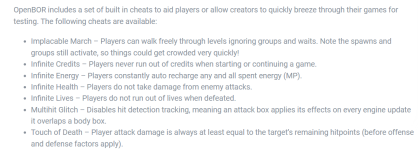
Did you mean the "implacable march" cheat? If yes, problem solved, this certainly is the cause.like that "marching" cheat option enabled
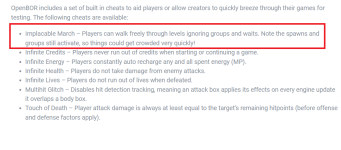
Yes, Implacable March. Not sure why that was enabled already by default.Did you mean the "implacable march" cheat? If yes, problem solved, this certainly is the cause.
But thanks for the report anyway, it's always better to have more feedback than less.
View attachment 7615
Did you install the beta 26 without uninstalling previous versions?Just had a quick session on android, no cheats or games unlocked yet, first run on beta 26 and stage 7 towards the end, no enemies are showing right at the end.
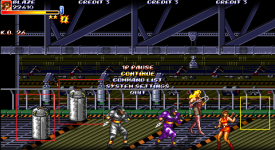
I always uninstall previous versions before installing the new betas on both platforms (PC/Android) perhaps the remnants of the data folder on android remain in the Android/Data/SORX folder even after deleting the app?Did you install the beta 26 without uninstalling previous versions?
By looking at your image the food is in the wrong place which was not programmed in the level file. If the food is a few pixels ahead, the level will not end because there's more enemies to appear ahead too, but in this case they are outside of the player's range due to the screen limit and will never be spawned.
Below the correct place.
View attachment 7620
I will keep testing but it hasn't happened yet, the codes are all correct and the level spawn positions are not affected by scripts. Please, let me know if you find a good way to reproduce it.
I think no, usually the app is fully uninstalled by Android, but I suggest checking for confirmation in this case.perhaps the remnants of the data folder on android remain in the Android/Data/SORX folder even after deleting the app?
I will check next time when beta 27 is out and confirm.I think no, usually the app is fully uninstalled by Android, but I suggest checking for confirmation in this case.
Thanks a lot, friendI just want to say amazing work!!! Everything looks, plays and sounds great.

You can hide the game timer using the "show clock" option in the game settings. However, I will change this option name to a more intuitive one, thanks for the feedback.would it be possible to hide the game timer if it's set off?

Oh man, I didn't think there was a separate option for itYou can hide the game timer using the "show clock" option in the game settings. However, I will change this option name to a more intuitive one, thanks for the feedback.

This happens because I maintained all the logos in their original sizes, I didn't resize the SOR1 to avoid distortion and keep the original quality.The logo of Street of Rage (the first one) is considerable smaller when you compare it to SoR 2 and SoR 3 logos.