working on Scripted slams. (ground moves)

NED

Well-known member
I re-started working on scripted slams.
I try to edit Maxima's suplex in Bloodbane's "Crime Buster" mod.
I think, this give me some esy way to understand it...

As an experiment, I would like to give to maxima an X velocity during the suplex.
I would like him to go back and the enemy still binding to him during this time.

I tryed to add move -20 (just as a test) but it's completly ignored.
I don't have any explanation for it. I'm stuck... one more time.

this is the suplex code only "move -20" and "move 0" are my editing.

Code:
anim freespecial6
	offset	52 140
        quakeframe 8 1 6
        attackone 0
	delay	6
        @cmd    position 7 30 60 -1 1
	frame	data/chars/maxima/slam05.gif
	delay	20
        attack16 68 29 49 92 7 0
        @cmd    position 7 50 -5 -1 1
        @cmd    spawn01 "Break" 47 44 1
	frame	data/chars/maxima/slam06.gif
	delay	5
        attack  0
        @cmd    hurt2 40
	frame	data/chars/maxima/slam06.gif

	delay	20
	move	-20
	offset	82 115
        @cmd    position 0 20 25 -1 1
	frame	data/chars/maxima/throw001.gif
	delay	5
        @cmd    antiwall -85 25 -1
        @cmd    position 1 -16 35 -1 1
        attack4 4 14 89 37 15 1 1
        sound	data/chars/maxima/suplex.wav
	frame	data/chars/maxima/throw002.gif
        @cmd    antiwall -85 30 -1
        @cmd    position 2 -41 53 -1 1
	frame	data/chars/maxima/throw003.gif

	move	0
	delay	10
        @cmd    antiwall -85 30 -1
        @cmd    position 6 -84 2 -1 1
        attack4 -22 33 44 83 15 1 1
	frame	data/chars/maxima/throw004.gif
	delay	10
        @cmd    spawner "QFX" -73 0 0
	frame	data/chars/maxima/throw004.gif
        attack  0
	delay	5
        @cmd    depost 0
        @cmd    finish 45 2 -2 2 0 0
	frame	data/chars/maxima/throw005.gif
	delay	8
	frame	data/chars/maxima/throw006.gif
	frame	data/chars/maxima/throw007.gif
	frame	data/chars/maxima/throw008.gif

Can you explain how to give a velocity to this move? X velocity and also some Y velocity for some kind of hop-back move.

Thanks in advance.
 
Yes, although you might need to modify depost function not to take any parameter since takedamagescript doesn't have any input

(some time later)

Oh yes, after reading Damon Caskey's post, don't forget to add damageentity function there to knock down grabbed opponent together with the release. This is also to change opponent's animation instead of FALL7 which is specifically used for slammed poses.

As for clearL function, it's not necessary if you already declared that function in IDLE.
 
hum, so in a takedamagescript I should use something like this (may contain syntax errors):

void self = getlocalvar("self");
void iTarget = getlocalvar("Target" + self);
damageentity(iTarget, self, 1, 1, openborconstant("ATK_NORMAL"));

or why don't I simple call the Depost function, since (corrects me if I am wrong) it have the same logic I need?

void depost(int Gr)
{// Release grabbed entity
  void self = getlocalvar("self");
  void target = getlocalvar("Target" + self);

  if(target==NULL())
  {
    target = getentityproperty(self, "grabbing");
    setlocalvar("Target" + self, target);
  }
  if(target!=NULL())
  {
    bindentity(target, NULL());

    if(Gr == 1)
    {
      int x = getentityproperty(target, "x");
      int z = getentityproperty(target, "z");
      changeentityproperty(target, "position", x, z, 0);
    }
  }
}

I need to use "return depost 0" or I can simply call "depost 0" on the script?
 
I'm working on basic system for all the characters.
The most funny part, but also the most frustrating when you can't do what you want to...

I would like to use one of my special attack button to pickup a grounded/liedown opponent without giving damage, just a pick up attempt, if the move hits there is a transition state that send to the regular "anim grab" state.

how can I add this feature to my mod?
thanks
 
I suggest you to do the same i did: i downloaded the manual and i had read it everyday

You answer is in the manual

followanim {value} •    ~Determines which FOLLOW animation played when followup condition is met or when counter condition is met. •    ~Possible values are 1, 2, 3 and 4. •    ~Used together with 'followcond' or 'counterframe'. followcond {value} •    ~This command is to make the entity performs FOLLOW{#} if an attackbox in the animation hits. •    ~value determines the condition requirements before FOLLOW{#} is played.        1 = this animation will followup as long as it hits an entity.        2 = this animation will followup as long as it hits an enemy (Or player if an enemy uses it).        3 = this animation will followup as long as it hits an enemy and the target does not get killed or block the attack.        4 = this animation will followup as long as it hits an enemy, and the target is not killed, does not block the attack, and is not set to be ungrabbable. •    ~Which FOLLOW animation played is determined by 'followanim
 
Thanks Ilu,
I use the manual too, but I still have ssome problems to find the good info sometimes... ???

Also, I'm not really good with some logic and have to give more effort, since I have to translate all the explanations in my head befor to understand them.

I'll check what you show me. Thanks!
 
@ Ilu: the takedamagescript should be like this:

void main()
{// Release grabbed opponent on damage
    void self = getlocalvar("self"); //Get calling entity.
  void target = getlocalvar("Target" + self); //Get grabbed opponent (if there's any)

  if(target!=NULL())
  {
      bindentity(target, NULL());
      damageentity(target, self, 0, 10, openborconstant("ATK_NORMAL"));
  }
}

It has contained depost function in it.
You can add tossentity function to control how far grabbed opponent would be knocked down on release if it is needed :)

@ned: Well, there are couple ways to get fallen opponent but AFAIK there's no way to enter GRAB state via script. So the best way would be to make scripted alternate GRAB state which might/might not have same features as original GRAB state.
(In case we are in different frequency, GRAB state is state when player is grabbing enemy in GRAB animation)
Or for start, why don't you just immediately slam/throw the opponent after successful 'take'.
 
No problem, BB,
We are in the same frequency!
I was wondering how to bring my character to the initial grab state.
But, this secon idea of a special throw to do directly on liedown opponent is great.
I'll do it! :)

Is there a way to make this move only working on liedown opponents (never standing) because "OTG" feature don't seem to give this possibility... :-\

OTG {bi}

    ~This command determines how attackbox affect lying opponent.
        0 = Attackbox can't hit lying opponent at all
        1 = Attackbox can hit lying oppoent
 
magggas said:
If you set OTG 2 then it can hit only lying oppoent.
No idea why this information is missing from manuals but,value 2 is real.

Awesome!
I don't even tried it.
Now, it works perfectly!!
Thanks one more time Magggas :D
 
I started to use the scipted slam code I took from Maxima in BB's Crime Buster.
I used it to code some of Rachel move : frankensteiner (move used by Clark in KOF or Cammy in SSF2)

It seems to be nearly descent, but the enemy don't want to play the right animation of gethit by the throw. Instead, he seems to play a regular pain/fall anim...

Note : p1 attack and enemy pain sprite have the same name for easier work...

P1 code
Code:
anim	grabbackward#throw# FRANKENSTEINER
	jumpframe	5 2.5 -1
	landframe	12
	attackone 0
	quakeframe 13 9 7#3
#	fastattack 1
#	loop       0
	 offset	96 177
	 bbox		0 0 0 0
	 hitfx   	data/sounds/empty.wav
#	 attack7  	1 	1 	478 		203 		0 		0 		1 		1 		0		0
	 delay      5#6
        @cmd    slamstart
        @cmd    position 0 0 0 0 0
       frame      data/chars/rachel/j01.gif
#	 attack7  	0 	0 	0 		0 		0 		0 		0 		0 		0		0
	 delay      5#6
        @cmd    position 0 0 0 0 0
       frame      data/chars/rachel/j02.gif
	 delay      4#5
        @cmd    position 0 0 0 0 0
       frame      data/chars/rachel/frank01.gif
        @cmd    position 1 0 0 0 0
       frame      data/chars/rachel/frank02.gif
        @cmd    position 2 0 0 0 0
	 delay      14#18
       frame      data/chars/rachel/frank03.gif
        @cmd    position 3 0 0 0 0
	 delay      5#7
       frame      data/chars/rachel/frank04.gif
        @cmd    position 4 0 0 0 0
       frame      data/chars/rachel/frank05.gif
        @cmd    position 5 0 0 0 0
       frame      data/chars/rachel/frank06.gif
        @cmd    position 6 0 0 0 0
	 delay      5#6
       frame      data/chars/rachel/frank07.gif
        @cmd    position 7 0 0 0 0
       frame      data/chars/rachel/frank07b.gif
        @cmd    position 8 0 0 0 0
       frame      data/chars/rachel/frank08.gif
        @cmd    position 9 0 0 0 0
	 delay      -1000
       frame      data/chars/rachel/frank08b.gif
	 delay      5
        @cmd    position 10 0 0 0 0
       frame      data/chars/rachel/frank09.gif
        @cmd    position 10 0 0 0 0
       frame      data/chars/rachel/frank09.gif
        @cmd    depost 0
        @cmd    finish 45 2 -2 2 0 0
       frame      data/chars/rachel/frank09.gif
	sound	data/sounds/fall.wav
#	 attack7  	1 	1 	478 		203 		1 		1 		1 		1 		0		0
       frame      data/chars/rachel/frank09.gif
       frame      data/chars/rachel/frank09.gif
       frame      data/chars/rachel/frank09.gif
#	 attack7  	0 	0 	0 		0 		0 		0 		0 		0 		0		0
	 delay      10
       frame      data/chars/rachel/frank10.gif
	 delay      10
       frame      data/chars/rachel/frank11.gif
	 delay      10
       frame      data/chars/rachel/j01.gif

Enemy pain anim
Code:
#-----------------THROW SLAM SYSTEM (scripted)-----------------#

anim pain7
	 delay      1000
	 offset	136 177
       frame      data/chars/mex/frank01.gif
       frame      data/chars/mex/frank02.gif
       frame      data/chars/mex/frank03.gif
       frame      data/chars/mex/frank04.gif
       frame      data/chars/mex/frank05.gif
       frame      data/chars/mex/frank06.gif
       frame      data/chars/mex/frank07.gif
       frame      data/chars/mex/frank07b.gif
       frame      data/chars/mex/frank08.gif
       frame      data/chars/mex/frank08b.gif
       frame      data/chars/mex/frank09.gif

#-----------------THROW SLAM SYSTEM (scripted)-----------------#

The script is basically BB's slam script
 
You're right! I changed it and it's far better!

Next step is to understand how to flip the enemy once he's released (fly away)
Does enemy anim have to continue after the moment he's relesed by P1?
 
thanks Ilu... I think I need to sleep :-[


EDIT-------------------------------------------------
My first slam is nearly finished!! :D
Beside the sound tweaks and shaking effects, I have one thing I can't adjust:
At the end, when p1 releases the enemy, he seems to be on a wrong place...
How can I decide his position (offset) for the flying away fall9 animation?
 
I'll check it!
I have to DL the new demo, right... :)

EDIT---------------
Perhaps I made an error, but I can't find a backthrow in Capcomm.

So I experiemnted it myself adding a final binding in the frame BEFORE the last frame used for releasing. (Am I right about how it has been done?)

It's a lil' bit buggy (the character move a little to his final fall position) but still descent.
 
Maybe Ilu meant GRABBACKWARD animation instead.

Setting offset standard in FALL7 is tricky, the one I set in Crime Buster v2.5 is not intuitive making it hard to remember where an offset would be in certain frame but the good news about this is that the offset is close to FALL animation's offset making it smooth transition from grabbed to slammed/thrown status.

You could make different standard which say like this in FALL7:
1st frame : upside down - offset on neck
2nd frame : upright - offset on chest
3rd frame : lying position - offset on waist
etc

This standard is intuitive making slam/throw design easier but the bad news is bad transition to FALL animation during release. I had this problem in other mod with same slam system and I solved it simply by using position function to fix the position just before finisher/throw.
 
Maybe Ilu meant GRABBACKWARD animation instead.
yeah, I was on my cellphone :)

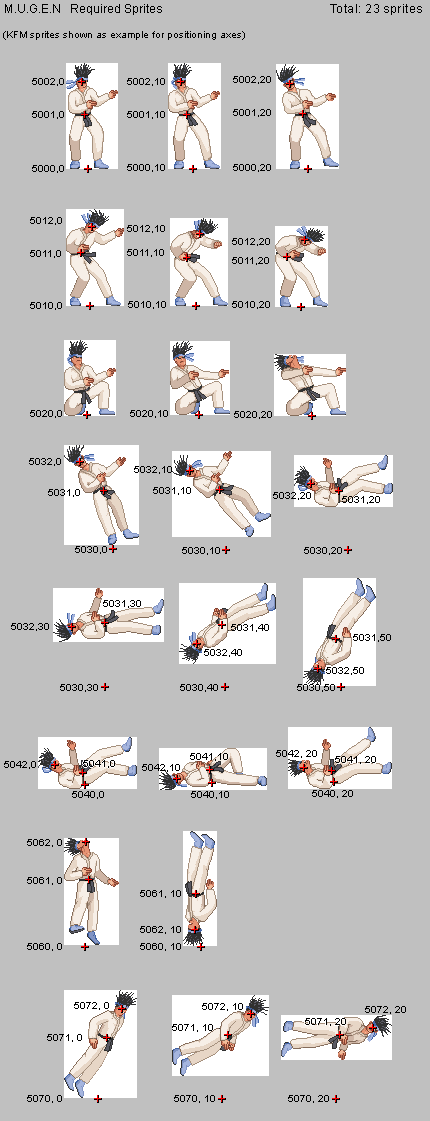
About the standart, I am using something like the required states from Mugen
spr.png


Sure, we don't need all those frames, but it will cover almost everything. Plus, we have Drawmethod, so for some frames, we can flip and rotate the images using it.

side note: as DC said, its better to make a canvas (an image big enough to handle your sprite) and set one axis. Then, you flip the sprite on that canvas.
 
Back
Top Bottom