Solved Why the Entity Freezes/Pauses at the end of the Animation?

Question that is answered or resolved.

Bruce

Active member
Hello everyone,

I am trying to use png instead of gif files, and somehow the character freezes/pauses for like 1/4 of a second after the freespecial animation finishes.
I have been trouble shooting this and see what it is causing the problem, but I am in the dead end :-(
Has anyone experienced this before?

My experimental game is in 1080P (1920 x 1080) resolution.

Thank you so much for your help
 
Solution
I think I found the problem... since the FX are on the character sprites.
Bascially, the animation is still on going. I just needed to delete the last few sprites...
Please ignore this thread.
Sorry about that.
Hello everyone,

I am trying to use png instead of gif files, and somehow the character freezes/pauses for like 1/4 of a second after the freespecial animation finishes.
I have been trouble shooting this and see what it is causing the problem, but I am in the dead end :-(
Has anyone experienced this before?

My experimental game is in 1080P (1920 x 1080) resolution.

Thank you so much for your help

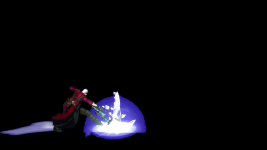
Post the animation text and attach the original .png sprite please.

DC
 
Code:
anim    freespecial6
    hitflash    Flash
    hitfx    data/sounds/beat3.wav
    fastattack    1
    attackone    0
    offset    589 938
    delay     3
    frame    data/chars/Dante/IceCrystal01.png
    frame    data/chars/Dante/IceCrystal02.png
    frame    data/chars/Dante/IceCrystal03.png
    frame    data/chars/Dante/IceCrystal04.png
    frame    data/chars/Dante/IceCrystal05.png
    frame    data/chars/Dante/IceCrystal06.png
    frame    data/chars/Dante/IceCrystal07.png
    frame    data/chars/Dante/IceCrystal08.png
    frame    data/chars/Dante/IceCrystal09.png
    frame    data/chars/Dante/IceCrystal10.png
    delay     5
    frame    data/chars/Dante/IceCrystal11.png
    attack    670 696 310 278   5   100  0  0  10  200
    dropv    4  2
    frame    data/chars/Dante/IceCrystal12.png
    frame    data/chars/Dante/IceCrystal13.png
    frame    data/chars/Dante/IceCrystal14.png
    attack    0 0 0 0
    frame    data/chars/Dante/IceCrystal15.png
    frame    data/chars/Dante/IceCrystal16.png
    frame    data/chars/Dante/IceCrystal17.png
    attack    670 696 310 278   5   100  0  0  10  200
    dropv    4  2
    frame    data/chars/Dante/IceCrystal18.png
    frame    data/chars/Dante/IceCrystal19.png
    frame    data/chars/Dante/IceCrystal20.png
    attack    0 0 0 0
    frame    data/chars/Dante/IceCrystal21.png
    frame    data/chars/Dante/IceCrystal22.png
    frame    data/chars/Dante/IceCrystal23.png
    attack    670 696 310 278   5   100  0  0  10  200
    dropv    6  2
    frame    data/chars/Dante/IceCrystal24.png
    delay    3
    frame    data/chars/Dante/IceCrystal25.png
    frame    data/chars/Dante/IceCrystal26.png
    attack    0 0 0 0
    frame    data/chars/Dante/IceCrystal27.png
    frame    data/chars/Dante/IceCrystal28.png
    frame    data/chars/Dante/IceCrystal29.png
    frame    data/chars/Dante/IceCrystal30.png
    frame    data/chars/Dante/IceCrystal31.png
    frame    data/chars/Dante/IceCrystal32.png
    frame    data/chars/Dante/IceCrystal33.png
    frame    data/chars/Dante/IceCrystal34.png
 

Attachments

  • IceCrystal12.png
    IceCrystal12.png
    44.2 KB · Views: 13
I think I found the problem... since the FX are on the character sprites.
Bascially, the animation is still on going. I just needed to delete the last few sprites...
Please ignore this thread.
Sorry about that.
 
Solution
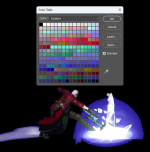
Looking at the image, there's a whole bunch of issues going on here, but I don't see anything that would cause a freeze.
  • Why on earth are you drawing particle effects into the main sprite? Stop that. Those need to be their own models spawned in on demand.
  • Using black for the transparency color is a bad idea in general. I highly recommend you switch to a bright pink or cyan. It makes no technical difference to the engine, but your workflow will improve using a high contrast color.
  • The palette itself is very disorganized, I'll get to that below.
Looking at the palette, it's a mess. I take it you just let your image program decide the color order and went from there. Plus you're wasting about half the colors on that ice blast and the aura behind Dante. See above about particle effects in the main sprite - DON'T DO THAT. Putting the effects into their own models will get rid of that awful color banding, allow you to apply alpha transparency, free up colors for Dante's body, and make handing your animations much easier. @O Ilusionista can explain better than me how to use Fighter Factory to organize your colors.

1702140227714.png

Speaking of the palette, did you remember to give all the sprites for Dante the same palette? The problem is that none of these things should be causing a lock, so I'm just not 100% sure. We might need you to upload a copy of the module to take a look.

DC
 
Looking at the image, there's a whole bunch of issues going on here, but I don't see anything that would cause a freeze.
  • Why on earth are you drawing particle effects into the main sprite? Stop that. Those need to be their own models spawned in on demand.
  • Using black for the transparency color is a bad idea in general. I highly recommend you switch to a bright pink or cyan. It makes no technical difference to the engine, but your workflow will improve using a high contrast color.
  • The palette itself is very disorganized, I'll get to that below.
Looking at the palette, it's a mess. I take it you just let your image program decide the color order and went from there. Plus you're wasting about half the colors on that ice blast and the aura behind Dante. See above about particle effects in the main sprite - DON'T DO THAT. Putting the effects into their own models will get rid of that awful color banding, allow you to apply alpha transparency, free up colors for Dante's body, and make handing your animations much easier. @O Ilusionista can explain better than me how to use Fighter Factory to organize your colors.

View attachment 6075

Speaking of the palette, did you remember to give all the sprites for Dante the same palette? The problem is that none of these things should be causing a lock, so I'm just not 100% sure. We might need you to upload a copy of the module to take a look.

DC
I understand that it is alot better to have FX sprites on their own models. However, I captured these sprites from another game (video recording, then used frame capture software to get the sprites). Therefore, it would take me too much time to remove the FX off these sprites for separate FX sprites.
I removed the background color to create transparent sprites.
I used StickStudio to combine a few sprites then used Fighter Factory to create a template palette.
After that, I used PalApply software to apply this template palette to all the sprites.

and I know using alpha 1 in a separate model for FX will get rid of the color banding and the FX will look a lot better.
I tempted to do that before, but there will be thousands of FX sprites like this for me to remove from the main character model
So I ended up leaving the sprites as they are.
 
Last edited:
@O Ilusionista can explain better than me how to use Fighter Factory to organize your colors.
In this case, there isn't much which could be done. Using a model with a high color count tied with effects on the same nature is a recipe of the doom.

There is a button on the FFS palette editor which can sort the colors on the palette. But it won't help much here
1702142752654.png
 
Code:
anim    freespecial6
    hitflash    Flash
    hitfx    data/sounds/beat3.wav
    fastattack    1
    attackone    0
    offset    589 938
    delay     3
    frame    data/chars/Dante/IceCrystal01.png
    frame    data/chars/Dante/IceCrystal02.png
    frame    data/chars/Dante/IceCrystal03.png
    frame    data/chars/Dante/IceCrystal04.png
    frame    data/chars/Dante/IceCrystal05.png
    frame    data/chars/Dante/IceCrystal06.png
    frame    data/chars/Dante/IceCrystal07.png
    frame    data/chars/Dante/IceCrystal08.png
    frame    data/chars/Dante/IceCrystal09.png
    frame    data/chars/Dante/IceCrystal10.png
    delay     5
    frame    data/chars/Dante/IceCrystal11.png
    attack    670 696 310 278   5   100  0  0  10  200
    dropv    4  2
    frame    data/chars/Dante/IceCrystal12.png
    frame    data/chars/Dante/IceCrystal13.png
    frame    data/chars/Dante/IceCrystal14.png
    attack    0 0 0 0
    frame    data/chars/Dante/IceCrystal15.png
    frame    data/chars/Dante/IceCrystal16.png
    frame    data/chars/Dante/IceCrystal17.png
    attack    670 696 310 278   5   100  0  0  10  200
    dropv    4  2
    frame    data/chars/Dante/IceCrystal18.png
    frame    data/chars/Dante/IceCrystal19.png
    frame    data/chars/Dante/IceCrystal20.png
    attack    0 0 0 0
    frame    data/chars/Dante/IceCrystal21.png
    frame    data/chars/Dante/IceCrystal22.png
    frame    data/chars/Dante/IceCrystal23.png
    attack    670 696 310 278   5   100  0  0  10  200
    dropv    6  2
    frame    data/chars/Dante/IceCrystal24.png
    delay    3
    frame    data/chars/Dante/IceCrystal25.png
    frame    data/chars/Dante/IceCrystal26.png
    attack    0 0 0 0
    frame    data/chars/Dante/IceCrystal27.png
    frame    data/chars/Dante/IceCrystal28.png
    frame    data/chars/Dante/IceCrystal29.png
    frame    data/chars/Dante/IceCrystal30.png
    frame    data/chars/Dante/IceCrystal31.png
    frame    data/chars/Dante/IceCrystal32.png
    frame    data/chars/Dante/IceCrystal33.png
    frame    data/chars/Dante/IceCrystal34.png
Why don't you set loop?
 
Back
Top Bottom