Bruce
Active member
Hello everyone,
Sorry if this similar question has been asked.
I started learning how to create a stage (level).
I created a simple desert stage (level) with the repeating dirt FX.
When the level starts, the dirt FX (as a panel type) works just fine. After the stage starts scrolling,
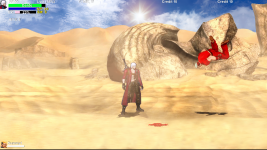
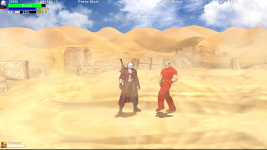
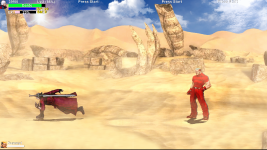
the dirt FX starts overlapping each other. Please take a look at the captured pictures.
I've been trying to fix it, but I could not find the cause of it, can someone please give me some advices?
Thank you so much for your help.
Training.txt
DirtFX.txt
Sorry if this similar question has been asked.
I started learning how to create a stage (level).
I created a simple desert stage (level) with the repeating dirt FX.
When the level starts, the dirt FX (as a panel type) works just fine. After the stage starts scrolling,
the dirt FX starts overlapping each other. Please take a look at the captured pictures.
I've been trying to fix it, but I could not find the cause of it, can someone please give me some advices?
Thank you so much for your help.
Training.txt
Code:
music        data/music/Training.ogg
panel        data/bgs/Desert.png
bglayer      data/bgs/BrightSky.png 0.4 0 0 0 0 0 1 1 1
fglayer      data/bgs/Sun.png -900 0.6 0 1600 -100 0 0 1 1   1 1   0 0 0 0 0
fglayer      data/bgs/Cloud.png -800 0.2 0 200 -50 0 0 1 1   1 1   0 0 0 0 0

maxtossspeed    1000
maxfallspeed    -400
gravity              -25
scrollspeed 2  #defines how fast screen scrolls when player scrolls the screen

order          a b c
type           1   # 0 for normal state, 1 is bonus stage (can use special attacks & no slow down on boss kill)
settime        0
notime         1  #Determines whether or not the player can see the game timer
shadowcolor    1
direction    both  #level scrolls both directions

stagenumber    100

# spawn1 {x} {z} {a}
spawn1  60 700 0
spawn2  90 700 0
spawn3  120 700 0
spawn4  150 700 0

light     256 -32 # X, Z  changes light direction for gfxshadow
at 0

spawn   DirtFX 1
coords 0 0
flip 0
at 0

spawn   DirtFX 1
coords 1920 0
flip 1
at 0

spawn   DirtFX 1
coords 3840 0
flip 0
at 0
DirtFX.txt
Code:
name        DirtFX
type        panel
speed        0
antigravity    100
alpha 1      #alpha transparency
setlayer    5000


anim  idle
    loop    1
    offset    960 0
    delay     10
    frame    data/chars/SkillEffects/TouchDownFX/TD_Big09.png
    frame    data/chars/SkillEffects/TouchDownFX/TD_Big10.png
    delay    20
    frame    data/chars/SkillEffects/TouchDownFX/TD_Big11.png
    frame    data/chars/SkillEffects/TouchDownFX/TD_Big12.png
    frame    data/chars/SkillEffects/TouchDownFX/TD_Big13.png
    frame    data/chars/SkillEffects/TouchDownFX/TD_Big14.png
    delay    25
    frame    data/chars/SkillEffects/TouchDownFX/TD_Big11.png
    frame    data/chars/SkillEffects/TouchDownFX/TD_Big12.png
    frame    data/chars/SkillEffects/TouchDownFX/TD_Big13.png
    frame    data/chars/SkillEffects/TouchDownFX/TD_Big14.png
    delay    22
    frame    data/chars/SkillEffects/TouchDownFX/TD_Big11.png
    frame    data/chars/SkillEffects/TouchDownFX/TD_Big12.png
    frame    data/chars/SkillEffects/TouchDownFX/TD_Big13.png
    frame    data/chars/SkillEffects/TouchDownFX/TD_Big14.png
    delay    18
    frame    data/chars/SkillEffects/TouchDownFX/TD_Big11.png
    frame    data/chars/SkillEffects/TouchDownFX/TD_Big12.png
    frame    data/chars/SkillEffects/TouchDownFX/TD_Big13.png
    frame    data/chars/SkillEffects/TouchDownFX/TD_Big14.png
    delay    24
    frame    data/chars/SkillEffects/TouchDownFX/TD_Big11.png
    frame    data/chars/SkillEffects/TouchDownFX/TD_Big12.png
    frame    data/chars/SkillEffects/TouchDownFX/TD_Big13.png
    frame    data/chars/SkillEffects/TouchDownFX/TD_Big14.png
    delay     19
    frame    data/chars/SkillEffects/TouchDownFX/TD_Big15.png
    frame    data/chars/SkillEffects/TouchDownFX/TD_Big16.png
    frame    data/chars/SkillEffects/TouchDownFX/TD_Big17.png
    frame    data/chars/SkillEffects/TouchDownFX/TD_Big18.png
    frame    data/chars/SkillEffects/TouchDownFX/TD_Big19.png
    delay    200
    frame    data/chars/SkillEffects/TouchDownFX/TD_Big19.png