Transfering from Unity / Godot

AxZelAnimations

New member
Hello. I'm a long time fan of OpenBOR, I am also one of the few lurkers back in lavalit.

I created a Unity Game but stopped because of the issue. I'm picking few other engines I could work on, I worked on Godot previously but also met limitations. OpenBOR was in my mind because I use to play a bunch of them on my PSP and PS Vita, as my goal is also to make them portable.

Here's a preview

Now I've already been watching tutorials and stuff for the past couple of days, but my main question is how would a Unity/Godot developer be able to work with an OpenBOR game? I've been used to editors and I've seen Chronocrash Modders Tool to be useful.

And also I make my own assets, mostly Sprite Animations, but I've seen my big struggle already which is the Pallet Stuff in Gimp. My Animations are created in Adobe Flash and I'm not using a Spritesheet, my Sprites are separated each frame and are transparent PNGs. Now I figured I might need to do some Pallet Editing stuff, which is going to be tough because my Animations have lots of frames. I'd like to ask if there's some other way to import Sprites without Pallet Editing, or I'd really have to edit them?

And lastly, my game is a Sonic Battle style (DMC-ish air Combos) but with KH-TWEWY-Project X Zone inspired artstyle, as I wanted to make a Beat-Em-Up but with Battle Mode like in Sonic Battle (and DJGameFreakTheIguana's Battle Mode in Sega Brawlers Megamix).

I'm sorry for the long text, I've been meaning to learn OpenBOR but I also need to know what limitations I have before jumping in. I wanted this project of mine to be something I'll keep working on so I wanted a secure engine to work with.

Thank you everyone.

(And also, I mentioned @DJGameFreakTheIguana, I'm also a fan of @NickyP, I find my Vita still having ClaFan after hiding it for years)
 
OpenBOR was in my mind because I use to play a bunch of them on my PSP and PS Vita, as my goal is also to make them portable.
Welcome buddy.
About making your game portable, maybe I will have bad news for you: PSP support was officially dropped in V4. So the portable options are Android and Linux.
If you wanna use an older engine, like V3, you will still be able to run the games on those platforms, but you will need to optimize your game a lot to make it to play in PSP. Many games doesn't play on it thanks to how much memory it has. Running on PS Vita is better, but still not all games will run on it.

I've compiled a lot information into a single topic, if you wanna take a look Tutorial - How To Start On OpenBOR

And also I make my own assets, mostly Sprite Animations, but I've seen my big struggle already which is the Pallet Stuff in Gimp. My Animations are created in Adobe Flash and I'm not using a Spritesheet, my Sprites are separated each frame and are transparent PNGs. Now I figured I might need to do some Pallet Editing stuff, which is going to be tough because my Animations have lots of frames. I'd like to ask if there's some other way to import Sprites without Pallet Editing, or I'd really have to edit them?
You can use PNG 24 bit images in OpenBOR, but only for stages, not for entities. So you will need to convert them to 8bit.
Soon you will realize that using 8bit is as bad as it seams and can even give you more freedom with things like alternative palettes (last time I saw this on Unity was a terrible experience to me, lol).

I've made a tutorial using a tool called Fighter Factory to extract palettes from images here Tutorial - Palettes, The Easy Way
and I explain a bit of the Palette tool from Fighter Factory here Tutorial - Advanced Palette Tool tutorial

Keep in mind that the tool will go a great job, but it won't be perfect and you will still need some manual work, as the transparent color needs to be the first index in the color table. it doesn't matter which color is there - any pixel using the same color will be transparent. Most of time, we use Magenta (255 0 255) or pure green (0 255 0), as they are easit to spot.

Also, OpenBOR is a pretty capable engine - many of us have experience with other engines but find OpenBOR powerful and easier to handle.
 
Welcome buddy.
About making your game portable, maybe I will have bad news for you: PSP support was officially dropped in V4. So the portable options are Android and Linux.
If you wanna use an older engine, like V3, you will still be able to run the games on those platforms, but you will need to optimize your game a lot to make it to play in PSP. Many games doesn't play on it thanks to how much memory it has. Running on PS Vita is better, but still not all games will run on it.

I've compiled a lot information into a single topic, if you wanna take a look Tutorial - How To Start On OpenBOR
Thank you.
And although not exactly PSP. PS Vita, Android and Switch could be my current targets as well.
I remember wanting to play DjGameFreak's Sega Brawlers Megamix on my PSP way back in 2012 and it's not working. One of the few reasons why I wanted to make my own. I guess I did missed alot of stuff as I only just remembered there's a V4 now.

And thanks for the link. I've been reading some stuff for a few days now but I wanted to see people's thoughts about this.

You can use PNG 24 bit images in OpenBOR, but only for stages, not for entities. So you will need to convert them to 8bit.
Soon you will realize that using 8bit is as bad as it seams and can even give you more freedom with things like alternative palettes (last time I saw this on Unity was a terrible experience to me, lol).

I've made a tutorial using a tool called Fighter Factory to extract palettes from images here Tutorial - Palettes, The Easy Way
and I explain a bit of the Palette tool from Fighter Factory here Tutorial - Advanced Palette Tool tutorial

Keep in mind that the tool will go a great job, but it won't be perfect and you will still need some manual work, as the transparent color needs to be the first index in the color table. it doesn't matter which color is there - any pixel using the same color will be transparent. Most of time, we use Magenta (255 0 255) or pure green (0 255 0), as they are easit to spot.

Also, OpenBOR is a pretty capable engine - many of us have experience with other engines but find OpenBOR powerful and easier to handle.
I see that's my obstacle for OpenBOR. I don't mind redoing all the codes and learning new language so long as my Animations can be reused without much editing and it seems it's a roadblock for me. Still I'm interested to see what I'm able and not able to do. I'm not exactly aiming for Pallet Swaps though but I'm always amazed at how OpenBOR easily has that feature.

And yes I'm now aware of the index rule due to the very first thing I've seen on tutorials, and it's actually what terrified me. As I mentioned the Animations I made have so many Animations, about 16 Skills (Ground+Air) and some Specials. Redoing all of them while coding is going to be tough.

And yes, I agree OpenBOR is very capable, is why I considered using it besides the fact that I've been using it to play for the past 10 years now, just not as active as I used to back then.

Thank you. I'm still considering about my plan but I really wanted to know what I can and can't do in this situation.
 
And although not exactly PSP. PS Vita, Android and Switch could be my current targets as well.
There is a switch port, but its not official so we can't offer support for it.

I see that's my obstacle for OpenBOR. I don't mind redoing all the codes and learning new language so long as my Animations can be reused without much editing and it seems it's a roadblock for me.
This could be way easier than you think. Can you show me one image?
 
There is a switch port, but its not official so we can't offer support for it.
Is okay, as long as Android is covered, I'm fine with it. The portables are a great addition but not exactly that important. It is interesting that I saw it in some Retroarch Builds.
This could be way easier than you think. Can you show me one image?
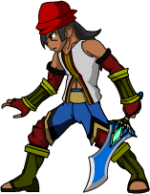
Here's one. Not the latest one though because I don't have access to my PC atm. I can probably do Index Changing if it's like less than 50 frames of Animation. But I was planning on giving each character at least "Smash Ultimate" amounts of Animation, and I already intended them to be "PNG-per-frame" instead of doing a Spritesheet.

They are already having their own offsets too, as that's one of my most priority in Unity, which is actually what I find most interesting in OpenBOR because Godot still doesn't have a proper Offset Adjustment per image.

If I could probably modify all image's pallet index at once, but I'm not sure if that's the solution I need.
 

Attachments

  • Idle_001.png
    Idle_001.png
    27.2 KB · Views: 10
If I could probably modify all image's pallet index at once, but I'm not sure if that's the solution I need.
Before doing this, I would suggest you to test one image first.
Since your image use antialiasing, you would need some extra steps. If you don't need it, you can export the images right from Flash without antiaslising.

Photoshop actions would help you a lot in this case, to avoid manual work. You would just need to make it once and record it.
After then, you use Automate/Batch to make everything at once in all your images

1- First, there is a trick: Save your image in either gif or png in 8bit using SAVE FOR WEB.
Pay attention to:
- No dither
- Mate color (black will borders stronger)
- transparency
- Colors: 64 - For you can try using less, because 64 colors for a single image is kinda too much (Capcom used less than 32 for most sprites).
- Play with the options SELECTIVE/ADAPTATIVE/PERCEPTUAL/RESTRICTIVE. Each one gives you different results
wrBuhYV.png


I would use 32 here.
Ddcx5kC.png

save the image

2 - Open the image, go to color table and change the background to magenta (255 0 255)
YmEm9pU.png


Now you have 2 options:
- Use Fighter factory to move the magenta color to the right index (0)
- use photoshop to convert the image to RGB and convert it back to indexed, but using forcing MAGENTA as the first color
jOxVyXG.png


- save the image as png and its done.

But probably you will need to break this in two steps, since thanks to the need of opening the file again.
So you start a new action, record the first step and stops. Then apply it to all the images you need.
After that, you make the step 2, record it and stops. Then apply it to all the images you need.

It may look a lot of work, but it can be quick if you know what you are doing.
 
They are already having their own offsets too, as that's one of my most priority in Unity, which is actually what I find most interesting in OpenBOR because Godot still doesn't have a proper Offset Adjustment per image.
About this, I really don't recomend you using multiple offsets. Sure, if you already have them set, you can try copying the values to OpenBOR.
But if I was you, I would export all the images again, using the same canva size so they will have the same offeset.
This saves you a LOT of work.
 
Welcome @AxZelAnimations.

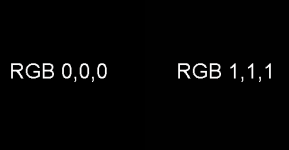
I just had a look at your sprite, and... honestly, it has some issues, even for Unity or GoDot. I can tell you have more of a background in animations than game development. The biggest obstacle is that you have areas of RGB black in it. Game design 101 - always avoid RGB 0,0,0 if possible, no matter what engine you're using. For black, you always want RGB 1,1,1. It's almost impossible for humans to see the difference.

1706741674298.png

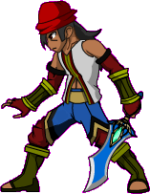
The other problem is you have a ton of anti aliasing. That's a big issue for most sprite work too. If it were just one or the other we could still automate indexing without much hassle, but you have both.

1. The anti-aliasing means non black transparent color won't work. In game, they'll have what we call the the "glow":

1706740442431.png Idle_001_ex.png

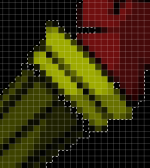
2. Normally, you could bypass the anti aliasing issue by using RGB 0,0,0 for the transparent color - but since you have so many areas with RGB 0,0,0 in them, that won't work either:

1706740573355.png

Hopefully @O Ilusionista has a solution, since he does graphic design professional and knows a lot more tools than I do.

They are already having their own offsets too, as that's one of my most priority in Unity, which is actually what I find most interesting in OpenBOR because Godot still doesn't have a proper Offset Adjustment per image.

OpenBOR has offsets of course, but we recommend you don't use them like you're describing. It doesn't make one whit of difference to the engine, but you can save a ton of work-time by using a uniform sprite size big enough for all your animations. OpenBOR optimizes and trims images on load, so there's not much point indoing it by hand.

So far as animation is concerned, the hard code limit is 2.1 billion animations, at 2.1 billion frames each. Think that will be enough for you? :cool:

I'll pass along some more details as I think of them or you have more questions.

DC

*Edit:* :ninja: by @O Ilusionista.
 
Last edited:
Before doing this, I would suggest you to test one image first.
Since your image use antialiasing, you would need some extra steps. If you don't need it, you can export the images right from Flash without antiaslising.

Photoshop actions would help you a lot in this case, to avoid manual work. You would just need to make it once and record it.
After then, you use Automate/Batch to make everything at once in all your images

1- First, there is a trick: Save your image in either gif or png in 8bit using SAVE FOR WEB.
Pay attention to:
- No dither
- Mate color (black will borders stronger)
- transparency
- Colors: 64 - For you can try using less, because 64 colors for a single image is kinda too much (Capcom used less than 32 for most sprites).
- Play with the options SELECTIVE/ADAPTATIVE/PERCEPTUAL/RESTRICTIVE. Each one gives you different results
wrBuhYV.png


I would use 32 here.
Ddcx5kC.png

save the image

2 - Open the image, go to color table and change the background to magenta (255 0 255)
YmEm9pU.png


Now you have 2 options:
- Use Fighter factory to move the magenta color to the right index (0)
- use photoshop to convert the image to RGB and convert it back to indexed, but using forcing MAGENTA as the first color
jOxVyXG.png


- save the image as png and its done.

But probably you will need to break this in two steps, since thanks to the need of opening the file again.
So you start a new action, record the first step and stops. Then apply it to all the images you need.
After that, you make the step 2, record it and stops. Then apply it to all the images you need.

It may look a lot of work, but it can be quick if you know what you are doing.
First of all, thank you so much for this. I have all of these in captured. I do intend on testing my Sprites as it is.

But as I am trying to consider with the project, it seems it does indeed take alot more time.
What I originally intended was to add the magenta/background color from the Flash right away.

It seems like it's as much time as just doing the Sprites as Pixel Art, which I can probably do when I have the time. But again, thank you so much for the ideas.
About this, I really don't recomend you using multiple offsets. Sure, if you already have them set, you can try copying the values to OpenBOR.
But if I was you, I would export all the images again, using the same canva size so they will have the same offeset.
This saves you a LOT of work.
Oh, sorry I meant each state has its own offset if necessarily needed to change. Because Sword Trails have longer reach and his body stretches when jumping, not necessarily each frame has offset. Most of them are following the exact offset with the Idle Animation or Falling Animation depending on the situation. The Offset is definitely fine, I'm sure because it's also the exact same issue when I'm doing this in Unity so I made sure it will never be a problem.
 
Welcome @AxZelAnimations.

I just had a look at your sprite, and... honestly, it has some issues, even for Unity or GoDot. I can tell you have more of a background in animations than game development. The biggest obstacle is that you have areas of RGB black in it. Game design 101 - always avoid RGB 0,0,0 if possible, no matter what engine you're using. For black, you always want RGB 1,1,1. It's almost impossible for humans to see the difference.

View attachment 7069

The other problem is you have a ton of anti aliasing. That's a big issue for most sprite work too. If it were just one or the other we could still automate indexing without much hassle, but you have both.

1. The anti-aliasing means non black transparent color won't work. In game, they'll have what we call the the "glow":

View attachment 7066 View attachment 7070

2. Normally, you could bypass the anti aliasing issue by using RGB 0,0,0 for the transparent color - but since you have so many areas with RGB 0,0,0 in them, that won't work either:

View attachment 7067

Hopefully @O Ilusionista has a solution, since he does graphic design professional and knows a lot more tools than I do.
Oh, I've read DC and all of a sudden I remembered something. Was it Damon Caskey? I think I used to chat to back in the old site. Thank you!

Yes, I'm more into Animation, but I figured my Animations are more for 2D Game, at least the way how I make the movements. (I mostly do Sword Fights.)

My sprites though, they are Vector since it's Adobe Flash. I tried replicating Solo/Final Remix of The World Ends With You but with less thicker lines, so maybe the way Adobe Flash exports them is the issue. I exported them with 75 dpi, I may have enabled anti-aliasing. The rest are what Adobe Flash gave me the result I wanted.
OpenBOR has offsets of course, but we recommend you don't use them like you're describing. It doesn't make one whit of difference to the engine, but you can save a ton of work-time by using a uniform sprite size big enough for all your animations. OpenBOR optimizes and trims images on load, so there's not much point indoing it by hand.

So far as animation is concerned, the hard code limit is 2.1 billion animations, at 2.1 billion frames each. Think that will be enough for you? :cool:

I'll pass along some more details as I think of them or you have more questions.

DC

*Edit:* :ninja: by @O Ilusionista.
Yeah actually I worded the offset wrong. Offset was not an issue. Godot has an issue with grouping different states and I think OpenBOR has a very great feature for that. I think it's similar to Game Maker if I remember correctly. But again, the offsets are fine, I have no problems with them.

As for the Animations, the Animation's limit is not the issue 😂, but it's just that I'm probably going to take longer to fix my Animations to work properly in OpenBOR. But yes I figured OpenBOR's well knowned for Sprite Animations, which is one of the few factor why I decided to Animate.

Again, thank you so much for the replies. I am also considering doing Pixel Animation when I had the time, but as of right now I wanted to make use of the characters I created in Flash.
 
Was it Damon Caskey? I think I used to chat to back in the old site. Thank you!

Yep, one and the same. Good to see you back.

It seems like it's as much time as just doing the Sprites as Pixel Art, which I can probably do when I have the time. But again, thank you so much for the ideas.

It wouldn't take as much as you think. Everything @O Ilusionista described can be automated. Once set up, you can go make a sandwich while it runs.

I also thought of a way to keep you color depth and aliasing if you wanted. Basically, you use autofill to replace all RGB 0 0 0 with RGB 1 1 1. Then you add an RGB 0 0 0 background, and convert to index. Finally (not 100% necessary, but I would) change the RGB 0 0 0 to magenta.

You can fully automate once set up.

The downside is you'll have a fully populated 256 color palette to deal with. That's a nightmare if you want to have remaps.

In any case, I'm just throwing it out there as an option. I still recommend @O Ilusionista's method. The reduced colors and harder lines look much better IMO and won't be cumbersome to work with.

DC
 
Yep, one and the same. Good to see you back.


It wouldn't take as much as you think. Everything @O Ilusionista described can be automated. Once set up, you can go make a sandwich while it runs.

I also thought of a way to keep you color depth and aliasing if you wanted. Basically, you use autofill to replace all RGB 0 0 0 with RGB 1 1 1. Then you add an RGB 0 0 0 background, and convert to index. Finally (not 100% necessary, but I would) change the RGB 0 0 0 to magenta.

You can fully automate once set up.

The downside is you'll have a fully populated 256 color palette to deal with. That's a nightmare if you want to have remaps.

In any case, I'm just throwing it out there as an option. I still recommend @O Ilusionista's method. The reduced colors and harder lines look much better IMO and won't be cumbersome to work with.

DC
Thanks.

I don't think I needed Anti-Aliasing exactly, I probably just let it sit there because it didn't do as much changes as I thought, I can just turn it off when exporting. Either way, I can try many experiments because it is a Vector Art exported to PNG/GIF.

Although here's the thing about Pallet Index, I was thinking about adding the Magenta/BG Color directly in Adobe Flash, so when I export them, they will have the Magenta/needed BG color, or will I still need to manually edit the index after that?
 
You will still need to make it manually
Alright. I'll try to work on it. Thank you.
As for the tools, I'm yet to try them but currently I'm looking at both OpenBORStats and Chronocrash Modders Tool, I know I can work with just the Text Files but I'm interested in using the tools, should I use them or should I just go manually? They look fine as editors.
 
Right now, you can forget OpenBORstats and focus in CMT. Pretty much everything Stats could do, CMT can do now and better.

For me, there is no reason to make your life harder :)
Right. CMT looks actually attractive, I always love seeing early development, prototyping and stuff. Thanks.

Now I know we're still discussing about Sprites but I can't help but look for the scripting part and come across DC's Dodge Script Tutorial and now understand a little bit of how we make Scripts. Honestly the programming side is very exciting, it's the Sprite part I feel I'm gonna have to adjust alot.
 
@AxZelAnimations,

Use CMT. Do not use OpenBORStats. It's not just that CMT is more feature rich. OBorStats is actively deleterious and unstable for new creators. It will mangle your files and cause all kinds of headaches.

DC
 
@AxZelAnimations,

Use CMT. Do not use OpenBORStats. It's not just that CMT is more feature rich. OBorStats is actively deleterious and unstable for new creators. It will mangle your files and cause all kinds of headaches.

DC
I've read that Stats does delete or modify stuff making things broken. I'll be using CMT instead.

I've also seen some templates to work into. But is there a template that is almost empty? Like only one playable character and one AI? Or we all start with the Legacy BOR and 2D/3D Samples?
 
Back
Top Bottom