Theoretical question about Bbox

Aerisetta

Active member
I was just wondering, how come bounding boxes (bbox) need to be defined and must be a quadrilateral 4 sided shape. I understand this is the norm for pretty much all sprite based games, but why is that?

In OpenBor, could there not be an option that states "all pixels NOT the first color on the palette (AKA the transparent) = the Bbox, AND +/- the edge pixels". Sure it's not going to work every time and we must allow players to define their own if they want, but I feel it will satisfy most needs. I can't imagine it is technically impossible...so I was wondering why sprite based games still use manually defined binding boxes.

OR even if it's not as I said, could there be a tool that exists which generate the "recommended bbox" based on the pixels that are there?

Maybe this actually exists and I just didn't know about it? In general I like to automate things where possible, plus I read several times that many games have bad hit detection so maybe the computer can generate better choices.
 
About "computer generated" solutions, @DCurrent knows a lot more than me and has the proper knowledge to explain, but I can give my two cents about the "recommended bbox".

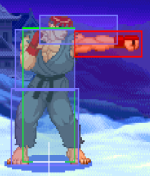
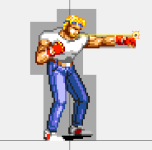
In my tests, the best results were achieved by focusing the bbox at the center of the body and most times discarding arms, legs, hair or accessories (at least when it makes sense). About the atbox, usually I start from the center "X" offset (or the sprite center, which sometimes can be different from the offset) and end at the last pixel of the arm or leg (or weapon too), but for the "Y" axis usually I follow the entire arm/leg size with minor changes depending on the current animation or movement.

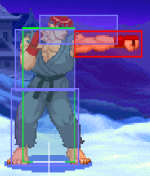
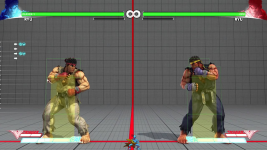
In the example below I'm trying to follow the Street Fighter logic. Once I'm not using multiple bboxes on SORX, usually I follow the main collision box logic (the Ryu's green line).

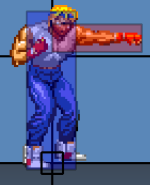
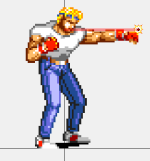
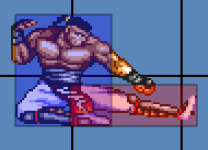
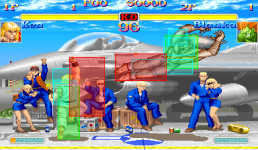
In VS fighting games two characters can't stay in the same "X" position because his collision boxes will push each other, so Ryu's atbox punch does not need to start at the center of his offset. However, once we have "Z" axis in brawler games, sometimes two or more characters can stay in the same "X" position and if you make a very small atbox sometimes your character will not hit the enemy. Below you can see SORX / SFA2 / original SOR2 examples.
1662011354397.png1662013807939.png1662014978563.png

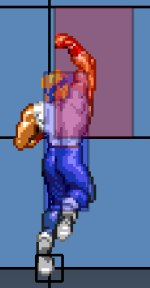
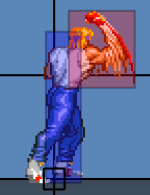
Below is an example of an exception that does not follow the sprite size, especially used for uppers or anti-aerial attacks. Usually I add an extra size in the X/Y axis to help against the enemy's jumping attacks, once most times the enemy's bbox is behind his own atbox.
1662011971464.png1662012717541.png
1662012567970.png

Of course, you can find different logics in different games or even wrong collision boxes in official games too, but some games like Street Fighter or SoR are good examples to use as a starting point.
 

Attachments

  • 1662011951363.png
    1662011951363.png
    7.4 KB · Views: 2
  • 1662013413674.png
    1662013413674.png
    810.9 KB · Views: 2
  • 1662013797834.png
    1662013797834.png
    11.8 KB · Views: 2
  • 1662014525901.png
    1662014525901.png
    5.9 KB · Views: 2
@Aerisetta,

@Kratus gave a good answer about the boxes from a game mechanics perspective, and he is correct. In games, not only is pixel precision collision unnecessary, it is also undesirable. It may seem like a good idea on the surface, but in actual gameplay, it quickly falls apart for a variety of reasons.

That's not why pixel collision doesn't exist though.

I can't imagine it is technically impossible..

Except it very much is. Basically, you are trying to apply human thought to a computer. Don't make that mistake. Computers don't "see" sprites. They don't know what's on screen, and they don't care. The graphics engine and the game mechanics function separately from each other. Game mechanics are calculated first, then items are placed on screen as a result. In extreme cases like Neo-Geo, the CPU literally has no access at all to sprite assets.

Even if you did access graphic data first, it still wouldn't work. Collision detection is one of the most expensive parts of running a game. There are entire schools of thought dedicated to optimizing collisions, or more accurately, to minimize them. Shapes are already the most efficient means, and the formulas to calculate shapes aren't getting more optimal until someone reinvents math. As a result, most efforts concentrate on eliminating as many collision calculations as possible. Pixel collision would do just the opposite.

Again, computers are not humans. They can't glance at the screen and go "Oh look, Axel's arm is inside Barbon's face, that's a hit!". You'd have to check the pixels of every single active entity and compare them to all the pixels on every other entity. Instead of a few dozen collision calculations per frame, you'd have tens of thousands (Ex. Five Streets of Rage Axel sized entities on screen would require about 9,000 pixel calculations). For high definition sprites, it could quickly reach into the millions. No computer then or now has enough CPU budget to do that.

On top of all that, engines like OpenBOR operate in a 3D world. Only the graphics are 2D. Since pixels only occupy a 2D space, you still have to do some type of shape calculation for the third axis. In short, pixel detection simply isn't feasible, especially when shapes can do the same job and do it better.

The closest thing you'll find is hardware sprite collision, which was available on the Amiga and a couple of other systems, but it is severely limited, and still couldn't account for 3D space. Clever developers could use it for optimization (see video example), but you still had to employ shapes.


HTH,
DC
 
Rewrote my post to hopefully explain better and make more sense.

DC
 
Something I thought for a while and it could be a hassle, but couldn't you have something close to this by setting delay low, like 2 or 1, repeating frames, and make a different bbox for each frame? Like a boss from a shumup game, Darius for example, 1 box covers the main parts of a boss, hitting all needed corners in 1 frame, and other frames for each section the first hitbox couldn't cover. More complex animations would need more repeat frames, maybe even changes in delay, but could be the closest to bboxes covering more pixels.

The alternative could be using some entity to spawn with it's own bbox or more, if bound to the entity.

x)
 
@DJGameFreakTheIguana, the upcoming release supports multiple collision boxes for frame, so no need for any of that. Actually, the current engine supports them internally, there's just no command to use them.

In any case, if you want multiple collision zones now, that's much simpler to run with some script math. I did it in my old Fatal Fury project to have proper hit and block reactions for head, body, and feet. All you do is have a large box that covers all areas, then when a collision occurs, you get the location of last hit (the engine calculates this automatically on every hit to figure out where to spawn flash sparks). Then, it's a matter of simple math to know where in that box your hit is and logic it out from there.

For my hit level, I just did a percent calculation of the entity's height (body box was always same as height). If the hit was >= 80% of height, it's a head hit. If it's < 80% and >= 20%, it's a body hit. Otherwise it's a low hit. You can do the same thing to make different zones around a boss or whatever.

I might add, the same principal can also give you scaled collision boxes. Visually scaling sprites doesn't change the collision boxes, but you can do your own second calculation when a hit occurs to compare it to a theoretical box scaled to the same % as sprite. If the second calculation fails, you cancel the hit. It's how I work collision in the Lucia's Run project (a rail shooter).


DC
 
Last edited:
In any case, if you want multiple collision zones now, that's much simpler to run with some script math. I did it in my old Fatal Fury project to have proper hit and block reactions for head, body, and feet. All you do is have a large box that covers all areas, then when a collision occurs, you get the location of last hit (the engine calculates this automatically on every hit to figure out where to spawn flash sparks). Then, it's a matter of simple math to know where in that box your hit is and logic it out from there.

For my hit level, I just did a percent calculation of the entity's height (body box was always same as height). If the hit was >= 80% of height, it's a head hit. If it's < 80% and >= 20%, it's a body hit. Otherwise it's a low hit. You can do the same thing to make different zones around a boss or whatever.

I might add, the same principal can also give you scaled collision boxes. Visually scaling sprites doesn't change the collision boxes, but you can do your own second calculation when a hit occurs to compare it to a theoretical box scaled to the same % as sprite. If the second calculation fails, you cancel the hit. It's how I work collision in the Lucia's Run project (a rail shooter).
Ha ha,
i get it now, so basically you make the engine kinda-sorta do a game of "battleship" using percentage values on the box.....

just wondering now, would there be eny drawbacks to this method versus actually scaling the boxes as if they where sprites?
(sort of like a drawmethod thing but for BBoxes)
either way i suspect that scaling the boxes would be way more taxing to the systems, not as bad as pixel accurate calculations, but still bad...
 
Ha ha,
i get it now, so basically you make the engine kinda-sorta do a game of "battleship" using percentage values on the box.....

just wondering now, would there be eny drawbacks to this method versus actually scaling the boxes as if they where sprites?
(sort of like a drawmethod thing but for BBoxes)
either way i suspect that scaling the boxes would be way more taxing to the systems, not as bad as pixel accurate calculations, but still bad...

The main drawback aside from convenience is speed. Native code will always beat script 1:1. However, well written script won't drop the frame rate on any human perceptible level, and native scaling for boxes would be a very complex addition. In addition to the calculations, it also requires doubling all bbox data since you have to keep an original version to reference. It's something that would severely increase resource consumption for all creators while maybe 1 of 100 modules would ever use it, and is therefore best left to script.

All those Neo-Geo games famous for zooming like Samurai Shodown, Art of Fighting, and early Fatal Fury titles never scaled their boxes either. The ones with full screen zoom made sure by design that any time fighters could reach each other with melee attacks they were at normal zoom. Projectiles could afford a bit of hitbox dissonance, so that was no big deal. In Fatal Fury, scaled fighters on the back plane didn't have corrections at all. The boxes, jump heights, etc. are all the same. They just didn't overdo it with the scaling so that you wouldn't notice. The easiest way to see this in action aside from debug modes is play to Fatal Fury 2 or Special, switch to the back plane and then jump. You'll notice the character appears to jump much higher because of the scaling.

DC
 
Last edited:
Back
Top Bottom