

Adroiid
New member
Hello, I'm new to OpenBor. I'd like to know the minimum requirements for displaying a character in the background.
I've looked at the wiki, but I can't find this information. I created a character sprite with a limited palette using the pixel art software AsEsprite:
with 1 inactive frame, 2 punches of two frames each, and an 8-frame walking animation.
1 2
2 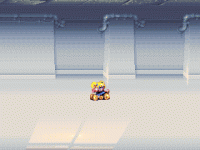
1: (idle01.gif) 2: (a gif test of sprite on background)
I just wanted to start a project by displaying only iddle01.gif for all actions (on a blank background), but even with this minimal project, the OpenBor window opens and closes.
I also looked at the blank template provided by Bloodbane, from which I was able to remove the enemy waves, for example. So some modifications work. However, Donovan's sprite is already a bit too advanced for me. I managed to replace it with the one of the girl accompanying him, but it required modifying all the existing sprites (I asked the GPT Chat to do it). If you have any solutions for a very minimalist project, for example, and if I can at least see my sprite displayed, that would really encourage me to continue and create other animations (I also created a background (2) and think for parralax).
Thanks in advance
I've looked at the wiki, but I can't find this information. I created a character sprite with a limited palette using the pixel art software AsEsprite:
with 1 inactive frame, 2 punches of two frames each, and an 8-frame walking animation.
1
2 1: (idle01.gif) 2: (a gif test of sprite on background)
I just wanted to start a project by displaying only iddle01.gif for all actions (on a blank background), but even with this minimal project, the OpenBor window opens and closes.
I also looked at the blank template provided by Bloodbane, from which I was able to remove the enemy waves, for example. So some modifications work. However, Donovan's sprite is already a bit too advanced for me. I managed to replace it with the one of the girl accompanying him, but it required modifying all the existing sprites (I asked the GPT Chat to do it). If you have any solutions for a very minimalist project, for example, and if I can at least see my sprite displayed, that would really encourage me to continue and create other animations (I also created a background (2) and think for parralax).
Thanks in advance
Last edited:


