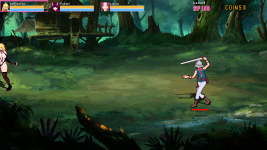
stop fight outside of visible screen

StrikerX

Member
In openbor, Is it necessary that fights can take place outside the visible scene?
It happen if I play in full-screen mode, 960x540, when some entity use slamgrab or some combo close to edge of screen. It would be really nice to know how to stop that.
Maybe a range with limit to center of screen or min dist of edge? subject_to_screen 1 does not solve it.
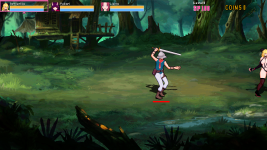
 
Sorry for the double post, but maybe I haven't been able to express myself well, the player is half offscreen. I would like to know how to fix this.
View attachment 3687
View attachment 3686
@StrikerX

This is a normal behaviour, the engine is acting correctly because indeed the character's offset usually defined at the center of the sprite is inside of the screen, this is why always half of the sprite stays out.

You can force players to stay farther from the screen edge by checking the distance constantly and changing their positions using events like onmove/ondraw/update scripts.
As an example, I have a custom offscreenkill function that checks the distance from the edges and you can modify it to fit in your game and change the character's positions.

C:
void offScreenKill(float dx, int edge)
{//Check position relative to screen. If is offscreen, suicide! (OBSTACLES)
 //dx: Distance to screen edge
 //edge: 0 = left, 1 = right
    void self    = getlocalvar("self");
    float x        = getentityproperty(self,"x");
    float xPos    = openborvariant("xpos");
    float hRes    = openborvariant("hresolution");
    
    //OFFSCREEN TO THE RIGHT OR LEFT?? SUICIDE!
    if(edge == 1 && x > xPos+hRes+dx || edge == 0 && x < xPos-dx){killentity(self);}
}
 
@StrikerX

This is a normal behaviour, the engine is acting correctly because indeed the character's offset usually defined at the center of the sprite is inside of the screen, this is why always half of the sprite stays out.

You can force players to stay farther from the screen edge by checking the distance constantly and changing their positions using events like onmove/ondraw/update scripts.
As an example, I have a custom offscreenkill function that checks the distance from the edges and you can modify it to fit in your game and change the character's positions.

C:
void offScreenKill(float dx, int edge)
{//Check position relative to screen. If is offscreen, suicide! (OBSTACLES)
 //dx: Distance to screen edge
 //edge: 0 = left, 1 = right
    void self    = getlocalvar("self");
    float x        = getentityproperty(self,"x");
    float xPos    = openborvariant("xpos");
    float hRes    = openborvariant("hresolution");
 
    //OFFSCREEN TO THE RIGHT OR LEFT?? SUICIDE!
    if(edge == 1 && x > xPos+hRes+dx || edge == 0 && x < xPos-dx){killentity(self);}
}

Thank you it worked. I used in onmovex

Code:
void main()
{
     //Check position relative to screen. If is offscreen, move
 //edge: 0 = left, 1 = right
    void self    = getlocalvar("self");
    float x        = getentityproperty(self,"x");
    float y        = getentityproperty(self,"y");
    float xPos    = openborvariant("xpos");
    float hRes    = openborvariant("hresolution");
   
    //OFFSCREEN TO THE RIGHT OR LEFT?? move!
    if(x > xPos+hRes-80) {changeentityproperty(self, "velocity", -80);}
    if(x < xPos+80){changeentityproperty(self, "velocity", 80);}
    if(y > 0 && x > xPos+hRes-80){changeentityproperty(self, "velocity", 0, 0, 0);} //fixed bug of jump fw in edge r
    if(y > 0 && x < xPos+80){changeentityproperty(self, "velocity", 0, 0, 0);} //fixed bug of jump fw in edge l
}
 
Last edited:
Back
Top Bottom