Solved Starting the player on the right side of the screen. ( Scrollx question)

Question that is answered or resolved.

PS_VITA

Active member
Hi-
I think I made a mistake by drawing and designing a stage where the player starts
on the right side of the screen and now I may have to change or re-do the stage - but before I do that -
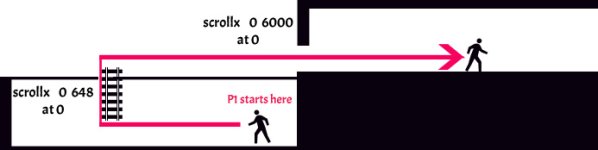
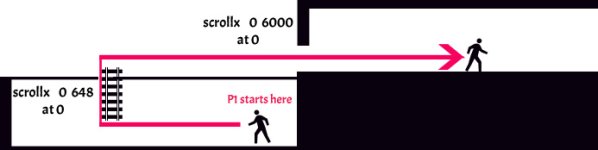
I was wondering if there is solution to the problem I have. Please take a look at the picture attached.

The starting scrollx values are:
scrollx 0 648
at 0
Untitled-1.jpg

( because I don't want to show the right side of the screen where there's an empty area)

whenever the players moves 1600 pixels to the right
after he climbs a latter and moves right - then I want the scrollx to behave as if I had set it to be
scrollx 0 6000
at 0

meaning the player could backtrack to postion x 0 or move forward 6000 pixels forward.

This is all possible - but currently I cant have it both ways
meaning I cant have start with scrollx 0 648 at 0 and then the next line of code be scrollx 0 6000 at 0 ( this will simply overwrite the previous line of code)


Thanks for reading this post - any hints or comments are appreciated.
 

Attachments

  • Untitled-1.jpg
    Untitled-1.jpg
    27.2 KB · Views: 1
You can change where players start when level starts with this script declared on an entity spawned at 0:
Code:
spawn    Empty
@script
void main()
{
    void P1 = getplayerproperty(0, "entity");

    changeentityproperty(P1,"position", x, z, y); // replace x, z and y with values!
    changeentityproperty(P1,"direction", 0); // force facing left
}
@end_script
coords    320 460
at    0

It's for player 1 but it can easily be cloned for other players.

As for changing scrollx, it could be done with script or command, however the major issue is when it is done. From your description, looks like player only needs to be near the doorway to change scrollx.
This could be done by using an entity which is waiting for player 1 there. If player 1 touches the entity or at least near required coords, scrollx is changed then entity remove itself.
 
You can change where players start when level starts with this script declared on an entity spawned at 0:
Code:
spawn    Empty
@script
void main()
{
    void P1 = getplayerproperty(0, "entity");

    changeentityproperty(P1,"position", x, z, y); // replace x, z and y with values!
    changeentityproperty(P1,"direction", 0); // force facing left
}
@end_script
coords    320 460
at    0

It's for player 1 but it can easily be cloned for other players.

As for changing scrollx, it could be done with script or command, however the major issue is when it is done. From your description, looks like player only needs to be near the doorway to change scrollx.
This could be done by using an entity which is waiting for player 1 there. If player 1 touches the entity or at least near required coords, scrollx is changed then entity remove itself.

Thank you, I'm pretty much almost done as your post was a tremendous help.
I have one remaining question: How can revert the camera to be like the camera settings on the level.txt "cameraoffset 0 -100" via script?

Once I used changelevelproperty("cameraxoffset",0 - 200);

That did the trick, but now the camera follows the player and hangs to much to the left.

So I want to learn how to revert the camera back to my level camera which is cameraoffset 0 - 100

I already have an invisible object that tracks where the player is, so it's all set up and ready, I just need that script code.

I tried: changelevelproperty("cameraoffset",0 - 100);

But it didn't work or maybe I need to run more tests.

Anyhow, thanks for your help.
 
Last edited:
Try this:
C:
changelevelproperty("camerazoffset", -100);
Hi, thanks for getting back to me and sorry I took so long to reply. I actually tried changelevelproperty("cameraxoffset", 0 - 0);

Before I read your post and it was working as I kinda hoped for.

Should I still try your solution Instead?
 
Back
Top Bottom