Seeking an Unrestricted Mod

PS_VITA

Active member
Hi and Happy new year!

I've been contemplating creating a survival horror game with a slow-paced Super Metroid vibe.
While the mod I'm seeking doesn't necessarily have to match the exact style of the game I'm envisioning,
I'm on the lookout for any independent mod that can serve as a foundation—no obligations, no permissions required.
Of course, I'd be more than happy to credit the provider of the mod used.
I'm exploring this route to spark inspiration and leverage an existing framework.
Does anyone know of a mod fitting this criteria, free of any strings attached?

EDIT: I may have found a solution already, but I wanted to double-check with you all if this link fits my requirements:


I'm exploring this resource as a potential foundation for my project. Any thoughts or additional suggestions would be greatly appreciated!
 
Last edited:
I never consider Super Metroid as survival horror so I assume this is two different aspect.
I'm not sure how to create survival horror game but if you want to create something like Super Metroid you can try Escape from Guha.
Thank you for your support!
While Super Metroid isn't a survival horror game, I'm excited to craft an original IP blending
the map style of Clock Tower and Resident Evil with beat 'em up elements.

Balancing this mix will be a challenge given my experience primarily lies in games like Double Dragon using OpenBOR.
Your generosity means a lot, and I see this as a fantastic starting point.

While testing the game, I've encountered an issue—unable to simultaneously move right or left while shooting or jumping.
Could this be due to limitations with my keyboard?
 
Thank you for your support!
While Super Metroid isn't a survival horror game, I'm excited to craft an original IP blending
the map style of Clock Tower and Resident Evil with beat 'em up elements.

Balancing this mix will be a challenge given my experience primarily lies in games like Double Dragon using OpenBOR.
Your generosity means a lot, and I see this as a fantastic starting point.

While testing the game, I've encountered an issue—unable to simultaneously move right or left while shooting or jumping.
Could this be due to limitations with my keyboard?
Also happened to me.
I changed the keyboard configuration through the game options menu and that fixed it.
 
Once you save your configurations, yes.
Sorry I meant as in if a new player ever opens the Module for the first time.
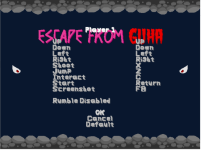
I think it's in the menu.txt attached -

It now reads:
renamekey moveup Up
renamekey movedown Down
renamekey moveleft Left
renamekey moveright Right
renamekey jump Jump
renamekey attack Shoot
renamekey special Interact
disablekey attack2
disablekey attack3
disablekey attack4

But I was not sure why @Bloodbane default keys looked like the image I previously posted instead of the usual "UP,DOWN,RIGHT,LEFT"

Sorry for any confusion.
 

Attachments

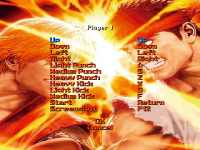
It depends on the creator's choice of configuring keys for his/her own taste (which you're welcome to change to suit your taste), but for key configurations in player control settings, the way those commands are read is in the following order. First off, is the directional inputs (up, down, left, and right). Second is the attack inputs (attacks 1, 2, 3, and then 4). Next ones are jump and special. Last ones are start and screenshot.

I have my menu.txt set here like this:
Code:
renamekey   moveup    Up
renamekey   movedown  Down
renamekey   moveleft  Left
renamekey   moveright Right
renamekey attack Light_Punch
renamekey attack2 Medium_Punch
renamekey attack3 Heavy_Punch
renamekey jump Light_Kick
renamekey special Medium_Kick
renamekey attack4 Heavy_Kick

#fontmonospace 1 1 0 0 0 0 0 0 0 0 0
#fontmonospace 
#fontmbs {font1} {font2} {font3} {font4} {font5} {font6} {font7} {font8}

But if you look at the order of it like what I said, this is what I'm tryna point out.

My Mod - 0886.png
 
Apologies for the confusion, everyone.
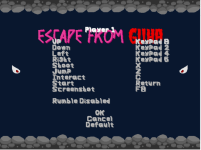
I've identified the issue – the Zip file uploaded by @Bloodbane contained a guha.cfg file that didn't align with the code in the data/menu.txt file.

It seems that @Bloodbane mapped his buttons using the num pad keys: 8 (up), 4 (left), 6 (right), and 2 (down)
(which is fine because that was he's preference).

Now, the follow-up question is directed towards the openbor developers:
Why did this CFG file function for me when my laptop lacks a num pad on the keyboard?

Although the keys seemed to work, there were limitations.
For instance, unable to simultaneously move right or left while shooting or jumping, as I explained earlier.
Just curious to know why and maybe help out someone in the future with this minor but strange issue.
 
Last edited:
Why did this CFG file function for me when my laptop lacks a num pad on the keyboard?

I think it's because OpenBoR just reads configuration from .cfg file.

how hard would it be to port "Escape from Guha." To OPENBOR V4?
Could you provide some insight into the feasibility and logistics of porting 'Escape from Gucha' to v4?

Well, is there any incompatibility issues with v4? I could test the game in v4 but I won't fix anything if the games works well in v4.
 
I think it's because OpenBoR just reads configuration from .cfg file.


Well, is there any incompatibility issues with v4? I could test the game in v4 but I won't fix anything if the games works well in v4.
Got it! Totally get where you're coming from.
Since you're the brains behind the game, I figured you might spot some potential hiccups in v4.
Anyway, gonna dive into testing it out today, see how things roll.
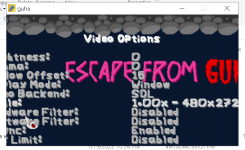
Oh, and I'm thinking about adding widescreen support—could be a slick upgrade.
I'll keep you posted on how it goes and any developments on the widescreen front!
 
@Bloodbane Been gaming for an hour in v4, and everything's smooth sailing—no major glitches so far.
Noticed one enemy stays down longer than others, but that might be intentional rather than a v4 issue.
By the way, do you have any wide screen settings in mind that could work across most machines?
Came across this link— Black bars in widescreen modules
bit overwhelmed since I've never designed for wide screen.
I know Guha might not be originally designed for it, but I'm keen on laying a solid foundation.
Any recommendations to make it wide screen friendly?
 

Attachments

  • Untitled-1.png
    Untitled-1.png
    73.2 KB · Views: 2
Last edited:
Back
Top Bottom