Solved Questions about PNG

Question that is answered or resolved.

Smart Kitty

Well-known member
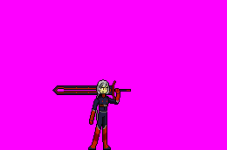
Hi everyone. A question to anyone who knows, I am putting images in png in openbor but as is the alternate color to define the transfer of the image (other than pure black)
 
Solution
You should swap those two color boxes by right-clicking around any color box and then selecting "Rearrange Colormap" menu. Drag the pink color box (which is the third) to where the black color box (the first color box at the top left corner) is. The first color box is always used as a transparency box, so you should put the pink color box to be at the first or top-left corner of the color table. Hit enter after you put the pink color as the first color box. Save it and try it.
Hi, my good friend. Look here I have an example, when in my game I place an image in png for a character the transparency is shown incorrectly. How to make the color of the transparency not black but the one in the background of the image?
 

Attachments

  • idle01.png
    idle01.png
    1.7 KB · Views: 5
  • Melta.txt
    Melta.txt
    3.6 KB · Views: 4
You should swap those two color boxes by right-clicking around any color box and then selecting "Rearrange Colormap" menu. Drag the pink color box (which is the third) to where the black color box (the first color box at the top left corner) is. The first color box is always used as a transparency box, so you should put the pink color box to be at the first or top-left corner of the color table. Hit enter after you put the pink color as the first color box. Save it and try it.
 

Attachments

  • swapping colorboxes.png
    swapping colorboxes.png
    125.9 KB · Views: 19
Solution
Pr9HfJD.png


I checked your palette using adobe photoshop and the first colour of the palette like maxman said needs to be the same colour you want to use for transparency, (don't duplicate colours) But your transparency colour is black not pink and you use black again as a duplicate colour.

I don't understand how paint 3d works, unfortunately I stopped using paint years ago, I would suggest using a different program for sprites like gimp or photoshop.
 
Didn't know you're using that program. I have never tried using Paint3D but in case you cannot drag color boxes (black and pink), you can change them by swapping color codes. Take a look at the color codes of those two color boxes. Copy the certain color codes of those colors and paste them in either note pad, word pad, power point, document, or whatever writing/typing document files you have, so you can use those codes to paste into your color table of the program you're using. If you put the color code of pink in the color code of black which is the first color box and change it, the pink background color of that image will become black. So you need to change that other color box (pink) with black which is not the first color box. After that, save it as png like you save it as a palette if you want to use it as a palette for conversion. You really don't have to save/make it as a palette file which I never do.
 
Last edited:
Oh thank you guys for your help :). @maxman thanks for everything, well I downloaded and installed the gimp to start editing and thanks for the tutorial, I will take it into account. @danno thank you too. For converting my image. I wish you both the best. Take care
 
Back
Top Bottom