Question about openborvariant "in_menuscreen"

mersox

Active member
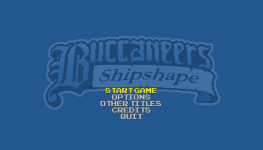
I've been spending quite a bit of time trying to customize somewhat the menus of the game, nothing extreme, but I've hit a roadblock. It seems that there's no openborvariant that checks if the game is currently showing this screen and this screen only:
buccaneers - 0003.png

"in_menuscreen" does detect this screen but not exclusively, as it also includes every screen within it, meaning all option screens are included. Meaning that if I make a modification to this screen, the changes affect the other screens too, which I'd like to avoid.

Most of the other screens have their own, exclusive openborvariant:

**"in_titlescreen", detects TITLE screen (the one with PRESS START)

**"in_menuscreen", - detects MENU screen

**"in_start_game", detects GAME OVER screen <--- (Description is not accurate, based on my tests)
**"in_new_game", - detects NEW GAME screen
**"in_load_game", - detects LOAD GAME screen

**"in_options", - detects OPTIONS screen
**"in_video_options", detects VIDEO OPTIONS screen
**"in_sound_options", detects SOUND OPTIONS screen
**"in_control_options", - detects control options
**"in_system_options", detects START GAME option <--- (Description is not accurate, based on my tests)
**"in_cheat_options", - detects cheat options

**"in_halloffamescreen", detects HALL OF FAME screen

**"in_enginecreditsscreen", detects if the engine's credits is displayed, but placed the variables for it in the shutdown command so that it can be called for even if the credits is not displayed.

Is there by any chance another openborvariant not included in the list that targets exclusively the "start game"/"options"/etc screen? @Kratus , any pointers?

I've tried stuff like "in_mainmenu" and similar, but no luck.
 
Is there by any chance another openborvariant not included in the list that targets exclusively the "start game"/"options"/etc screen? @Kratus , any pointers?
@mersox In this case I suggest to detect the menuscreen and negate others, like this:

Code:
int menuscreen = openborvariant("in_menuscreen");
int startgame = openborvariant("in_start_game");
int newgame = openborvariant("in_new_game");

if(menuscreen && !startgame && !newgame)
{
    doSomething();
}

In this example, any non-zero value means the screen is currently active. You can use it as a guide to know which screen you have to negate.


Here's the script I used in the video in case you want to do the same check. Just put this content in the void main() at the updated.c file.

Code:
int x = 10;
int y = 50;
int add = 10;

drawstring(x, y, 0, openborvariant("in_cheat_options")+"_in_cheat_options"); y = y+add;
drawstring(x, y, 0, openborvariant("in_control_options")+"_in_control_options"); y = y+add;
drawstring(x, y, 0, openborvariant("in_gameoverscreen")+"_in_gameoverscreen"); y = y+add;
drawstring(x, y, 0, openborvariant("in_halloffamescreen")+"_in_halloffamescreen"); y = y+add;
drawstring(x, y, 0, openborvariant("in_level")+"_in_level"); y = y+add;
drawstring(x, y, 0, openborvariant("in_load_game")+"_in_load_game"); y = y+add;
drawstring(x, y, 0, openborvariant("in_menuscreen")+"_in_menuscreen"); y = y+add;
drawstring(x, y, 0, openborvariant("in_new_game")+"_in_new_game"); y = y+add;
drawstring(x, y, 0, openborvariant("in_options")+"_in_options"); y = y+add;
drawstring(x, y, 0, openborvariant("in_selectscreen")+"_in_selectscreen"); y = y+add;
drawstring(x, y, 0, openborvariant("in_showcomplete")+"_in_showcomplete"); y = y+add;
drawstring(x, y, 0, openborvariant("in_sound_options")+"_in_sound_options"); y = y+add;
drawstring(x, y, 0, openborvariant("in_start_game")+"_in_start_game"); y = y+add;
drawstring(x, y, 0, openborvariant("in_titlescreen")+"_in_titlescreen"); y = y+add;
drawstring(x, y, 0, openborvariant("in_enginecreditsscreen")+"_in_enginecreditsscreen"); y = y+add;
drawstring(x, y, 0, openborvariant("in_video_options")+"_in_video_options");
 
I was wondering the same thing yesterday and yep, the description of some items are wrong - I just realized this yesterday too
**"in_start_game", detects GAME OVER screen <--- (Description is not accurate, based on my tests)

by the way, the screen you want to dected is in_menu_screen.
 
Last edited:
hello. So this is for disable certain modes,as I want to disable credits and hall of fame. In mugen is just use "" instead name mode as team simul and others.
it's not how it works here.
To disable the hall of fame ... its straight from the manual:

disablehof {int}
  • set 1 you won't display the hall of fame screen! useful for custom HUD.
    • 0: display (default)
    • 1: not display
 
Back
Top Bottom