Art Phantoms Sprite work

The thread is some time of visual artwork like sketch, painting, or sprite work.

Phantom9

Member
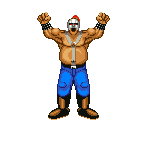
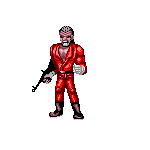
Just some random Willy & Burnov pixel art. (Bluno in DD Neo, at least that's what the announcer says...) Criticism welcome as this isn't something I took very seriously... I'll probably add to this post as time goes by when I get bored haha.
 

Attachments

  • WillyLG.png
    WillyLG.png
    16.1 KB · Views: 8
  • Burnov.png
    Burnov.png
    3.5 KB · Views: 8
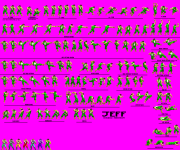
Here we have, JEFF. The 2nd Boss of the original Double Dragons arcade game. This is my first official sprite sheet.

It is an edit of MsMalik681's Jimmy Lee Sprite Sheet.

yes I did ask permission first of course... I'm not evil...
Jeff Sprites Public.png
 
Nice color separation and alternate palettes. Maybe you can change your title and put your DD resource here.
He has enough sprites to be a complete beat em up character.
I will maker a starter pack with one level and explain you how making new entities works.
 
Nice color separation and alternate palettes. Maybe you can change your title and put your DD resource here.
He has enough sprites to be a complete beat em up character.
I will maker a starter pack with one level and explain you how making new entities works.
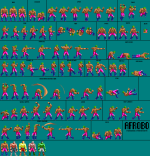
In that case let me post Afrobo and Williams here as well. They actually look better than Jeff. The one really good thing now though is that I can just head swap Jeff to make Jimmy, and just mildly edit some of Billy's sprites.

yes I made Afrobo from Double Dragon Advance... I admit, I freaking love DDA nearly as much as DD Special.
 
@Phantom9 I've combined all your art work into this thread so you can have it all in one consolidated place otherwise it will be scattered all over the forum and double triple posted in separate threads.
 
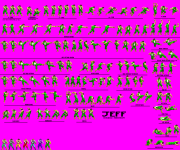
WILLIAMS, joins the skirmish...
Williams Sprites.png
Phew... Now I gotta do Afrobo... Tomorrow...
my finger is about to fall off from tapping this screen so much... especially with the handmade font...
 
Last edited:
1/10 rating anyone?

You get a 1 out of 10 from me :ROFLMAO:

Qx2azSu.png


Your colour separation needs more work, you should separate more individual parts of the body like hands so you can add more customisation to your characters for example gloves.

also your colours are shared like the skin with shoes and even some sprites have completely different colour skin from the sprite next to it.

FGXA7qC.png


D0l6MF3.png
 
To be honest the idea wasn't to color separate everything. Just enough for slightly more advanced palettes. Also about the skin color thing, that didn't occur on my end. Maybe it's different on PC because I edit on my phone. Also how the heck are you doing that selection thing on GIMP? I have it on my laptop and I just can't figure out how to do hardly anything lol.
 
Last edited:
I wouldn't use your phone for pallette work, if the program you're using doesn't detect the same colour is being used you're gonna have a nightmare with pallets in the end,

I use Adobe Photoshop on windows pc, I tried using gimp with Linux a few months back but it was a nightmare.

do you have anything other than a phone to work on? It's obviously unfair to give you a 1/10 if you're working on a phone, I'll upgrade it to 6/10 because that's a skill in itself using a mobile phone for sprites.
 
Yeah, I'll give Photoshop a try. It'll take me some getting used to though, cuz I've pretty much never done sprite work on a laptop. Also, the skin thing finally appeared for me as well... I think it's possibly because those images were from a different sheet.
 
Back
Top Bottom