Solved Load 3 question (Engine question)

Question that is answered or resolved.

PS_VITA

Active member
Hi,

(I use load 3 in the level.txt file for objects that are inside my level.txt )
Will load 3 work for objects that spawn other objects?

For example:

In my Level.txt I have

Load chicken 3

Now... during gameplay the
Chicken spawns an egg.


So will using [ load egg 3] work within the level.txt file?

Or this done in some other way.

Both the chicken and the egg are "known" entities within the models.txt btw.
 
You have to be careful using "load 3" make sure on every level you have the chicken you use "load chicken 3" or else it will stay in memory when the level finishes. This means the egg will unload when the level is finished but then chicken will not load again as it is already in memory therefor the command "load egg 3" will not be run on any other levels with the chicken in them.

This command is normally used to get your mod working on system with limited ram.

edit: sorry missed your question "load egg 3" should be in the chickens header data. but you could add it to the level file its used in. here is a snippet of a level from rescue palooza light.

Code:
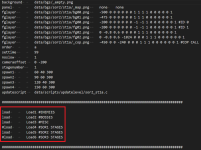
music        data/music/cosmic_wars-player_turn.bor
direction       right
settime 0
notime 1
nosave 1
spawn1 116 29
spawn2 64 63
spawn3 116 97
spawn4 64 131
setweap 6

nofadeout   1

panel        data/bgs/training/panel_retrocatapult.png

load leo_catapult       3
load don_catapult       3
load mike_catapult      3
load raph_catapult      3
load smoke_jump         3
load flash              3
load foot_retrocatapult 3
load delay              3
load fade_in_tmnt       3
load delay_long         3
load fade_out_tmnt      3

order a
#--#---

nojoin 1
at 0


spawn delay
coords 430 200
at 0


spawn fade_in_tmnt
coords 200 200
at 0


#**#**#**#**#**#**#**#**#**#**#**#**#**#***

wait
at 0
 
sorry missed your question "load egg 3" should be in the chickens header data.
Header? No, it should be placed at the level txt.

This command is normally used to get your mod working on system with limited ram.
Not only that: you can (and should) use it when you have an entity (like an enemy) that won't appear anymore after a certain level for example.
To avoid having the entity on the memory forever, you use that.
 
So, unloading only sprites is 2 and only models 1. But if combined by unloading both sprites and models, then that's 3. I understand how it works, but I don't know how it can execute for it to display or something. Also, does it save memory, as in it won't consume memory?
 
So, unloading only sprites is 2 and only models 1. But if combined by unloading both sprites and models, then that's 3. I understand how it works, but I don't know how it can execute for it to display or something. Also, does it save memory, as in it won't consume memory?
I don't understand what you mean by " execute for it to display "

And yes it saves a LOTS of memory.
I've been working on getting a mod for the psvita version for almost 2 years now and without ( load 3) the vita kept running out of memory, luckily @DCurrent schooled me on the whole thing a while back and ever since I'm still able to keep this hobby going strong.
 
You sure you dont mean the psp (25-50mb ram) as the vita has 512mb of ram.
I'm talking about the ps vita.vpk an openbor.vpk port of the an older version of openbor. Even though the ps vita has sufficient ram that particular port of openbor for the ps vita was dropped and I'm probably the last person in this planet still working with it. And it's not very optimized for the ps vita, but it does the job.

I post in GBA temp and I was actually able to port a complete version of double dragon reloaded that wouldn't run out of memory after stage 3.


I had to optimize the backgrounds, certain scripts that were wasting a ton of memory and use load 3 just to be able to get a stable version of double dragon reloaded on the vita. I even got @magggas permission to do so.

If I'm not mistaken that version on the link should run better on the switch and low end specs computers as well.
 
How to unload both sprites and models at a same time with that value if they display. I did try it with load 3 but I don't know how it can appear as an entity or not.
Sorry, I literally don't know what you mean by "display" . From my understanding using my example above the chiken load 3 entity and sprite will be removed from stage 1 (one i complete stage 1) and the chicken sprite and chicken. Txt will be out of the memory until I replay stage 1 again. Meaning that for say stage 2,3,4 that chicken model wont permeate in the memory of the game.
 
Last edited:
load leo_catapult 3 load don_catapult 3 load mike_catapult 3 load raph_catapult 3 load smoke_jump 3 load flash 3 load foot_retrocatapult 3 load delay 3 load fade_in_tmnt 3 load delay_long 3 load fade_out_tmnt 3
load {name} {bi}

  • Used to load a model whose name is {name} in current level.
  • {bi} determines if model stays in memory or not after current level ends.
    • 0 = Nothing. The model is left alone (IOW, remains loaded) and loop moves on. This is the default action.
    • 1 = Unload model only. The model is unloaded, but the sprites are not. Pretty pointless unless the model has a lot of script attached to it.
    • 2 = Unload sprites only. The mode remains loaded, but its sprites are removed from memory.
    • 3 = You’ll notice there there is no third option, but because bitwise logic is in play, 3 effectively means “1 and 2” – model and sprites are unloaded.
  • This command is for loading weapons models or other entities which shouldn’t be loaded until this command is executed. It’s useful for memory usage control.
  • Don’t forget to load {name} with ‘know’ in models.txt!
  • Like other level objects, this command must be followed by ‘at’ (see above) and also counted by ‘group’.
This is the latest from the manual.. It says it must be followed by 'at'

Does this mean I have to have an 'at' for every load in the level.txt?
Example,

Code:
load Test1  3
at 0
load Test2  3
at 0
load Test3  3
at 0

or

and also counted by ‘group’ what does this mean? meaning I can group them up and only have 1 'at'
like this?
Code:
load Test1  3
load Test2  3
load Test3  3
at 0

Thank you
 
This is the latest from the manual.. It says it must be followed by 'at'

Does this mean I have to have an 'at' for every load in the level.txt?
Example,

Code:
load Test1  3
at 0
load Test2  3
at 0
load Test3  3
at 0

or

and also counted by ‘group’ what does this mean? meaning I can group them up and only have 1 'at'
like this?
Code:
load Test1  3
load Test2  3
load Test3  3
at 0

Thank you
Optionally you can use it without "at" and place it at the beginning of the level file. This way the content will be loaded during the native load screen.

But take care with the "load 3", it will fully unload the entity and can cause crashes if you do not use it correctly. Commonly I suggest to avoid it, just use "load" without any flag.

1752103955666.png
 
Openbor is not really made to be memory efficient as it holds all players in memory so to get a game like rescue palooza working i had to make fake entities that load in and switch to real player entities on select.

If your game is complete let me take a crack at it and see if i can get it to run on a psp.

Also only openbor 3.0 works on psp 4.0 it was dropped.
 
Openbor is not really made to be memory efficient as it holds all players in memory so to get a game like rescue palooza working i had to make fake entities that load in and switch to real player entities on select
That's what I was thinking to do.
Especially on my game (1080p), I always have to find a way to optimize memory consumption as much as possible.
This is why I am using load XXX 3, but I have to be very careful with this. Otherwise, I will get headaches with crashing problems later.
I am creating for Windows only for now though.
I also need to learn how to fake characters...
Teenage Mutant Ninja Turtles - Rescue Palooza
Is this the game you mentioned and is this your game? how come it says the author is "mersox" ?
There are too many things to learn with a little time...
Thank you
 
Not only that: you can (and should) use it when you have an entity (like an enemy) that won't appear anymore after a certain level for example.
To avoid having the entity on the memory forever, you use that.
Since this thread has been revived, I'll update some information I posted here. As Kratus mentioned, "load 3" works best for simple entities that don't have scripts.

I was getting some crashes in AUBF, and we discovered it was caused by using "load 3" on heavily scripted entities, like enemies.

I replaced it with unload at spawn and had no further problems:

spawn Joe 1
coords XX XX
at XX XX

The digit "1" causes the entity to be unloaded from memory when the level ends.
 
Back
Top Bottom