
You are using an out of date browser. It may not display this or other websites correctly.
You should upgrade or use an alternative browser.
You should upgrade or use an alternative browser.
Solved How to Throw
- Thread starter Grit
- Start date
Question that is answered or resolved.


Grit
Well-known member
I just have the grab and get sorted so out but wat is to follow...Usually player grabs an enemy first before the former could throw the latter.
Enemies OTOH only need to have player within their grab distance before throwing player, for enemies which can throw that is.
I will experiment later and show the results.
Much appreciated
Grit
Well-known member
You got some nice throws in 89 with Guy's air grab.You need to use @slamstart or @grabstart to get proper throw
many modules use it, for start check their anim grabforward
I want to cancel the tatsu into a power bomb with Ken.

NED
Well-known member
If you go for generic throw you can use the function included in almost any mod.
But yes for advanced ones and slams etc, you would need the grab script.
I'm not into coding particularly lately so, it's hard to give precise advice, but this stuff works well when you understand how to configure it.
But yes for advanced ones and slams etc, you would need the grab script.
I'm not into coding particularly lately so, it's hard to give precise advice, but this stuff works well when you understand how to configure it.

machok
Well-known member
for air grab you'll need another script. @Kratus help me with this one, check guy keyscript lompat.cYou got some nice throws in 89 with Guy's air grab.
I want to cancel the tatsu into a power bomb with Ken.
I suggest you start with slamscript first, If you understand it well, then try air grab
Slowly but sure, I think you're a fast learner.

maxman
Well-known member
slamstart is used for grabs, while slamstart2 is used for non-grabs. Like what machok mentioned about the use of slamstart in a grab state (anim grabforward for pressing forward + attacks if anim grab exists), you need anim grab for just... grabbing, and anim grabforward (grabbackward, optional). You can use slamstart2 like slamstart, but the only difference is it "grabs" in a non-grab state. It's like performing an attack, but you start the grab in action. Mr. Q uses slamstart2 in his UDD. I use slamstart2 too for my SF because there's no reason to have a grab state.
Remember to use both
Remember to use both
followanim and followcond as attack followup. Take a look at Zangief's Spinning Piledriver for example.
Code:
anim freespecial12 #L Grab to Spinning Piledriver
    offset 337 291
    delay 6
    followanim 26 #Switch to Spinning Piledriver animation
    followcond 2
    fastattack 1
    hitfx    data/sounds/empty.wav
    attack1 300 175 99 41 0 0 1 1 0 0
    #attack{#} {x} {y} {right} {down} {damage} {power} {block} {noflash} {pausetime} {z}
    frame data/CHARS/Zangief/CVS2_Zangief_114.png
    attack 0
    frame data/CHARS/Zangief/CVS2_Zangief_115.png
    frame data/CHARS/Zangief/CVS2_Zangief_118.png
    frame data/CHARS/Zangief/CVS2_Zangief_119.png
    frame data/CHARS/Zangief/CVS2_Zangief_120.png
Code:
anim follow26 #Spinning Piledriver L
    offset 337 291
    delay 6
    loop 1 6 10
    jumpframe 5 4 0 0
    landframe 10
    @cmd slamstart2
    @cmd position 15 60 15 0 -1
    @cmd    camFocus 1
    frame data/CHARS/Zangief/CVS2_Zangief_116.png # 0
    delay 14
    @cmd position 15 54 15 0 -1
    frame data/CHARS/Zangief/CVS2_Zangief_117.png # 1
    delay 9
    @cmd position 1 63 15 0 -1
    frame data/CHARS/Zangief/CVS2_Zangief_306.png # 2
    @cmd position 5 83 17 0 -1
    frame data/CHARS/Zangief/CVS2_Zangief_307.png # 3
    @cmd position 6 108 40 0 -1
    frame data/CHARS/Zangief/CVS2_Zangief_308.png # 4
    @cmd position 16 60 72 0 -1
    delay 2
    frame data/CHARS/Zangief/CVS2_Zangief_309.png # 5
    @cmd position 16 60 72 0 -1
    delay 9
    frame data/CHARS/Zangief/CVS2_Zangief_309.png # 6
    @cmd position 17 21 71 1 1
    frame data/CHARS/Zangief/CVS2_Zangief_310.png # 7
    @cmd position 17 -26 80 0 1
    frame data/CHARS/Zangief/CVS2_Zangief_311.png # 8
    @cmd position 16 20 61 0 -1
    frame data/CHARS/Zangief/CVS2_Zangief_312.png # 9
    @cmd position 3 58 12 0 1
    sound data/sounds/fall.wav
    delay 28
    frame data/CHARS/Zangief/CVS2_Zangief_313.png # 10
    @cmd position 3 58 12 0 1
    frame data/CHARS/Zangief/CVS2_Zangief_314.png # 11
    delay 9
    @cmd depost
    @cmd finish 8 1 1 1 0 -1
    @cmd camFocus 0
    frame data/CHARS/Zangief/CVS2_Zangief_315.png # 12
    @cmd anichange "ani_follow29"
    frame data/CHARS/Zangief/CVS2_Zangief_315.png # 13
followanim {value}
- Determines which FOLLOW animation played when followup condition is met or when counter condition is met.
- Possible values are 1, 2, 3 and 4.
- Used together with ‘followcond’ or ‘counterframe’.
followcond {value}
- This command is to make the entity performs FOLLOW{#} if an attackbox in the animation hits.
- value determines the condition requirements before FOLLOW{#} is played.
- 1 = this animation will followup as long as it hits an entity.
- 2 = this animation will followup as long as it hits an enemy (Or player if an enemy uses it).
- 3 = this animation will followup as long as it hits an enemy and the target does not get killed or not block the attack.
- 4 = this animation will followup as long as it hits an enemy, and the target is not killed, does not block the attack, and is not set to be ungrabbable.
- 5 = this animation will followup as long as it hits an enemy and the target does not get killed or block the attack.
- Which FOLLOW animation played is determined by ‘followanim’.
Last edited:
Grit
Well-known member
@maxman
I really appreciate you coming through for me on this!
There is one thing I'd like to know though!
How do I setup the fall animation for the enemy being thrown?
I have an idea of what needs to be done.
The enemy being thrown animation should match the player doing the throw.
Say!
Attack 4 connects then anim pain4 is played!
I just need to grasp the basics but you covered exactly what I'd like to do.
I only have grab and get with a few attacks when the enemy is held.
I only recently understood how to implement cancel,pause and follow with better results.
The possibilities are endless with them when creating a combat system.
I'll add throws in eventually with you all to thank.
I really appreciate you coming through for me on this!
There is one thing I'd like to know though!
How do I setup the fall animation for the enemy being thrown?
I have an idea of what needs to be done.
The enemy being thrown animation should match the player doing the throw.
Say!
Attack 4 connects then anim pain4 is played!
I just need to grasp the basics but you covered exactly what I'd like to do.
I only have grab and get with a few attacks when the enemy is held.
I only recently understood how to implement cancel,pause and follow with better results.
The possibilities are endless with them when creating a combat system.
I'll add throws in eventually with you all to thank.
machok
Well-known member
@Grit
this is when you throw the enemy when you use slamstart
According maxman example, first parameter "8" is damage and second parameter "1" is attack type
for example if type 1 is "ATK_NORMAL"then, enemy use fall1.
I no expert and still learning too, all I know slamstart using fall not pain
for example slamstart "ATK_NORMAL4" = fall4 for enemy animation.
this is when you throw the enemy when you use slamstart
C:
@cmd finish 8 1 1 1 0 -1According maxman example, first parameter "8" is damage and second parameter "1" is attack type
C:
void finish(int Damage, int Type, int x, int y, int z, int Face)for example if type 1 is "ATK_NORMAL"then, enemy use fall1.
C:
     if(Type==1)
     {
       damageentity(target, self, Damage, 1, openborconstant("ATK_NORMAL"));
I no expert and still learning too, all I know slamstart using fall not pain
for example slamstart "ATK_NORMAL4" = fall4 for enemy animation.
Grit
Well-known member
@machokfor example slamstart "ATK_NORMAL4" = fall4 for enemy animation.
Does anything need to be done to fall4?
You don't mine if I take a look at how you implemented it in 89.
I'm currently
I'll revisit this topic most likely with a better understanding once I start testing It with new sprites.
I'll upload a video eventually.
Appreciate the the assistance.
machok
Well-known member
sure, my enemies fall4 anim is almost the same with pierwolf ff gold since I learned to implement it from there so you might also want to check itDoes anything need to be done to fall4?
You don't mine if I take a look at how you implemented it in 89.
Grit
Well-known member
Will do!my enemies fall4 anim is almost the same with pierwolf ff gold since I learned to implement it from there so you might also want to check it
maxman
Well-known member
I was expecting that question coming from you, so I thought I could tell you this.How do I setup the fall animation for the enemy being thrown?
You need some particular animation scripts for making a character's grapple system to work. slamstart/grabstart is a very good one to start with slams. Plus, you will need a position script for the interaction of both the grabber and the target.
Before showing you the codes, let me lay out the basic concept for preparing the slam-throw system. Here is a simple illustration showing both the thrower and its target.
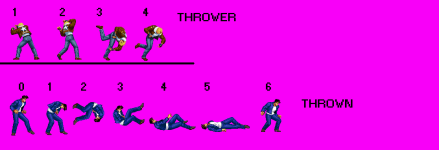
You have an idea of a player throwing its specific target, but how can there be a specific interaction between those two entities? As for the target, look at how many frames the target will have that will be used as a thrown animation. The number of frames for the target is not 6. It's 7. You can use any number less than 7 in a special fall animation if you like. It's a fall animation but you should set its delay value LONGER like 1000 or higher so that it will look like it's not playing an animation. In real time, the speed runs the animation slowly. All frames in that target's certain fall animation are for being grabbed only.
Here are some of the scripts you need for slams/throws for animation scripts. Copy them and paste them if you don't have them. If you have any of these, you don't need to copy and paste in there.
C:
void slamstart()
{ // Slam Starter
// Use finish after using this
   void self = getlocalvar("self");
   void target = getlocalvar("Target" + self);

   if(target==NULL())
   {
     target = getentityproperty(self, "grabbing");
     setlocalvar("Target" + self, target);
   }
   if(target!=NULL())
   {
     damageentity(target, self, 0, 1, openborconstant("ATK_NORMAL7")); // Slam Starter
   }
}

void slamstart2()
{ // Slam Starter for nongrab slams
// Use finish or throw after using this
   void self = getlocalvar("self");
   void target = getlocalvar("Target" + self);

   if(target==NULL())
   {
     target = getentityproperty(self, "opponent");
     setlocalvar("Target" + self, target);
   }
   if(target!=NULL())
   {
     damageentity(target, self, 0, 1, openborconstant("ATK_NORMAL7")); // Slam Starter
   }
}

void position(int Frame, float dx, float dy, float dz, int face)
{ // Modify grabbed entity's position relative to grabber
   void self = getlocalvar("self");
   void target = getlocalvar("Target" + self);

   if(target==NULL())
   {
     target = getentityproperty(self, "grabbing");
     setlocalvar("Target" + self, target);
   }
   if(target!=NULL())
   {
     updateframe(target, Frame);
     bindentity(target, self, dx, dz, dy, face, 0);

   }
}

void depost(int Gr)
{// Release grabbed entity
   void self = getlocalvar("self");
   void target = getlocalvar("Target" + self);

   if(target==NULL())
   {
     target = getentityproperty(self, "grabbing");
     setlocalvar("Target" + self, target);
   }
   if(target!=NULL())
   {
     bindentity(target, NULL());

     if(Gr == 1)
     {
       int x = getentityproperty(target, "x");
       int z = getentityproperty(target, "z");
       changeentityproperty(target, "position", x, z, 0);
     }
   }
}

void antiwall(int Dist, int Move, int Distz)
{// Checks if there is wall at defined distance
// If there is wall, entity will be moved away with defined movement
   void self = getlocalvar("self");
   int Direction = getentityproperty(self, "direction");
   int x = getentityproperty(self, "x");
   int z = getentityproperty(self, "z");
   float H;
   float Hz;

   if (Direction == 0){ //Is entity facing left?
      Dist = -Dist; //Reverse Dist to match facing
      Move = -Move; //Reverse Move to match facing
   }

   H = checkwall(x+Dist,z);
   Hz = checkwall(x+Dist,z+Distz);

   if(Hz > 0)
   {
     changeentityproperty(self, "position", x, z-Distz);
   }

   if(H > 0)
   {
     changeentityproperty(self, "position", x+Move);
   }
}

void antiwall2(int Dist, int Move, int Distz)
{// Checks if there is wall at defined distance
// If there is wall, entity will be moved away with defined movement
   void self = getlocalvar("self");
   int Direction = getentityproperty(self, "direction");
   int x = getentityproperty(self, "x");
   int y = getentityproperty(self, "a");
   int z = getentityproperty(self, "z");
   float H;
   float Hz;

   if(Direction == 0){ //Is entity facing left?
      Dist = -Dist; //Reverse Dist to match facing
      Move = -Move; //Reverse Move to match facing
   }

   H = checkwall(x+Dist,z);
   Hz = checkwall(x+Dist,z+Distz);

   if(Hz > y)
   {
     changeentityproperty(self, "position", x, z-Distz);
   }

   if(H > y)
   {
     changeentityproperty(self, "position", x+Move);
   }
}

void finish(int Damage, int Type, int x, int y, int z, int Face)
{ // Damage as slam or throw finisher
   void self = getlocalvar("self");
   void target = getlocalvar("Target" + self);
   int SDir = getentityproperty(target,"direction");
   int MDir;

   if(Face==0){ // Same facing?
       MDir = SDir;
   }

   if(Face==1){ // Opposite facing?

     if(SDir==0){ // Facing left?
       MDir = 1;
     } else { MDir = 0;}
   }

   if(target==NULL())
   {
     target = getentityproperty(self, "grabbing");
     setlocalvar("Target" + self, target);
   }
   if(target!=NULL())
   {
     int dir = getentityproperty(target,"direction"); //Get opponent's facing direction
     if(dir==0){ // Facing left?
       x = -x;
     }

     if(Type==1)
     {
       damageentity(target, self, Damage, 1, openborconstant("ATK_NORMAL")); // 1st Finisher
     }

     if(Type==2)
     {
       damageentity(target, self, Damage, 1, openborconstant("ATK_NORMAL9")); // 2nd Finisher
     }

     tossentity(target, y, x, z); // Toss opponent ;)
     changeentityproperty(target, "direction", MDir);
   }
}

void throw(int Damage, int Type, int x, int y, int z, int Face)
{ // Damage as throw finisher
   void self = getlocalvar("self");
   void target = getlocalvar("Target" + self);
   int SDir = getentityproperty(target,"direction");
   int MDir;

   if(Face==0){ // Same facing?
       MDir = SDir;
   }

   if(Face==1){ // Opposite facing?

     if(SDir==0){ // Facing left?
       MDir = 1;
     } else { MDir = 0;}
   }

   if(target==NULL())
   {
     target = getentityproperty(self, "grabbing");
     setlocalvar("Target" + self, target);
   }
   if(target!=NULL())
   {
     int dir = getentityproperty(target,"direction"); //Get opponent's facing direction
     if(dir==0){ // Facing left?
       x = -x;
     }

     if(Type==1)
     {
       damageentity(target, self, 0, 1, openborconstant("ATK_NORMAL")); // 1st throw type
     }

     if(Type==2)
     {
       damageentity(target, self, 0, 1, openborconstant("ATK_NORMAL9")); // 2nd throw type
     }

     if(Type==3)
     {
       damageentity(target, self, 0, 1, openborconstant("ATK_NORMAL2")); // 3rd throw type
     }

     changeentityproperty(target, "attacking", 1);
     changeentityproperty(target, "damage_on_landing", Damage);
     changeentityproperty(target, "projectile", 1);
     changeentityproperty(target, "direction", MDir);
     tossentity(target, y, x, z); // Toss opponent ;)
   }
}

void clearL()
{// Clears all local variables
     clearlocalvar();
}
Before you start the slams, add clearL in anim idle for the player like this.
Code:
anim idle

    offset 140 188
    delay 13
    loop 1
    bbox 116 93 57 95
    @cmd clearL
    frame data/chars/heroes/KOF_2K3_Terry_Sprite.7z/0_0.png
    frame data/chars/heroes/KOF_2K3_Terry_Sprite.7z/0_1.png
    frame data/chars/heroes/KOF_2K3_Terry_Sprite.7z/0_2.png
    frame data/chars/heroes/KOF_2K3_Terry_Sprite.7z/0_3.png
    frame data/chars/heroes/KOF_2K3_Terry_Sprite.7z/0_4.png
    frame data/chars/heroes/KOF_2K3_Terry_Sprite.7z/0_5.png
    frame data/chars/heroes/KOF_2K3_Terry_Sprite.7z/0_6.png
    frame data/chars/heroes/KOF_2K3_Terry_Sprite.7z/0_7.png
This is clearL which I listed for you to get.
C:
void clearL()
{// Clears all local variables
     clearlocalvar();
}
This is what's interesting. Look at these frames and animations between these two. The thrower and the target.
anim fall7
delay 1000
offset 89 143
frame data/chars/joe/pain1.gif # 0
frame data/chars/joe/pain2.gif # 1
# offset 92 96
# drawmethod rotate 180
# drawmethod fliprotate 1
frame data/chars/joe/falla1.gif # 2 / new gif
nodrawmethod
offset 92 96
frame data/chars/joe/fall1.gif # 3
offset 89 143
frame data/chars/joe/fall2.gif # 4
frame data/chars/joe/fall3.gif # 5
frame data/chars/joe/rise2.gif # 6
The target has 7 frames of its specific fall animation, while the thrower has 4 frames for throwing as interaction.
anim grabforward
offset 140 188
delay 16
@cmd slamstart
@cmd position 0 -28 31 0 1 # position {target's frame} {target's x} {target's y} {target's z} {target's facing}
frame data/chars/heroes/KOF_2K3_Terry_Sprite.7z/209_1.png
@cmd position 1 -8 67 0 1
frame data/chars/heroes/KOF_2K3_Terry_Sprite.7z/209_2.png
@cmd position 2 4 52 0 1
frame data/chars/heroes/KOF_2K3_Terry_Sprite.7z/209_3.png
@cmd depost 0
@cmd throw 10 1 3 2.2 0 -1 #throw {damage}{type} {x} {y} {z} {direction}
frame data/chars/heroes/KOF_2K3_Terry_Sprite.7z/209_4.png
The ones highlighted in red are specific frames from target's fall7 animation when player interacts for throwing. The ones in blue are the specified position where the target will be. The ones in green are the target's direction of facing anywhere. If you look at the manual about facing, you will see how its facing type is like. Be aware that when you start a slam, you need to set its offset above its feet or legs or anywhere around it, so that there will be no annoying fall sounds to hear. Look at this here.

As a beginner, I say it's best for you to practice the thrower's slam with very slow speed by giving higher delay value. If you get better with it, you change its speed to what you desire.
I will continue explaining this later. My time is up now. See ya.
Last edited:
Grit
Well-known member
@maxman
you went above and beyond on this!
Let me be honest here!
As far as custom scripts go!
I need to catch up.
I been using the default scripts if that's how you put it into words!
I made sure I have all the tools needed along with the sprites so when I do get into custom scripts I will be able to push the mechanics further.
These note are book marked for further reference.
Thanks
you went above and beyond on this!
Let me be honest here!
As far as custom scripts go!
I need to catch up.
I been using the default scripts if that's how you put it into words!
I made sure I have all the tools needed along with the sprites so when I do get into custom scripts I will be able to push the mechanics further.
These note are book marked for further reference.
Thanks
maxman
Well-known member
I'm back. Where was I? There must be some points I forgot to point out or didn't have time to explain. Let me continue this further as they were kind of not enough.
1. When I talked about the target's offset for being placed above feet, it is for lifting up the target's position up so no fall sound can be heard while working on the slams. If you leave the target's altitude to 0 or whatever number that makes it to be heard, it will be heard. That's why you need altitude.
2. Now I explained about the target's position, time for me to move with some other scripts. Let's start with throw/finish command. It's used how the target is tossed by the thrower.
The one in green is the damage point. The one in red is the type of fall animation that will change to a fallen statement or fall animation after the target's fall7 animation. The one in blue with 3 parameters is how far the target is thrown before it lands from its fallen state. The one in purple... it's the target's facing of direction like position. depost 0 is used for releasing a grabbed entity. (Read the notes that are in two slashes. The syntaxes in both .txt and .c are different.)
Look at how many parameters and the number of throw types that throw has, which I give them color marks, for instance.
It has 6 parameters; and 3 throw types in the type parameter belonging to it. The one highlighted in yellow is a specific attacktype animation after the target's fall7 animation like what machok stated. For example, if Type is set to 1, the target will perform anim fall when he's thrown after fall7. Do you know why it's anim fall7 for slamstart? Because of this one marked here.
You can change to whatever fall animation if you like (like for anim fall4 or whatever as machok said earlier). But as for now for your own practice, let's leave it like that. You have your choice when to change it to suit your taste.
Both throw and finish have 6 parameters. They look similar in code, but the result between the two is different. throw is used when the enemy receives its certain damage point being thrown before landing, while finish results receiving damage after landing.
Note: @cmd is a command as an animation script like you see other examples above.
One thing I forgot. If you use CMT under bindings tab for previewing the target, select an entity model you want and its animation. Checkmark the box for displaying the model. Plus, look at the binding settings.
1. When I talked about the target's offset for being placed above feet, it is for lifting up the target's position up so no fall sound can be heard while working on the slams. If you leave the target's altitude to 0 or whatever number that makes it to be heard, it will be heard. That's why you need altitude.
2. Now I explained about the target's position, time for me to move with some other scripts. Let's start with throw/finish command. It's used how the target is tossed by the thrower.
anim grabforward
offset 140 188
delay 16
@cmd slamstart
@cmd position 0 -28 31 0 1 # position {target's frame} {target's x} {target's y} {target's z} {target's facing}
frame data/chars/heroes/KOF_2K3_Terry_Sprite.7z/209_1.png
@cmd position 1 -8 67 0 1
frame data/chars/heroes/KOF_2K3_Terry_Sprite.7z/209_2.png
@cmd position 2 4 52 0 1
frame data/chars/heroes/KOF_2K3_Terry_Sprite.7z/209_3.png
@cmd depost 0
@cmd throw 10 1 3 2.2 0 -1 #throw {damage}{type} {x} {y} {z} {direction}
frame data/chars/heroes/KOF_2K3_Terry_Sprite.7z/209_4.png
The one in green is the damage point. The one in red is the type of fall animation that will change to a fallen statement or fall animation after the target's fall7 animation. The one in blue with 3 parameters is how far the target is thrown before it lands from its fallen state. The one in purple... it's the target's facing of direction like position. depost 0 is used for releasing a grabbed entity. (Read the notes that are in two slashes. The syntaxes in both .txt and .c are different.)
Look at how many parameters and the number of throw types that throw has, which I give them color marks, for instance.
void throw(int Damage, int Type, int x, int y, int z, int Face)
{ // Damage as throw finisher
void self = getlocalvar("self");
void target = getlocalvar("Target" + self);
int SDir = getentityproperty(target,"direction");
int MDir;
if(Face==0){ // Same facing?
MDir = SDir;
}
if(Face==1){ // Opposite facing?
if(SDir==0){ // Facing left?
MDir = 1;
} else { MDir = 0;}
}
if(target==NULL())
{
target = getentityproperty(self, "grabbing");
setlocalvar("Target" + self, target);
}
if(target!=NULL())
{
int dir = getentityproperty(target,"direction"); //Get opponent's facing direction
if(dir==0){ // Facing left?
x = -x;
}
if(Type==1)
{
damageentity(target, self, 0, 1, openborconstant("ATK_NORMAL")); // 1st throw type
}
if(Type==2)
{
damageentity(target, self, 0, 1, openborconstant("ATK_NORMAL9")); // 2nd throw type
}
if(Type==3)
{
damageentity(target, self, 0, 1, openborconstant("ATK_NORMAL2")); // 3rd throw type
}
changeentityproperty(target, "attacking", 1);
changeentityproperty(target, "damage_on_landing", Damage);
changeentityproperty(target, "projectile", 1);
changeentityproperty(target, "direction", MDir);
tossentity(target, y, x, z); // Toss opponent
}
}

It has 6 parameters; and 3 throw types in the type parameter belonging to it. The one highlighted in yellow is a specific attacktype animation after the target's fall7 animation like what machok stated. For example, if Type is set to 1, the target will perform anim fall when he's thrown after fall7. Do you know why it's anim fall7 for slamstart? Because of this one marked here.
void slamstart()
{ // Slam Starter
// Use finish after using this
void self = getlocalvar("self");
void target = getlocalvar("Target" + self);
if(target==NULL())
{
target = getentityproperty(self, "grabbing");
setlocalvar("Target" + self, target);
}
if(target!=NULL())
{
damageentity(target, self, 0, 1, openborconstant("ATK_NORMAL7")); // Slam Starter
}
}
You can change to whatever fall animation if you like (like for anim fall4 or whatever as machok said earlier). But as for now for your own practice, let's leave it like that. You have your choice when to change it to suit your taste.
Both throw and finish have 6 parameters. They look similar in code, but the result between the two is different. throw is used when the enemy receives its certain damage point being thrown before landing, while finish results receiving damage after landing.
Note: @cmd is a command as an animation script like you see other examples above.
One thing I forgot. If you use CMT under bindings tab for previewing the target, select an entity model you want and its animation. Checkmark the box for displaying the model. Plus, look at the binding settings.
Last edited:
Grit
Well-known member
One question regarding CMT!
Is there a wiki for using it yet!
I want to move on to something that is continuously updated in the future for my Xmen(mvc sprites) beat em up.
It's Basically Xmen clone wars but with capcom sprites....I will stick to OpenBORStats for my current project.
Is there a wiki for using it yet!
I want to move on to something that is continuously updated in the future for my Xmen(mvc sprites) beat em up.
It's Basically Xmen clone wars but with capcom sprites....I will stick to OpenBORStats for my current project.

Die_In_Fire
Well-known member
CMT is updated very often every time a bug is found. Sometimes even within the same day a bug is reported.One question regarding CMT!
Is there a wiki for using it yet!
I want to move on to something that is continuously updated in the future
Going to an outdated tool like Openborstats is a bad idea.

O Ilusionista
Captain 100K
Like every tool, it requires a little practice at first. But then you don't want to go back - I abandoned the stats, I only use it when I want to copy things from one project to another.One question regarding CMT!
Is there a wiki for using it yet!
It is a matter of habit. But if I, who was totally used to using stats, managed to migrate to CMT, you can do it

And a random tip: Avoid posting using exclamation point. Things like "is there a wiki for using it Yet!" They end up sounding badly.