Solved Hole Altitude settings, how do they work?

Question that is answered or resolved.

PS_VITA

Active member
Hi,
I'm trying to change the altitude of a hole the higher the player climbs up on a stage,I have everything working except the altitude for the hole won't change.

hole 190 6300 0 0 3700 3700 5000 0
( changed via script)

hole 190 6300 0 0 3700 3700 5000 2000


I'm running openbor v3.0 build from Aug 29 2018

Even if I just create a hole from the level txt with say 500 altitude, I'm not really seeing the difference.
 
@PS_VITA

I searched the manual about the hole's height but didn't found too much info.
Please, could you post more details about how your level works? Maybe there's an alternative solution.
 
@PS_VITA
i think that you may be editing the hole's depth (how far down it goes)

i may be reading the numbers wrong right now....

in my module for some reason holes with only 5 pix deep kill the characters.

what your script might need is to change the coodrinates of the hole's "offset"

a better solution could be something similar to the "splat" script from nightslasher's van level where the edge of the screen at the bottom triggers death
 
@PS_VITA

I searched the manual about the hole's height but didn't found too much info.
Please, could you post more details about how your level works? Maybe there's an alternative solution.
Certainly. The room is is about 2000 pixels wide and 6000 pixels high.

the players spawns at the bottom left corner of the screen and just 200 pixels to the right the player he gets on a boat and rides it all the way to the right until he finds a platform that moves him up. the player continues to jump through several more platforms until he reaches the very top of the screen and the stage ends.

therefore I thought it would be a good idea to use the code I learned in this topic
and apply it to the hole as the player continues to go up the hole altitude would continue to gain altitude.
 
@PS_VITA
i think that you may be editing the hole's depth (how far down it goes)

i may be reading the numbers wrong right now....

in my module for some reason holes with only 5 pix deep kill the characters.

what your script might need is to change the coodrinates of the hole's "offset"

a better solution could be something similar to the "splat" script from nightslasher's van level where the edge of the screen at the bottom triggers death
Hi,

here's where I'm basing the altitude from:


hole {xpos} {zpos} {upperleft} {lowerleft} {upperright} {lowerright} {depth} {alt} {type}

the 8th parameter is altitude no?

and thank you for the "splat " script suggestion, I would have to check it out.
 
the player continues to jump through several more platforms until he reaches the very top of the screen and the stage ends
Why do you need to increase the hole's height? Once the entity's height is higher than the default ground (base 0), he will automatically falls if jump off from any high platform.
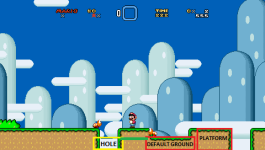
You can create a hole by simply leaving a space between two or more platforms. Holes are commonly used to make entities fall from the default ground, like the example below.

1671653815624.png

An visual example could help a little more to understand how your level works.
 
Why do you need to increase the hole's height? Once the entity's height is higher than the default ground (base 0), he will automatically falls if jump off from any high platform.
You can create a hole by simply leaving a space between two or more platforms. Holes are commonly used to make entities fall from the default ground, like the example below.

View attachment 2551

An visual example could help a little more to understand how your level works.

Adding to this, it might help to understand how holes work under the hood.

The hole is really a simple kind of terrain map that sets the default base to -1000 within its boundary. The killing is done by a separate bit of logic that checks if any entities are within the X and Z bounds of a hole, and if their Y is at or below -1000. If those things are true, the entity takes damage equal to its current hit points. Older engines used type 1 damage, while later updates have a unique damage type called ATK_PIT.

That later caveat means it's possible to make entities immune to the damage from holes, but of course you'll have to do something to get them out or they'll be stuck there forever.

DC
 
Why do you need to increase the hole's height? Once the entity's height is higher than the default ground (base 0), he will automatically falls if jump off from any high platform.
You can create a hole by simply leaving a space between two or more platforms. Holes are commonly used to make entities fall from the default ground, like the example below.

View attachment 2551

An visual example could help a little more to understand how your level works.
Sure, sorry if I was not clear in my previous post.


so in the video above the player continues to climb up but if the player falls midway through the level. the player dies because the "hole"has been elevated the higher the player goes up.

its different than a mario level because mario would survive the fall and it's not very arcade like.

But after reading some of your responses, I might not have understood from the very beginning how ALT affects holes in openbor.
 
Hmm I think now I understand better, you want to update a new limit for players to die every time you reach a new higher platform, right?
Yeah it makes sense, Mario can fall at any height but in other games if you fall from a very high height you can't reach the default ground alive. Is that correct?
 
Now, looking at that video, you don't need to use hole for it. Try looking up to @magggas's Double Dragon mod for that. The good thing is that it's not in scripts at all. I checked it but I forgot the name of that entity that plays its role as a hole according to height.
 
Hmm I think now I understand better, you want to update a new limit for players to die every time you reach a new higher platform, right?
Yeah it makes sense, Mario can fall at any height but in other games if you fall from a very high height you can't reach the default ground alive. Is that correct?
correct
 
stage 3 is just a floor hole it really has no "altitude " and when player dies the animation changes to a water splash. I checkd the other stages and they are just regular holes.
 
Adding to this, it might help to understand how holes work under the hood.

The hole is really a simple kind of terrain map that sets the default base to -1000 within its boundary. The killing is done by a separate bit of logic that checks if any entities are within the X and Z bounds of a hole, and if their Y is at or below -1000. If those things are true, the entity takes damage equal to its current hit points. Older engines used type 1 damage, while later updates have a unique damage type called ATK_PIT.

That later caveat means it's possible to make entities immune to the damage from holes, but of course you'll have to do something to get them out or they'll be stuck there forever.

DC
Is it possible to see the source code and use the method in which hole's kill players and use it as a script?

something simple like if P1y < Xy (kill like hole would)

p1 y being the player Y and Xy being an invisible entity in the stage acting as a hole marker.
 
stage 3 is just a floor hole it really has no "altitude " and when player dies the animation changes to a water splash. I checkd the other stages and they are just regular holes.
I meant the edited Stage 2-B which is the building where you climb up the ladder and you see the conveyor belts running in two ways. Take a look at the 2-4 edited stages for that. I think the entities could be movezblo, moveyblo, and movezblo2.

Code:
set    STORY
skipselect billy billy
equalairpause 0
noslowfx 1
maxplayers 2
nosame    0 1
credits 30
custfade 50
z 297 495
file      data/levels/st1/st1.txt # Stage 1
z 729 882
file      data/levels/st2/st2.txt # Stage 2
z 996 1306
file      data/levels/st2b/st2b.txt # Stage 3 / Stage 2-B
z 798 1286
file      data/levels/st3a/st3a.txt # Stage 4 / Stage 3-A
z 260 600
file      data/levels/st3/st3.txt # Stage 5 / Stage 3
z 936 1333
file      data/levels/st4/st4e.txt # Stage 6 / Stage 4-E
z 484 900
file      data/levels/st5a/st5a.txt # Stage 7 / Stage 5-A
z 384 697
file      data/levels/st5/st5.txt # Stage 8 / Stage 5
 
I watched the entire video, I see two options for your game:

1) Similar to what @maxman said, you can create an entity that goes up together with the camera at the bottom of the screen and make this entity able to kill players instantly as soon as they touch him.

2) Create an "onmoveascript" event that kill the players with a defined height limit, updated dynamically at every time the screen goes up. You can also lock the camera movement in Y axis by updating the openborvariant("ypos") constantly, allowing it only to change the value if the screen goes up, not down.
In addition, you can use the bottom of the screen edge as a reference to kill the players too.
 
I watched the entire video, I see two options for your game:

1) Similar to what @maxman said, you can create an entity that goes up together with the camera at the bottom of the screen and make this entity able to kill players instantly as soon as they touch him.

2) Create an "onmoveascript" event that kill the players with a defined height limit, updated dynamically at every time the screen goes up. You can also lock the camera movement in Y axis by updating the openborvariant("ypos") constantly, allowing it only to change the value if the screen goes up, not down.
In addition, you can use the bottom of the screen edge as a reference to kill the players too.


I guess my new question is how can I mimic the way a player dies when falling into a hole?

By mimic I mean what does that look like in code?

edit: As in the player simply disappears and respawns if he still has a life left.
 
Back
Top Bottom