Help with level

I was wondering if someone might be able to help me insert this level into a game....just the main stuff I can add this level to a mod....it's time square from Shadow...I can do the little things like add mailboxes and lights but I have no idea how to size it on the level file?  :o At one point it curves and I just wasn't exactly sure how to do this one.....would really appreciate any help, advice or tips
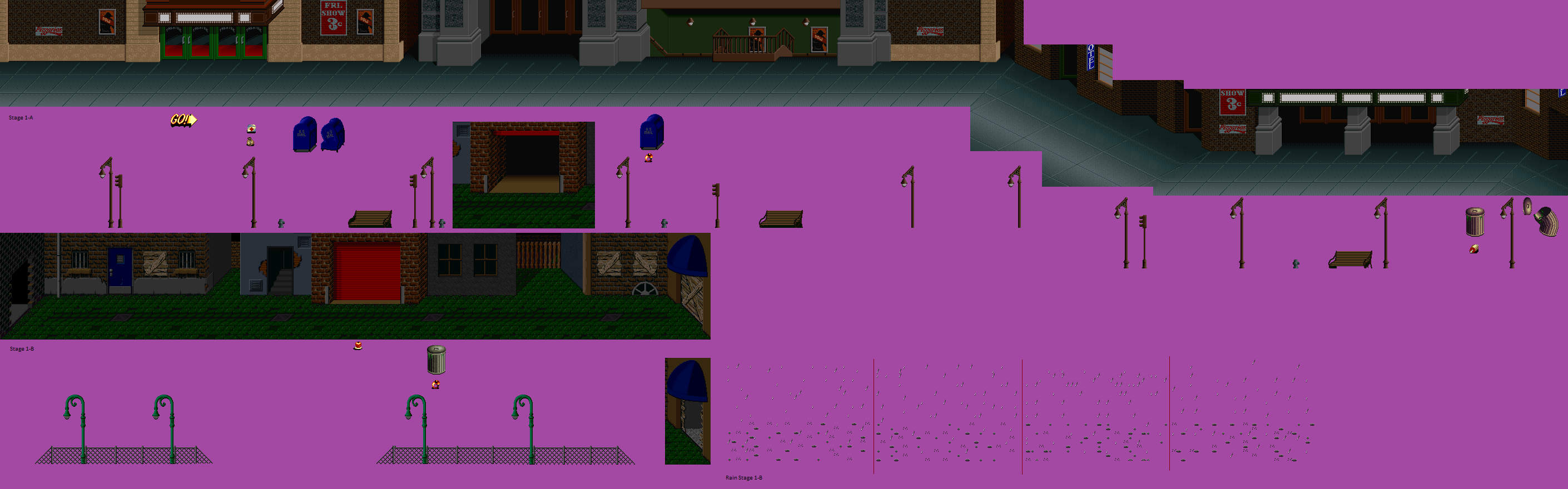
130449.png
 
Wombat2112 said:
I was wondering if someone might be able to help me insert this level into a game....just the main stuff I can add this level to a mod....it's time square from Shadow...I can do the little things like add mailboxes and lights but I have no idea how to size it on the level file?  :o At one point it curves and I just wasn't exactly sure how to do this one.....would really appreciate any help, advice or tips

130449.png

The sprite is great.
The first thing you have to make friends is to look at the limit of the level (which is declared in the Levels file)
This is an example:

z 20 690 160
file data / levels / map.txt

Those three number values ​​define how far playable characters and enemies can go (for other entities like none it has no effect) Well what I want to tell you is that with that the size of the level is defined. Then the position of the chamber will be defined and a wall should be placed to secure the walls of the level. I hope this information has helped something, greetings
 
Blade Master said:
Wombat2112 said:
I was wondering if someone might be able to help me insert this level into a game....just the main stuff I can add this level to a mod....it's time square from Shadow...I can do the little things like add mailboxes and lights but I have no idea how to size it on the level file?  :o At one point it curves and I just wasn't exactly sure how to do this one.....would really appreciate any help, advice or tips

130449.png

The sprite is great.
The first thing you have to make friends is to look at the limit of the level (which is declared in the Levels file)
This is an example:

z 20 690 160
file data / levels / map.txt

Those three number values ​​define how far playable characters and enemies can go (for other entities like none it has no effect) Well what I want to tell you is that with that the size of the level is defined. Then the position of the chamber will be defined and a wall should be placed to secure the walls of the level. I hope this information has helped something, greetings


Yeah I have used those numbers before but  didn't know what they would be...do you mean the wall command?
 
This kinda of level is tough to set in level.

If you're still new, I suggest avoid using this background. Instead, you create edited version which is straight and not curved :)
 
Wombat2112 said:
Bloodbane  is there anywhere in the manual that might help me understand how to use the curve.....I really like to use this

Bloodbane is right friend, you should leave that level for now, and train with normal levels. And when you know how to do it, you do it and that's it. And I know you're going to do it friend, I believe in you  :)
 
Blade Master said:
Wombat2112 said:
Bloodbane  is there anywhere in the manual that might help me understand how to use the curve.....I really like to use this

Bloodbane is right friend, you should leave that level for now, and train with normal levels. And when you know how to do it, you do it and that's it. And I know you're going to do it friend, I believe in you  :)

Thanks for the confidence...that means a lot. And very kind of you to say. It just seems everything I want to try I can't do....a straight forward level in every case just seems boring. I made several straight forward levels in my main game but when I saw them I didn't like most of them once I saw them in game several of the colors just didn't fit right. I wonder if I could keep the panels straight but somehow cut and turn the direction of the graphics and then have barriers or invisible walls so it would still be straight but appear to turn. Oh back to square one yet again....maybe I just need to try to learn a new hobby....Sea Monkeys perhaps lol 
 
yep obeditor has visual overlay for walls i think, thus should be easier to adjust wall coords by using it, though i strongly recomend to use it just for that, get the correct coord and enter them manualy on your txt and make a back up your level´s txt just for safety, obeditor tends to mess it up badly if you save with it.
 
Gurtag said:
yep obeditor has visual overlay for walls i think, thus should be easier to adjust wall coords by using it, though i strongly recomend to use it just for that, get the correct coord and enter them manualy on your txt and make a back up your level´s txt just for safety, obeditor tends to mess it up badly if you save with it.


Correct Coordinates? Hmm that sounds challenging I see what Bloodbane meant lol....I was a little spoiled by Editors from other engines that let you use brushes to do everything lol...looking at it again most of the level is straight it's just that part where it ramps...It's from the original game I just really like that look. It reminds me of earlier 20th century New York. I really liked that game especially for an unreleased prototype I just thought it's enemies should be different. The ones in it seem kind of boring. I found a great old school police car that I thought would fit really well with the rest of the level.  Sigh I hope I can pull this off. LOL!

Thanks!
 
Back
Top Bottom