help dueling pistols

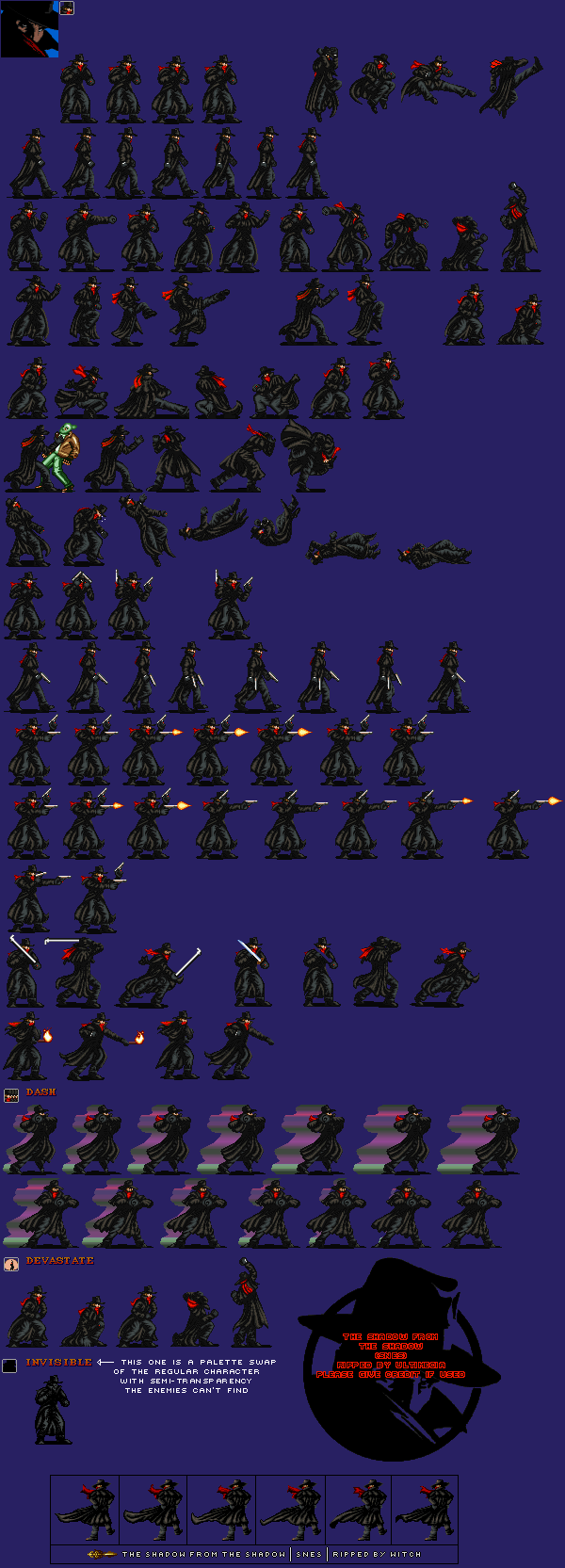
I'm working on a new project because my main one probably has a year or more. I really like this character but wanted to do something much different than the original game. In his sprite sheet it looks like he fires his guns two handed - dueling pistol-style shooting. Would I make it just one attack? Can someone please show me how the code might look and the best way to do this? I think I can make a small one level demo. I would really appreciate any help  :)

30107.png
 
danno said:
Do you mean 1 key press fires 2 shots  (one from each hand) or 1 key press 1 shot then 2nd key press second shot alternate hand?

I want him to alternate....either have him fire one shot then switch to the other gun....or finish the rounds in one and switch to the other....whatever would be easiest....I really like this character.
 
You can turn them into freespecials that cancel each other out like this
Code:
anim freespecial8 #idle shoot1
loop      0
delay     7
offset    55 95
bbox      37 45 23 50
@cmd      mpcost 4
cancel    2 3 0 a2 freespecial9
@cmd	  aniLimit "ANI_FOLLOW16" 0 2
frame     data/chars/spidey/ws1.png
delay     20
sound     Data/chars/spidey/sounds/wb.wav
@cmd	shooter2 "ws" -2 30 0 3
frame     data/chars/spidey/ws2.png
delay     7
frame     data/chars/spidey/ws1.png
frame     data/chars/spidey/i1.png


anim freespecial9  #idle shoot2
loop      0
delay     7
offset    55 95
bbox      37 45 23 50
@cmd      mpcost 4
cancel    2 3 0 a2 freespecial8
@cmd	  aniLimit "ANI_FOLLOW16" 0 2
frame     data/chars/spidey/ws1.png
delay     20
sound     Data/chars/spidey/sounds/wb.wav
@cmd	shooter2 "ws" 12 33 0 3
frame     data/chars/spidey/ws3.png
delay     7
frame     data/chars/spidey/ws1.png
frame     data/chars/spidey/i1.png


It fires 1 shot but if you press shoot again just after the first shot it alternates to the second shot, you'll have to change things so it matches your cancels, I'll put something together tomorrow morning and show you in more detail, almost bed time here
 
I made a mini demo to show how cancelling into freespecials work

https://www.youtube.com/watch?v=gnxxWXhbBGk

download here

http://www.mediafire.com/file/qicrihm5yohfwgq/shadow.zip/file
 
That is great!. So as long as I use my sprites and sounds etc. the rest of the code will do that? I have ben learning a little about scripting but never used any shooting...mainly melee attacks. I need to learn more about commands like shoot
 
Yar you also you might need to change the cancel command depending on how many frames your animations use

Code:
cancel {start frame} {end frame} {hits} {sequence of inputs} {freespecial#}

and com depending on which freespecial starts the shooting sequence off

Code:
  com a2 freespecial #shoot   

 
danno said:
Yar you also you might need to change the cancel command depending on how many frames your animations use

Code:
cancel {start frame} {end frame} {hits} {sequence of inputs} {freespecial#}

and com depending on which freespecial starts the shooting sequence off

Code:
  com a2 freespecial #shoot   


Well I sure do appreciate it VERY MUCH I am on Cloud 9....you did it perfect.....I love how he shooting. Now if I can just get this time square level working which I am told might be difficult because it curves. This was intended to be my more simple learning mod just to have something until I can learn more and finish Warzard (I like that Japanese title so much better than North Americas "Red Earth". I thought I would make a one level demo and hopefully learn some tricks along the way. 
 
Back
Top Bottom