
You are using an out of date browser. It may not display this or other websites correctly.
You should upgrade or use an alternative browser.
You should upgrade or use an alternative browser.
Double Dragon "Masters of SOU-SETSU-KEN"
- Thread starter alemasper
- Start date

Hi guys!!!
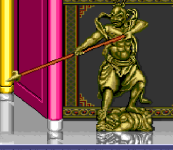
I'm making my game and I need the sprites of the statue that is in mission 4 of double dragon 2 arcade.
Can any of you tell me where to find it?
thank you so much!!!
AFAIK, no one bothered to rip that and make it public. Your best bet is probably looking at other Double Dragon games here. I don’t recall, but maybe 9ne if them has it in their assets.
HTH,
DC

DD Tokki
Well-known member
Arcade - Double Dragon 2: The Revenge - Final Mission - The Spriters Resource
Arcade - Double Dragon 2: The Revenge - Final Mission - The #1 source for video game sprites on the internet!
 www.spriters-resource.com
DD Tokki
Well-known member
hello !!!
Yes, I already searched on that page, but I didn't find anything.
I will continue searching and if you know of any please let me know. thank you so much.
a hug!!!
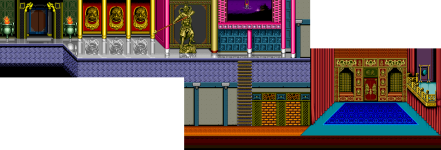
Doesn't this image appear?

alemasper
Member

alemasper
Member
Another thing I don't understand is what the third value means when one places an entity
Example:
coords 20 35 ?

maxman
Well-known member
That's for lifting the entity up off the ground. For example, if you put 10 in the third value, it will lift 10 pixels high up from the ground. It spawns at 10 pixels high off the ground.
coords {x} {z} {a}
- Determines the x, z, and a positions on the screen where the entity will spawn.
- {x} is relative to the screen's current position, NOT the actual position in terms of the level itself.
- {z} is the position on the Z axis, which is counted from the top of the screen. NOT related to the screen's current position.
- {a} is how high off the ground the entity will spawn.
- If {x} is between 0 and 320, and the entity is an enemy, it will magically fall out of the sky. Unless it has a SPAWN animation, in which case it'll play that.
- If {x} is between 0 and 320, and the entity is an obstacle or item, it will magically appear out of thin air. Unless it has a SPAWN animation, in which case it'll play that.
- In case you're wondering, the BoR playing field is, in bbox format, 0 320 160 230. Unless, of course, you've changed the {min} and {max} values in LEVELS.txt with 'z'. You can also place enemies outside those ranges, but they'll try to return to the playing field if you do.
- Most projectiles will automatically die if their offset is more than 80 pixels offscreen left or right (their x value must stay between -80 and 400). Knives are the only exception: they can go up to 180 either way (-180 to 500). Other entities will also die if they move too far, but they have more leeway (Around 1000 in either direction). Keep that in mind while spawning characters.
- Bikers should normally be spawned further out than other enemies. By default, they are spawned either at -200 or (video horizontal resolution +200, in other words, your screen resolution + 200 pixels).
Last edited:


Bloodbane
Well-known member
My recommendation for z setting is z 935 1145.
Judging from the solidness of the structure, you could use walls to construct the structure.
The balcony on bottom right might require platform. But if you edit it to remove the balcony, you could avoid using platform.
That's the tough part, this kind of stage should use custom scripted camera which usually designed specifically for certain stages.
And there's also respawn coords setting which is best done with scripts.
And with respect to the staircase, is the entire upper floor considered a platform?
Judging from the solidness of the structure, you could use walls to construct the structure.
The balcony on bottom right might require platform. But if you edit it to remove the balcony, you could avoid using platform.
It's difficult for me how to handle the scrolls
That's the tough part, this kind of stage should use custom scripted camera which usually designed specifically for certain stages.
And there's also respawn coords setting which is best done with scripts.

