
You are using an out of date browser. It may not display this or other websites correctly.
You should upgrade or use an alternative browser.
You should upgrade or use an alternative browser.
Solved Animating object and moving it left and right
- Thread starter PS_VITA
- Start date
Question that is answered or resolved.

In case you are making the rotation effect using sprites, you can create a second animation with an inverted sprite order.Hi guys,
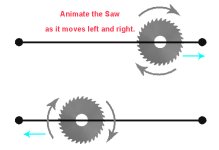
would you guys be so kind to post your solution to picture below:
(I've always struggle to make this happen but my solutions are always overly complicated and it seems to me that there should be a simple/efficient solution)
View attachment 4264
You can use a simple animation changer at the last frame of each animation and the amount of frames must be enough to reach the edges of every course. So, as soon as the saw reaches the end of the course, it will change to another animation with the opposite direction.
In case you are making the rotation effect using sprites, you can create a second animation with an inverted sprite order.
You can use a simple animation changer at the last frame of each animation and the amount of frames must be enough to reach the edges of every course. So, as soon as the saw reaches the end of the course, it will change to another animation with the opposite direction.
Okay , here's what I have
Code:
anim follow2 # Saw Go
    loop    1
    delay    4100
           offset    190 255
        @cmd    dasher -0.1 0 0
        frame    data/levels/st3bx/saw_right.png
        @cmd    dasher 0.1 0 0
        frame    data/levels/st3bx/saw_left.png
And these are the sprites that are unused because I can't figure how to apply the above code and animate the saw to spin.
Code:
        frame    data/levels/st3bx/saw_right1.png
        frame    data/levels/st3bx/saw_right2.png
        frame    data/levels/st3bx/saw_right3.png


        frame    data/levels/st3bx/saw_left1.png
        frame    data/levels/st3bx/saw_left2.png
frame data/levels/st3bx/saw_left3.pngIn case the sprites 1/2/3 do a perfect loop, you could try something like this.
It's possible to use a script to rotate the sprite but let's try this method first.
C:
anim follow2 # Saw Go
    loop    1
    delay    8
    offset    190 255
    @cmd    dasher -0.1 0 0
    frame    data/levels/st3bx/saw_right1.png
    frame    data/levels/st3bx/saw_right2.png
    frame    data/levels/st3bx/saw_right3.png
    frame    data/levels/st3bx/saw_right1.png
    frame    data/levels/st3bx/saw_right2.png
    frame    data/levels/st3bx/saw_right3.png
    frame    data/levels/st3bx/saw_right1.png
    frame    data/levels/st3bx/saw_right2.png
    frame    data/levels/st3bx/saw_right3.png
    @cmd    dasher 0.1 0 0
    frame    data/levels/st3bx/saw_left1.png
    frame    data/levels/st3bx/saw_left2.png
    frame    data/levels/st3bx/saw_left3.png
    frame    data/levels/st3bx/saw_left1.png
    frame    data/levels/st3bx/saw_left2.png
    frame    data/levels/st3bx/saw_left3.png
    frame    data/levels/st3bx/saw_left1.png
    frame    data/levels/st3bx/saw_left2.png
    frame    data/levels/st3bx/saw_left3.png
It's possible to use a script to rotate the sprite but let's try this method first.
In case the sprites 1/2/3 do a perfect loop, you could try something like this.
C:anim follow2 # Saw Go loop 1 delay 8 offset 190 255 @cmd dasher -0.1 0 0 frame data/levels/st3bx/saw_right1.png frame data/levels/st3bx/saw_right2.png frame data/levels/st3bx/saw_right3.png frame data/levels/st3bx/saw_right1.png frame data/levels/st3bx/saw_right2.png frame data/levels/st3bx/saw_right3.png frame data/levels/st3bx/saw_right1.png frame data/levels/st3bx/saw_right2.png frame data/levels/st3bx/saw_right3.png @cmd dasher 0.1 0 0 frame data/levels/st3bx/saw_left1.png frame data/levels/st3bx/saw_left2.png frame data/levels/st3bx/saw_left3.png frame data/levels/st3bx/saw_left1.png frame data/levels/st3bx/saw_left2.png frame data/levels/st3bx/saw_left3.png frame data/levels/st3bx/saw_left1.png frame data/levels/st3bx/saw_left2.png frame data/levels/st3bx/saw_left3.png
It's possible to use a script to rotate the sprite but let's try this method first.
Hey thanks for your continued support. The problem here is that the saw must be delayed "delay 4100" so that it can move to the right 4100 (openbor seconds) and than move to the left 4100 ( openbor seconds) Also, the saw was just a picture I drew for the example . I actually don't need to code the rotation. The animation delay for the sprites should at-least be 8 (openbor seconds)
In this case you can use a looper script to reach near the 4100 of total delay but constantly repeating the frames 1/2/3.Hey thanks for your continued support. The problem here is that the saw must be delayed "delay 4100" so that it can move to the right 4100 (openbor seconds) and than move to the left 4100 ( openbor seconds) Also, the saw was just a picture I drew for the example . I actually don't need to code the rotation. The animation delay for the sprites should at-least be 8 (openbor seconds)
C:
void looper(int frame, int limit)
{//Loops current animation
    void self    = getlocalvar("self");
    void anim    = getentityproperty(self, "animationID");
    int loop    = getlocalvar("loop"+self+anim);

    if(loop == NULL()){ //LOCALVAR EMPTY?
        setlocalvar("loop"+self+anim, 0);
        loop = 0;
    }

    if(loop < limit){ //LOOPS REACH LIMIT?
        setlocalvar("loop"+self+anim, loop+1); //INCREMENT NUMBER OF LOOPS
        updateframe(self, frame); //CHANGE FRAME
    }
    else
    if(loop == limit){ //LOOPS REACH LIMIT?
        setlocalvar("loop"+self+anim, NULL());
    }
}
C:
anim follow2 # Saw Go
    loop    1
    delay    8
    offset    190 255
    @cmd    dasher -0.1 0 0
    frame    data/levels/st3bx/saw_right1.png # DELAY 8
    frame    data/levels/st3bx/saw_right2.png # DELAY 8+8 = 16
    frame    data/levels/st3bx/saw_right3.png # DELAY 8+8+8 = 24
    delay 1 # SHORT DELAY TO QUICKLY PASS THE EXTRA FRAME USED ONLY FOR THE LOOP SCRIPT
    @cmd looper 0 170 # IT MEANS 170 TIMES REPEATING THE 24 DELAY = 4080 + 24 INITIAL = 4104
    frame    data/levels/st3bx/saw_right3.png
    delay    8
    @cmd    dasher 0.1 0 0
    frame    data/levels/st3bx/saw_left1.png
    frame    data/levels/st3bx/saw_left2.png
    frame    data/levels/st3bx/saw_left3.png
    delay 1 # SHORT DELAY TO QUICKLY PASS THE EXTRA FRAME USED ONLY FOR THE LOOP SCRIPT
    @cmd looper 0 170
frame data/levels/st3bx/saw_left3.pngWholly molly, that looper script just blew my mind.In this case you can use a looper script to reach near the 4100 of total delay but constantly repeating the frames 1/2/3.
C:void looper(int frame, int limit) {//Loops current animation void self = getlocalvar("self"); void anim = getentityproperty(self, "animationID"); int loop = getlocalvar("loop"+self+anim); if(loop == NULL()){ //LOCALVAR EMPTY? setlocalvar("loop"+self+anim, 0); loop = 0; } if(loop < limit){ //LOOPS REACH LIMIT? setlocalvar("loop"+self+anim, loop+1); //INCREMENT NUMBER OF LOOPS updateframe(self, frame); //CHANGE FRAME } else if(loop == limit){ //LOOPS REACH LIMIT? setlocalvar("loop"+self+anim, NULL()); } }
C:anim follow2 # Saw Go loop 1 delay 8 offset 190 255 @cmd dasher -0.1 0 0 frame data/levels/st3bx/saw_right1.png # DELAY 8 frame data/levels/st3bx/saw_right2.png # DELAY 8+8 = 16 frame data/levels/st3bx/saw_right3.png # DELAY 8+8+8 = 24 delay 1 # SHORT DELAY TO QUICKLY PASS THE EXTRA FRAME USED ONLY FOR THE LOOP SCRIPT @cmd looper 0 170 # IT MEANS 170 TIMES REPEATING THE 24 DELAY = 4080 + 24 INITIAL = 4104 frame data/levels/st3bx/saw_right3.png delay 8 @cmd dasher 0.1 0 0 frame data/levels/st3bx/saw_left1.png frame data/levels/st3bx/saw_left2.png frame data/levels/st3bx/saw_left3.png delay 1 # SHORT DELAY TO QUICKLY PASS THE EXTRA FRAME USED ONLY FOR THE LOOP SCRIPT @cmd looper 0 170 frame data/levels/st3bx/saw_left3.png
Thank @Kratus - lol - that's actually genius - did you come up with that script ?
Thank you again!
Glad it worksWholly molly, that looper script just blew my mind.
Thank @Kratus - lol - that's actually genius - did you come up with that script ?
Thank you again!

This looper script I got some years ago in the forum but I did some small changes to avoid minor issues.
It works well @Kratus but lol the saw just kept going to the right , I'm looking to see what the problem is because from what you posted everything looks good.Glad it works
This looper script I got some years ago in the forum but I did some small changes to avoid minor issues.
Here's the actual code
Code:
anim follow71 # Raft water go
    loop    1
    delay    6
    offset    248 -168
    @cmd    dasher -0.1 0 0
    frame    data/levels/st3bx/st3bxws1.png # DELAY 6
    frame    data/levels/st3bx/st3bxws2.png # DELAY 6+6 = 12
    frame    data/levels/st3bx/st3bxws3.png # DELAY 6+6+6 = 18
    delay 1 # SHORT DELAY TO QUICKLY PASS THE EXTRA FRAME USED ONLY FOR THE LOOP SCRIPT
    @cmd looper 0 170 # IT MEANS 170 TIMES REPEATING THE 24 DELAY = 4080 + 24 INITIAL = 4104
    frame    data/levels/st3bx/st3bxws3.png
    delay    6
    @cmd    dasher 0.1 0 0
    frame    data/levels/st3bx/st3bxws1.png
    frame    data/levels/st3bx/st3bxws2.png
    frame    data/levels/st3bx/st3bxws3.png
    delay 1 # SHORT DELAY TO QUICKLY PASS THE EXTRA FRAME USED ONLY FOR THE LOOP SCRIPT
    @cmd looper 0 170
    frame    data/levels/st3bx/st3bxws3.png
Last edited:
Sorry, I forgot to put the correct frame to be repeated in the second instance of the looper.It works well @Kratus but lol the saw just kept going to the right , I'm looking to see what the problem is because from what you posted everything looks good.
Here's the actual code
Code:anim follow71 # Raft water go loop 1 delay 6 offset 248 -168 @cmd dasher -0.1 0 0 frame data/levels/st3bx/st3bxws1.png # DELAY 6 frame data/levels/st3bx/st3bxws2.png # DELAY 6+6 = 12 frame data/levels/st3bx/st3bxws3.png # DELAY 6+6+6 = 18 delay 1 # SHORT DELAY TO QUICKLY PASS THE EXTRA FRAME USED ONLY FOR THE LOOP SCRIPT @cmd looper 0 170 # IT MEANS 170 TIMES REPEATING THE 24 DELAY = 4080 + 24 INITIAL = 4104 frame data/levels/st3bx/st3bxws3.png delay 6 @cmd dasher 0.1 0 0 frame data/levels/st3bx/st3bxws1.png frame data/levels/st3bx/st3bxws2.png frame data/levels/st3bx/st3bxws3.png delay 1 # SHORT DELAY TO QUICKLY PASS THE EXTRA FRAME USED ONLY FOR THE LOOP SCRIPT @cmd looper 0 170 frame data/levels/st3bx/st3bxws3.png
Code:
 follow71 # Raft water go
    loop    1
    delay    6
    offset    248 -168
    @cmd    dasher -0.1 0 0
    frame    data/levels/st3bx/st3bxws1.png # DELAY 6
    frame    data/levels/st3bx/st3bxws2.png # DELAY 6+6 = 12
    frame    data/levels/st3bx/st3bxws3.png # DELAY 6+6+6 = 18
    delay 1 # SHORT DELAY TO QUICKLY PASS THE EXTRA FRAME USED ONLY FOR THE LOOP SCRIPT
    @cmd looper 0 170 # IT MEANS 170 TIMES REPEATING THE 24 DELAY = 4080 + 24 INITIAL = 4104
    frame    data/levels/st3bx/st3bxws3.png
    delay    6
    @cmd    dasher 0.1 0 0
    frame    data/levels/st3bx/st3bxws1.png # THE SECOND INSTANCE MUST REPEAT FROM THIS FRAME NUMBER 4
    frame    data/levels/st3bx/st3bxws2.png
    frame    data/levels/st3bx/st3bxws3.png
    delay 1 # SHORT DELAY TO QUICKLY PASS THE EXTRA FRAME USED ONLY FOR THE LOOP SCRIPT
    @cmd looper 4 170
frame data/levels/st3bx/st3bxws3.pngOOOhh, I see - Kindly, Thank you again @KratusSorry, I forgot to put the correct frame to be repeated in the second instance of the looper.
Code:anim follow71 # Raft water go loop 1 delay 6 offset 248 -168 @cmd dasher -0.1 0 0 frame data/levels/st3bx/st3bxws1.png # DELAY 6 frame data/levels/st3bx/st3bxws2.png # DELAY 6+6 = 12 frame data/levels/st3bx/st3bxws3.png # DELAY 6+6+6 = 18 delay 1 # SHORT DELAY TO QUICKLY PASS THE EXTRA FRAME USED ONLY FOR THE LOOP SCRIPT @cmd looper 0 227 # IT MEANS 227 TIMES REPEATING THE 18 DELAY = 4078 frame data/levels/st3bx/st3bxws3.png delay 6 @cmd dasher 0.1 0 0 frame data/levels/st3bx/st3bxws1.png # THE SECOND INSTANCE MUST REPEAT FROM THIS FRAME NUMBER 4 frame data/levels/st3bx/st3bxws2.png frame data/levels/st3bx/st3bxws3.png delay 1 # SHORT DELAY TO QUICKLY PASS THE EXTRA FRAME USED ONLY FOR THE LOOP SCRIPT @cmd looper 4 227 frame data/levels/st3bx/st3bxws3.png
Edit: Added the "anim" word before follow71 in case anyone ever tries to use this script.

Last edited: