
NED
Well-known member
Yes! Now it looks clean !


Some character portraits I have don't have borders at all. Don't mind the white parts around Yang 'cause it's just a temporary concept which I will change. I know that needs to be edited.-try to remove them.
-Or make thicker white borders
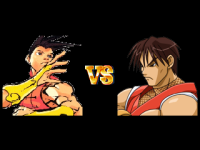
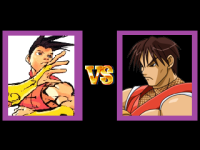
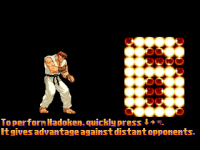
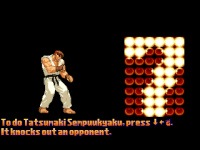

Looking good. If I may add something, in fighting games the slide back after hit happens after the hit pause (on the target), not together with the hit.Just made this pushback corner stable, I guess.
I had the exact same feeling.Looking good. If I may add something, in fighting games the slide back after hit happens after the hit pause (on the target), not together with the hit.
Sometimes, the slide is a bit too big, both in normal attacks and on the corner push - mainly, the crouched upper.
And one last note: I feel there is a missin friction here, as the characters looks to slide on the same velocity during all the move, where it should gradually the reduced.
OpenBOR doesn't have a native friction, but fighting engines like mugen/ikemen does, where the crouch fritction is even greater than the standing one.
other than that, looks cool

OpenBOR doesn't have a native friction
Yeah. I couldn't tell whether there's a pause time on the hit or not when it comes to attacks. Even with the shake, used with offsets (I have no time to add offsets for frames, but I just found out that using looper is the best solution for me to avoid frame redundancy. That way, I wouldn't add many frames with offsets for/in any animation). However, I was suggested to use a pause time for each hit, but I don't have time until there's a moment that I will make a release, like an alpha or beta. Not sure, though.in fighting games the slide back after hit happens after the hit pause (on the target), not together with the hit.
I wasn't very certain how fast/slow I would change the speed for the pushback of each attack. Also, I forgot to remove unnecessary parameters I previously made for the pushback animation function which were for range attacks on screen boundaries, specifically from crouch/duck + heavy punch. I'm not using range attack of distance in animation script for the screen edges anymore. Now it's only with velocity in animation script, but it's reliable on doattack script. The ondoattack script was a lot more challenging than animation script because of the screen edges and the velocity movement together. So, I started creating an entityvar for a smooth movement.Sometimes, the slide is a bit too big, both in normal attacks and on the corner push - mainly, the crouched upper.
If you only mean attacks on the velocity, I use velo001 for moving smoothly backwards in anim pain.And one last note: I feel there is a missin friction here, as the characters looks to slide on the same velocity during all the move, where it should gradually the reduced.
anim    pain #L Get Hit Normal
    delay    8
    offset    336 292
#    platform 336 292 0 0 50 50 10 50
    bbox 316 194 39 101
    drawmethod fillcolor 255_0_0
    frame    data/chars/ken/cvs2_ken_558.png # 0
    @cmd velo001 -2 0 0
    frame    data/chars/ken/cvs2_ken_559.png # 1
    drawmethod fillcolor 255_0_0
    frame    data/chars/ken/cvs2_ken_559.png # 2
    @cmd stop
    frame    data/chars/ken/cvs2_ken_558.png # 3
    @cmd beidle
    frame    data/chars/ken/cvs2_ken_558.png # 4
    @cmd velo001 -2 0 0
    bbox 314 226 44 68
    frame data/CHARS/Ken/CVS2_Ken_567.png #5
    frame data/CHARS/Ken/CVS2_Ken_568.png # 6
    frame data/CHARS/Ken/CVS2_Ken_568.png # 7
    frame data/CHARS/Ken/CVS2_Ken_567.png # 8
    @cmd stop
    frame data/CHARS/Ken/CVS2_Ken_567.png # 9
    @cmd    keyint2 "ANI_DUCK" 2 "D" 0
    @cmd    keyint2 "ANI_FOLLOW6" 0 "D" 1
    bbox 0 0 0 0
frame data/CHARS/Ken/CVS2_Ken_570.png # 8anim attack #STAND LP
offset 97 177
delay 2
bbox 84 79 39 98
sound data/sounds/common/punch.wav
@cmd attack1 0 50 0 "ANI_ATTACK4"
#@cmd attack1 0 50 0 openborconstant("ANI_ATTACK4")
@cmd randSoundSF "Ryu" "SND_PL00_4.wav" "SND_PL00_5.wav" NULL()
frame data/CHARS/ARyu/idlelp01.png
attack 101 84 68 23 0 0 0 0 23 0 # 7 - damage
@cmd antiscreen 3
frame data/CHARS/ARyu/idlelp02.png
frame data/CHARS/ARyu/idlelp03.png
attack 0
frame data/CHARS/ARyu/idlelp04.png
bbox 81 80 37 97
#@cmd stop
frame data/CHARS/ARyu/idlelp05.pnganim pain #Face 1-2-1
offset 97 177
delay 4
#IDLE PAIN
bbox 71 81 37 96
@cmd velo001 -2 0 0
frame data/CHARS/ARyu/gethit00.png
delay 7
frame data/CHARS/ARyu/gethit01.png
delay 5
frame data/CHARS/ARyu/gethit01.png
frame data/CHARS/ARyu/gethit00.png
@cmd beidle
frame data/CHARS/ARyu/gethit00.png
#DUCK PAIN
bbox 75 112 42 68
@cmd velo001 -2 0 0
frame data/CHARS/ARyu/duckhit1.png
frame data/CHARS/ARyu/duckhit2.png
frame data/CHARS/ARyu/duckhit2.png
frame data/CHARS/ARyu/duckhit1.png
@cmd keyint2 "ANI_DUCK" 2 "D" 0
@cmd keyint2 "ANI_FOLLOW6" 0 "D" 1
#@cmd keyint openborconstant("ANI_DUCK") 2 "D" 0 0
#@cmd keyint openborconstant("ANI_FOLLOW6") 0 "D" 1 0
frame data/CHARS/ARyu/duckhit1.png What I have so far for the ondoattack on its velocity, is something I can't gradually reduce its speed in time. It's tricky. I don't know which animation should be reduced. It's either anim pain after a hit or the attacker being pushed back. Or it could be both. (How much speed should I reduce and which animation?)
I know, but if you take a look at the original Final Fight arcade game, each player has a friction which both players can't pass through each other. DC is right on the money for saying it's scriptable.OpenBOR doesn't have a native friction, but fighting engines like mugen/ikemen does, where the crouch fritction is even greater than the standing one.
Something like being a bit distant away from getting way too close to each other, right? I use platform(s) as a blockade, mostly in anim idle. I've tried. It's the closest thing I've got as a friction in a one-on-one system, but the push-forward motion isn't implemented yet. There will be, though it's very challenging.also, perhaps getting a wait to avoid getting so close from opponent. (depending on the size of characters.)
In this exemple, I fee like Ryu and Ken can get a little too close from each others.

Thanks, dude. Didn't expect you'd stop by here.Looking awesome, dude!
 Hahah. You can tell that the pushback looks like a real fighting game, though some speed will need to be adjusted.
Checking your code, I saw that you use a negative velocity firstIf you only mean attacks on the velocity, I use velo001 for moving smoothly backwards in anim pain.
void bmtFriction(float fX, float fY, float fZ)
{
// Reduces the actual velocity, simulating friction.
// Douglas Baldan - 13/01/2014
// http://www.brazilmugenteam.com
void self = getlocalvar("self");
float Xvel = getentityproperty(self, "xdir");// x velocity
float Yvel = getentityproperty(self, "tossv");// y velocity
float Zvel = getentityproperty(self, "zdir");// z velocity
changeentityproperty(self, "velocity", Xvel/fX, Yvel/fY, Zvel/fZ);
}delay 20
@cmd bmtFriction 2 1 1
frame bla bla bla
delay 5
@cmd bmtFriction 2 1 1
frame bla bla bla
@cmd bmtFriction 2 1 1
frame bla bla bla
@cmd bmtFriction 2 1 1
frame bla bla bla
@cmd bmtFriction 2 1 1
frame bla bla bla
void stop()
{// Stop hero's movement!
    void self = getlocalvar("self");
    changeentityproperty(self, "velocity", 0, 0, 0);
    changeentityproperty(self, "speed", 0); //Stop moving!
}Checking your code, I saw that you use a negative velocity first
@cmd velo001 -2 0 0
Then you stop the character
@cmd stop
then apply the same velocity again
@cmd velo001 -2 0 0
And that is the problem: you are using just one single velocity, where you should reduce it in every frame (if you want to be more precise, over time, so you aren't tied to frames)
I've wrote a half baked* function that I use to simulate friction
C-like:void bmtFriction(float fX, float fY, float fZ) { // Reduces the actual velocity, simulating friction. // Douglas Baldan - 13/01/2014 // http://www.brazilmugenteam.com void self = getlocalvar("self"); float Xvel = getentityproperty(self, "xdir");// x velocity float Yvel = getentityproperty(self, "tossv");// y velocity float Zvel = getentityproperty(self, "zdir");// z velocity changeentityproperty(self, "velocity", Xvel/fX, Yvel/fY, Zvel/fZ); }
Usage:
@cmd bmtFriction 2 1 1
Your velocity will be reduced (divided) by each value. And then I use it on every frame I need.
There is a trick: if you have a frame with delay 20 and want it to be a smooth friction, divide your frames in smaller numbers.
So instead of using 1 frame with delay 20
use 4 frames with delay 5
*I say half baked because I haven't added any security check to it, so if you add 0 as any value, you would get a division by zero which probably will trigger a shutdown.
Also, I won't stop moving by using stop() function. velo001() function changes the entity velocity, while stop() change both velocity and speed:
Most of time, I use stop only in projectiles, not on players/enemies. If I need to make a player to stop, I just set velo001 to 0:C-like:void stop() {// Stop hero's movement! void self = getlocalvar("self"); changeentityproperty(self, "velocity", 0, 0, 0); changeentityproperty(self, "speed", 0); //Stop moving! }
@cmd velo001 0 NULL() NULL()
Using NULL() will not affect the other velocities, like your Y velocity.
0.9 each update. You may need to experiment a little to get the exact slowdown rate you want, then force the velocity to 0 once it drops below a small threshold. That is basically how friction systems handle movement, and it is also similar in concept to how OpenBOR handles gravity. Once tuned, it feels butter smooth and becomes fire-and-forget.
ah yeah I am aware of this. Keep in mind that I made that funcion back in 2014, I was more stupid back then (I am just a little less, but still haha)Notice I said multiply, not divide. This is a general programming rule, not an OpenBOR rule. Depending on the CPU and runtime, multiplication is often a little faster than division - and at minimum it's just as fast, so whenever you need fractional adjustment, prefer multiplying by a decimal factor instead of dividing. It's only a tiny optimization, but it's free.
I just tried your function with velo001 and surprisingly, it works!I've wrote a half baked* function that I use to simulate friction
C-like:void bmtFriction(float fX, float fY, float fZ) { // Reduces the actual velocity, simulating friction. // Douglas Baldan - 13/01/2014 // http://www.brazilmugenteam.com void self = getlocalvar("self"); float Xvel = getentityproperty(self, "xdir");// x velocity float Yvel = getentityproperty(self, "tossv");// y velocity float Zvel = getentityproperty(self, "zdir");// z velocity changeentityproperty(self, "velocity", Xvel/fX, Yvel/fY, Zvel/fZ); }
Usage:
@cmd bmtFriction 2 1 1
Your velocity will be reduced (divided) by each value. And then I use it on every frame I need.
There is a trick: if you have a frame with delay 20 and want it to be a smooth friction, divide your frames in smaller numbers.
So instead of using 1 frame with delay 20
use 4 frames with delay 5
*I say half baked because I haven't added any security check to it, so if you add 0 as any value, you would get a division by zero which probably will trigger a shutdown.
Also, I won't stop moving by using stop() function. velo001() function changes the entity velocity, while stop() change both velocity and speed:
Most of time, I use stop only in projectiles, not on players/enemies. If I need to make a player to stop, I just set velo001 to 0:C-like:void stop() {// Stop hero's movement! void self = getlocalvar("self"); changeentityproperty(self, "velocity", 0, 0, 0); changeentityproperty(self, "speed", 0); //Stop moving! }
@cmd velo001 0 NULL() NULL()
Using NULL() will not affect the other velocities, like your Y velocity.
 It works exactly like you said! This is a lot better when it comes to reducing the velocity (with a slight movement). I just have got to calculate it. I did notice that if I use the same values like 2 in both bmtFriction and velo001, the character moves in a few pixels like 8. (I don't have time to explain it. Sorry.)
anim pain #L Get Hit Normal
delay 8
offset 336 292
# platform 336 292 0 0 50 50 10 50
bbox 316 194 39 101
@cmd velo001 -3 0 0
@cmd bmtFriction 2 1 1
frame data/chars/ken/cvs2_ken_558.png # 0
@cmd bmtFriction 2 1 1
frame data/chars/ken/cvs2_ken_559.png # 1
@cmd bmtFriction 2 1 1
#frame data/chars/ken/cvs2_ken_560.png # 2
frame data/chars/ken/cvs2_ken_559.png # 2
#@cmd stop
@cmd velo001 0 NULL() NULL()
frame data/chars/ken/cvs2_ken_558.png # 3
@cmd beidle
frame data/chars/ken/cvs2_ken_558.png # 4
@cmd velo001 -3 0 0
bbox 314 226 44 68
@cmd bmtFriction 2 1 1
frame data/CHARS/Ken/CVS2_Ken_567.png #5
@cmd bmtFriction 2 1 1
frame data/CHARS/Ken/CVS2_Ken_568.png # 6
@cmd bmtFriction 2 1 1
frame data/CHARS/Ken/CVS2_Ken_568.png # 7
@cmd bmtFriction 2 1 1
frame data/CHARS/Ken/CVS2_Ken_567.png # 8
#@cmd stop
@cmd velo001 0 NULL() NULL()
frame data/CHARS/Ken/CVS2_Ken_567.png # 9
@cmd keyint2 "ANI_DUCK" 2 "D" 0
@cmd keyint2 "ANI_FOLLOW6" 0 "D" 1
bbox 0 0 0 0
frame data/CHARS/Ken/CVS2_Ken_570.png # 8anim attack #STAND LP
offset 97 177
delay 2
bbox 84 79 39 98
sound data/sounds/common/punch.wav
@cmd attack1 0 50 0 "ANI_ATTACK4"
#@cmd attack1 0 50 0 openborconstant("ANI_ATTACK4")
@cmd randSoundSF "Ryu" "SND_PL00_4.wav" "SND_PL00_5.wav" NULL()
frame data/CHARS/ARyu/idlelp01.png
attack 101 84 68 23 7 0 0 0 23 0
@cmd antiscreen 3
@cmd bmtFriction 2 1 1
frame data/CHARS/ARyu/idlelp02.png
@cmd bmtFriction 2 1 1
frame data/CHARS/ARyu/idlelp03.png
attack 0
@cmd bmtFriction 2 1 1
frame data/CHARS/ARyu/idlelp04.png
bbox 81 80 37 97
#@cmd stop
@cmd bmtFriction 2 1 1
frame data/CHARS/ARyu/idlelp05.pnganim pain #Face 1-2-1
offset 97 177
delay 4
#IDLE PAIN
bbox 71 81 37 96
@cmd velo001 -2 0 0
@cmd bmtFriction 2 1 1
frame data/CHARS/ARyu/gethit00.png
delay 7
@cmd bmtFriction 2 1 1
frame data/CHARS/ARyu/gethit01.png
delay 5
@cmd bmtFriction 2 1 1
frame data/CHARS/ARyu/gethit01.png
@cmd bmtFriction 2 1 1
frame data/CHARS/ARyu/gethit00.png
@cmd beidle
frame data/CHARS/ARyu/gethit00.png
#DUCK PAIN
bbox 75 112 42 68
@cmd bmtFriction 2 1 1
@cmd velo001 -2 0 0
frame data/CHARS/ARyu/duckhit1.png
@cmd bmtFriction 2 1 1
frame data/CHARS/ARyu/duckhit2.png
@cmd bmtFriction 2 1 1
frame data/CHARS/ARyu/duckhit2.png
@cmd bmtFriction 2 1 1
frame data/CHARS/ARyu/duckhit1.png
@cmd keyint2 "ANI_DUCK" 2 "D" 0
@cmd keyint2 "ANI_FOLLOW6" 0 "D" 1
#@cmd keyint openborconstant("ANI_DUCK") 2 "D" 0 0
#@cmd keyint openborconstant("ANI_FOLLOW6") 0 "D" 1 0
frame data/CHARS/ARyu/duckhit1.pngSo, in my game, players can choose between D, U+A or D+A2, and D,F+A or A2.anim freespecial3 #upper
loop 0
com D A2 freespecial3
com d U A freespecial3
void main()
{//Execute an animation by holding a certain direction and pressing a defined key
    // Thanks Kratus! - 2024.08.14
    void self = getlocalvar("self");
    void animation = getentityproperty(self, "animationID");
    int pIndex = getlocalvar("player");
    int direction = getentityproperty(self, "direction");
    int pressSpecial = playerkeys(pIndex, 1, "attack4");
    int holdRight = (playerkeys(pIndex, 0, "moveright") && direction == 1);
    int holdLeft = (playerkeys(pIndex, 0, "moveleft") && direction == 0);
    void MPower = getentityproperty(self,"mp"); //GET CALLER MP
    int minMP = 20; // MINIMUM MP TO EXECUTE THE MOVE

    //DETECT KEYS
    if(pressSpecial && (holdRight || holdLeft)){

        //LIST ALL ALLOWED ANIMATIONS
        if( animation == openborconstant("ANI_IDLE")||
            animation == openborconstant("ANI_WALK")||
            animation == openborconstant("ANI_RUN")){

            if (MPower >= minMP){ // CHECK MP VALUE
            //RESET CHARACTER VELOCITY AND EXECUTE THE DESIRED ANIMATION
            changeentityproperty(self, "velocity", 0, 0, 0); //STOP THE ENTITY
            changeentityproperty(self, "mp",MPower-minMP); //SUBSTRACT THE MINIMUM MP FROM THE ACTUAL MP VALUE
            performattack(self, openborconstant("ANI_FREESPECIAL2")); // ANIMATION TO EXECUTE
            }
        }
    }
}