How to use "playgame"?

mersox

Active member
Hi all, I'm trying to use:

playgame(set_index, usesave)

  • set_index like getsaveinfo and usesave == 1 if you want continue your game from a loaded file, else use 2.
  • Example: playgame(0,1) to continue the ARCADE mode or playgame(0,2) to start an ARCADE mode.

But it's not working. I want to make it so when players select "load game" in the menu, they're taken straight to a specific saved state. My game only can save in one of its level "sets" so there's no need for the "load game" menu screen.

This is my updated.c:
Code:
void main(){
if(openborvariant("in_load_game"))
    {   
      loadgamefile();
      playgame(1, 1);
    }
}

Notes:
- The script is pretty much ignored, nothing happens nor does the game crashes
- The "in_load_game" portion of the script works when using other commands like shutdown()
- The "set" I want to load is the second one in my levels.txt, which is why I'm using 1 and not 0 in the code
 
Hi all, I'm trying to use:


But it's not working. I want to make it so when players select "load game" in the menu, they're taken straight to a specific saved state. My game only can save in one of its level "sets" so there's no need for the "load game" menu screen.

This is my updated.c:
Code:
void main(){
if(openborvariant("in_load_game"))
    {  
      loadgamefile();
      playgame(1, 1);
    }
}

Notes:
- The script is pretty much ignored, nothing happens nor does the game crashes
- The "in_load_game" portion of the script works when using other commands like shutdown()
- The "set" I want to load is the second one in my levels.txt, which is why I'm using 1 and not 0 in the code
To be honest this function never worked for me. I looked in the engine source and it seems that this is an unfinished feature, there's no line that makes the engine start a level or jump to a branch. In addition, I saw that during the loading menu some things don't work properly.

There's some ways to bypass it. You can build a custom save/load system, using the jumptobranch function directly from the main menu to load a level previously saved into a variable (you may need to export these variables for external files). Once you select the "new game", the jumptobranch will send you to the level defined in this command.

You can also try the "skiptoset" openborvariant, this way you can jump directly to a level set even from the title screen. Useful in case you want to skip the entire main menu and build a custom one using levels.

Code:
changeopenborvariant("skiptoset", 1);
 
@Kratus and @mersox,

Sorry, I didn't know that function was broken. I'll put it on my fix list.

DC
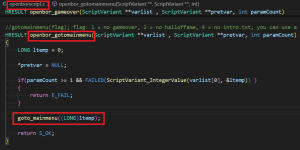
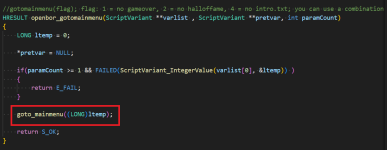
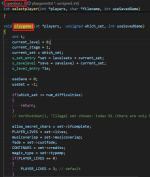
@DCurrent Yeah, this function looks strange. For example, in the openborscript.c we can see that usually other script functions calls a similar one that is in the openbor.c file, like the gotomainmenu does.

1748910419651.png

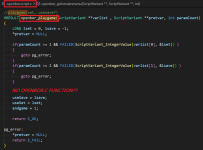
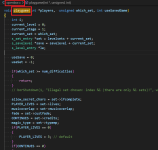
However, the playgame function does not do the same, even if we have a similar one inside the openbor.c

1748910641911.png

1748910716974.png
 

Attachments

  • 1748910099528.png
    1748910099528.png
    49 KB · Views: 1
  • 1748910327818.png
    1748910327818.png
    82 KB · Views: 1
To be honest this function never worked for me. I looked in the engine source and it seems that this is an unfinished feature, there's no line that makes the engine start a level or jump to a branch. In addition, I saw that during the loading menu some things don't work properly.

There's some ways to bypass it. You can build a custom save/load system, using the jumptobranch function directly from the main menu to load a level previously saved into a variable (you may need to export these variables for external files). Once you select the "new game", the jumptobranch will send you to the level defined in this command.

You can also try the "skiptoset" openborvariant, this way you can jump directly to a level set even from the title screen. Useful in case you want to skip the entire main menu and build a custom one using levels.

Code:
changeopenborvariant("skiptoset", 1);
Thank you @Kratus for such a detailed response. It's a shame I can't use that function. I appreciate the workaround suggestions as well.

@DCurrent , thanks for your message and sorry to add to your pile of work!
 
Back
Top Bottom