Group enemies for 3 and 4 players

tightninja

Member
Is there anyway to adjust the group function for 3 and 4 players

for example we have:

group 3 3
at
120

Is there a way to have


3pgroup 3 5
at
120

4pgroup 3 6
at
120
 
Is there anyway to adjust the group function for 3 and 4 players

for example we have:

group 3 3
at
120

Is there a way to have


3pgroup 3 5
at
120

4pgroup 3 6
at
120

No. You can control individual spawns on player count basis, but not group sizes. That would require script.

DC
 
I am interested on this as well, how could be implemented? at times 2pspawn and 3pspawn are not enough, and a different group quantity is needed for that amount of players.
 
Like DC said, scripts are the best way in this case.

I suggest using spawn scripts or inline like the method below with a dummy entity. This way, by using it in conjunction with other functions like spawn01, you can fully control many aspects of the spawns.

Code:
spawn GroupX
@script
void main()
{
    setentityvar(getlocalvar("self"), "name1", "GalsiaB_");
    setentityvar(getlocalvar("self"), "name2", "DonovanB_");
    setentityvar(getlocalvar("self"), "groupLimit", 5);
    setentityvar(getlocalvar("self"), "spawnLimit", 8);
    setentityvar(getlocalvar("self"), "screenEdge", 0);
    setentityvar(getlocalvar("self"), "distanceEdge", 100);
}
@end_script
map 0
flip 1
coords -50 440 0
at 650

wait
at 1050
 
I think I've shared this trick for this question before. The trick is to set big group for 4 players and spawn fake enemies to reduce the group size. These fake enemies will remove themselves based on number active players. Of course, they'll remove themselves when a wait is over (all enemies defeated) to allow progressing.
 
Hey Kratus,

How to does that script work in practice? From what I can tell Galsia and Donovan only spawn if enemies fall below 4 and with a max of 8?

in other words:

// If 4 players are present, Galsia and Donovan will spawn and change grouping from 3 3 to 5 8
4pspawn GroupX
at 650

Is that correct?
 
I think I've shared this trick for this question before. The trick is to set big group for 4 players and spawn fake enemies to reduce the group size. These fake enemies will remove themselves based on number active players. Of course, they'll remove themselves when a wait is over (all enemies defeated) to allow progressing.
Yep, this is what I do too.
 
Hey Kratus,

How to does that script work in practice? From what I can tell Galsia and Donovan only spawn if enemies fall below 4 and with a max of 8?

in other words:

// If 4 players are present, Galsia and Donovan will spawn and change grouping from 3 3 to 5 8
4pspawn GroupX
at 650

Is that correct?
@tightninja Not exactly. In the code I posted the "5" is the group limit, it means how many enemies can be spawned at the same time.
And the "8" is the spawn limit, it means the total enemies that will be spawned before this dummy disappears.

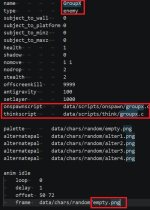
Basically it works by spawning an invisible Dummy enemy that will be always active until the spawnLimit is reached. Then, this dummy has a thinkscript running all the time, checking some conditions and acting accordingly.

Dummy
1778982212412.png

Think script
1778982334683.png

This is just an example, you can define any other rules if you want.
However, before diving in this script I suggest testing the Ilu / Bloodbane's method first, looks easier for your case.
 
@Bloodbane

How do the fake/dummy enemies know when remove themselves? Can you provide a script example?
I don't know exactly but I suppose it may be something like this

Code:
group 6 6
at 120

spawn Galsia
coords 550 230 0
at 120

spawn Galsia
coords 550 230 0
at 120

spawn Galsia
coords 550 230 0
at 120

spawn Galsia
@script
void main()
{
 void self = getlocalvar("self");
 int players = openborvariant("count_players");
 if(players < 3)
 {
     killentity(self);
 }
}
@end_script
coords 550 230 0
at 120

spawn Galsia
@script
void main()
{
 void self = getlocalvar("self");
 int players = openborvariant("count_players");
 if(players < 4)
 {
     killentity(self);
 }
}
@end_script
coords 550 230 0
at 120

spawn Galsia
@script
void main()
{
 void self = getlocalvar("self");
 int players = openborvariant("count_players");
 if(players < 4)
 {
     killentity(self);
 }
}
@end_script
coords 550 230 0
at 120
 
How do the fake/dummy enemies know when remove themselves? Can you provide a script example?

Originally I was thinking of fake enemies with their own scripts in which they remove themselves based on number of active players. They also wait for order to remove themselves.
Turns out there's a simpler solution than that. Here's an example of level with this method:
Code:
group    4 4
at    100

spawn   FakeEn
@script
void main()
{
    void self = getlocalvar("self");
    int Plays = openborvariant("count_players");

    if(Plays >= 4){
      killentity(self);
    }
}
@end_script
alias    Holder
coords  240 200
at      0

spawn   FakeEn
@script
void main()
{
    void self = getlocalvar("self");
    int Plays = openborvariant("count_players");

    if(Plays >= 3){
      killentity(self);
    }
}
@end_script
alias    Holder
coords  240 200
at      0

spawn   FakeEn
@script
void main()
{
    void self = getlocalvar("self");
    int Plays = openborvariant("count_players");

    if(Plays >= 2){
      killentity(self);
    }
}
@end_script
alias    Holder
coords  240 200
at      0

spawn   Enemy
coords  480 216
at      0

spawn   Enemy
coords  400 206
at      0

spawn   Enemy
coords  480 216
at      0

spawn   Enemy
coords  400 206
at      0

spawn   Enemy
coords  480 216
at      0

spawn   Enemy
coords  400 206
at      0

spawn   Killer
alias    Holder
coords  400 206
at      0

group    1 1
at    0

group    100 100
at    0

When grouping 4 4 is active, it spawns 3 FakeEns. FakeEn is this invisible enemy:
Code:
name        FakeEn
health         1000
type        enemy
nomove      1 1
stealth        350
antigravity    100
subject_to_wall    0
offscreenkill    3000
nodrop        2


anim    idle
    loop    1
    delay    30
    offset    1 1
    frame    data/chars/misc/empty.gif
    frame    data/chars/misc/empty.gif

FakeEns will reduce group size based on number of active players. If there were 2 players, one FakeEn will remove itself. If only one player, all FakeEn will stay and if 4 players, all FakeEns will remove themselves. All FakeEns have Holder as alias BTW.
Then after all Enemys are defeated, Killer is spawned to remove all FakeEns.
Actually Killer removes all entities with same alias as the former. Here's Killer entity:
Code:
name        Killer
type        none


anim idle
@script
    void self = getlocalvar("self");            //Caller.

    if(frame==1){
      char Name = getentityproperty(self,"name");
      void vEntity;                                       //Target entity placeholder.
      int  iEntity;                                       //Entity enumeration holder.
      char iName;                                         //Entity Name.
      int  iMax      = openborvariant("count_entities");  //Entity count.

      //Enumerate and loop through entity collection.
      for(iEntity=0; iEntity<iMax; iEntity++){
        vEntity = getentity(iEntity);                 //Get target entity from current loop.
        iName   = getentityproperty(vEntity, "name"); //Get target name.

        //Same alias but different entity?
        if(iName == Name && vEntity != self){
          killentity(vEntity);
        }
      }
    }
    if(frame==2){
      killentity(self);
    }
@end_script
    delay    10
    offset    1 1
    frame    data/chars/misc/empty.gif
    frame    data/chars/misc/empty.gif
    frame    data/chars/misc/empty.gif

After Killer moves all FakeEns, all enemies would be gone allowing grouping to change to next entry or allowing wait to be cleared if one has been declared before.

HTH
 
Call me a donkey, but I still can't understand haha, can someone please put a practical example of a random group explaining it? Let's say:

Making a group of 6 6
Turned into a 5 5 enemy group if 2 players
or turn it into a 4 4 group for just 1 player


Dunno if this is possible
 
Hey Mr. Q. I am starting to understand.

Looking at Bloodbane's scripts, you spawn invisible enemies that kill themselves to let real enemies take over if the player count is 3 or 4.

// 12 enemies in this section, max of 6 enemies on screen at a time.
// If player count is 2 or less, 2 fake enemies remain Max 4 enemies on screen
// If player count is 3 players 1 fake enemy remains Max 5 enemies on screen
// If player count is 4 players no fake enemies Max 6 enemies on screen

group 4 6

spawn roper
spawn Williams
spawn linda
spawn baker

spawn fake
spawn fake

spawn roper
spawn Wiliams
spawn linda
spawn baker

spawn fake
spawn fake


spawn roper
spawn wiliams
spawn linda
spawn baker

spawn fake1
spawn fake2

The scripting for the fake enemies is complicated. 3pgroup and 4pgroup would be better but it does not currently exist, so this is the work around. In the example above 4 player mode would have the first 4 real enemies and an extra williams and roper


Hope that helps
 
I wanted to update this thread with a new way to manage enemies via group

It requires two things:
1.Part of Bloodbane's fake enemy script
2."Chain Spawning"

The code below only spawns 3 entities but 7 enemies. custwill spawns a total of 3 enemies
Code:
scrollx 0 400
at 0

group 3 3


spawn  baker
health 80
coords 150 174
at 0


#CUSTWILL SPAWNS CUSTROPER AND CUST LINDA1
spawn  custwill
@script
void main()
{
 void self = getlocalvar("self");
 int players = openborvariant("count_players");
 if(players <3)
 {
     killentity(self);
 }
}
@end_script
coords 276 197
at 0


#CUSTWILL SPAWNS CUSTROPER AND CUSTLINDA1
spawn  custwill
@script
void main()
{
 void self = getlocalvar("self");
 int players = openborvariant("count_players");
 if(players <3)
 {
     killentity(self);
 }
}
@end_script
coords 186 221
at 0


group 1 1
at 0


Chain Spawning
By using spawnframe on "anim spawn" custwill can spawn custroper. Then I used spawnframe on custroper spawn custlinda1. I didn't have to change the group number, or create any dummy entities. I plan to play around with the script some more and try different variantions. You do not have to create a new entities but I wanted to create a different map


Code:
#custwill
anim spawn
     loop       0
     delay      2
     offset     80 129
    
     spawnframe 1 10 0 0 0           #spawnframe {frame} {x} {z} {a} {relative}
     subentity custroper            #custwill is the "spawner entity"
         frame      data/chars/2wllms/idle01.gif
         frame      data/chars/2wllms/idle01.gif
        
#custroper         
anim spawn
     loop       0
     delay      2
     offset     80 129
    
     spawnframe 1 10 0 0 0           #spawnframe {frame} {x} {z} {a} {relative}
     subentity custlinda1            #roper is spawned from custwill
         frame      data/chars/2wllms/idle01.gif
         frame      data/chars/2wllms/idle01.gif       
        
#custlinda1     
anim spawn
     loop       0
     delay      2
     offset     80 129
                                    #linda1 is spawned from custroper
         frame      data/chars/2wllms/idle01.gif
         frame      data/chars/2wllms/idle01.gif

It is important to note that spawnframe must be activate on frame 1 or later during "anim spawn" This gives the engine enough time to detect the number of players.
If frame==0 entitles will always spawn regardless of the number of players,.

Lastly I have two questions.

1. The manual states that spawnframe is "has no limit" how ever I can only seem to spawn 1 enemy per entity? Is there a way around this? I have the custom enemies loaded in models.txt and tried to declare more than one subenity or custentity but it only loads the last entity.....twice In the example below you will get two ropers instead of a linda1 and a roper.

Code:
anim spawn

     loop       0
     delay      2
     offset     80 129

     spawnframe 1 10 0 0 0           #spawnframe {frame} {x} {z} {a} {relative}
    
     subentity linda1                #custwill is the "spawner entity"
     subentity custroper            #custwill is the "spawner entity"

         frame      data/chars/2wllms/idle01.gif
         frame      data/chars/2wllms/idle01.gif

2. Is there a way to change the map of an entity spawned this way? I would prefer the spawned enemy have different colors, this way I will not have to create custom enemies.
 
I believe what you're doing is the opposite of my suggestion, that is instead of spawning fake enemies to reduce group size, you spawn more enemies based on number of active players.
The reason I didn't suggest the latter is because it's harder to control which enemies would be spawned in the level.

If you insist on using that method, I highly suggest using script to spawn enemies. You won't be limited like spawnframe command and you can define which map spawned entity would have.
Speaking of script, it is possible to control which enemy would be spawned if you're using script.
 
I originally tried to spawn enemies via spawn script but the enemies would never spawn or the entity i used the spawn script with would not spawn at all. It could be my script is bad, but I am unsure how to fix it.


Code:
spawn  ropert
spawnscript        data\scripts\groupwrl.c
health 150
coords 196 177
map 1
at 0


spawnscript
Code:
void main()
{
    // 1. Clear engine spawn memory
            clearspawnentry();

    // 2. Spawn Williams
    clearspawnentry();
    setspawnentry("name", "williams");
    setspawnentry("coords", 450, 190, 0);
    setspawnentry("map", 1);
    spawn();   

    // 3. Spawn Roper
    clearspawnentry();
    setspawnentry("name", "roper");
    setspawnentry("coords", -25, 220, 0);
    setspawnentry("health", 150);
    spawn();
    
    // 4. Spawn Linda
    clearspawnentry();
    setspawnentry("name", "linda1");
    setspawnentry("coords", 410, 15, 0);
    setspawnentry("health", 150);
    spawn();

    // Kill this dummy controller instantly
        void self = getlocalvar("self");
        killentity(self);
}
 
In order to spawn enemy or anything, you have to ensure they have been loaded first.
That's why if you are using script to spawn enemy, you either declare load command to load respective enemy in entity text doing the spawning OR declare load in respective level.
 
Back
Top Bottom